Keep Ollama running on a MacBook
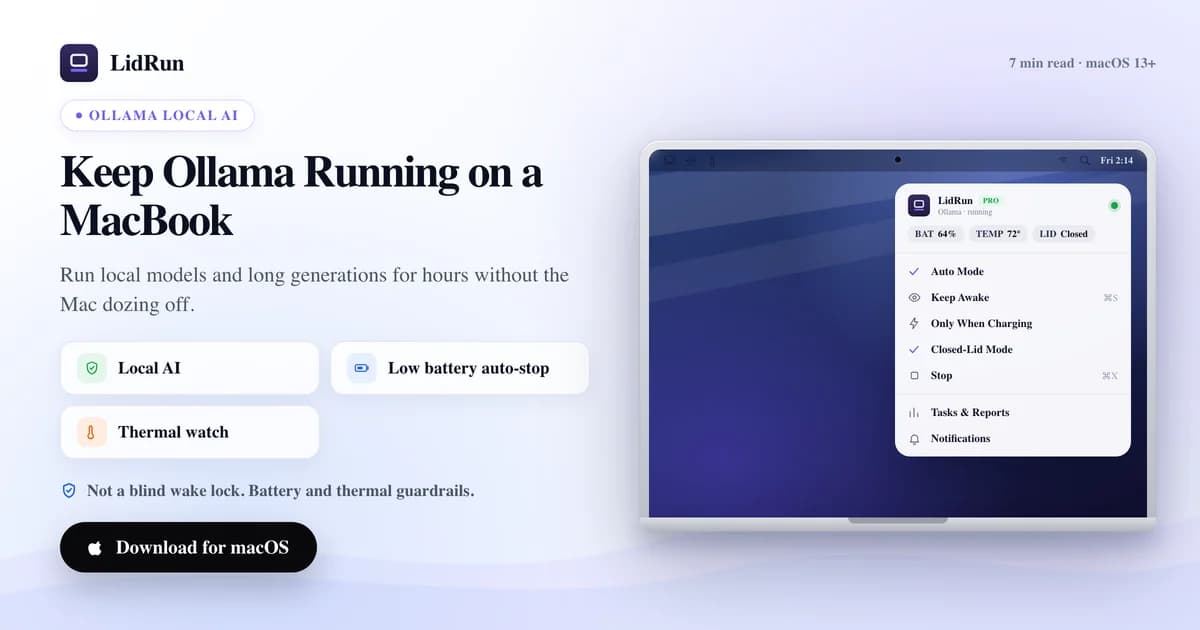
Keeping Ollama running on a MacBook for a long generation or an overnight batch means beating two different kinds of sleep — idle sleep, and, if the lid closes, clamshell sleep — and macOS's free tools only reliably solve the first one. LidRun solves both: it can detect Ollama automatically, hold the Mac awake while it's actually working, and let it sleep again once the run ends or a battery or thermal limit is crossed. Here's how the free options work, where they fall short for a long unattended run, and exactly how LidRun fits around Ollama specifically.
Why Ollama stalls when the Mac sleeps
Ollama runs as an ordinary background process — ollama serve plus whatever model is loaded. It has no special exemption from macOS sleep. When the Mac sleeps, that process is suspended along with everything else, and a long generation or a model pull stops exactly where it was.
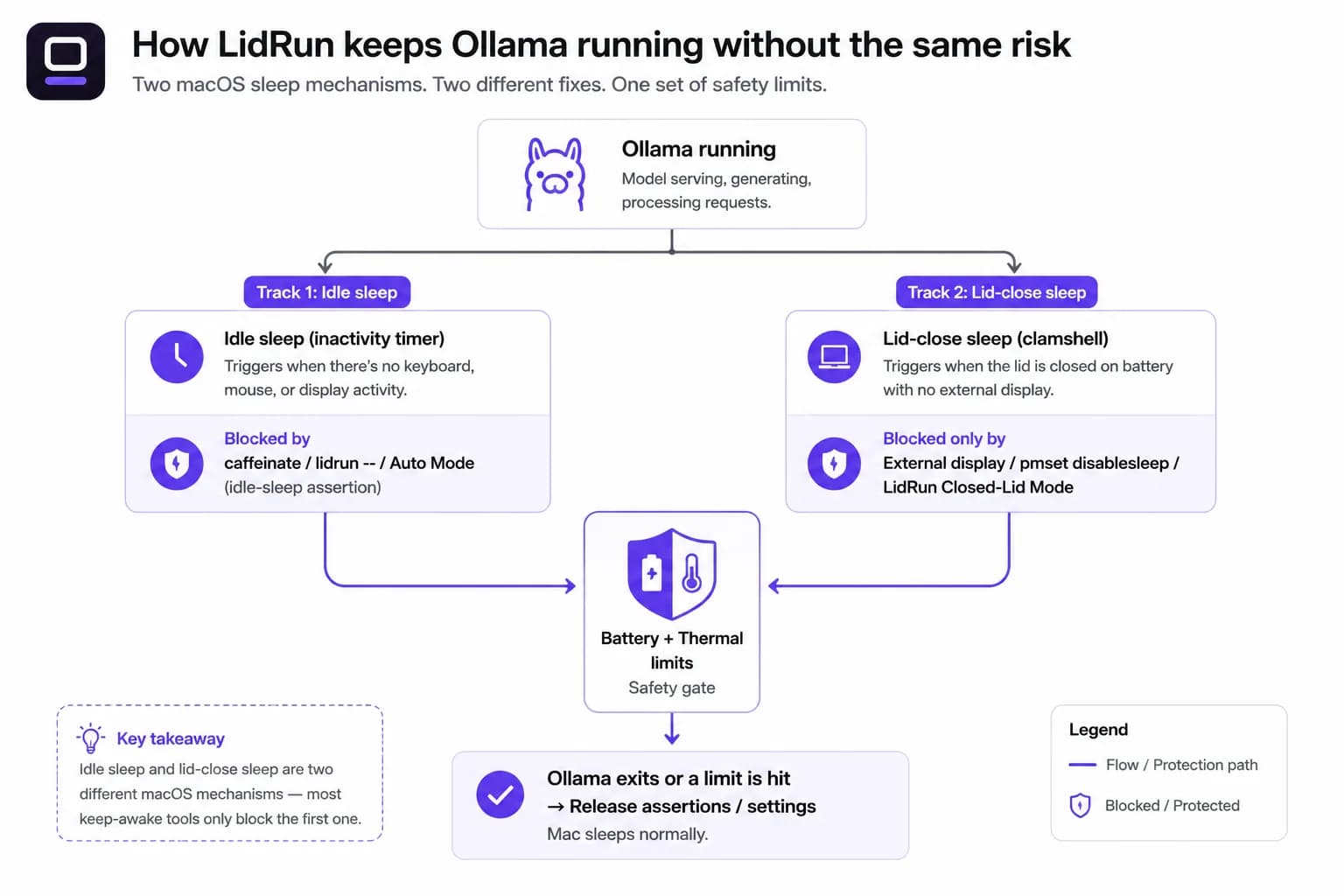
macOS actually has two separate sleep triggers worth knowing apart here. Idle sleep kicks in after a period without keyboard, mouse, or display activity, and any app holding a "prevent idle sleep" power assertion — caffeinate, LidRun's Keep Awake — can block it. Lid-close (clamshell) sleep is a different, lower-level trigger: closing the lid, without an external display attached, puts the Mac to sleep regardless of what idle-sleep assertions are held. That distinction is the part most "just run caffeinate" advice skips, and it's why an idle-sleep fix only gets you halfway to actually running Ollama with the lid closed.
The free way: caffeinate, pmset, and Apple's own clamshell mode
For a lid-open session, the built-in fix is caffeinate. Run caffeinate -i ollama serve and the assertion lasts exactly as long as that command runs; caffeinate -w <pid> does the same for a process you started separately, like an already-running ollama serve daemon. It's free, scriptable, and ships with macOS — no install needed.
LidRun has its own free equivalent with one less step: lidrun -- ollama serve wraps the command, holds an idle-sleep assertion only while that exact process is alive, and releases it the moment Ollama exits. No license, no app UI, no account — it's a self-contained CLI command that works whether or not the LidRun app is even running.
If you want to close the lid without any of that, Apple has a native answer that needs no third-party tool at all: plug the Mac into power, connect an external display, and use an external keyboard or mouse. Under that setup the Mac runs lid-closed indefinitely — that's Apple's own closed-clamshell mode, not something LidRun or any keep-awake app has to fake.
Without an external display, the only lever that stops lid-close sleep is sudo pmset -a disablesleep 1 in Terminal — a genuine free trick, and the exact same macOS setting LidRun's Closed-Lid Mode automates under the hood.
Menu-bar tools like Amphetamine, KeepingYouAwake, Lungo, and the original Caffeine sit on the same public idle-sleep assertion API as caffeinate. They're polished, App Store–distributed, and good at what they're built for — a one-click toggle, scheduled sleep prevention, per-app triggers. They share caffeinate's lid-close limitation, though: none of them reach into disablesleep, so closing the lid without an external display still sleeps the Mac even with one of them switched on.
Where the free workaround breaks down for an unattended run
caffeinate, lidrun --, and every menu-bar keep-awake app hold the Mac awake structurally — they don't know what Ollama is doing, only that something asked to stay awake. Run a model pull for twenty minutes with caffeinate -w <pid> and that's fine. Leave caffeinate -i running by hand for an eight-hour overnight batch and forget to stop it, and it happily keeps the Mac awake long after the run finished — burning battery unattended, with nothing watching.
pmset -a disablesleep 1 set by hand carries a sharper risk. It's a global, persistent macOS setting — not scoped to Ollama, not scoped to your Terminal session. Close the lid, forget to run sudo pmset -a disablesleep 0 afterward, or let the script managing it die, and the Mac will not sleep on its own until you undo it manually or reboot. That's a Mac that can sit lid-closed, fully awake, with nothing checking the battery or the heat building up behind closed vents.
None of the free options gate on battery level or thermal state at all — they're a switch, not a governor. That's the actual gap for an unattended overnight Ollama run: a resident model keeps memory and the GPU busy for hours, and no one is there to notice if the battery is draining fast or the chassis is running hot.
How LidRun keeps Ollama running without the same risk
Auto Mode's default watch list already includes "ollama" alongside llama-server, vllm, and lm-studio — turn it on from the menu bar and LidRun starts holding the Mac awake the moment it sees Ollama running, no pattern to type in yourself. Detection samples CPU use every 10 seconds by default; a process counts as active above a 20% CPU threshold, and a 60-second idle holdoff — tuned specifically for gaps like Ollama sitting between tokens — keeps the assertion held through short pauses instead of flapping the Mac in and out of sleep.

Closed-Lid Mode is the piece that replaces a manual pmset -a disablesleep 1. Same underlying macOS lever, but LidRun pairs every enable with a automatic disable when you stop it, quit the app, or relaunch after a crash — it can't get stuck globally disabled the way a forgotten Terminal command can.
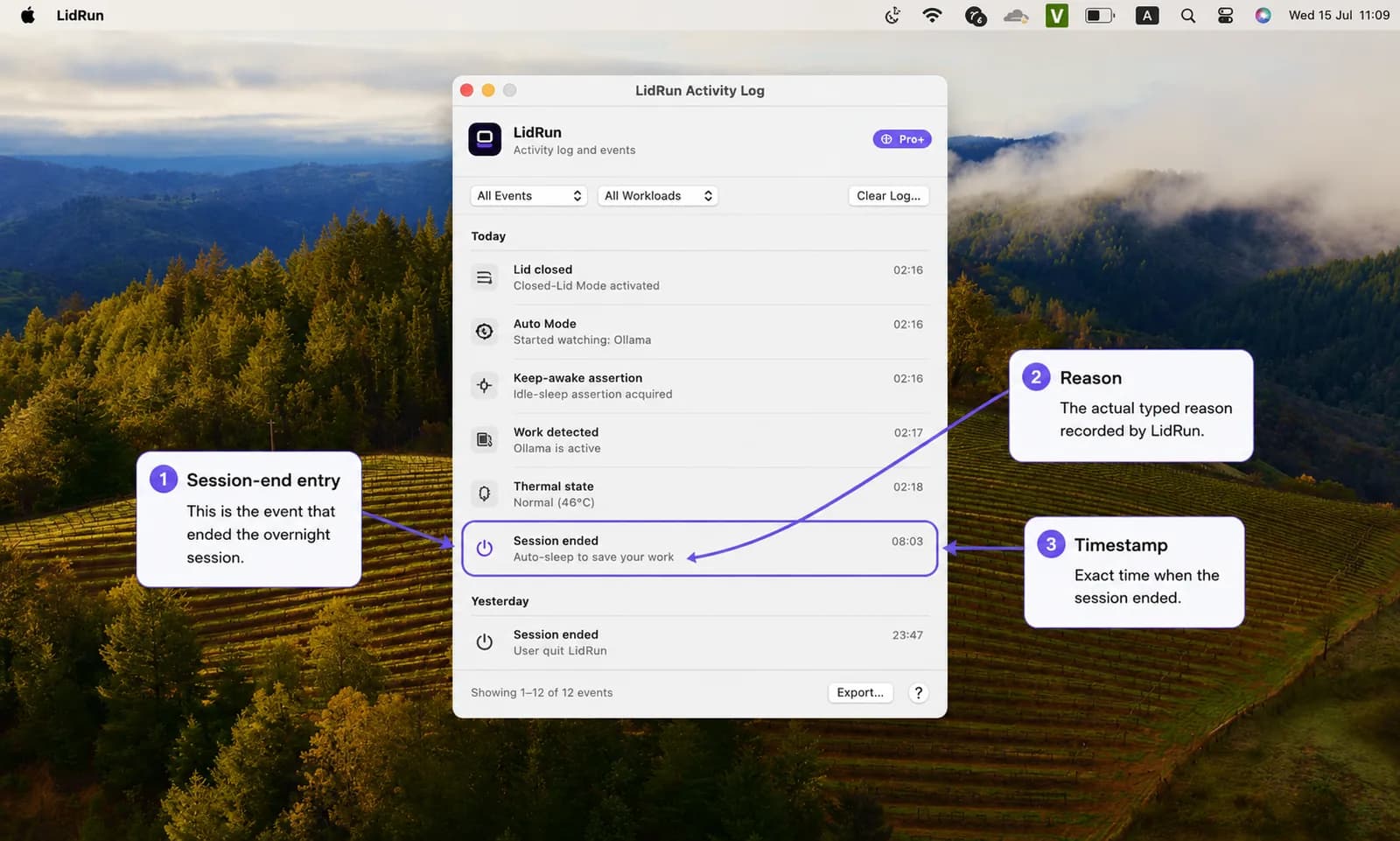
Battery and thermal limits sit underneath both. LidRun stops holding the Mac awake at 20% battery by default, always drops out of an unattended session if the Mac reaches a critical thermal state, and force-sleeps at a 4% battery floor no matter what — a long inference run doesn't get to end in a hard shutdown. The activity log records exactly why a session ended (battery floor hit, thermal limit, task finished), so a stalled overnight run isn't a mystery in the morning. The rule underneath all of it is simple: Ollama running → stay awake; Ollama done, or something unsafe, → release and let the Mac sleep.
Free vs Pro, honestly
Keep Awake, Timer, and Charging-only run unlimited, free forever, no trial. Start Keep Awake manually before you launch Ollama, leave the lid open, stop it when you're done — that alone covers most day-to-day use, and so does the free lidrun -- ollama serve CLI wrapper.
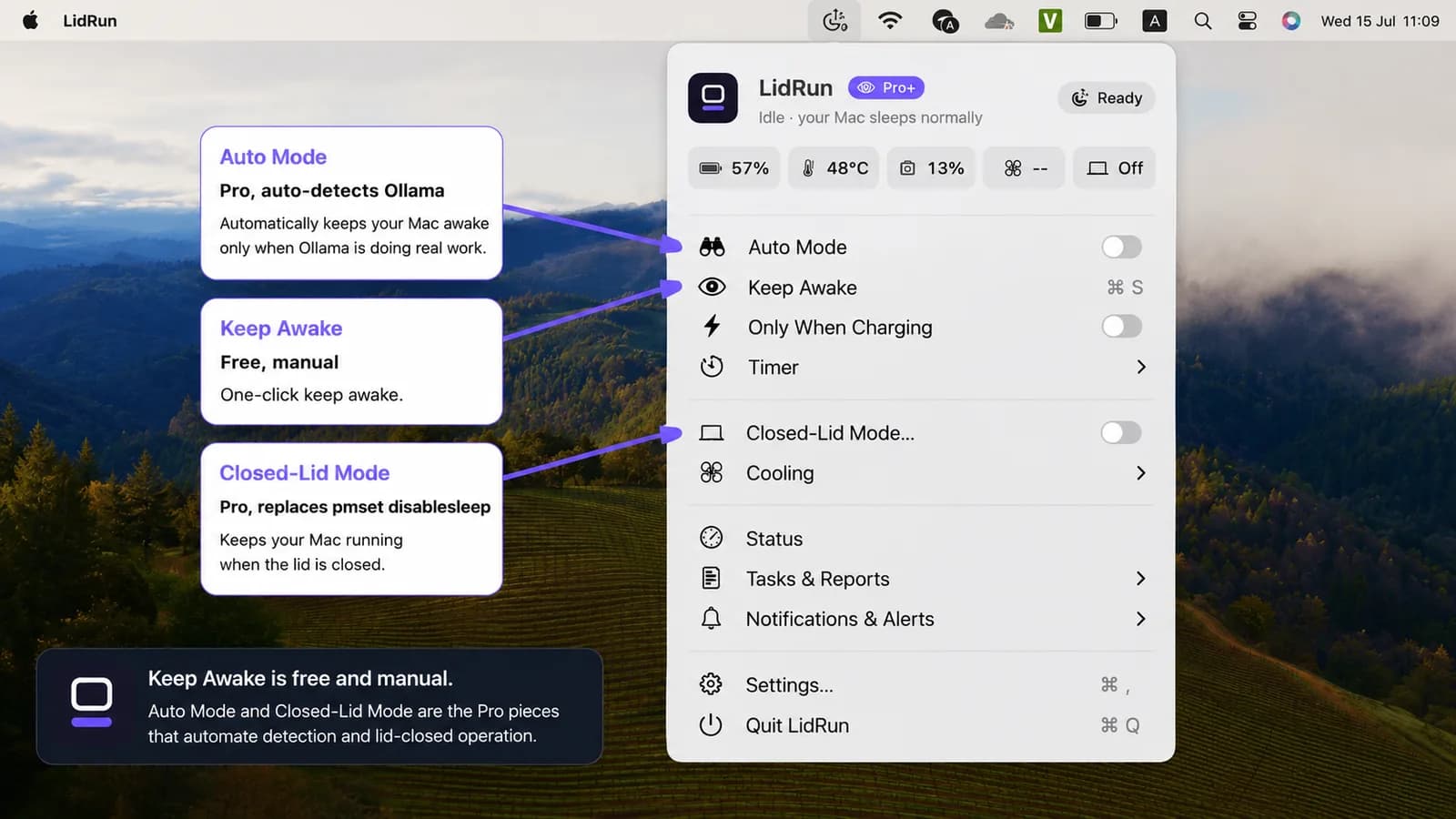
What's Pro is the automation: Auto Mode's automatic detection, so you don't have to remember to toggle Keep Awake yourself, and Closed-Lid Mode, which is what lets you run with the lid closed at all. Closed-Lid Mode includes a limited number of free trial runs before it asks you to upgrade, so you can try a lid-closed overnight run before paying for one.
The safety thresholds themselves — the 20% auto-stop, the always-on thermal protection, the 4% force-sleep floor — are the same for every tier and can't be switched off. Only adjusting the exact numbers is a Pro feature; the safe defaults protect free users too.
Overnight runs and when it's worth it
This earns its place for the long stuff: a large model download, a batch of generations, or a model server you want left running while you step away. If you're chatting with a small model interactively, you don't need any of this — normal keystroke activity already keeps the Mac awake, and a quick prompt finishes long before idle sleep would ever trigger.
Overnight is where the gap matters most. Four to eight hours of local inference while you sleep is fully unattended — no one there to notice a thermal climb or a battery drop. That's exactly what the thermal watch and the battery floor are for: stopping the run before a limit is crossed, instead of the hardware running unsupervised all night behind nothing but a manual disablesleep flag.
A practical setup
Turn on Closed-Lid Mode first (menu bar → Closed-Lid Mode). The first time, macOS asks you to approve LidRun's privileged helper once — after that it's password-free. Then turn on Auto Mode (menu bar → Auto Mode) so it picks up Ollama automatically, or just start Keep Awake by hand if you'd rather skip the Pro automation and manage it yourself.
The watch pattern list, poll interval, and idle holdoff live under Settings → Automation; the battery and thermal limits live under Settings → Safety. You don't need to touch either for Ollama specifically — the defaults already cover it.
Plug in before an overnight run. A resident model draws power steadily, and Charging-only is the safer default here: on battery, eight hours of inference can hit the 20% auto-stop or the 4% force-sleep floor and end the run early. Plugged in, only the thermal watch decides when to pause.
Keep the Mac on a hard, ventilated surface, lid closed or not — a closed lid blocks the usual vents, so sustained inference needs somewhere for the heat to go. And set a session timer that matches the run length, so a model server you forgot about doesn't hold the Mac awake all night for nothing. That's the whole setup: two toggles, a charger, and the thresholds doing the watching so you don't have to.
LidRun keeps your work running with the lid closed, with battery and thermal safety built in.
Already have LidRun? Read the setup guide →
Frequently asked
Yes — Auto Mode's default watch list includes ollama, llama-server, vllm, and lm-studio, so turning it on is enough; you don't need to add a pattern yourself. Auto Mode is a Pro feature.
caffeinate — and LidRun's own free lidrun -- ollama serve CLI wrapper — block idle sleep, which is enough if the lid stays open. Neither one stops lid-close sleep; that needs Closed-Lid Mode, Apple's external-display clamshell mode, or a manual pmset -a disablesleep 1, which is a separate macOS mechanism entirely.
No. Keep Awake, Timer, and Charging-only are free forever with the lid open — start Keep Awake manually before a run and stop it after. Auto Mode's automatic detection and Closed-Lid Mode (running with the lid closed) are Pro, with a limited number of free Closed-Lid runs to try first.
LidRun watches thermal state and drops an unattended session if the Mac reaches a critical thermal state — that's a safety stop, not active cooling, and it doesn't manage RAM. Local model memory pressure is on the model and your Mac's specs, not something a keep-awake tool can fix.
Yes — turn on Closed-Lid Mode plus Auto Mode (or manual Keep Awake), keep the Mac plugged in, and it stays up as long as battery and thermal conditions stay within your limits. Closed-Lid Mode is what actually stops the lid-close sleep macOS would otherwise trigger.
When Auto Mode no longer sees Ollama active, LidRun releases the keep-awake assertion so the Mac goes back to sleeping normally — it doesn't hold the Mac awake indefinitely just because Ollama was seen once.
Yes, plugged in with Auto Mode and Closed-Lid Mode on — LidRun holds the session for hours while battery and thermal thresholds stay in range. For an unattended overnight run, charging-only is the safer choice, since the thermal stop exists specifically to end the run before a limit is crossed rather than let it go all night unsupervised.
It works, but it's global and persistent with no safety net — forget to set it back to 0 and the Mac won't sleep on its own at all, regardless of battery or heat, until you undo it or reboot. Closed-Lid Mode uses the same setting but always pairs the enable with a disable when the task stops, the app quits, or after a crash relaunch.