Keep Claude Code running when your MacBook is closed

Short answer: closing the lid does not just dim the screen, it triggers a separate, lower-level clamshell sleep that a plain keep-awake tool cannot touch, so Claude Code freezes mid-task even if you had caffeinate or a menu-bar app running. This guide covers the free way to override that yourself, where it gets risky on an unattended overnight run, and how to keep Claude Code running when your MacBook is closed with battery and thermal auto-stop instead of a raw system switch.
Why a lid close kills an agent mid-task
Claude Code runs as an ordinary process in your terminal, not a job sitting on a server somewhere, so it lives or dies with your Mac's power state. Close the lid and, on stock macOS, the whole machine suspends within a couple of seconds. The agent stops mid-step, and whatever tool call or file edit was in flight simply pauses where it was.
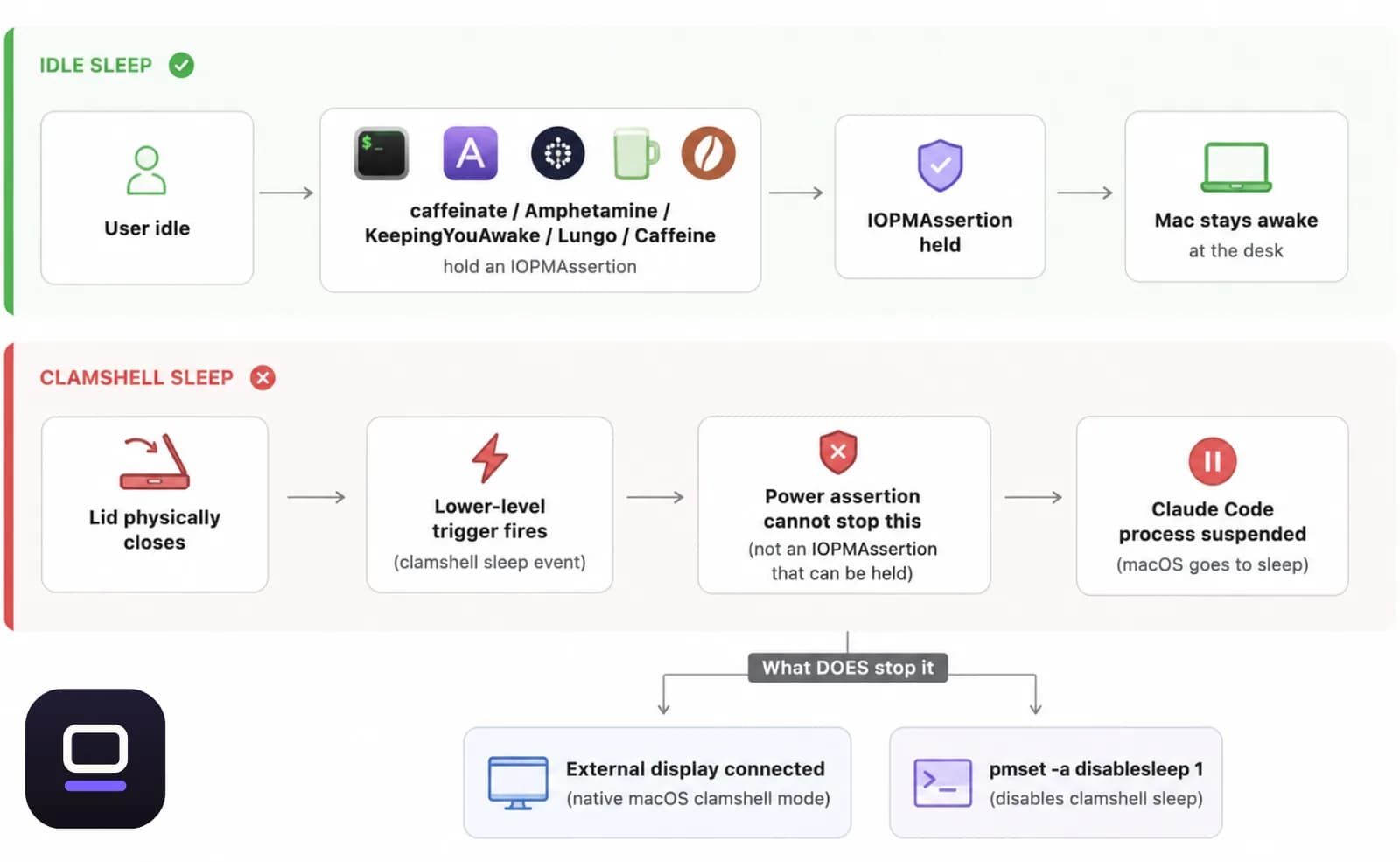
What catches most people out is that this isn't the same sleep a keep-awake tool normally fights. macOS has two separate triggers. Idle sleep is the system dozing off from inactivity, and that's what caffeinate and most menu-bar keep-awake apps hold off by creating a power assertion — the same public API (IOPMAssertionCreateWithName) under most of them. Clamshell sleep is a lower-level trigger that fires the instant the lid physically closes, and a plain power assertion cannot stop it. That's the actual reason a lid close kills Claude Code even if you started caffeinate five minutes earlier: you blocked the wrong kind of sleep.
The timing makes it worse. Long agent runs — a multi-file refactor, a big test suite, an overnight migration — are exactly the ones you want to leave alone. So the lid closes right after you walk away, and you come back to a session that has done nothing for hours.

The free way to do it yourself, and where it gets risky
Before reaching for any app, it's worth knowing what macOS already gives you for free, because more than one of these options genuinely works.
The cleanest is a monitor. Connect an external display (and, on older Intel Macs, a keyboard or mouse) while the Mac is on power, and macOS's native clamshell mode keeps the whole machine running with the lid down, no third-party software involved. It's the right call if you're at a desk. It doesn't help if the point is to close the lid and walk away with just the laptop, which is most of the actual 'keep Claude Code running while I'm out' case.
The lever that works without a monitor is pmset -a disablesleep 1, run in Terminal. This is the real setting that stops the clamshell-sleep trigger — it's free, it's built into macOS, and it's the same switch every third-party 'survive a closed lid' tool ultimately flips on your behalf. The catch is what it doesn't do: it's a global, persistent setting with no timer, no battery check, and no thermal check. Close the lid, put the Mac in a bag, and forget you ever ran it, and the machine keeps running — hot, in an enclosed space, on whatever battery it has — until you remember sudo pmset -a disablesleep 0 or the battery runs out. Forgetting the revert is the single most common way this bites people: the Mac won't sleep on the couch that night either, because you never turned it back off.
caffeinate, Amphetamine, KeepingYouAwake, Lungo, and Caffeine are all genuinely good at a different job: holding off idle sleep while you're at your desk, cheaply or for free, with a clean menu-bar toggle. Apple's own caffeinate is reliable for exactly that. But idle sleep isn't clamshell sleep, so the lid-close problem from the section above applies to any tool built only on that power-assertion API, unless the specific app documents its own separate lid-closed workaround — worth checking before you rely on one overnight.
How LidRun keeps a Claude Code run alive safely
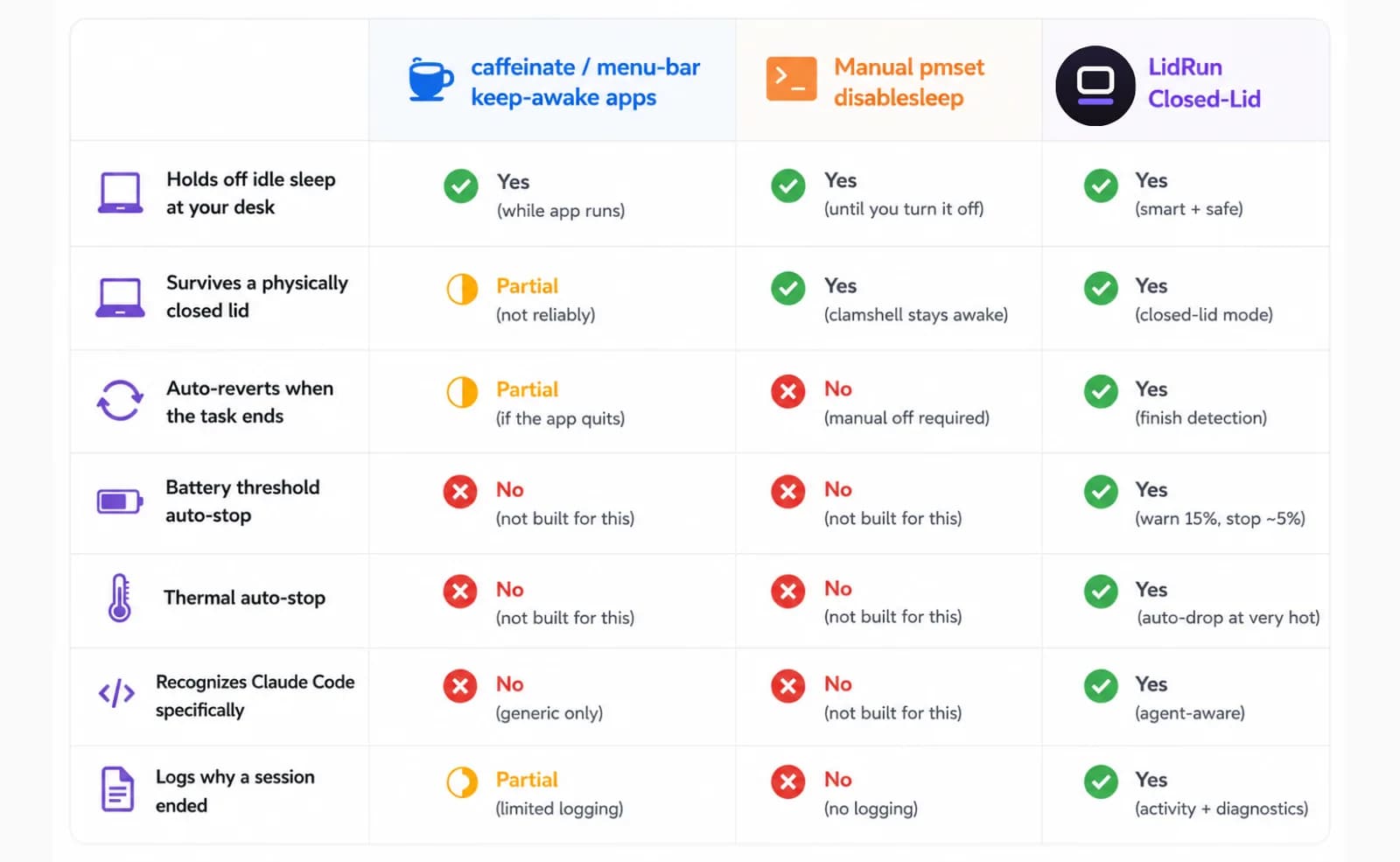
LidRun's Closed-Lid Mode is built on the same pmset disablesleep lever above. There's no separate kernel trick, just the public one, applied through a small privileged helper instead of a raw Terminal command. The difference is what wraps around it: LidRun always pairs turning it on with turning it off — on stop, on quit, and by reconciling on the next launch if the app ever crashed with it stuck on — so it's much harder to end up with a Mac that silently can't sleep for days. The confirm dialog is upfront that turning this on for the first time may prompt for your admin password to approve that helper; after that it doesn't ask again.
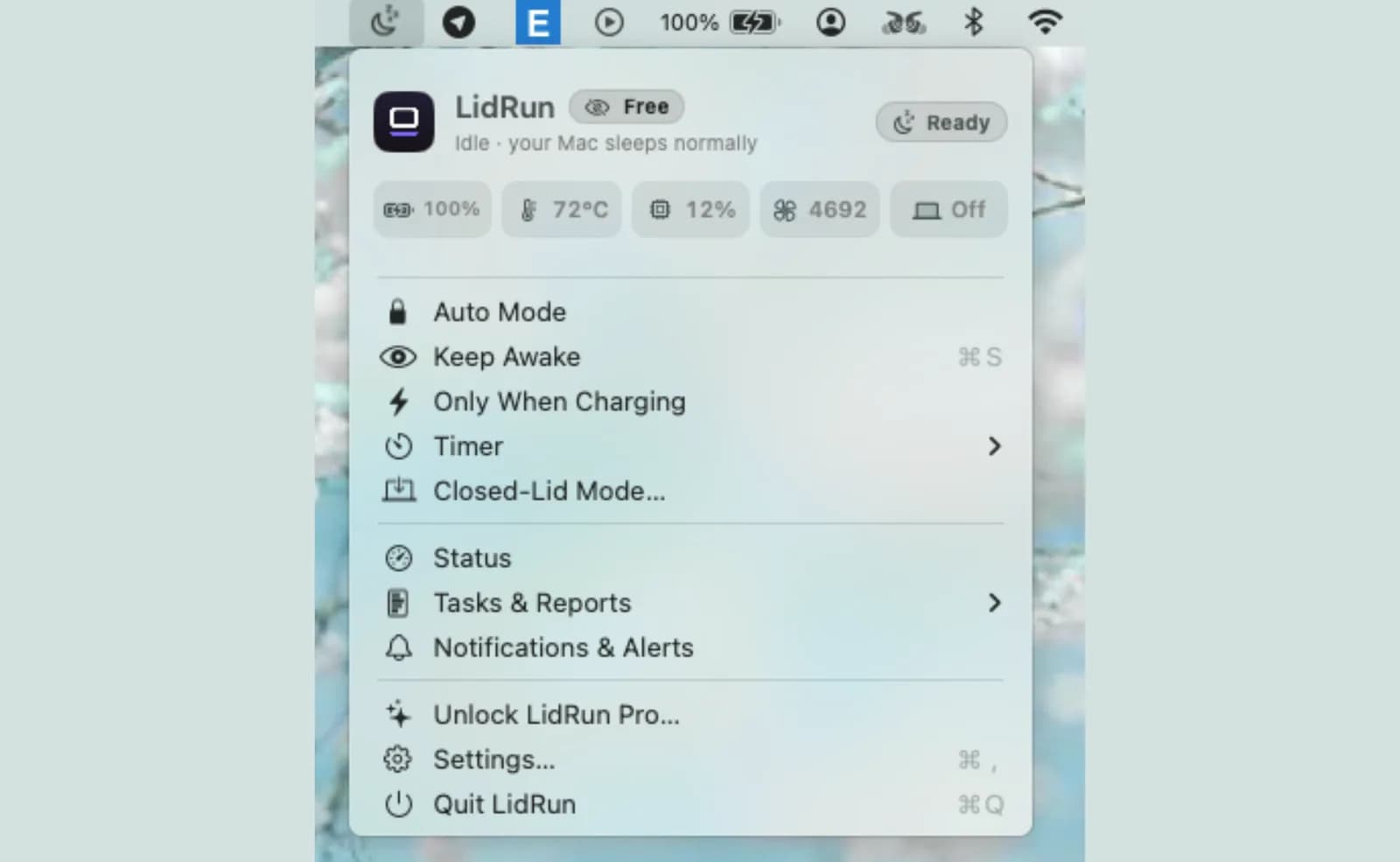
On top of the lever itself, LidRun adds the parts a manual pmset command can't: it watches your battery — auto-stop below 20% by default, adjustable from 15% to 50%, on for every user whether or not you've paid — and your thermal state, read as macOS's own nominal → fair → serious → critical pressure signal (shown to you as Normal → Fair → Hot → Very hot). If thermal pressure reaches Serious while a session is running, LidRun backs off; if it reaches Critical while the lid is closed, it forces the Mac to sleep rather than let it keep running with no airflow. A stricter 4–8% emergency floor stays active regardless, specifically so a long run ends in a controlled sleep instead of a sudden shutdown that loses work — that floor is on for everyone, though fine-tuning exactly where it sits inside that range is part of the paid tier.
For actually noticing Claude Code, LidRun's Auto-Watch scans running processes every 10 seconds for a set of known dev and AI tool signatures, claude among them, and turns Keep Awake on the moment it sees one running — no manual toggle needed. Because an agent spends real time waiting on an API response at near-0% CPU between tool calls, LidRun treats a recognized agent process as active by its presence, not by CPU load, so it doesn't release the Mac out from under Claude Code just because it looks idle for a minute. Auto-Watch itself is a Pro feature; on the free tier there's no automatic detection, so you turn Keep Awake — or Closed-Lid Mode directly, which starts Keep Awake for you in the same step — on yourself before closing the lid. It holds just as reliably, it's just manual.
Every session, whether it ends because the task finished, the timer ran out, a battery or thermal threshold tripped, or you turned it off yourself, gets written to the Activity Log with which of those it was. A run that stalls overnight isn't a mystery in the morning; you open the log instead of guessing. That's the whole idea behind it: agent running, stay awake; agent done — or the Mac's own safety thresholds say otherwise — release it and let it sleep. It isn't a blind wake lock that just runs until you remember to turn it off.
When to use it, and when you don't need it
This earns its keep for unattended runs: a big refactor kicked off before bed, a long agent task while you're away from the desk, anything where you'd otherwise sit there just to keep the Mac awake yourself.
If you're actively watching and steering the agent, you don't need any of this — the Mac won't sleep with the lid open while you're typing or clicking, and short tasks that finish in a couple of minutes are fine on their own. The lid-close problem only bites once you actually want to walk away.
Free covers plugging in and turning Closed-Lid Mode (or Keep Awake) on yourself, plus a limited number of free Closed-Lid runs so you can test the whole overnight flow before deciding whether it's worth paying for. If you've ever left the lid open all night just so Claude Code would survive until morning, that's the exact case this is built for.
A practical, step-by-step setup for an overnight run
Plug in first. Mains power takes the battery question off the table entirely for a long run — closing the lid on battery alone, with no screen to check on, is the fastest way to come back to a dead Mac instead of a finished task.
Start your Claude Code task in the terminal as usual, then open the LidRun menu bar icon and turn on Closed-Lid Mode. It holds the Mac awake and covers the lid-close trigger in the same step, so there's no separate Keep Awake toggle to remember first. The confirm dialog asks how long to hold it — until you turn it off, or a fixed window from 30 minutes up to 8 hours — and which behavior you want: Keep-awake holds the Mac for the full duration regardless of what's running, while Smart, the default, lets the Mac sleep on its own about 10 minutes after LidRun sees no tracked task left. Smart is the safer pick for an overnight run, since it won't sit there idling awake all night after Claude Code actually finishes at 2am.
If this is your first time turning Closed-Lid on, expect a one-time admin password prompt to approve LidRun's privileged helper — it won't ask again after that. If you're not licensed yet, the same dialog shows how many free Closed-Lid runs you have left, enough to genuinely test this on a real overnight task before paying for it.
Close the lid and walk away. Put the Mac on a hard, ventilated surface — a desk, a stand, anything that isn't a bed, a couch cushion, or a closed bag. A closed lid already cuts off the main airflow path; an enclosed space on top of that is the real overheating risk, not the software running underneath it.
In the morning, open the Activity Log from the same menu to see exactly how the session ended — task finished, timer expired, or a battery or thermal threshold stepped in — instead of guessing from a cold trackpad.
Start it with one key before you close the lid
When Claude Code is mid-task and you need to leave, LidRun 1.2 makes arming closed-lid mode a single key: press ⌥L (Option-L) or tap Caps Lock, then shut the lid and let the agent keep working.
Caps Lock works because a closed-lid Mac isn't being typed on, so it's safe to repurpose there and needs no extra permission. Use ⌥L instead if you keep Caps Lock for typing.
You get the same guarded session: timer, charging-only, low-battery auto-stop, thermal guardrails, and a warning before the Mac sleeps so a long agent run isn't cut off unexpectedly. Press the key again to release.
LidRun keeps your work running with the lid closed, with battery and thermal safety built in.
Already have LidRun? Read the setup guide →
Frequently asked
With Auto-Watch, a Pro feature, yes — LidRun scans running processes every few seconds for a set of known dev and AI tool signatures, including claude, and turns Keep Awake on the moment it sees one running. On the free tier there's no automatic detection; you turn Keep Awake or Closed-Lid Mode on yourself before closing the lid, and it holds just as reliably.
In Smart mode, the default for Closed-Lid, LidRun lets the Mac sleep on its own about 10 minutes after it sees no tracked task left, instead of holding it awake all night for nothing. Keep-awake mode holds for the full duration you picked regardless of whether the task is done.
LidRun's battery and thermal thresholds are there to help reduce that risk — it backs off at Serious thermal pressure and forces sleep at Critical, plus a 4–8% emergency floor so a run ends in a controlled sleep instead of a sudden shutdown. But a closed lid still cuts off the Mac's main airflow, so keep it plugged in on a hard, ventilated surface, not a bed, cushion, or inside a bag, for any overnight run.
On battery, the default 20% auto-stop threshold (adjustable 15–50%) ends the Keep Awake hold before the charge runs out, and a stricter 4–8% floor forces sleep as a last resort — both on by default whether or not you've paid. For an overnight Claude Code run, mains power is still the safer choice; you don't want a battery threshold to be the reason the agent stops.
Because they hold off idle sleep, not clamshell sleep. Closing the lid triggers a separate, lower-level sleep that a plain power assertion can't stop — the only lever for that without an external display is pmset -a disablesleep, which is what LidRun's Closed-Lid Mode wraps with battery and thermal auto-stop and automatic revert, instead of leaving it as a raw manual switch you have to remember to turn off.
Keep Awake, Timer, and Charging-only run unlimited on the free tier — no trial, no session cap. Closed-Lid Mode itself is a paid feature, but unlicensed users get a limited number of free runs to test the whole flow, including an overnight one, before deciding whether to unlock it.
Press ⌥L (Option-L) or tap Caps Lock to arm LidRun's closed-lid mode, then close the lid — Claude Code keeps running. Press the same key again to release it.
Not by default — closing the lid triggers macOS's clamshell sleep within a couple of seconds, and Claude Code freezes wherever it was, even if caffeinate or a similar app is already running (it blocks a different kind of sleep). With LidRun's Closed-Lid Mode turned on first, yes — that's the exact situation it's built to handle.
With Closed-Lid Mode on, it keeps running the whole time — the Mac never actually sleeps, so there's nothing for Claude Code to pause and resume from. What ends the session is Smart mode releasing the Mac once the task is done, a timer or battery/thermal limit stepping in, or you turning it off yourself, and the Activity Log shows which one happened. Without LidRun, closing the lid sleeps the whole machine — the task stops, it doesn't keep going quietly in the background.