What Is AI Agent Continuity?
AI Agent Continuity is what keeps a Claude Code, Cursor, or Codex CLI session running on a Mac from start to finish instead of stalling out - surviving idle sleep, a closed lid, and a low-battery cutoff without you standing guard over it. Kick off a long agent run before lunch and come back to find the Mac asleep and the job stuck at step four, and you've just met the gap this term describes: not a bug in the agent, but a mismatch between how macOS manages power and what an unattended AI workload actually needs.
Why AI Agent Continuity Matters for Developers
AI agents like Claude Code, Cursor, OpenAI Codex CLI, Aider, and Gemini CLI are no longer just assistants that answer questions on demand. They run agentic loops - calling tools, writing files, executing tests, iterating on output - for minutes or hours at a stretch. A single interrupted run can mean a half-migrated database schema, a test suite that never finished, or a code-generation job that has to restart from step one.

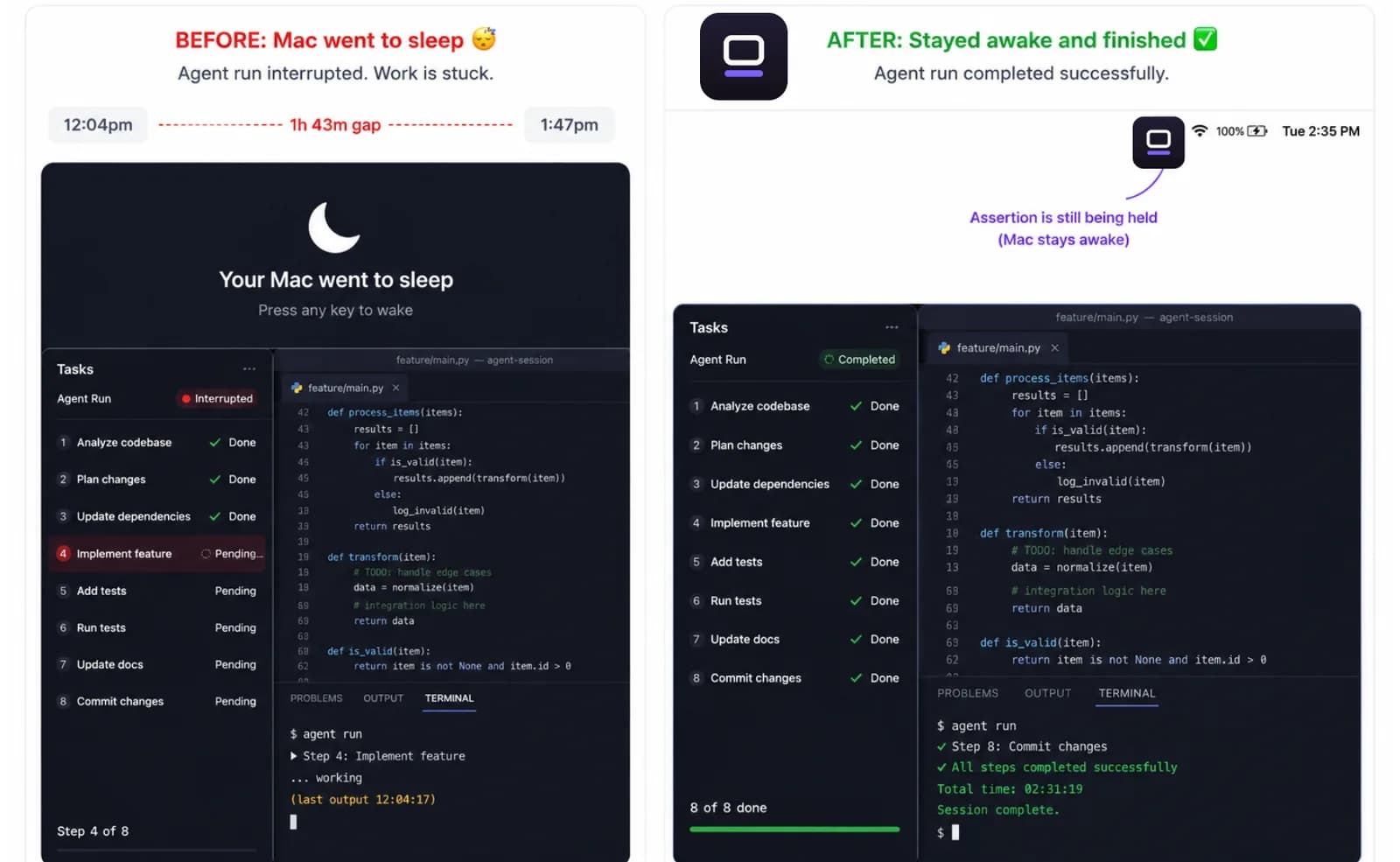
The term describes the property of an agent session that survives normal Mac power-management events: idle sleep, lid-close, and automatic low-battery shutdown. It's a category concern, not a single-feature fix. Getting continuity right means addressing all three failure modes, not just suppressing idle sleep and calling it done.
For quick five-minute generations, macOS power management rarely gets in the way - the job finishes before the system decides anything looks idle. The problem surfaces on longer tasks: full-repo analysis, multi-file refactors, overnight training runs, anything long enough that the Mac has time to decide the session looks abandoned and act on it.
The Three Ways a Mac Interrupts an Agent Run
Idle sleep is the most common failure mode. macOS tracks input events - keyboard, mouse, display activity - and declares a session idle after a configurable timeout. An AI agent doesn't produce those events. Even while it's actively writing files and making API calls, the Mac sees silence on the input layer and sleeps. On battery with an aggressive Energy Saver setting, that timeout can be short enough to catch a run within a couple of minutes.
Lid-close sleep triggers the instant a MacBook lid shuts, regardless of any idle timeout. Plenty of developers close the lid to move from desk to meeting room assuming a background job will just wait - it won't, unless something has explicitly told macOS to hold a sleep-free assertion through the lid-close event. A tool that only blocks idle sleep does nothing here; lid-close is a separate trigger entirely.
Low battery is the least predictable of the three. Apple doesn't publish one universal percentage where macOS forces a sleep - the exact behavior depends on the Mac model, the macOS version, and whether Low Power Mode is active. What's consistent is the direction: as charge drops, macOS throttles more aggressively and, near empty, forces sleep or shutdown to protect the battery, regardless of whether a terminal has a job running. An agent that starts a two-hour job at 40% can hit that wall mid-task, and it looks like a crash rather than what it actually is - a power-management event.
A tool that blocks idle sleep but ignores the lid, or blocks the lid but ignores the battery, still leaves an agent run exposed on whichever mode it doesn't cover. All three have to be handled together for the term to mean anything.
Related guideKeep AI Agents Running While You SleepFree Ways to Keep an Agent Run Alive
Before reaching for any app, macOS already ships free ways to cover two of the three failure modes. caffeinate -i blocks idle sleep from the terminal - the built-in command every Mac already has. Its most useful trick for this exact use case is the -w flag: caffeinate -i -w $(pgrep -n claude) blocks idle sleep for exactly as long as the given process is alive, then releases automatically the moment it exits. No install, no cleanup, and it's tied to the agent's actual lifetime rather than a fixed timer.
Lid-close has a free manual override too: sudo pmset -a disablesleep 1 before closing the lid, and sudo pmset -a disablesleep 0 once you're done. This is the exact same system toggle any lid-close tool ends up calling under the hood - there's no more privileged mechanism than this.
There's also a fully native option that needs no override at all. Apple's own supported closed-lid workflow is: plug into power and connect an external display (older guidance also called for an external keyboard and mouse; on most modern MacBooks, power plus a display is enough). Close the lid, the internal display turns off, the Mac keeps running on the external one - no disablesleep flag involved, nothing to remember to turn back off. For anyone working at a desk with a monitor, this is arguably the safest of the three because there's nothing left in a half-finished state if you forget a step.
Where the Free Options Break Down
caffeinate only covers idle sleep. It doesn't survive lid-close at all - closing the lid overrides it regardless of the flag - and it has no concept of battery percentage. Left running unattended, it will happily keep a job alive until the Mac forces itself into an emergency shutdown rather than stop early on its own.
The manual pmset disablesleep pair is global and persistent by design. Forget the matching disablesleep 0 - a crash, a force-quit terminal, a skipped reboot - and the Mac stays overridden indefinitely. On a desk with airflow that's mostly cosmetic. It turns into a real risk if the Mac later ends up somewhere enclosed: a bag, a sleeve, a stack of books, anywhere heat can't escape. The fix isn't to avoid closed-lid mode, it's to keep the Mac on a flat, ventilated surface and have an actual plan for the override getting turned back off, not just a hope that you'll remember.
The external-display trick only works tethered to a monitor. It doesn't help the case of closing the lid, putting the Mac in a bag, and walking off while an overnight job keeps running - which is exactly the scenario a lot of AI Agent Continuity questions are really about.
The common thread: none of the three free options watches battery level or thermal state while the job runs, and none of them releases itself automatically when the agent process actually exits. Whatever you use, that monitoring layer is where continuity really lives - and with the free options, it's manual discipline you're responsible for every single time.
The Safe Approach to Continuity
The right primitive for idle sleep is an IOKit power assertion - specifically kIOPMAssertionTypePreventUserIdleSystemSleep, the same assertion category macOS itself uses when, say, a video is playing full-screen. It tells the system something meaningful is happening without touching thermal or battery safety governors, which is why it's the correct building block rather than a workaround: it cooperates with macOS instead of fighting it.
Covering lid-close means pairing pmset disablesleep 1 with an automatic matching 0 - on stop, on quit, and re-checked the next time the app launches in case the previous shutdown wasn't clean. Skipping that cleanup is exactly the risk described above: a Mac stuck permanently overridden. When the lid is actually closed, use a flat surface with airflow and keep the Mac ventilated rather than enclosed; plugging in matters too, since closed-lid removes the option to just top off the battery mid-job the way you could with the lid open.
On the battery side, since macOS's own cutoff isn't documented, the safer move is setting your own floor well ahead of it rather than trying to guess macOS's number. LidRun's default auto-stop is 20% battery (adjustable in a 15-50% range), with earlier warnings at 15% and 5%, backed by an emergency floor that can't be pushed below 4% - roughly the point under which macOS may not have enough headroom left to sleep cleanly before the Mac dies - and that floor fires even if the regular auto-stop has been turned off.
Temperature works the same way. macOS exposes four public thermal levels through ProcessInfo - nominal, fair, serious, critical - the same signal apps like video encoders use to back off. Closed-lid mode is where this matters most, since closing the lid removes the Mac's main air path; a well-behaved tool watches this signal, warns at serious, and automatically drops closed-lid mode at critical so the hardware can throttle and sleep the normal way instead of being forced to. None of this is a guarantee - a session timer and a thermal watch help reduce risk, they don't eliminate it - but the combination of a real power assertion, a battery floor, and a thermal watch is what makes running an agent closed-lid a defensible tradeoff instead of a reckless one.
Put together, a safe setup looks the same whether you build it yourself or use a tool for it: hold the idle-sleep assertion for the duration of the job, not indefinitely; if the lid needs to close, pair disablesleep 1 with an automatic 0; set a battery floor above macOS's undocumented one and leave it on; watch thermal state and back off before it forces the issue; and tie the whole thing to the agent process so it releases the moment the job actually ends, not just when you remember to turn it off.
Tools That Support AI Agent Continuity on Mac
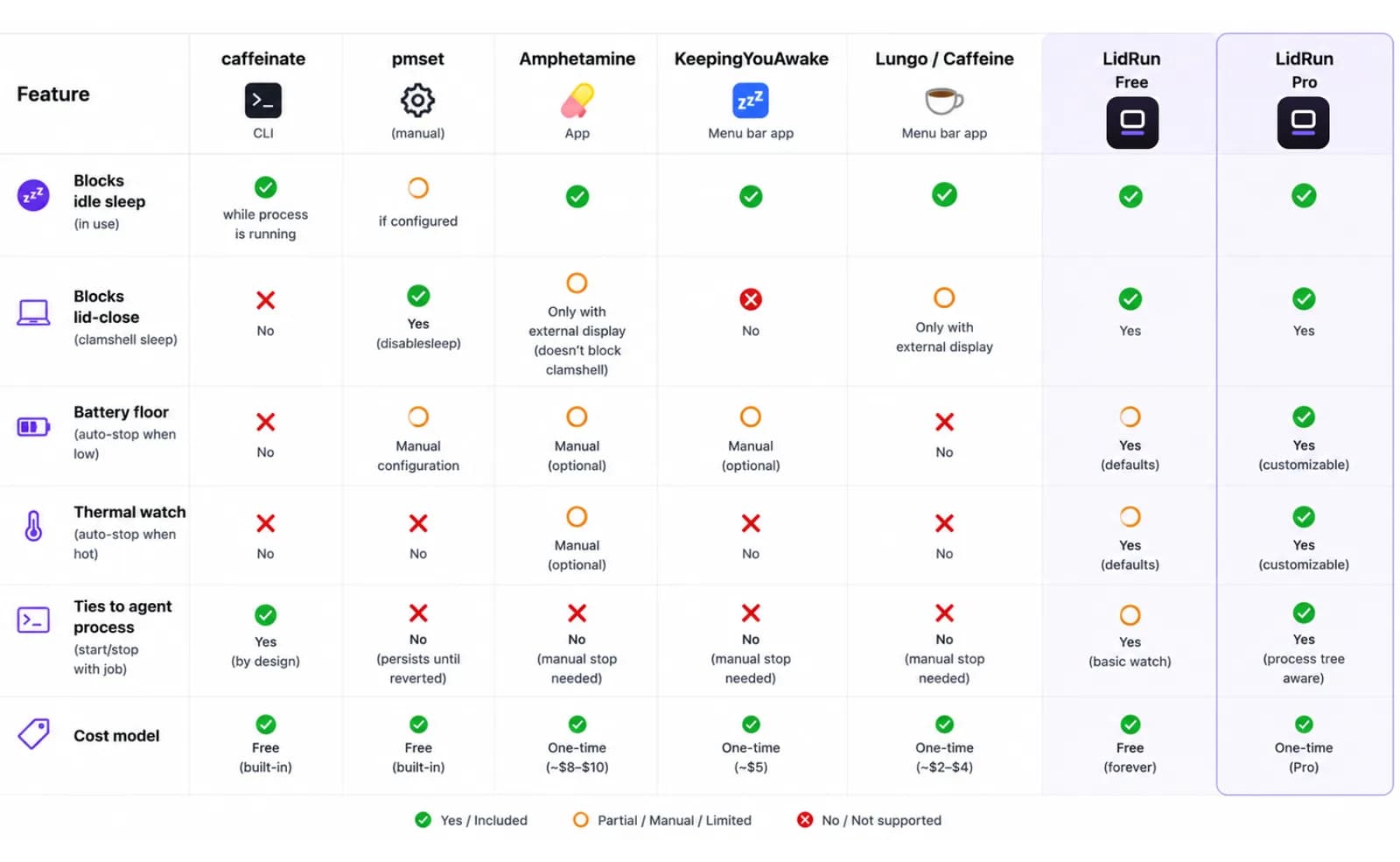
The free options above cover real ground - caffeinate's -w flag is a genuinely good pattern for a one-off foreground job, and the external-display clamshell trick needs nothing installed at all. Where they stop is roughly where most third-party menu-bar utilities stop too: general-purpose sleep blocking that you configure to approximate this case, not something built around watching for an AI agent process specifically.
Amphetamine is the most feature-rich of the popular menu-bar tools - free on the Mac App Store, with triggers by app, process name, battery level, Wi-Fi network, and schedule, plus its own way of allowing lid-closed use with an external display connected. If deep customization is what you want and you don't mind spending time in its trigger settings, it's a strong general-purpose choice.
KeepingYouAwake is free and open-source: a minimalist, single-purpose menu-bar toggle with no scheduling or triggers - good if all you want is a manual on/off switch and nothing else. Lungo and the Mac App Store's Caffeine app both wrap the same idea into a simple, inexpensive timer-based toggle, useful if living in Terminal isn't your thing. None of these four were purpose-built around an unattended AI agent specifically - you're configuring a general sleep blocker to fit the case, which mostly works, but the battery floor and the process lifecycle stay your responsibility to manage.
LidRun is built around that specific case. The free tier - no trial, no session cap - already includes Keep Awake, a session Timer, Only-While-Charging, Low Battery Auto Stop with the 20%/4% floors described above, a Safety Governor, an Activity Log, the lidrun CLI, and a live 'why is my Mac awake' assertion viewer so you can see exactly what's holding sleep and why, at any moment.
The paid tier is a one-time purchase with lifetime updates and no subscription - plans differ only in how many Macs you can activate, with a 14-day refund if it's not for you. It adds Auto Mode, which watches for over two dozen built-in AI and dev process patterns (claude, codex, cursor, aider, gemini, and more, plus any custom pattern you add) and starts and releases the assertion around the process's actual lifetime instead of a timer guess; Run & Watch a command; Closed-Lid Mode with the pmset pairing and the thermal auto-drop handled for you; plus a dashboard, smart rules, watchdog alerts, and weekly reports.
The design goal underneath all of it comes down to one sentence: agent running, stay awake; agent done or unsafe, release and sleep. That's deliberately not a blind wake lock - it's a set of guardrails that hold the assertion only while there's a live reason to, and let go the moment the battery, the temperature, or the agent itself says the job is over. For the practical, step-by-step setup of an unattended overnight run, keeping AI agents running while you sleep walks through it end to end.
LidRun keeps your work running with the lid closed, with battery and thermal safety built in.
Already have LidRun? Read the setup guide →
Frequently asked
AI Agent Continuity is the property of a locally-running AI agent session - Claude Code, Cursor, Codex CLI - that lets it execute from start to finish without being interrupted by Mac idle sleep, lid-close events, or low-battery auto-shutdown. It's not a single feature; it's a set of guarantees that have to cover all three failure modes together.
macOS tracks user input events - keyboard, mouse, display activity - to decide when a session is idle. An AI agent that's actively calling tools, writing files, and processing API responses doesn't produce input events from the OS's point of view. The system sees no user activity and triggers idle sleep after the configured timeout, stopping the agent mid-run.
No. Even a 20-minute agent session can hit idle sleep if the system timeout is set aggressively - some MacBooks default to a couple of minutes on battery. Overnight tasks are the most visible case, but the same three failure modes apply to any unattended agent run regardless of duration. Lid-close sleep in particular can interrupt a job within seconds.
A wake lock - or IOKit power assertion - is one technical mechanism that tells the OS to stay awake. AI Agent Continuity is the broader outcome: the agent session runs to completion. Achieving it takes the right power assertions plus session management - timers, thermal monitoring, and process detection to make sure assertions are held and released correctly. A wake lock alone covers idle sleep; continuity also covers lid-close and the battery floor.
Apple doesn't publish an official number, but a reasonable rule of thumb is to plug in for anything longer than an hour, and on battery, not to start a job below your auto-stop threshold. LidRun defaults to stopping at 20%, warns earlier at 15% and 5%, and never lets its emergency floor go below 4% - roughly the point under which macOS may not have enough headroom left to sleep cleanly before the Mac powers off. That emergency floor applies even with the regular auto-stop turned off.
The free, native options genuinely cover two of the three failure modes: caffeinate -i (with -w to tie it to a process) handles idle sleep, and a manual pmset disablesleep 1/0 pair, or Apple's own external-display clamshell mode, handles lid-close. What they don't do is watch battery percentage or thermal state while the job runs, or release themselves automatically when the agent exits - that's either manual discipline you take on yourself, or the part a purpose-built tool like LidRun handles for you.