Keep a Cursor agent running on your Mac
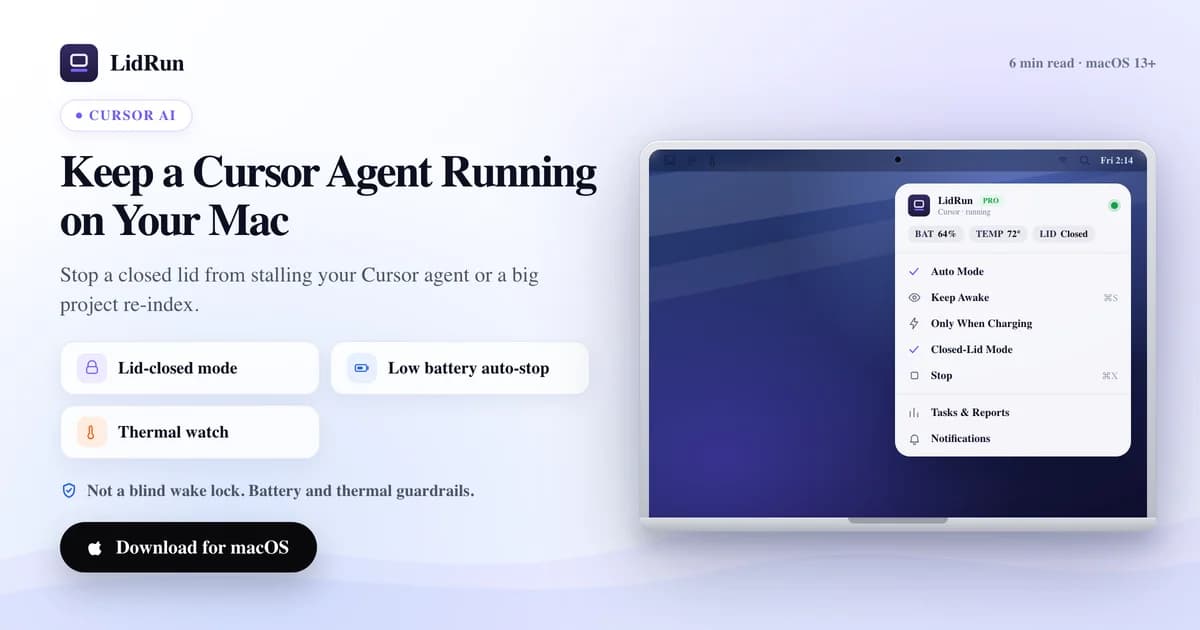
The direct fix is to hold the Mac awake at the OS level only while Cursor is actually working, and let go the moment it stops — not a blanket 'never sleep' toggle you have to remember to turn off. Cursor's background agents and its indexer run as ordinary local processes, so a long composer run, an unattended agent task, or a full project re-index all pause the instant your Mac sleeps, whether that's an idle timeout or a closed lid. Here's how to keep a Cursor agent running on your Mac, including where caffeinate and pmset already cover you and where they don't.
What interrupts a Cursor run
Cursor's agents and its indexer both run locally on your Mac — there's no cloud worker picking the job back up when your machine sleeps. The process is simply suspended wherever it was until something wakes the Mac again.

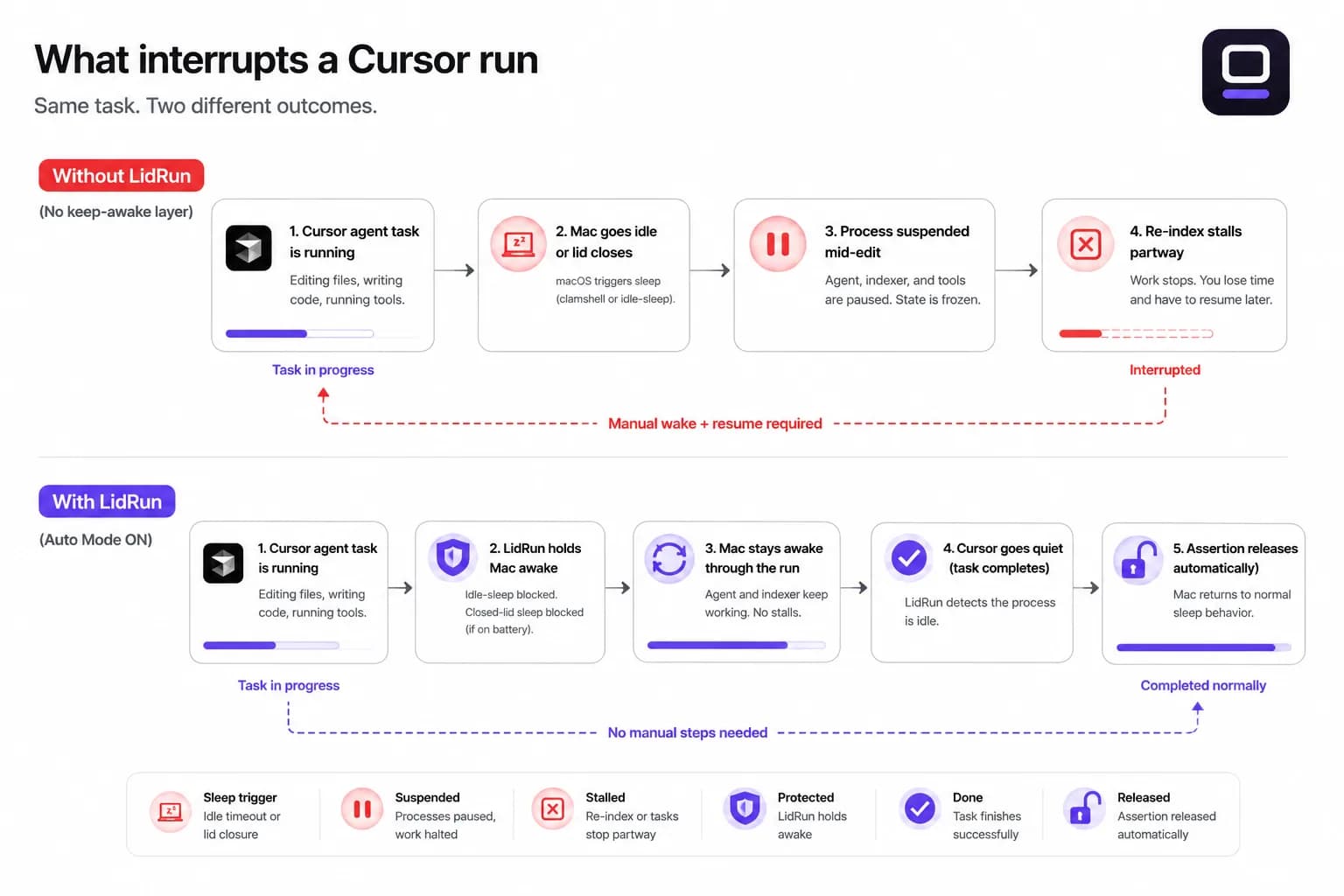
That hits two spots hardest: a background agent grinding through a multi-step task stops mid-edit or mid-tool-call, and a large workspace re-index — the kind that takes several minutes on a big repo — halts partway and has to resume later.
These are exactly the runs you start so you can step away, which is why an idle timeout or a closed lid tends to land at the worst moment: an hour into an overnight refactor, not five minutes in.
Why caffeinate and pmset don't fully cover it
macOS actually has two separate sleep triggers, and most keep-awake tools only stop one of them. caffeinate, and menu bar apps like Amphetamine, KeepingYouAwake, Lungo, and Caffeine, all work by holding a system power assertion — the same primitive. That blocks idle sleep: the Mac won't doze off from inactivity while the assertion is held.
Closing the lid is a different, lower-level trigger — clamshell sleep — and a power assertion alone doesn't stop it. Without an external display attached, closing the lid still puts the Mac to sleep even with caffeinate or a keep-awake app running, whether you started it or something else did.
The one public lever that prevents lid-close sleep on battery without an external monitor is the system-level pmset -a disablesleep 1 setting, and it needs administrator rights to flip. That's the mechanism behind LidRun's own Closed-Lid mode — and it's also available to you directly from Terminal if you'd rather try it by hand first.
Related guideKeep Claude Code running when your MacBook is closedThe free workaround: caffeinate, pmset, and an external display
For a quick unattended Cursor session at your desk, the built-in options can be enough. Plug in an external display (even an adapter with nothing attached works) and macOS keeps the whole Mac awake with the lid closed automatically — no extra software, no admin password, the same clamshell mode Apple built for docked laptops.
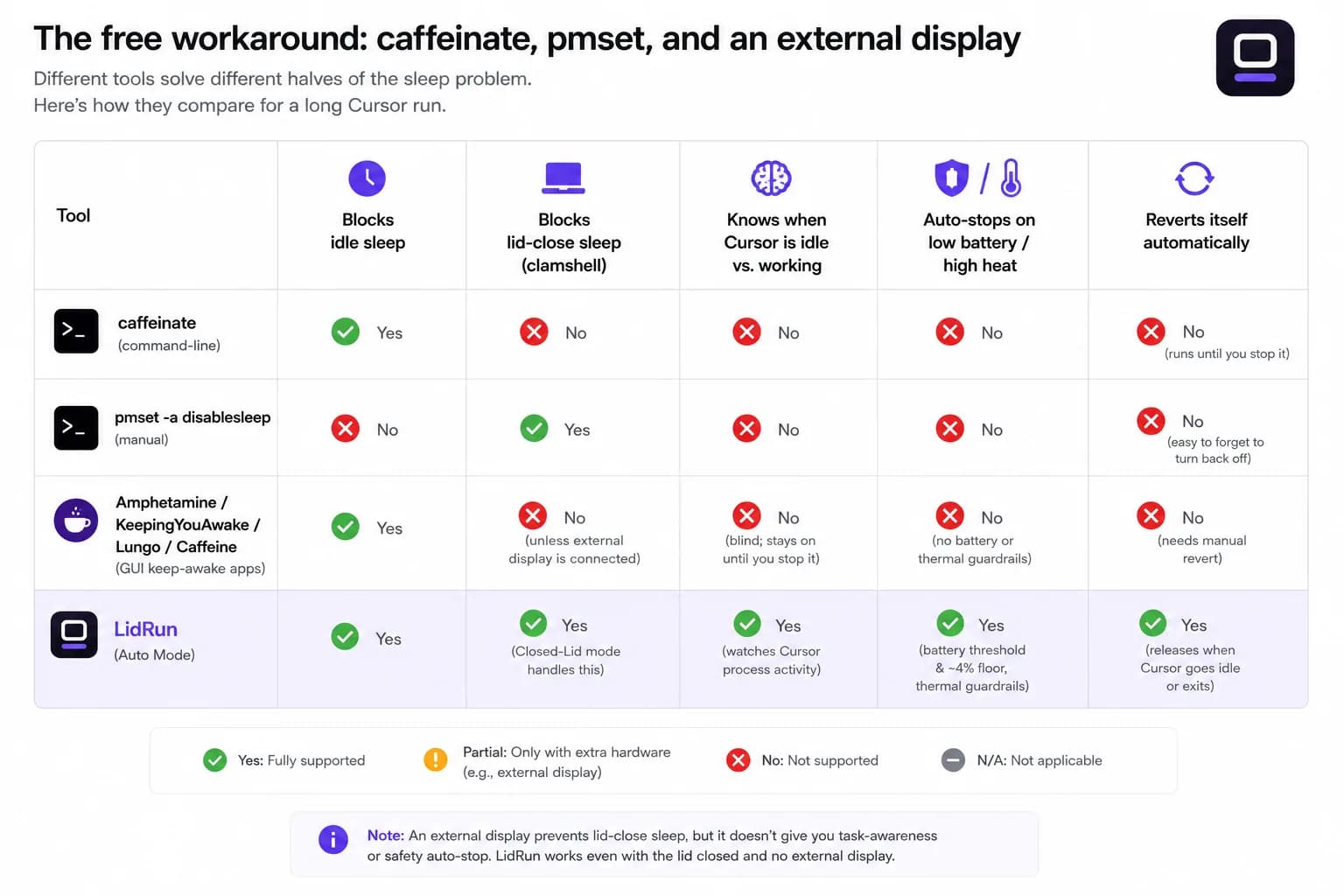
Away from a display, caffeinate -i in Terminal keeps the Mac from idling out while it runs, which covers a Cursor agent as long as the lid stays open. For the lid-closed case specifically, sudo pmset -a disablesleep 1 does the same job LidRun's Closed-Lid mode does under the hood — just remember to flip it back to 0 (sudo pmset -a disablesleep 0) when the run is done.
Third-party menu bar apps — Amphetamine, KeepingYouAwake, Lungo, Caffeine — are a genuinely nice upgrade over a bare terminal command: a menu bar toggle, scheduled durations, per-app rules. They're a solid choice if all you need is 'don't let this Mac sleep for a while,' and they cost nothing to try.
Where the free workaround breaks
None of the tools above know what Cursor is actually doing. caffeinate -i and any assertion-based keep-awake app hold the Mac open the same way whether the agent is mid-task or has been sitting idle for two hours — you have to remember to stop it yourself, or it just keeps running (and using battery) after the job is done.
pmset -a disablesleep is a global, persistent system setting, not a per-app toggle. If Terminal crashes, you close the window without flipping it back, or you simply forget, the Mac will not sleep — on battery, at your desk, in a bag — until you manually reset it or reboot. That's worth being deliberate about on a laptop that closes flat: a lid-closed Mac already has a harder time getting rid of heat, so keep it on a hard, ventilated surface rather than a bed or an enclosed bag.
None of these tools watch battery or thermal state for you either. Start an overnight re-index unplugged and caffeinate or a menu bar app will hold the Mac awake right down to 0%. That's the gap LidRun's safety thresholds are built to close — auto-stopping before the battery runs out or the Mac overheats, instead of holding blind.
Setting up LidRun for a Cursor session
Install LidRun and open it — it lives in the menu bar, not the Dock. Cursor is already on the default watch list alongside Claude Code, Codex, and around 50 other dev and AI tools, so there's nothing to type in for the common case.
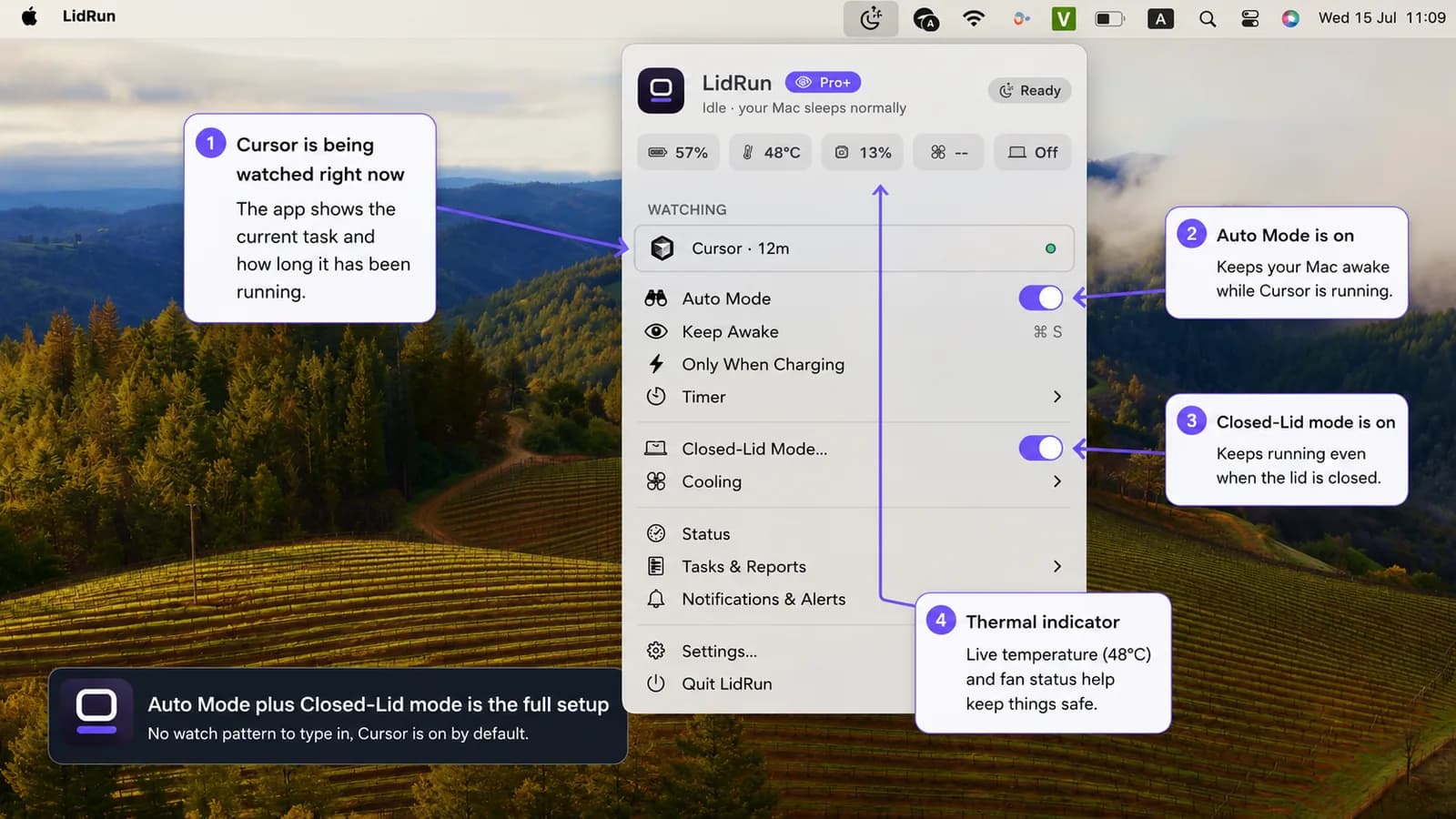
Turn on Auto Mode from the menu bar. LidRun watches for Cursor's process and holds the Mac awake for as long as it's actually working, then releases the assertion — letting the Mac sleep normally — once the last watched task finishes. Auto Mode is a Pro feature; Keep Awake and Timer mode (both free, no time cap) cover the same Cursor session manually if you're not ready to unlock it.
For a lid-closed run, also turn on Closed-Lid mode. The first time, macOS asks you to approve a one-time helper so later runs don't need a password prompt. Closed-Lid mode is Pro too, with a limited number of free runs to try it before it asks you to unlock the rest.
Battery and thermal limits are set for you out of the box — auto-stop below 20% battery (adjustable 15–50%), plus a hard emergency floor between 4% and 8% that force-sleeps the Mac no matter what you've set. These apply on every mode, including the free ones, not only Auto Mode.
What "watching Cursor" actually means
Cursor is in LidRun's built-in AI-agent list, not just its generic app list, and that distinction matters. A merely-open Cursor window doesn't hold the Mac awake by itself — it has to prove it's doing something first. Once it has, LidRun switches to presence-based detection: an agent sitting near 0% CPU while it waits on a model response still counts as active, for up to 30 minutes, so a Cursor agent mid-think doesn't get dropped just because it went quiet for a bit.
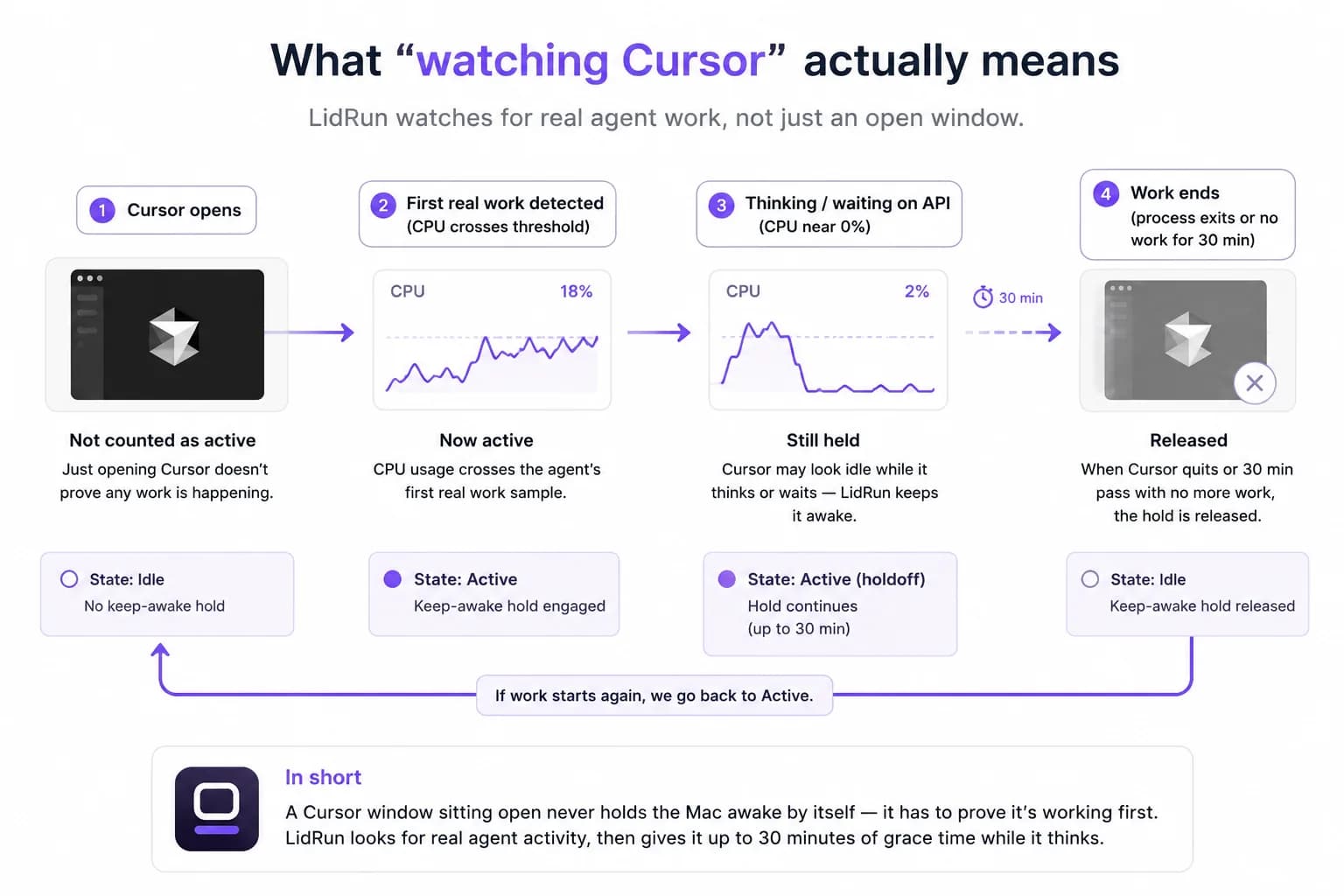
A large re-index runs through the same watcher, no separate setting, since it shows up as CPU activity from the Cursor process. Quick edits and small-file indexing finish fast enough that sleep never enters the picture either way.
The current thermal state — Normal, Fair, Hot, Very hot — shows in the menu bar throughout, so a warm run during a long index is visible instead of silent. If it reaches the critical mark, Closed-Lid mode turns itself off so the Mac can throttle and cool the normal way instead of trapping heat behind a closed lid.
When it's worth turning on
This earns its place for the unattended stretches: a background agent working through a long task, a fresh index of a large repo, an overnight cleanup pass you don't want to sit and watch.
If you're in Cursor actively working alongside the agent, you don't need any of this — the Mac stays awake while you're interacting with it regardless of mode, and short tasks that finish in a minute or two are fine on their own.
If you've ever kept nudging the trackpad just to stop the Mac dozing mid-run, that habit is the actual signal it's worth turning Auto Mode — or, if you're not ready to unlock it, just a free Timer run — on instead.
Recommended settings
Stay plugged in for long agent or indexing runs — the battery auto-stop threshold is a safety net for when you forget, not a plan for an overnight run starting at 40%.
If you'd rather not unlock Auto Mode yet, start a Timer for roughly how long you expect the task to take. It's free and uncapped, and it gives the run a hard upper bound even if the agent stalls or an index gets stuck.
Keep the Mac on a hard, ventilated surface, lid open or closed — a sustained re-index generates real heat, and that's true with or without any keep-awake tool running.
Try it on the next run that's long enough to make you consider propping the lid open. That's the exact case Auto Mode and Closed-Lid mode are built for, and Keep Awake or Timer mode let you test the core idea today without unlocking anything.
LidRun keeps your work running with the lid closed, with battery and thermal safety built in.
Already have LidRun? Read the setup guide →
Frequently asked
Cursor's agents and indexing both run locally on your Mac — there's no remote worker keeping the task going elsewhere — so they pause the moment the Mac sleeps, whether from an idle timeout or a closed lid. LidRun holds the Mac awake while Cursor is actively working, within your battery and thermal limits, so the agent or re-index can finish instead of stalling mid-task.
Install LidRun, open it from the menu bar, and turn on Auto Mode — Cursor is already on the default watch list, so there's nothing to configure. LidRun holds the Mac awake while Cursor is actively working and releases it when the task ends. Auto Mode is a Pro feature; the free Keep Awake or Timer modes cover the same session manually if you're not ready to unlock it.
Yes, once Auto Mode is on. LidRun matches Cursor by process name and bundle ID and treats it as a known AI agent rather than just an open app, so it only holds the Mac awake once Cursor has proven it's actually working, and keeps holding through short quiet stretches — up to 30 minutes — while the agent waits on a response.
For an open-lid session, largely yes — caffeinate and apps like Amphetamine, KeepingYouAwake, Lungo, and Caffeine block idle sleep the same way LidRun's basic Keep Awake mode does. The gap is lid-closed sleep: none of them override it without an external display attached, because a power assertion doesn't reach clamshell sleep. That needs the system's pmset disablesleep setting, which LidRun's Closed-Lid mode manages for you with battery and thermal auto-stop attached.
Yes, with Closed-Lid mode on. It's the same pmset -a disablesleep lever available from Terminal, but LidRun pairs it with battery and thermal thresholds and automatically re-enables normal sleep when the run ends, the app quits, or it restarts after a crash, so it doesn't stay stuck on indefinitely the way a manual pmset flip can if you forget to revert it.
Holding the Mac awake for a long run does use more battery and generate more heat than letting it sleep — that's true of any keep-awake tool, LidRun included. The battery and thermal thresholds exist to reduce that risk: auto-stop below your battery limit (20% by default), a hard 4–8% emergency floor no matter what you've set, and a thermal check that drops Closed-Lid mode at the critical level. Staying plugged in and on a ventilated surface for long runs still matters.
No — Auto Mode, the automatic Cursor and dev-tool detection, is a Pro feature. Keep Awake and Timer mode are free with no time cap and can cover a Cursor session manually. Closed-Lid mode is also Pro, with a limited number of free runs to try it first.
Yes — indexing runs as CPU activity inside the same Cursor process LidRun is already watching, so a large re-index keeps the Mac awake the same way an agent task does, within your battery and thermal limits.