How to keep a Mac awake when the lid is closed
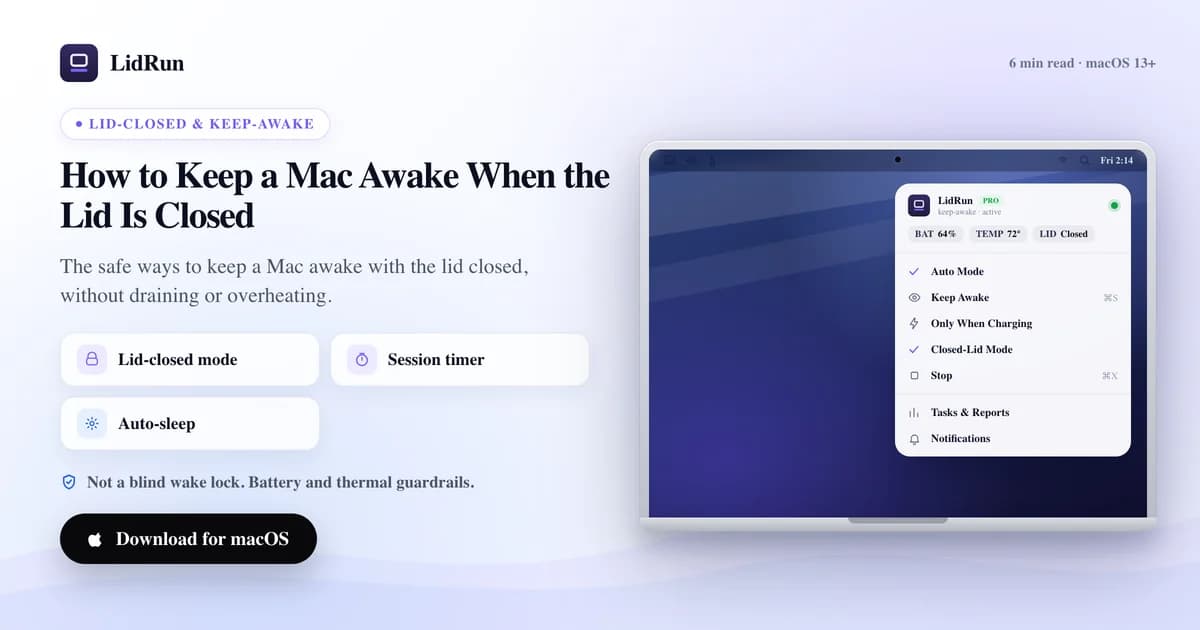
You can keep a Mac awake with the lid closed by overriding macOS's clamshell sleep — with the built-in pmset disablesleep command, Apple's own external-display clamshell mode, a third-party keep-awake app, or LidRun's Closed-Lid Mode. Plain caffeinate and most simple keep-awake tools can't do it on their own, because closing the lid triggers a separate, lower-level sleep that ordinary power assertions don't block.
Why closing the lid stops everything
Closing a MacBook's lid doesn't just dim the screen — it triggers clamshell sleep, a lower-level suspend that's separate from the idle sleep you get by leaving an open lid untouched. macOS reads the lid switch through IOPMrootDomain's AppleClamshellState property, and the instant that flips to closed on battery, the system suspends within seconds to save power and let the chassis start cooling down.

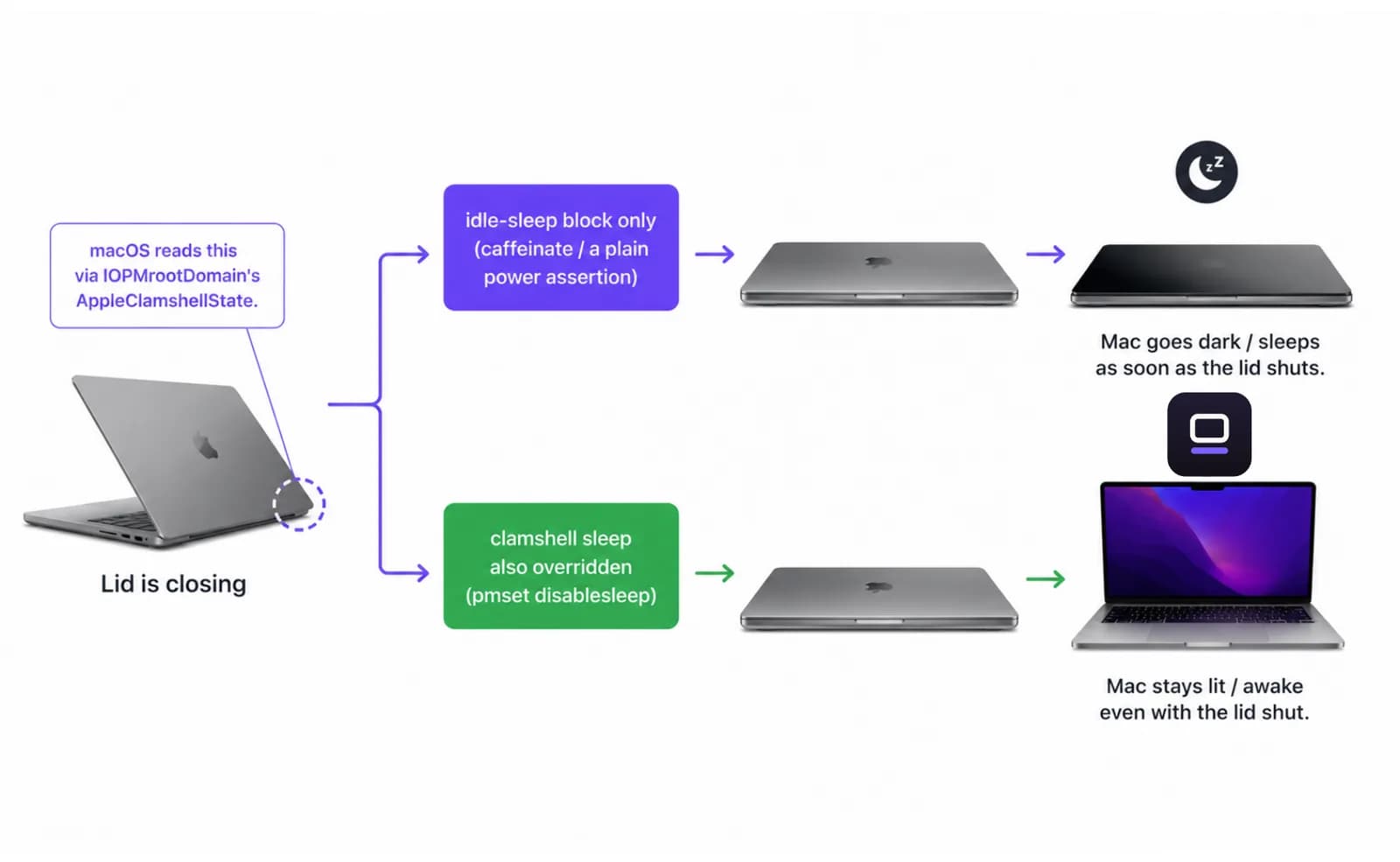
Ordinary power-assertion tools — including the built-in caffeinate command — only block idle sleep. They have no effect on clamshell sleep, which is why running caffeinate -i in Terminal and then closing the lid still puts the Mac to sleep on battery.
When it sleeps, whatever was running pauses with it — the build, the download that was at 80 percent, the agent that was halfway through a task. Nothing is lost, but nothing moves either, and it only picks back up once you open the lid again or plug in something that wakes it.
The free ways to keep a Mac awake with the lid closed
Three free options exist before you reach for any app, LidRun included.
caffeinate is macOS's built-in command-line keep-awake tool — no install required. caffeinate -i blocks idle sleep for as long as it runs, caffeinate -s does the same but only while on AC power, and caffeinate -t 3600 times out after an hour so you don't have to remember to kill it. It's the right tool for a lid-open terminal you don't want to nod off — it just can't touch clamshell sleep, as covered above.
pmset disablesleep is the actual lever for lid-closed sleep. Running sudo pmset -a disablesleep 1 in Terminal turns off sleep system-wide, including the clamshell trigger — the same system setting LidRun's Closed-Lid Mode flips under the hood. It asks for an administrator password and works whether the Mac is on battery or plugged in.
Apple's own clamshell mode is the third option, and it needs no extra software at all: connect the Mac to power, connect an external display (traditionally also a keyboard or mouse), then close the lid. macOS treats that as a desktop session and never triggers clamshell sleep — but only while all of those conditions hold. Unplug the power or disconnect the display and normal lid-close sleep resumes immediately.
Related guideA lid-closed developer workflow for the MacBookWhere the free options run out
Each of those free routes does the one job — stopping sleep — and nothing else.
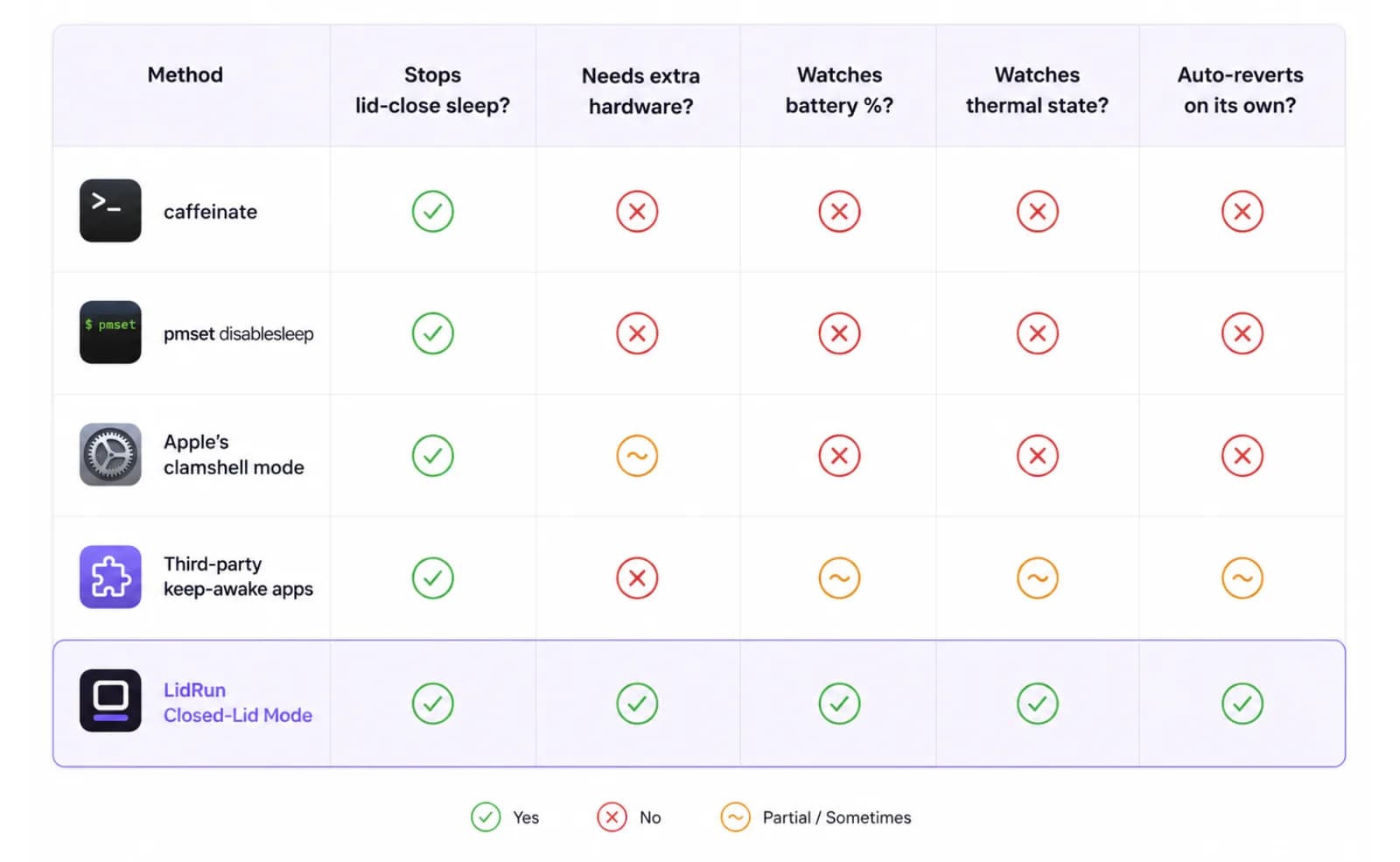
pmset disablesleep is a global, persistent setting. Once it's 1, macOS won't sleep at all, lid open or closed, until something sets it back to 0 — a script, an app, or you typing the command again. Forget to revert it, and a Mac in a bag with a heavy job running has no automatic point where it backs off; nothing is watching how much battery is left or how hot the chassis is getting.
Third-party keep-awake apps — Amphetamine, Caffeine, KeepingYouAwake, Lungo — are a real step up in convenience. Menu-bar toggles, schedules, and app-specific triggers beat typing Terminal commands, and some offer a lid-closed option built on the same kind of system-level override. What we haven't seen in that category is the override paired with a live battery percentage and thermal state that stop the session on their own — that pairing, not the override itself, is the part worth having for anything long enough to matter.
Apple's clamshell mode has the opposite problem: it's the safest of the three because macOS is doing exactly what it's designed to do, but it demands hardware most people don't have on hand for a spontaneous long job — mains power and an external display, plugged in before you shut the lid.
The safe way to keep it running
Keeping it awake is easy; keeping it safe is not.
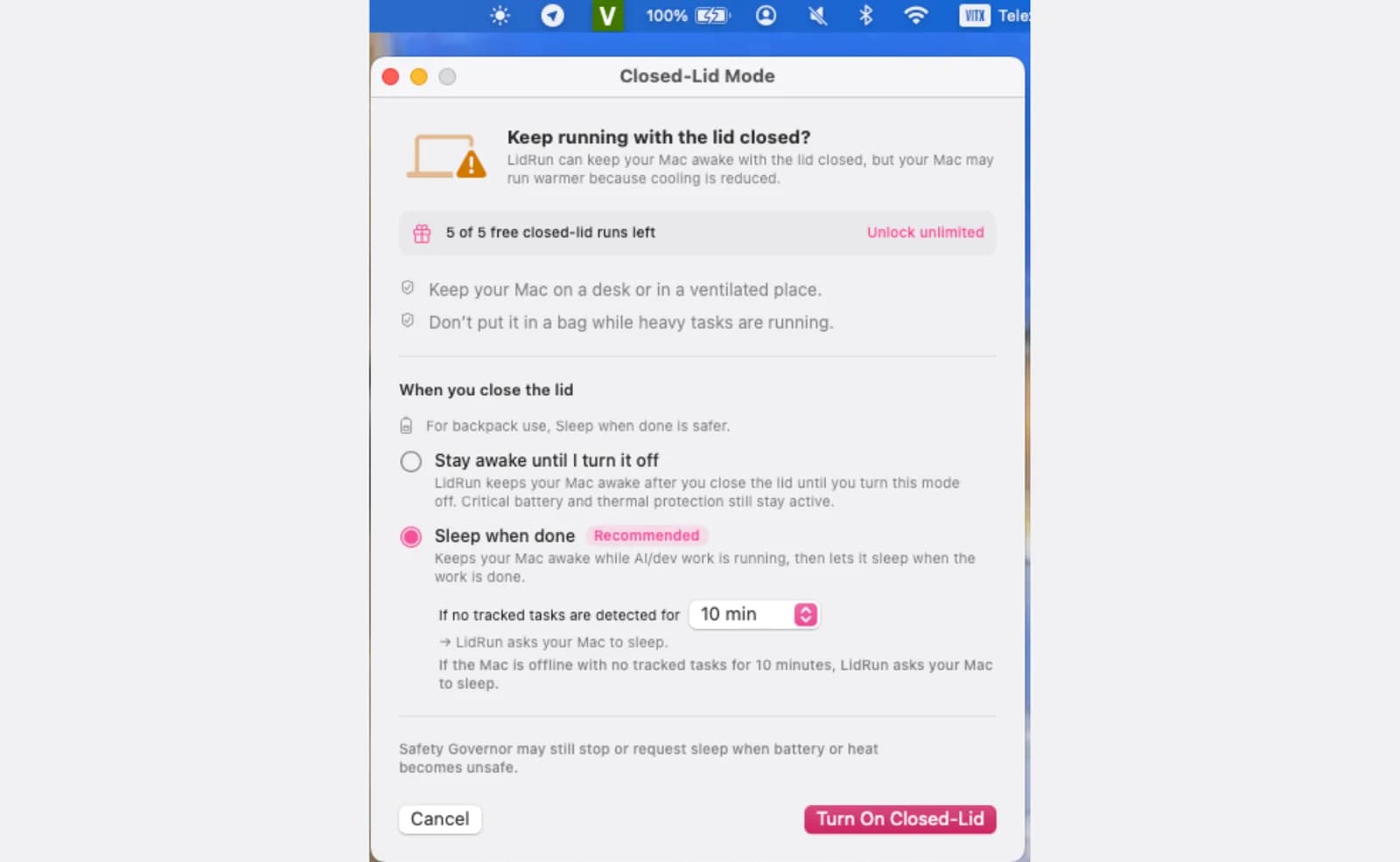
LidRun's Closed-Lid Mode holds an IOKit power assertion for idle sleep and pairs it with the same pmset disablesleep override covered above, applied through LidRun's privileged helper so macOS doesn't ask for an administrator password every time — once that helper is approved with a single prompt.
Two modes decide what closing the lid actually does. Sleep when done — the default — keeps the Mac awake only while it detects AI or dev work running, then lets it sleep once nothing is left to track (10, 20, or 30 minutes of no tracked activity, your choice). Stay awake until I turn it off holds the assertion indefinitely, for anything Auto-Watch can't see, with an optional session limit from 30 minutes up to 8 hours so a run doesn't stay awake overnight because you forgot about it.
Underneath both modes, a Safety Governor watches battery charge and thermal state the whole time. Set an auto-stop threshold anywhere from 15% to 50% (20% by default) and the Mac is allowed to sleep once charge drops past it, instead of running the battery down further. On the thermal side, LidRun watches macOS's own thermal-pressure signal and warns at the Hot level; if it climbs to Very Hot, Closed-Lid Mode drops on its own so the hardware can throttle and cool the normal way. That's not a promise the Mac stays cool with the lid down — closing the lid always cuts airflow — it's a guardrail so a bad placement doesn't turn into a bad outcome while you're not there to catch it.
Closed-Lid Mode is a Pro feature. New installs also get a limited number of free Closed-Lid sessions to try it before it asks for a license.
When you actually need this
If you just want the screen and idle timer to hold off during a presentation or a long read with the lid open, caffeinate -d or a plain keep-awake app is plenty — you don't need any of this.
Lid-closed wake is for the narrower case: you want to physically close the laptop and walk away. A long compile, a model download, an overnight data job, an agent run you don't want to babysit at a desk. That's also the case none of the free command-line options handle safely unattended — they stop sleep, but nothing is watching the Mac while you're gone.
It's worth trying Closed-Lid Mode specifically when you catch yourself propping the lid open an inch just so a job won't die, especially if the Mac is on battery or sitting somewhere warm while it works.
Habits that help
These apply no matter which method above you use, LidRun included.
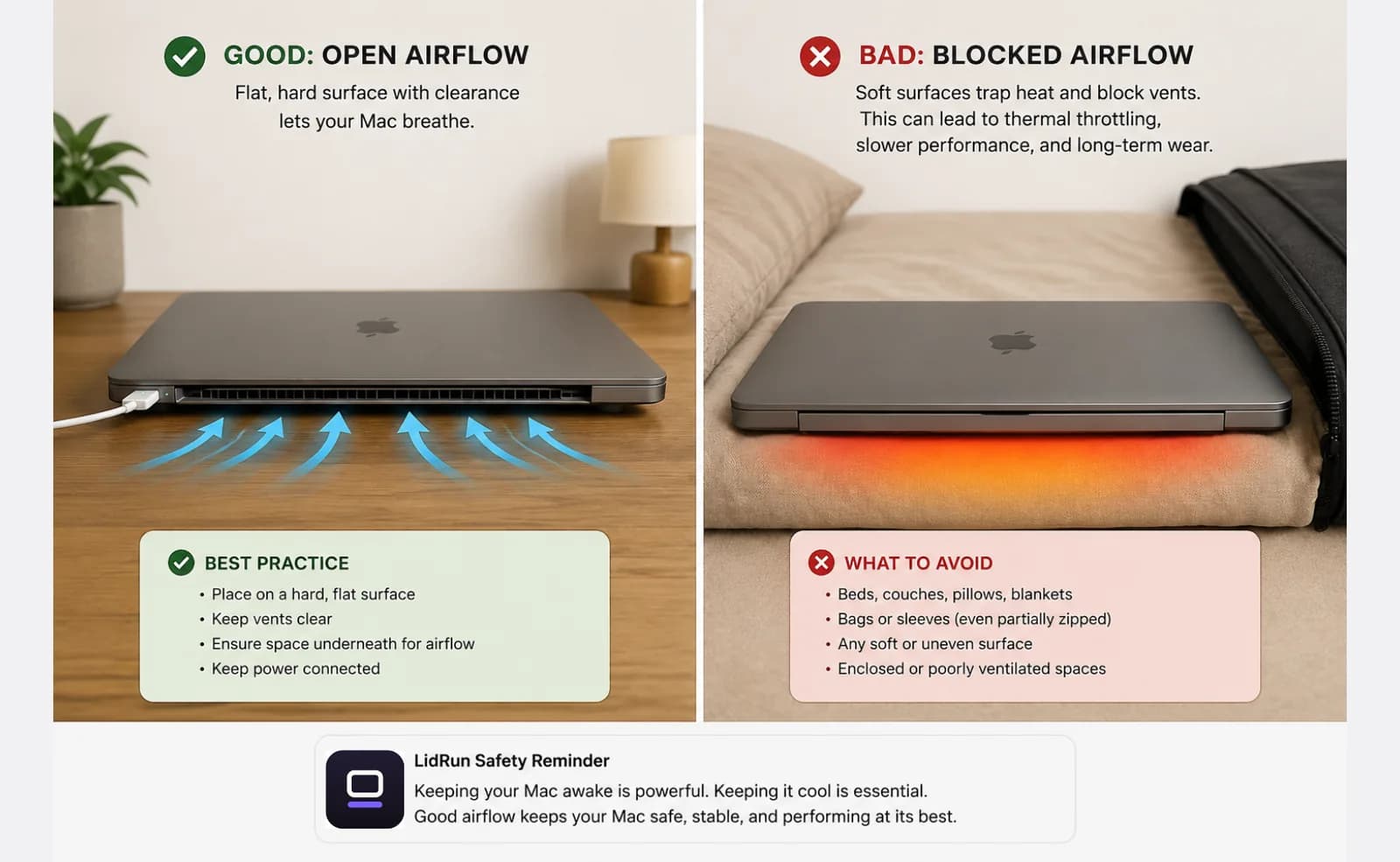
Run the Mac on a hard, flat surface with airflow underneath. A closed lid already traps some heat around the keyboard deck; a bed, a couch cushion, or a closed bag makes that worse by blocking the last vents that are still exposed.
Stay plugged in for anything long. Lid-closed work on battery is fine for a short run, but AC power sidesteps the charge question entirely for that session and keeps things running a normal duty cycle instead of the system trying to conserve charge.
Leave the battery auto-stop threshold on even while plugged in, so an unexpected power cut or a loose cable ends the session cleanly instead of draining the battery flat overnight.
If you used pmset disablesleep by hand instead of an app, set yourself a reminder to run sudo pmset -a disablesleep 0 when the job is done — it's the one step nothing enforces for you.
Keep the Mac awake lid-closed with one keystroke
To keep a Mac awake with the lid closed, you normally toggle a setting first. LidRun 1.2 turns that into one keystroke: press ⌥L (Option-L), or just Caps Lock, then close the lid — the Mac stays awake and your work keeps running.
Caps Lock is repurposed here because a closed-lid Mac isn't being typed on, and it needs no extra accessibility permission. Prefer Caps Lock for typing? The ⌥L global hotkey does the same job.
It's the same guarded session either way: timer, charging-only, low-battery auto-stop and thermal guardrails stay on, and LidRun warns before sleeping the Mac. Press the key again to let it sleep.
LidRun keeps your work running with the lid closed, with battery and thermal safety built in.
Already have LidRun? Read the setup guide →
Frequently asked
LidRun's battery and thermal thresholds help reduce that risk, but placement and airflow are still on you — run it on a flat, ventilated surface and skip soft furniture or a closed bag. A closed lid already traps some heat around the keyboard deck; bad placement adds to that.
Yes. LidRun supports macOS 13 Ventura and later on both Apple Silicon and Intel Macs.
You set an auto-stop threshold anywhere from 15% to 50% (20% by default). When charge drops past it, LidRun lets the Mac sleep instead of draining it further, with a warning before that point.
Only for Apple's own clamshell trick, which needs the Mac on power with an external display attached — traditionally also a keyboard or mouse — before you close the lid. LidRun's Closed-Lid Mode skips all of that; it holds the Mac awake with just the lid closed, on battery or AC.
caffeinate blocks idle sleep, the kind that happens when the Mac sits inactive with the lid open. It has no effect on clamshell sleep, the separate, lower-level suspend macOS triggers the moment you physically close the lid on battery. Overriding that needs pmset disablesleep or Apple's external-display clamshell mode — which is what caffeinate alone doesn't do, and what LidRun's Closed-Lid Mode handles for you.
Yes — sudo pmset -a disablesleep 1 is the same system-level override LidRun uses, and it's a legitimate free way to keep a Mac awake with the lid closed. The tradeoff is that it's global and persistent: macOS won't sleep at all, lid open or closed, until you run sudo pmset -a disablesleep 0 (or reboot), and nothing about the command watches your battery percentage or thermal state while you're away.
Turning it off or quitting LidRun restores normal sleep automatically. If it's ever stuck — after a crash, for example — running sudo pmset -a disablesleep 0 in Terminal resets it immediately.
Yes — in LidRun 1.2+, press ⌥L (Option-L) or tap Caps Lock to keep the Mac awake with the lid closed, then shut the lid. Press the same key again to release it and let the Mac sleep.