Clamshell mode on MacBook: what it means for AI work
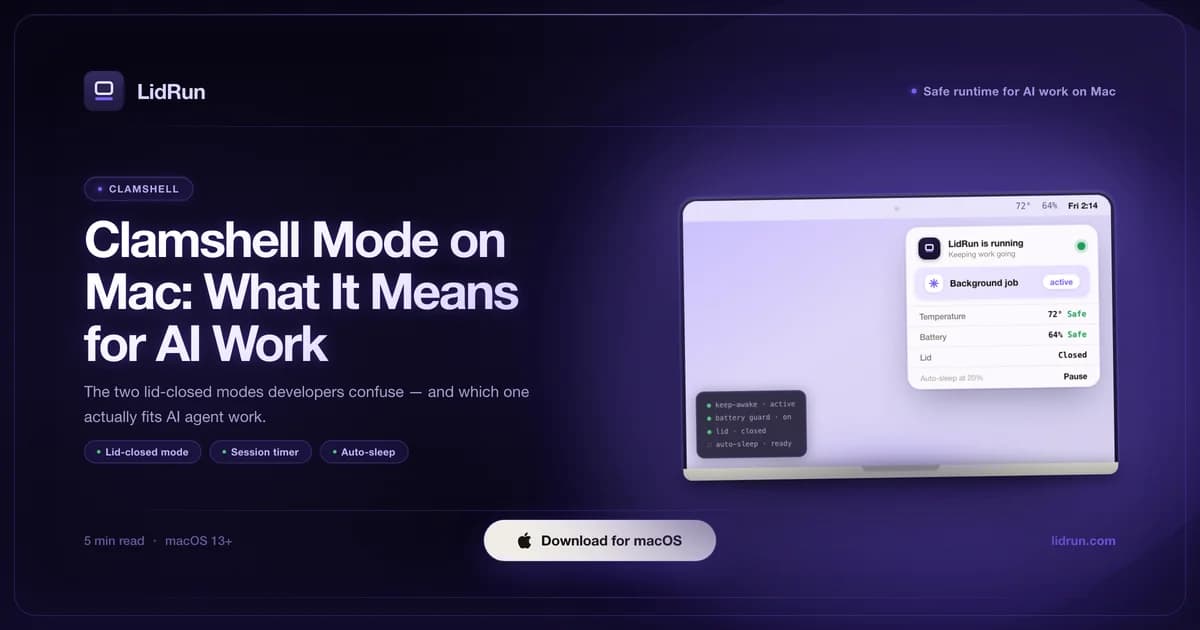
Clamshell mode, in Apple's own definition, is closing the MacBook lid while it stays connected to an external display, keyboard, and mouse - the Mac keeps running as a compact desktop. That is not what most AI developers mean when they say they want to "run with the lid closed." They want a closed laptop finishing an agent run, a build, or a long script with no monitor, no dock, and no desk involved - and that's a different macOS mechanism with a different fix, not a variant of clamshell mode.
What clamshell mode means on a Mac
Apple's clamshell mode requires three things at once: the lid closed, an external display connected, and at least one external input device (keyboard or mouse, wired or Bluetooth) active. Meet all three and macOS switches the internal screen off and keeps the system fully awake, running through the external display like a desktop. It's a genuinely useful mode - it's why a MacBook can double as a Mac mini with a nicer keyboard.

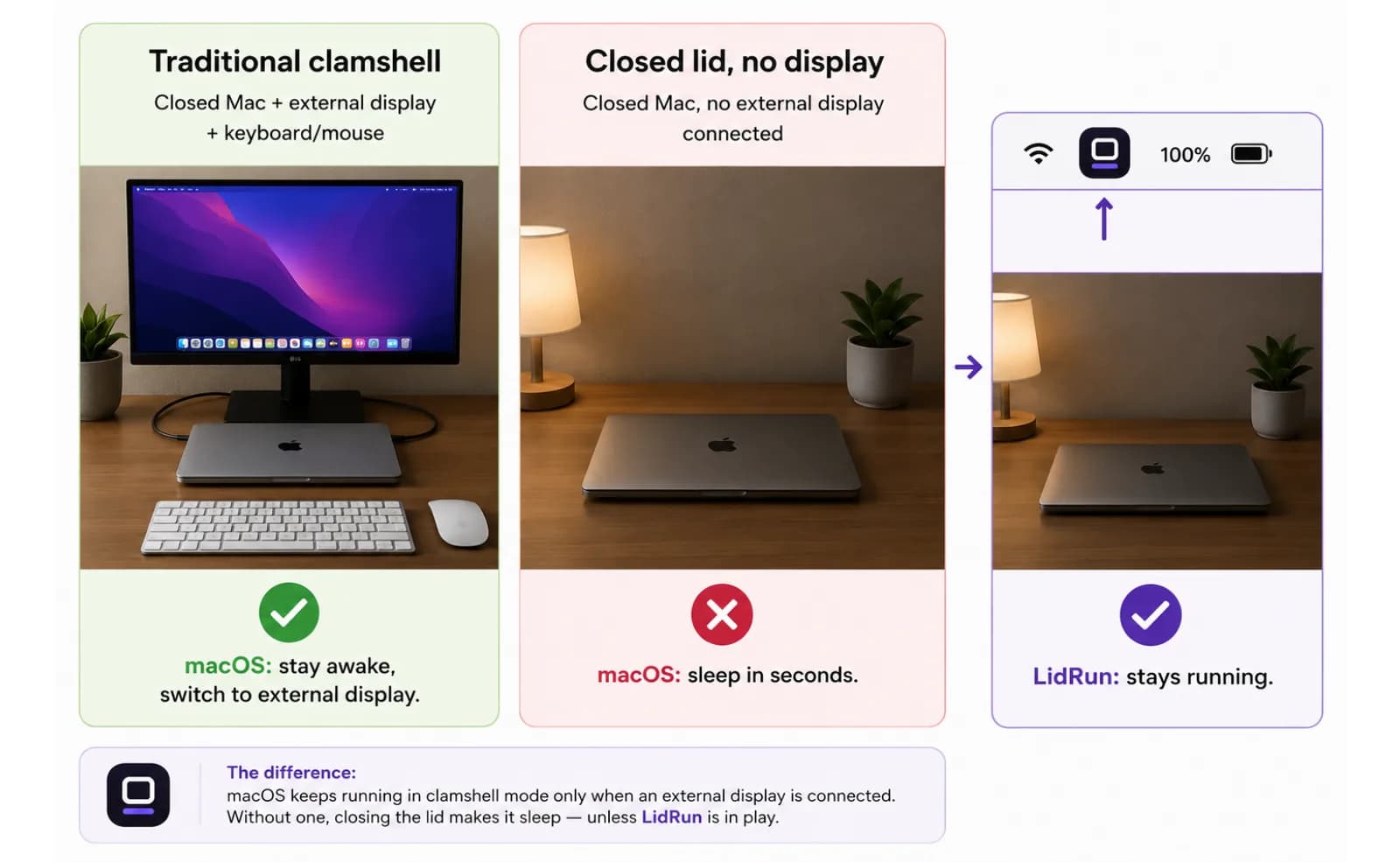
It's also narrower than people expect. Miss any one leg of the tripod and it doesn't activate. Plug in a monitor with no keyboard or mouse attached, and closing the lid still puts the Mac to sleep in a few seconds - the display alone isn't enough. This is the single most common "clamshell mode isn't working" complaint, and it's usually not a bug: it's the external-input requirement not being met.
None of that setup is what unattended AI work needs. An agent finishing a Claude Code session, a long npm run build, or a local model doing inference doesn't care about an external display - it needs the Mac to stay on with the lid down and nothing else plugged in at all. That's outside what clamshell mode was designed to do, which is why looking for a "clamshell mode without a monitor" setting in System Settings won't turn anything up. It doesn't exist, because it isn't clamshell mode.
Why closing the lid still sleeps your Mac without a display
The reason a plain keep-awake tool doesn't survive a lid close comes down to two separate sleep mechanisms inside macOS, and most tools only touch one of them. caffeinate, Amphetamine, KeepingYouAwake, and LidRun's own base Keep Awake mode all work by holding an IOKit power assertion - specifically the same PreventUserIdleSystemSleep assertion type - which tells macOS "don't go to sleep from inactivity." That's real, and it works well with the lid open: leave the Mac idle for hours and it won't nod off.
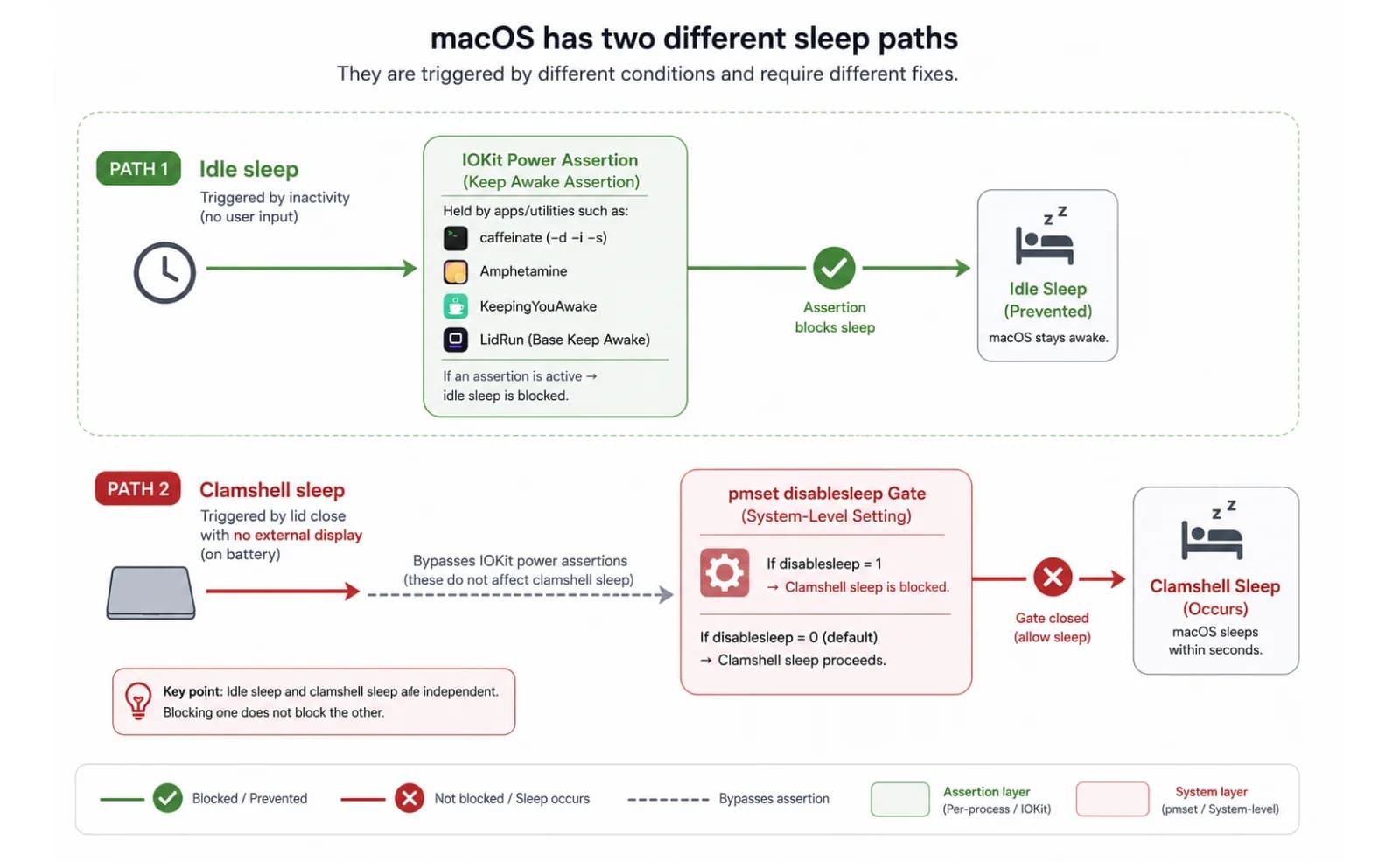
Closing the lid with no display attached doesn't route through that idle-sleep check at all. It triggers a separate, lower-level clamshell sleep, and a PreventUserIdleSystemSleep assertion - from any app, including LidRun's own default mode - cannot stop it. Run caffeinate -i in Terminal, close the lid with nothing plugged in, and the Mac sleeps anyway within a few seconds. This isn't a caffeinate bug or a weak assertion; it's a different sleep path that idle-sleep assertions were never built to block.
The only public lever that stops that specific sleep is pmset -a disablesleep 1 - a system-wide setting, not an app-level assertion, and it needs administrator privileges to set.
The free fix - pmset disablesleep, and its catch
The free version of this is one command: sudo pmset -a disablesleep 1, run once in Terminal with your admin password. That flips a global macOS setting that tells the system to ignore clamshell sleep entirely, display or no display. Set it, close the lid, and the Mac keeps running. When you're done, sudo pmset -a disablesleep 0 puts things back to normal - and that second step is where the risk lives.
disablesleep isn't scoped to your terminal session or your app; it's a persistent, machine-wide flag that survives until something sets it back to 0. If you forget, if the script that was supposed to reset it never runs, or if your shell session just closes without you remembering, the Mac will not sleep lid-closed or otherwise - not for the next job, not overnight, not on the flight home - until you manually flip it back or reboot. There's no timer, no battery check, and no thermal check built into the command itself; pmset does exactly what you told it to and nothing more.
That's a reasonable trade for a one-off: you're running a long compile before a flight and you'll remember to reset it after. It's a worse trade as a standing habit, because the failure mode is silent - nothing tells you the flag is still set except a Mac that won't sleep and a battery that's quietly draining in a bag.
Where Amphetamine, KeepingYouAwake, Lungo, and Caffeine fit
These are all solid, well-regarded keep-awake utilities, and it's worth being clear about what they're actually built for. Amphetamine is the most configurable of the free options - schedules, per-app triggers, custom durations - and a good default choice if you just want to stop idle sleep while you work with the lid open. KeepingYouAwake is the minimal, open-source version of the same idea: one menu-bar toggle, small footprint, nothing to configure. Lungo and the original Caffeine app are both simple, well-designed paid or freemium toggles with the same one-click premise - press the icon, the Mac stays awake.
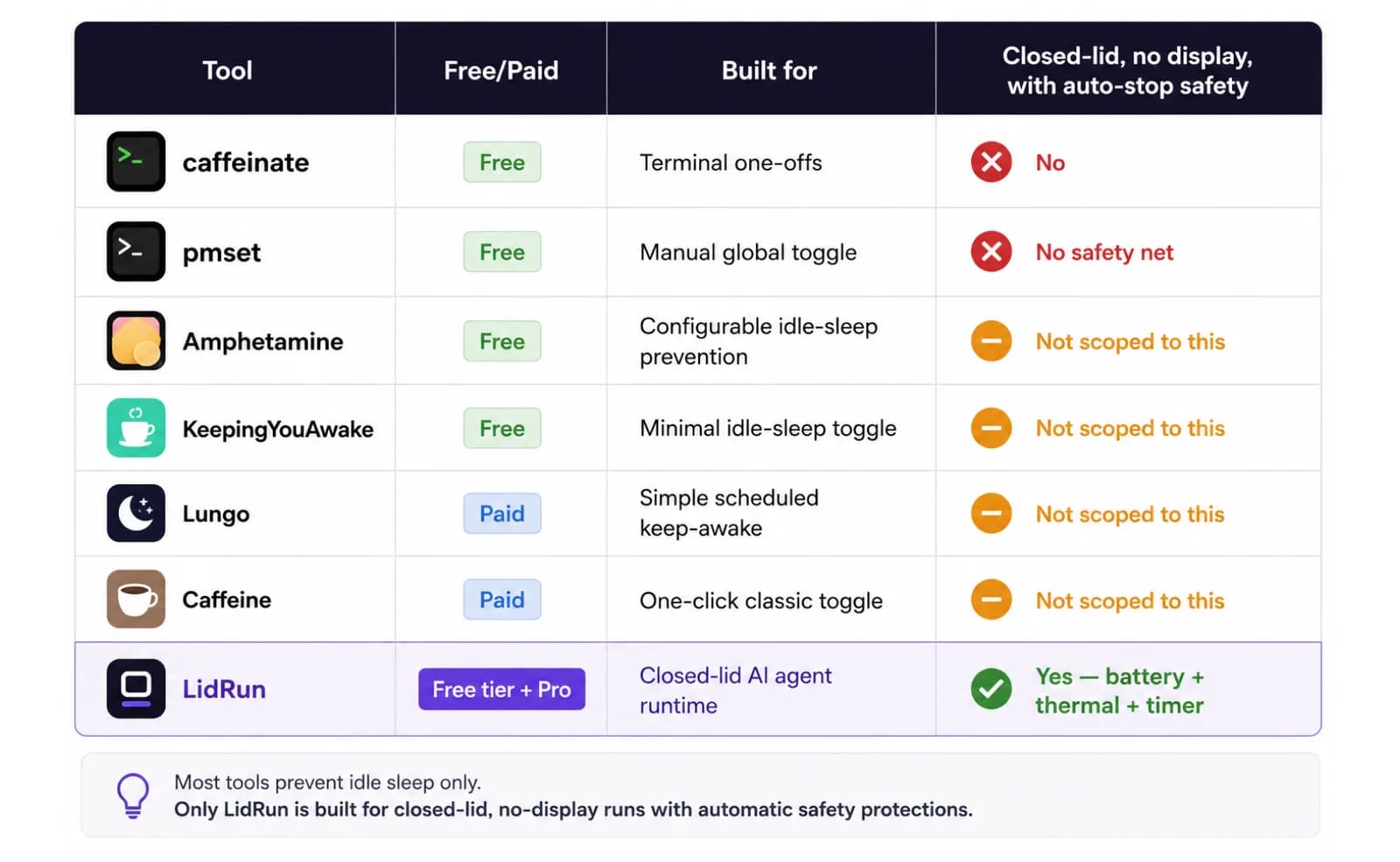
All of them, like caffeinate itself, operate through the idle-sleep assertion described above. That's the right tool for keeping a Mac awake with the lid open - presentations, downloads, long-running foreground tasks. None of them is scoped around the specific job of closing the lid with no display attached and stopping automatically on a battery or thermal limit; that's a narrower, more specific problem than general idle-sleep prevention, and it isn't what any of these tools set out to solve.
So the honest comparison isn't "which is best" - it's picking the tool that matches the job. Lid open, want the screen to stay lit while you read something long: any of the above works fine. Lid closed, no monitor, an agent running unattended, and you want it to stop on its own if the battery or the Mac's temperature gets to a bad place: that's the specific gap this article is about.
Why AI agents changed what developers need from "clamshell"
A few years ago, unattended lid-closed work was a niche case. Laptop use was mostly interactive - open it, use it, close it - and anything that ran long and unattended ran on a server, not on the machine in front of you. Clamshell mode's monitor-and-keyboard requirement was never a problem in practice, because nobody was trying to close the lid on something that was still working.
AI agents changed that shape of work. Claude Code and Cursor background agents, local models running through Ollama, and multi-step pipelines now routinely run for minutes to hours without needing any input while they do. The laptop itself is the compute - there's nothing to look at on a screen while it works, which makes the whole point of an external display moot. You want to start the job and walk away, not keep a monitor lit for a process that isn't producing anything to watch.
That reframes the question entirely. It's not "how do I get a bigger screen on my MacBook at a desk" anymore - that's still what clamshell mode answers, and it still requires the display. It's "how do I let this MacBook keep working while I'm not at a desk at all," and that's the problem pmset disablesleep (manually) or LidRun (automated, with guardrails) actually solves.
How LidRun handles closed-lid runtime
LidRun's base Keep Awake mode, Timer mode, and Charging-only mode are free forever - no trial, no session cap, no time limit, and they work the same way caffeinate does under the hood: an IOKit idle-sleep assertion, held for as long as you want, lid open. Closed-lid runtime - actually running with the lid shut and no display - is the one mode gated to the Pro tier, after a limited number of free closed-lid runs to try it first without paying anything.
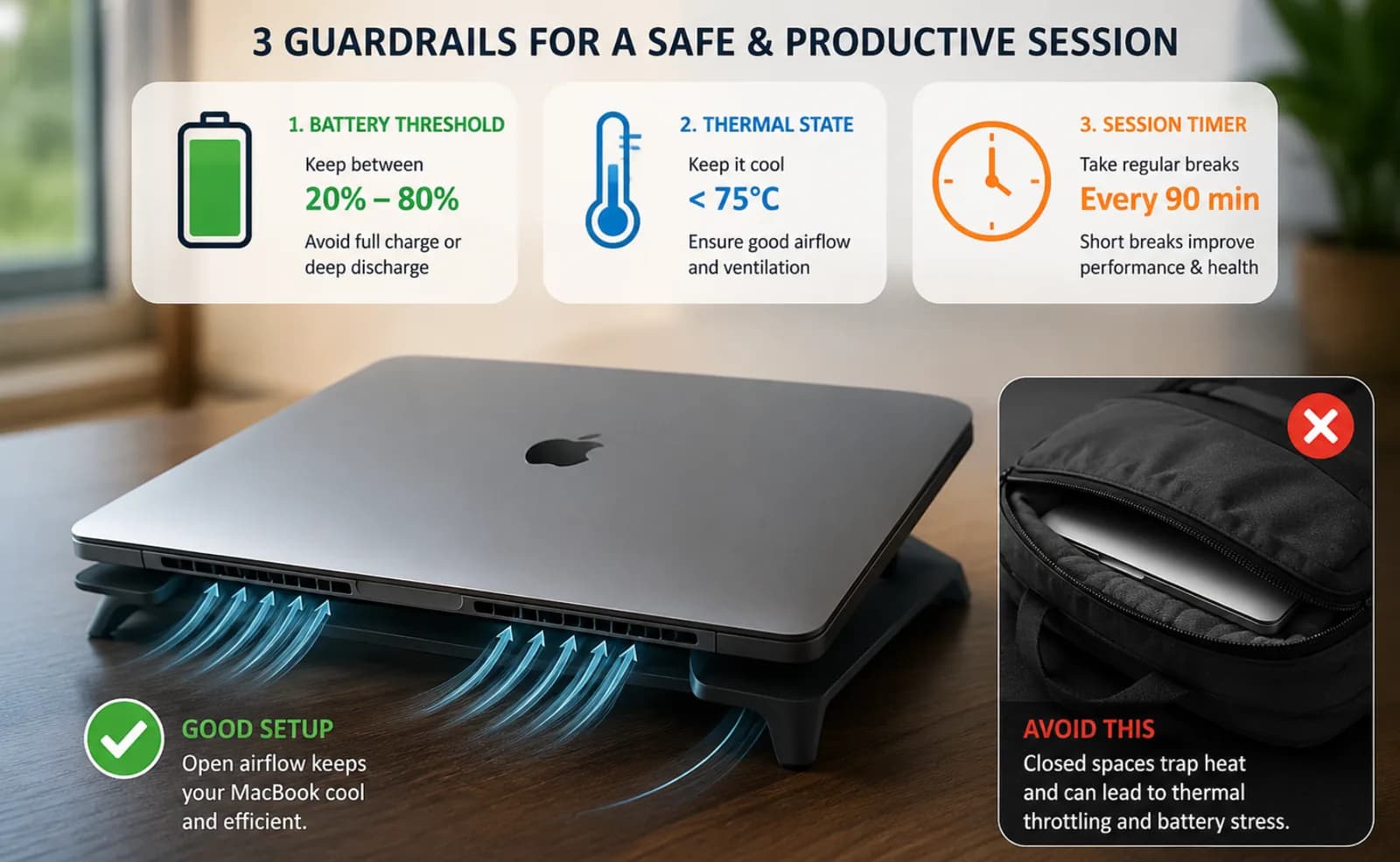
When you start a closed-lid session, LidRun holds the same idle-sleep assertion as always, and additionally issues the pmset -a disablesleep 1 toggle on your behalf - the same mechanism as the manual fix above, automated. The first time, macOS needs a one-time admin approval to install LidRun's privileged helper; after that, starting and stopping closed-lid sessions doesn't prompt for your password again, because the helper does the toggle instead of a fresh AppleScript admin prompt each time. If the helper isn't approved or its call fails for any reason, LidRun falls back to the same admin-authorization prompt manual pmset would need - it never reports success unless the setting was actually applied.
The part manual pmset doesn't give you is the reset guarantee. LidRun pairs every disablesleep 1 with a matching 0 - when you stop the session, when you quit the app, and on next launch if it finds a 1 left over from a crash. That closes the exact failure mode described above: the flag doesn't stay stuck globally because you forgot to reset it in a terminal that's long since closed.
Running a closed-lid session safely
Placement still matters more than any setting. Run the Mac on a hard, flat surface with air able to move under the vents - a table, a stand, a shelf. A closed lid already traps more heat than an open one; a soft surface or a closed bag makes that worse, and no keep-awake app changes what the chassis is sitting on. Safety wins over convenience here: if the physical setup is wrong, no software guardrail fixes it.
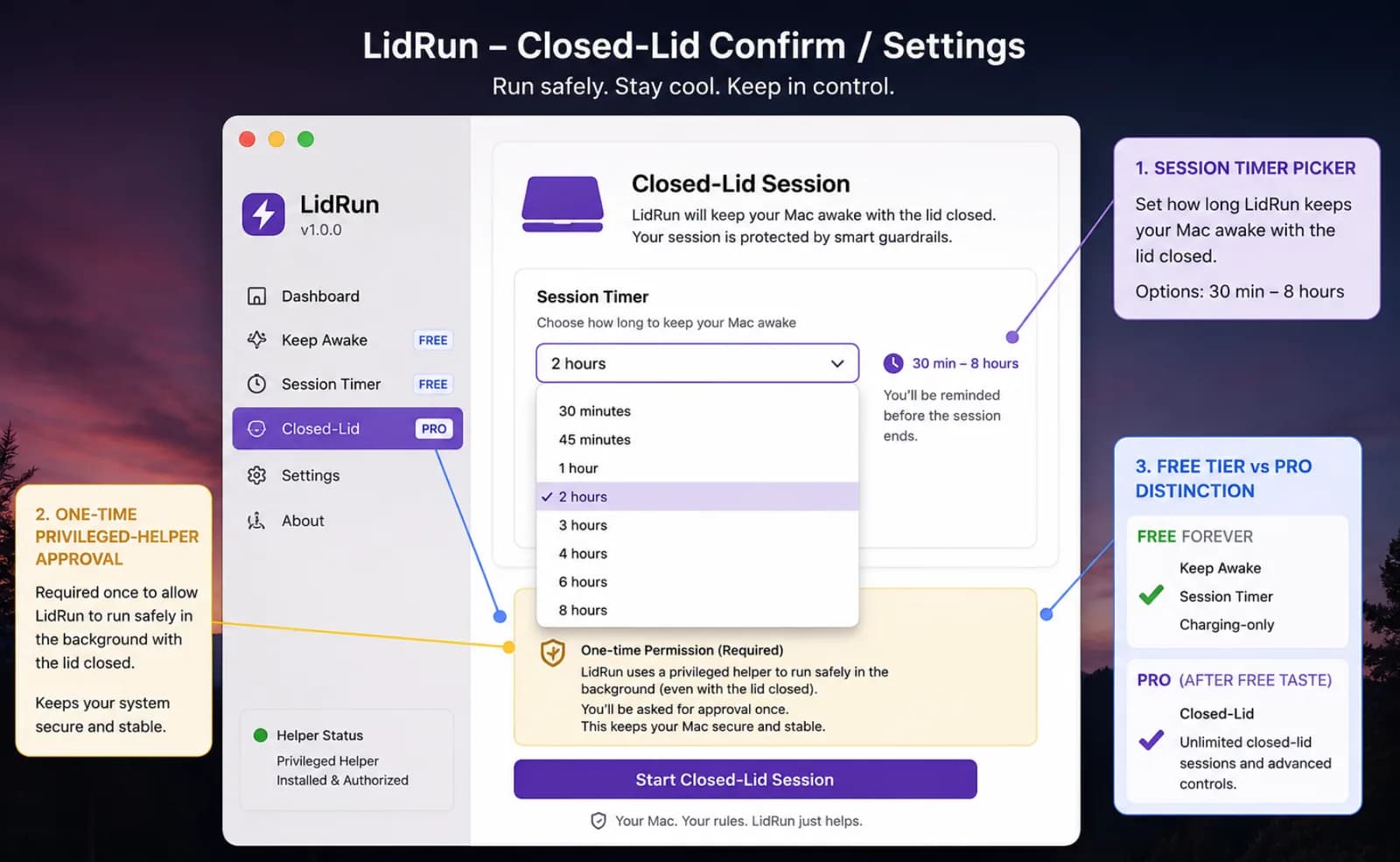
Stay plugged into power for anything longer than a short session - closed-lid work on battery alone is fine for a quick job, but mains power removes the drain question for a multi-hour run. On top of whatever threshold you set, LidRun also holds a hardcoded low-battery floor as a backstop, so even an unconfigured session won't run the battery to zero - it's a safety net under your own setting, not a replacement for setting one.
Temperature is watched the same way: LidRun follows macOS's own thermal state signal - nominal, fair, serious, critical - and stops the session if it escalates too far, the same signal the OS itself uses to start throttling. Preventing sleep doesn't make a job run faster or slower; it just keeps the Mac from going to sleep. Thermal escalation is the thing that actually matters, which is why the auto-stop watches it rather than a made-up temperature number. Every closed-lid session also carries a timer - 30 minutes up to 8 hours - so a stalled or runaway job can't hold the Mac awake indefinitely by accident. None of this is a blind wake lock: it's a session that's supposed to end, on its own, the moment it's no longer safe or no longer needed. If your Mac already lives at a desk and doesn't need to move, SSHing in and running the job there sidesteps the closed-lid question entirely - worth considering before reaching for any keep-awake tool at all.
Arm clamshell keep-awake with one key: Caps Lock or ⌥L
Traditional clamshell mode needs an external display to stay awake. LidRun's closed-lid mode doesn't - and since 1.2 you can arm it without touching the menu bar: press ⌥L (Option-L), or just tap Caps Lock, then close the lid.
Caps Lock is fair game here because a shut-lid Mac isn't being typed on, so the key is free to repurpose in that context - and it needs no extra accessibility permission. Prefer to keep Caps Lock for typing? Use the ⌥L global hotkey instead.
Either shortcut arms the same guarded session: the timer, charging-only option, low-battery auto-stop and thermal guardrails still apply, and LidRun warns before it sleeps the Mac to save your work. Press the key again to release.
LidRun keeps your work running with the lid closed, with battery and thermal safety built in.
Already have LidRun? Read the setup guide →
Frequently asked
Clamshell mode is using a MacBook with the lid closed while connected to an external display and at least one external input device (keyboard or mouse). macOS detects all three - closed lid, external display, external input - and switches to the monitor automatically, turning the MacBook into a compact desktop with the internal screen off.
Yes, for Apple's traditional clamshell mode - it requires a monitor plus an external keyboard or mouse. If you connect a display but skip the external input device, clamshell mode won't activate and the lid close still sleeps the Mac. Running lid-closed with no display at all is a different mechanism, not a variant of clamshell mode - it needs pmset disablesleep (manually) or a tool like LidRun (automated) instead.
The most common cause is a missing external input device - clamshell mode needs a closed lid, a display, and a keyboard or mouse together. A display alone isn't enough. Check that the keyboard or mouse is actually connected and awake (Bluetooth devices can disconnect on their own), not just powered on nearby.
Yes, but not through clamshell mode or a plain keep-awake assertion - both require a display or only block idle sleep, not the lower-level clamshell sleep a lid close triggers with no display attached. The free fix is sudo pmset -a disablesleep 1 in Terminal, which needs to be manually reset afterward. LidRun automates that same toggle on its Pro tier, with a battery floor, thermal auto-stop, and a session timer, and always pairs it with a matching reset so it can't get stuck on.
It helps reduce risk to do it deliberately: a hard flat surface with airflow, mains power for anything beyond a short session, and a battery auto-stop threshold configured rather than left to chance. LidRun adds battery and thermal thresholds plus a session timer as guardrails on top of that, but placement - not in a bag, not on soft furniture - is still on you. Use closed-lid sessions with care rather than treating any tool as a substitute for good placement.
Those tools (and LidRun's own free Keep Awake mode) all work by holding a macOS idle-sleep assertion, which is great with the lid open but does nothing once the lid closes with no display connected - a separate clamshell sleep takes over that assertions can't block. LidRun's closed-lid mode additionally automates the pmset disablesleep toggle that actually stops that sleep, wraps it in a battery floor, thermal auto-stop, and a 30-minute-to-8-hour session timer, and guarantees the toggle gets reset - instead of leaving it as a manual, easy-to-forget system setting.
In LidRun 1.2+, yes - press ⌥L (Option-L) or tap Caps Lock to arm closed-lid keep-awake, then close the lid. Press the same key again to turn it off. The menu-bar toggle still works; the shortcut just skips a step.