The closed-lid heat trap: why a Mac cooks in a bag or car
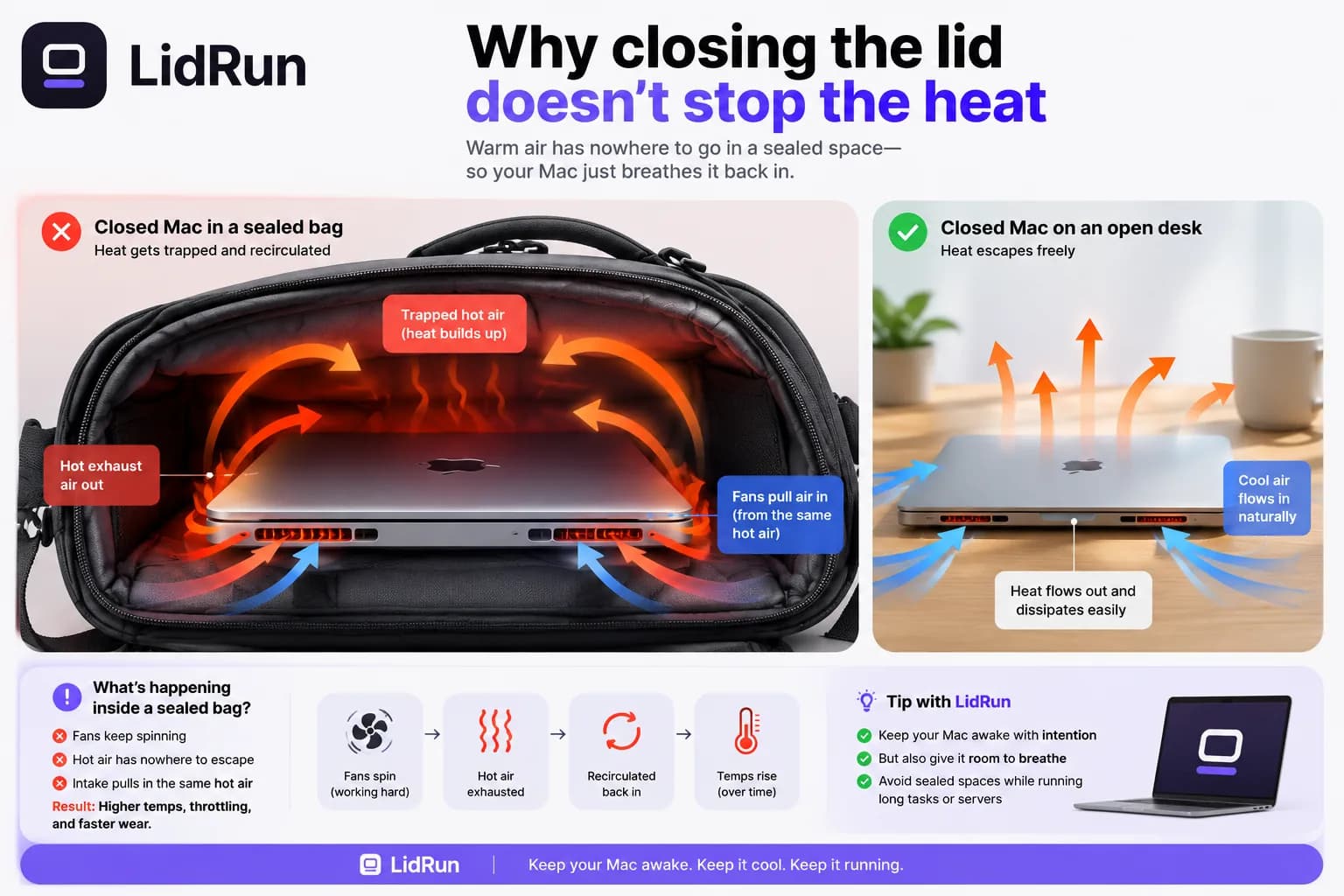
Don't run a workload with the lid closed inside a sealed bag - that's the answer, and the physics backs it up. Closing the lid already cuts most of a Mac's airflow; zipping it into a backpack removes what's left, so heat that vents fine on a desk has nowhere to go. A MacBook overheating in a bag isn't a freak event - it's what happens when a job keeps running, the fans keep working, and the exhaust just gets pulled back in. This is the one scenario where we'll say it plainly instead of hedging: don't seal a running Mac in a bag.
Why closing the lid doesn't stop the heat
A Mac sheds heat by moving air across its internals and out through the vents. Close the lid and that airflow is already reduced - the cooling design assumes an open lid is the normal case. Seal the whole machine inside a bag and the outside air disappears too, so the warm air the machine just exhaled has nowhere to go except straight back into the intake.

In LidRun's own thermal testing on an Intel MacBook, a closed-lid, in-bag cooling failure throttled the CPU down to about 24% of full clock speed - while macOS's own coarse thermal-state signal still reported the milder 'fair' level the whole time. That gap is exactly why LidRun's closed-lid guard reads the real SMC temperature in °C plus the CPU throttle percentage directly, instead of trusting only what the OS reports.
The bag itself makes the physics worse, not just the sealing. Fabric and foam insulate - they hold heat against the chassis instead of letting it radiate away - so a padded backpack compartment is worse than an open tote, and a hard-shell sleeve with a bit of internal air gap is still a sealed compartment the moment the zipper closes. None of that matters much if the Mac isn't generating heat in the first place; the one bag-side fix that actually works is not running a job while it's sealed inside one.
The free way people try to keep a job running with the lid down
There's a real reason people reach for a workaround here. macOS's built-in caffeinate command (caffeinate -i to block idle sleep, -s to keep the display awake on AC power, and so on) is a solid, free tool - but it only blocks idle sleep. Close the lid and the Mac still goes into clamshell sleep regardless, because that's a separate, lower-level system behavior a plain sleep assertion can't override. Menu-bar tools like Amphetamine, KeepingYouAwake, Lungo, and Caffeine wrap the same kind of assertion caffeinate uses, and they're genuinely good at the job they're built for: keeping a Mac awake at a desk with the lid open.
The only ways to actually keep working with the lid physically closed are attaching an external display with power connected and a keyboard or mouse - Apple's own supported closed-lid configuration, though not something you're carrying in a backpack - or running sudo pmset -a disablesleep 1 from Terminal, which tells macOS to ignore lid-close sleep system-wide. That second option is the same low-level lever LidRun uses under the hood for Closed-Lid Mode. It's free, it's built into macOS, and anyone can type it.
Related guideThe mac keep-awake safety governor: why LidRun lets a hot or idle Mac sleepWhy that free lever is risky in a bag
pmset -a disablesleep 1 is blunt on purpose. It's a global, persistent flag with no idea what's inside the lid, what temperature the machine is running at, or how much battery is left. Turn it on to finish a build with the lid down, forget to turn it back off, and the Mac won't sleep at all - on a desk, in a bag, anywhere - until someone runs the matching disablesleep 0 or reboots. Third-party apps with a 'keep awake even lid closed' toggle are doing the exact same thing behind a nicer UI, with the exact same blind spot.
That's the actual failure mode behind a MacBook overheating in a bag: not that closed-lid work is inherently reckless, but that the only free way to do it comes with no guardrail once it's switched on. A plain keep-awake tool was told to keep the machine awake, so it does - while the temperature climbs inside an enclosure that can't vent. That's the part worth being careful about.
What repeated overheating actually costs you
Modern MacBooks are built to protect themselves before anything breaks. As the chip heats up it throttles its own clock speed to cut heat output - that's the CPU speed limit you'd see drop in Activity Monitor - and if that's not enough, the firmware forces a sleep or, worst case, a hard shutdown rather than let the silicon keep cooking. A single incident rarely causes instant, permanent damage on its own.
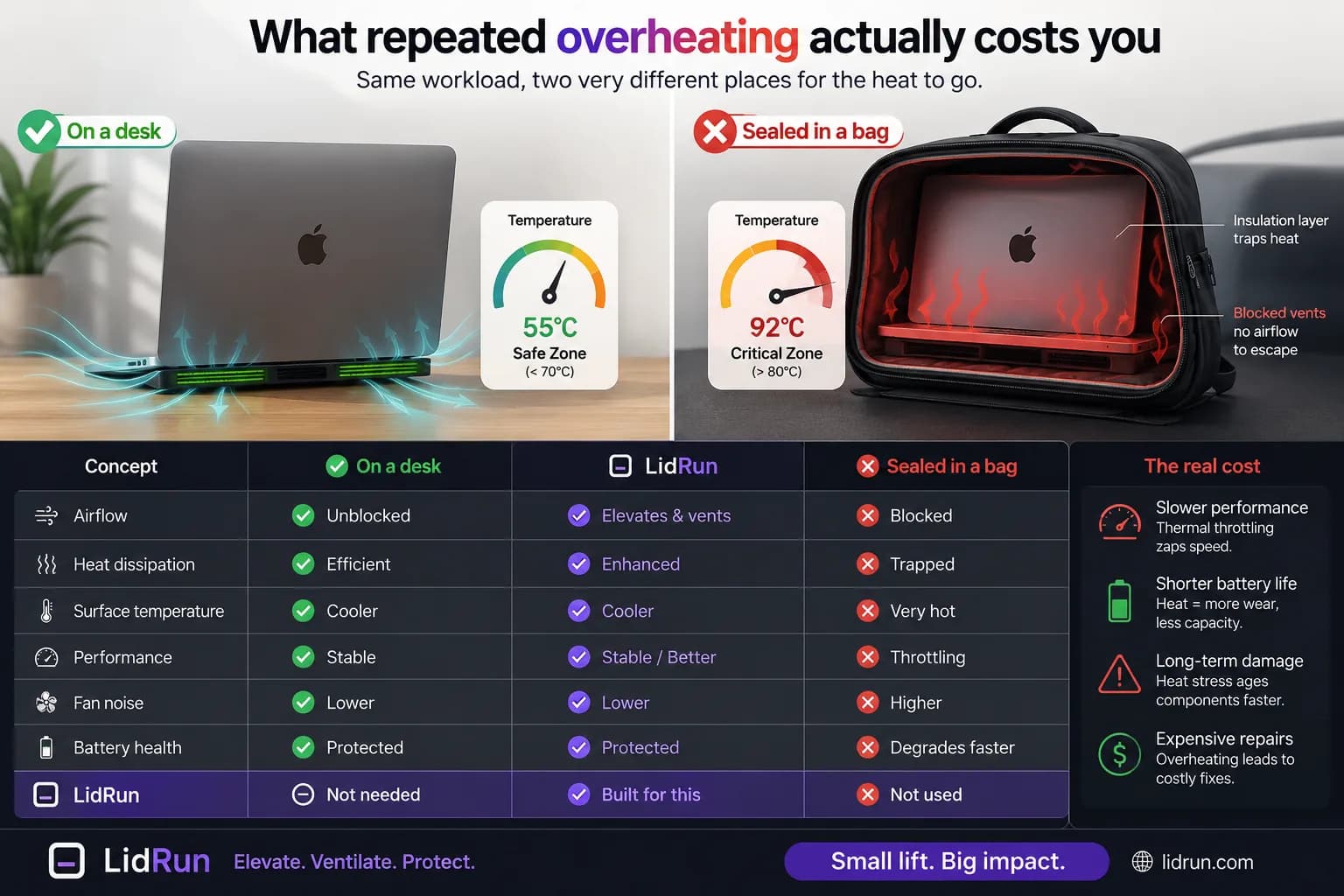
The real cost shows up with repetition. Heat is the single biggest driver of lithium-ion battery wear, so a battery that regularly spends time hot under load ages faster than one that doesn't. And a Mac that hits a thermal shutdown mid-task loses whatever wasn't saved. Apple's own published guidance puts the safe operating range for a Mac notebook at roughly 50-95°F (10-35°C) ambient - a closed cabin in direct sun can clear that range before you've even walked back to the car, independent of anything the machine itself is doing.
If your Mac is already hot in a bag right now
Take it out and set it on a hard, flat, ventilated surface - a desk or table, not a lap or a cushion. If it's already asleep or unresponsive, leave it alone; the fans and macOS's own thermal protections are built to handle exactly this, and forcing it awake to check on it just adds more heat.
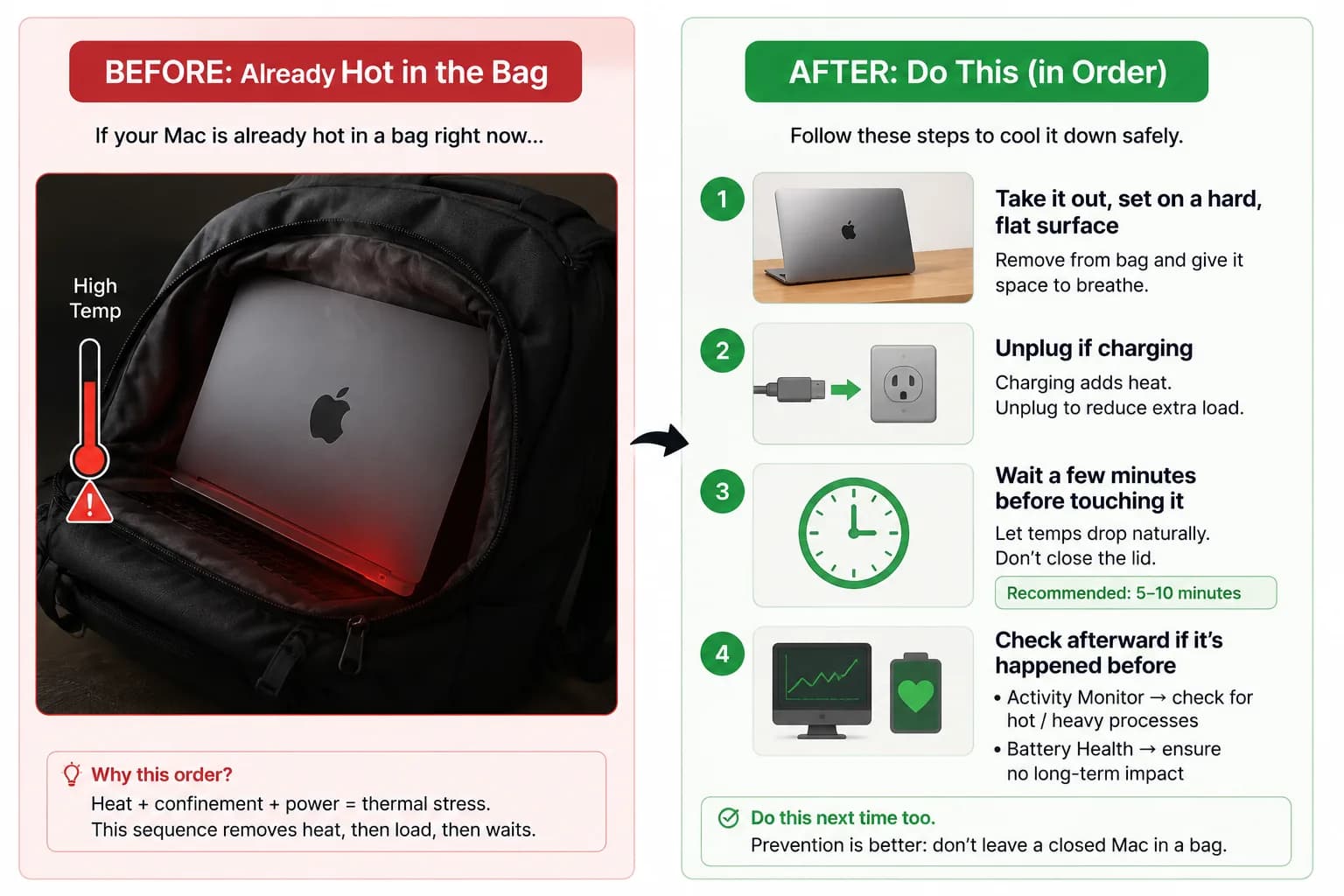
Unplug it if it was charging. Charging adds its own heat on top of whatever the workload was generating, and removing that one variable helps it cool faster. Give it a few minutes before opening the lid or touching the keyboard - checking on it too soon just restarts the cycle.
Once it's cooled, a quick look at Activity Monitor's CPU info (or System Settings → Battery, if this has happened more than once) is worth it, mainly for peace of mind. If it won't power back on, or it's acting erratic after cooling, that's a hardware question for an Apple Store or authorized service provider - not something software can fix.
The safer closed-lid workflow
If a job needs to keep going and you have to move, the safe move is to stop it, let macOS sleep the Mac normally, and resume when it's back on a flat, ventilated surface. A few minutes of lost progress costs less than thermal stress on the machine.
When you do want to run something with the lid closed, give it real conditions: a hard surface, clear vents, ideally plugged in, and the thermal and battery thresholds turned on so something can end the session if conditions climb. Plugging in doesn't make a sealed bag safe - it just means that if you're also on a desk with the lid down, the Mac has power to keep cooling instead of also racing a draining battery.
Where LidRun's thermal governor fits
This is the difference between a plain wake lock and a safety-gated one. LidRun's model is meant to be simple: agent running → stay awake; agent done, or the Mac becomes unsafe → release the hold and let it sleep. For heat specifically, Closed-Lid Mode reads live SMC temperature and CPU throttle percentage rather than just macOS's coarse thermal signal, and it runs two different response profiles depending on context.
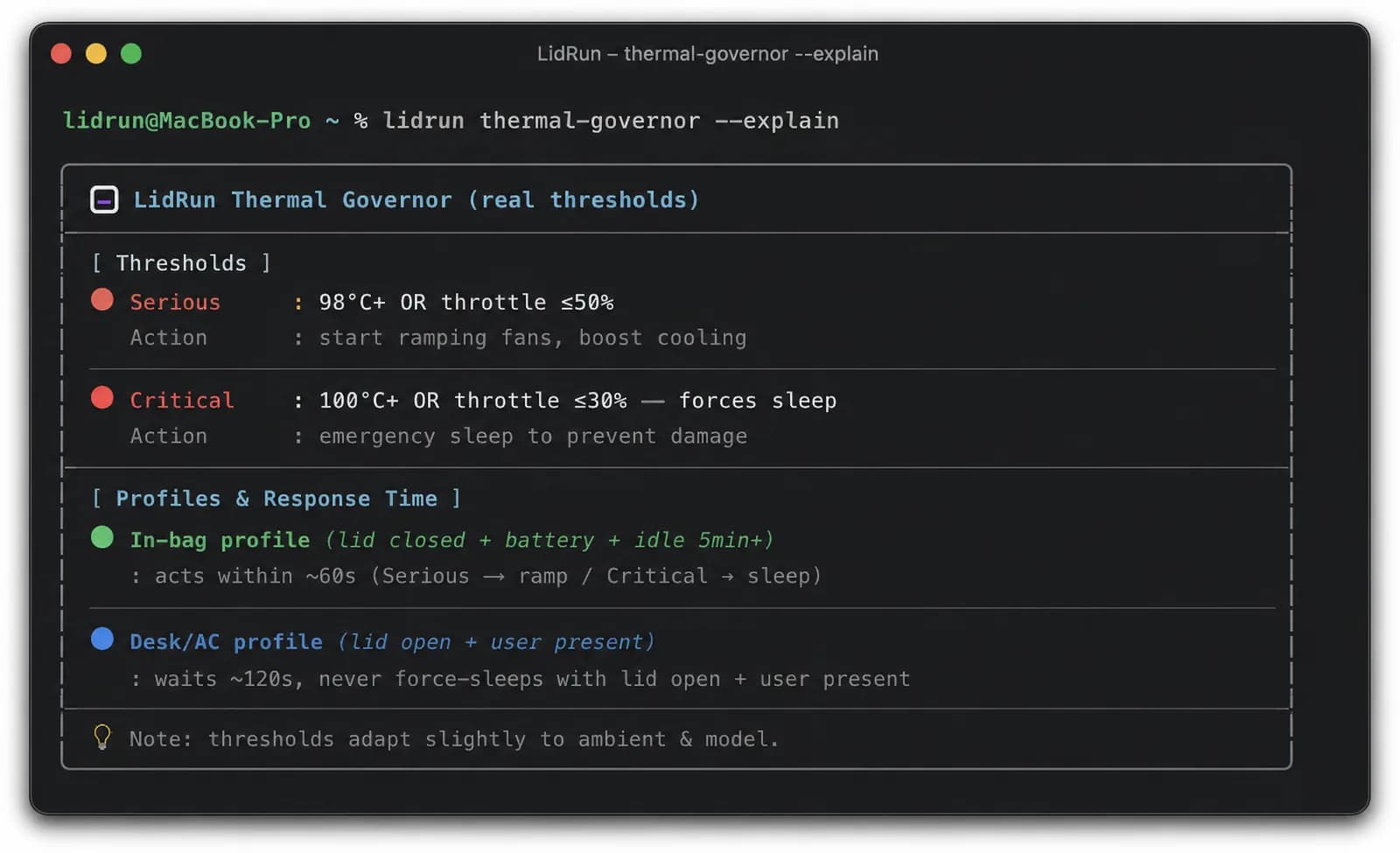
If the lid is closed, the Mac is on battery, and it's been idle for five minutes or more - the shape of 'probably in a bag' - LidRun escalates fast: after about 60 seconds of sustained thermal pressure it releases its hold so the Mac can clamshell-sleep on its own, or force-sleeps immediately if the temperature has already crossed the critical line. On AC power, where someone's more likely at the desk, it's more patient - about 120 seconds of sustained pressure before it acts - and it will never force a sleep while the lid is open and someone's actively using the machine. Before any of that, Closed-Lid Mode's own setup screen shows the same warning directly: keep it on a desk or somewhere ventilated, and don't put it in a bag while heavy tasks are running.
Overheat-sleep is also one of the few settings you can't turn off - a non-disablable safety floor, the same way critical-battery sleep is, precisely because it only fires when the Mac is unattended or the lid is closed, so it never interrupts an active session at your desk. But be clear about what that buys you: the governor is reading temperature and battery state, not a camera inside your backpack. It can't tell a desk from a duffel bag. It helps reduce the risk of a MacBook overheating in a bag. It does not make doing so safe - the honest rule is still: don't seal a running Mac in a bag.
LidRun keeps your work running with the lid closed, with battery and thermal safety built in.
Already have LidRun? Read the setup guide →
Frequently asked
No. A sealed bag removes airflow entirely, and a workload that's still running keeps generating heat with nowhere for it to go. Stop the job and let the Mac sleep normally before it goes in the bag - airflow is mandatory, not optional.
Closing the lid already reduces the airflow a Mac's cooling design assumes. Put it inside a bag and the outside air disappears too, so the warm exhaust the machine gives off has nowhere to go and gets pulled straight back into the intake. Soft, insulating bag sides make it worse by holding that heat against the chassis instead of letting it radiate away.
There's no single number Apple publishes as a hard limit, but LidRun's closed-lid guard treats sustained CPU temperatures around 98°C (or a throttle down to 50% or less of full clock speed) as serious pressure, and 100°C+ (or throttle at 30% or less) as critical - the point where it forces a sleep instead of letting a workload keep running.
Take it out and set it on a hard, flat, ventilated surface - not a lap or a cushion. Unplug it if it was charging, and give it a few minutes before touching the keyboard or lid again. If it won't power back on or acts erratic after cooling, that's a job for an Apple Store or authorized service provider.
It helps reduce the risk. Closed-Lid Mode reads live SMC temperature and CPU throttle percentage, and when the lid is closed with the Mac on battery and idle - the in-bag shape - it releases its hold or force-sleeps within about a minute of sustained thermal pressure. But it's reading sensors, not watching your backpack - it can't tell a desk from a duffel bag, so it reduces risk rather than making a sealed bag safe.
It changes which safety profile applies, but it doesn't replace airflow. On battery with the lid closed and no activity, LidRun escalates fast because that combination looks like a bag. Plugged in, with someone likely at the desk, it's more patient before acting. Either way, a sealed bag still has no airflow - plugging in doesn't change that.
Faster fans only help if there's cool air to move. Inside a sealed bag they recirculate hot air, and on Apple Silicon, fan RPM isn't something a normal app can just override - it's governed by the firmware. The chip throttles to protect itself, which assumes the heat can actually escape.