The mac keep-awake safety governor: why LidRun lets a hot or idle Mac sleep
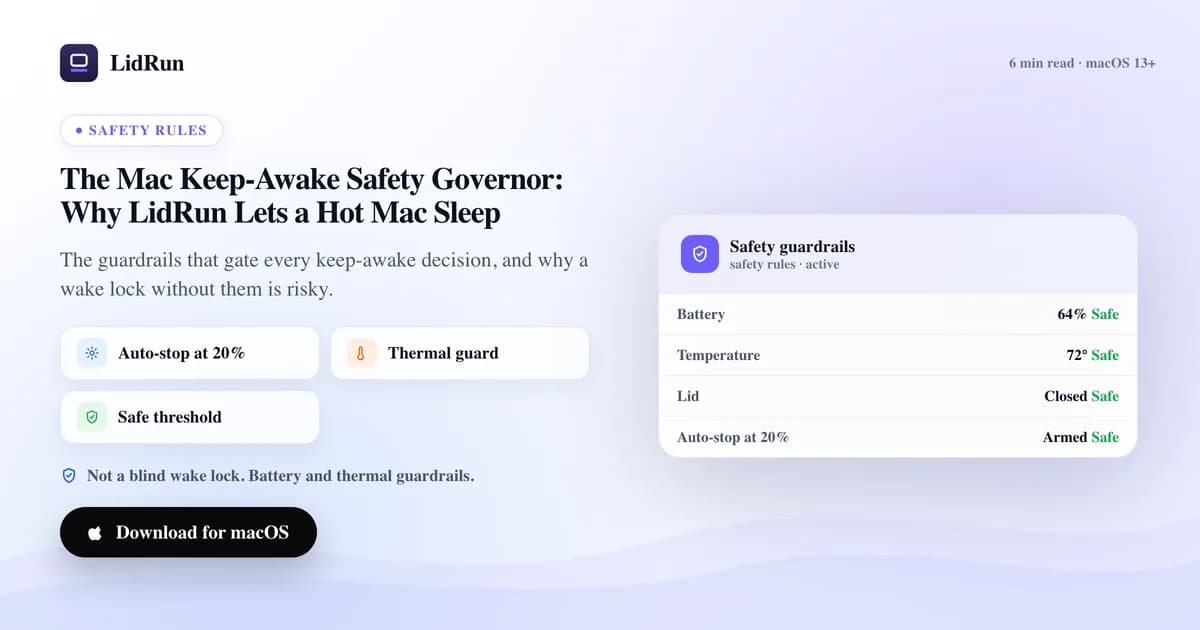
A mac keep-awake safety governor is the layer that decides when a running Mac is allowed to stop staying awake, instead of staying on no matter what. It gates every keep-awake session on battery level, thermal state, power source, and how long the machine has sat unattended, and it releases the hold the moment one of those crosses a threshold you set. LidRun's version defaults to auto-stopping at 20% battery (adjustable 15%-50%), backing off the instant thermal state goes critical, and releasing a hold after 15-20 minutes of confirmed no-activity on battery. It helps reduce risk on long, unattended AI and dev runs. It does not eliminate it, and it is not a substitute for putting the Mac somewhere it can actually breathe.
Why an overnight AI or dev run needs more than "stay awake"
A plain keep-awake tool answers exactly one question: should the Mac stay on right now? For a video call, a presentation, or a 20-minute build you're watching, that's the right question and the only one that matters. caffeinate, Amphetamine, and KeepingYouAwake all answer it well, and for short interactive use you don't need anything more than that.
Unattended AI and dev work changes the shape of the problem. A local model download, an overnight fine-tuning job, a coding agent like Claude Code or Cursor left running against a repo for hours, a multi-agent pipeline, or a long build kicked off before bed — these are jobs where nobody's at the keyboard to notice the battery sliding toward empty or the chassis running hot under a stack of papers. A 40-minute build on your lap is fine. The same wake lock left on through the night doesn't know the difference between "still working" and "already dead."
macOS's own idle-sleep exists to protect the battery and the hardware when nobody's watching. A wake lock — any wake lock, from any tool — exists specifically to override that protection. The moment you turn one on, you've taken over a decision the system used to make for you: when it's no longer worth staying awake. Most keep-awake tools take that job and then never do anything with it. They hold the lock until you tell them to stop, and if you're asleep in the next room, that instruction never comes.
The free, built-in ways to keep a Mac awake
macOS already ships everything you need for a short, watched job. caffeinate is a command-line tool built into every Mac: caffeinate -i blocks idle sleep, -s blocks system sleep on AC power, -d also keeps the display on, -w <pid> ties the hold to a specific process so it releases automatically when that process exits, and -t <seconds> caps it outright. For a foreground job you're actively watching — caffeinate -i npm run build — this is genuinely the correct, free, zero-install answer.
For running with the lid closed, the actual mechanism behind every "clamshell mode" trick is one command: pmset -a disablesleep 1. That's a real macOS power-management setting, not a hack — it tells the system not to sleep on lid-close at all, system-wide, and it needs admin rights to set. macOS also has a built-in exception for this without any command: plug in an external display, keyboard, and mouse, close the lid, and the Mac stays awake on its own, no extra software required.
Beyond the command line, third-party menu-bar tools do this well with a friendlier interface. Amphetamine adds trigger rules — activate when a specific app launches, when you join a certain Wi-Fi network, on a schedule — that go well beyond what caffeinate offers out of the box. KeepingYouAwake is a tiny, clean menu-bar toggle for exactly one job. Lungo and Caffeine both give you a simple timer picker for "stay awake for N hours." All of them are solid, focused tools for the thing they're built for: holding a wake lock until you say otherwise.
Related guideWhen your MacBook gets hot while codingWhere the free workaround runs out of guardrails
None of the tools above know your battery's trajectory or your Mac's thermal state, and that's not a criticism — it isn't what they're for. Run caffeinate -i on battery overnight and it will hold the Mac awake straight down toward zero, taking whatever job it was protecting down with it. There's no partial checkpoint, no early warning, no decision to stop early with the battery still healthy. You get a dead Mac and a dead job at the same time.
pmset -a disablesleep 1 has a sharper, more concrete failure mode. It's a global, persistent system setting, not something scoped to one app or process. If whatever set it to 1 crashes, gets force-quit, or the Mac loses power ungracefully, that setting can be left ON — the system stays configured to never sleep on lid-close until something explicitly sets it back to 0 (sudo pmset -a disablesleep 0). That means a Mac can end up running warm inside a closed bag with the display off, and nothing about the setting itself tells you it's still doing that.
Third-party keep-awake apps share the same shape of gap by design. They wait for you to tell them when to stop — a timer, a manual toggle, a trigger rule you configured in advance — rather than watching the machine's own vitals while you're away. For a 20-minute call that's exactly the right amount of tool. For an 8-hour unattended run, the tool has no way to notice that circumstances changed since you set it. That's the difference between any of them and a mac keep-awake safety governor: none of this is a flaw in caffeinate, pmset, or these apps — they do the one job they promise well. The gap only shows up when a plain, blind wake lock runs unattended for hours, and closing that gap is what a safety governor exists for.
What the safety governor actually checks
LidRun's governor is a separate layer from the keep-awake mode itself — it can override manual Keep Awake, Timer, Charging-only, or Closed-Lid alike. It never adds a reason to stay awake. The only two things it can decide are: release the hold, or push the Mac to sleep outright.

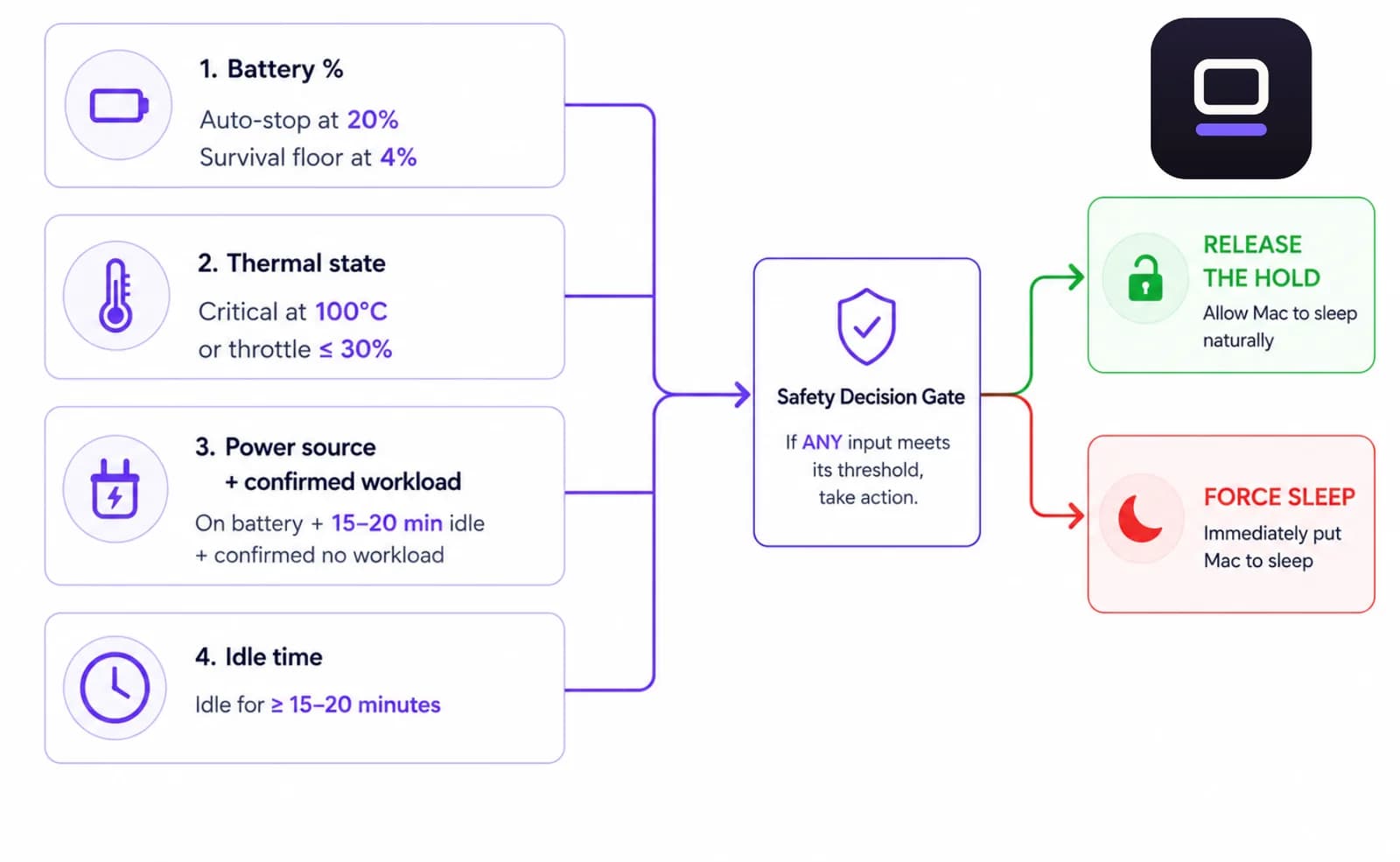
Battery: keep-awake auto-stops by default at 20% (adjustable from 15% to 50% in Settings), which releases the hold and lets the Mac idle-sleep the normal way. Below that there's a separate one-time warning at 15%, and underneath everything sits a survival floor — 4% by default — that forces an actual sleep regardless of your other settings. That floor can't be set lower than 4%, because macOS needs a little headroom to finish going to sleep before the cell is actually empty.
Thermal: LidRun reads the SMC-reported chip temperature and CPU throttle percentage, not just the coarse public thermalState API — critical is a chip at 100°C or hotter, or a CPU throttled down to 30% capacity or less; serious is 98°C or a throttle at 50% or less. The moment it reads critical, the governor releases the hold immediately, no grace period. If it stays critical for a sustained 2 minutes, that escalates to an actual forced sleep, but only when you're not there to see it: idle at the keyboard for 5 minutes or more, or the lid physically closed. A present user with the lid open is never force-slept on heat alone — you keep working, LidRun just stops adding to the load. (On one internal calibration Mac, a normal lid-open workload ran around 95°C with the throttle still above 80% capacity; the same load sealed in a bag dropped the throttle to roughly 24% while the OS's own public thermalState still read only "Fair" — which is exactly why the governor doesn't lean on that signal alone.)
Power source and workload together: on battery, if the Mac goes offline with no confirmed active job for 15 minutes, or sits idle for 20 minutes with no confirmed job running, the hold releases. The word "confirmed" is doing real work here — if LidRun can't tell whether something is actually running, it treats that as unknown, not idle, and never releases on a guess. It only lets go once it has positively confirmed nothing is happening, a deliberate fail-safe bias toward staying awake when uncertain and only ever sleeping when the evidence says it's safe to.
When any of those four crosses its line, the governor releases the exact same IOKit power assertion (PreventUserIdleSystemSleep) that caffeinate -i uses, and lets macOS sleep the way it normally would. It's not overriding the system's own protections. It's choosing not to keep fighting them.
Letting the Mac sleep is the feature
It sounds backwards to call sleeping a feature of a keep-awake app, but that's the actual point of a governor. Staying awake forever is the easy half — caffeinate does that in one line. The hard half is stopping at the right moment when nobody's there to pull the plug, and that's where a blind wake lock has nothing to offer.
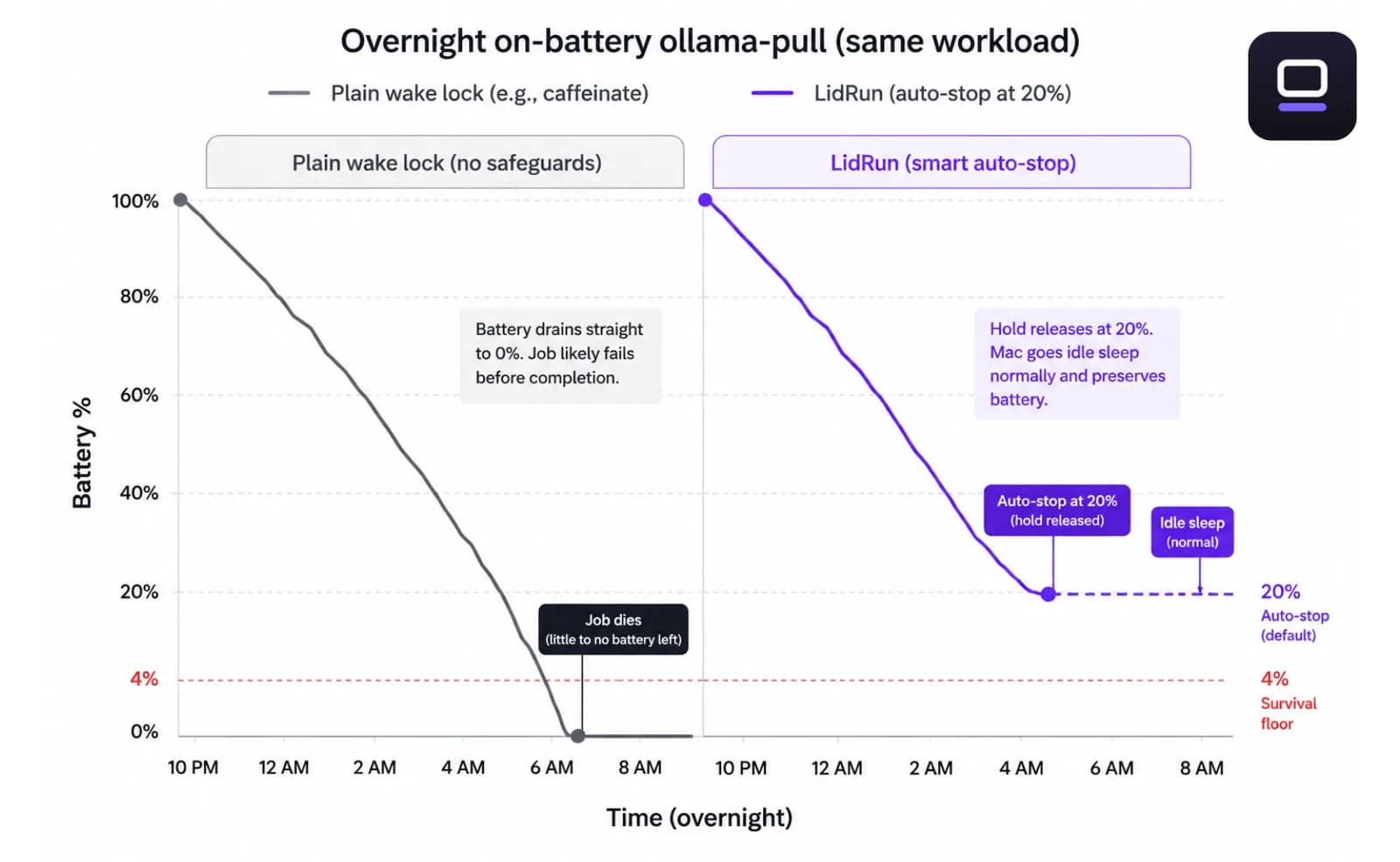
Picture an overnight ollama pull, or a coding agent left running against a repo, on battery in a quiet room. An unguarded wake lock holds the Mac on until the battery is flat and the job dies with it, usually somewhere in the last few minutes with no warning. The governor watches the charge fall, and at 20% it lets the hold go so the Mac can sleep normally with the battery still well above the 4% survival floor. You still lose the run either way if nobody restarts it, but you get a healthy battery back in the morning instead of a dead one.
Same logic for heat. Leave a laptop running an LLM fine-tune on a couch cushion or inside a stand that blocks the bottom vents, and the chassis climbs faster than it should. The governor doesn't wait for macOS's own thermal throttling to eventually intervene — it releases the hold as soon as the chip crosses its critical mark, and if you're not there and it stays critical, it pushes the Mac all the way to sleep rather than let bad placement keep cooking the machine for hours.
Multi-agent setups make this sharper, not softer. Kick off several agents or a long pipeline before leaving for the day, and one unattended keep-awake session is now covering hours of work you can't check on. That's exactly the scenario where a tool that only knows "stay on" is riskiest, and where a tool that also knows "stop when it's unsafe" earns its place.
What the governor can't do for you
Be honest about the limits. The governor reads the signals the hardware actually exposes — battery percentage, thermal state, network, idle time — and acts on the thresholds you set. It can't feel the room. Run a long job on a bed, a couch cushion, or inside a closed bag, and you've physically blocked the airflow the cooling system needs. No software setting fixes a machine that can't breathe.
Airflow and placement stay your job, not the app's. Run long workloads on a hard, flat surface. Keep the Mac ventilated — clear vents, not sealed under a blanket or a laptop stand with blocked sides. Stay plugged in for the big ones so battery isn't even part of the equation. These are safety guardrails on top of good habits, not a replacement for them.
Think of the governor as a careful second set of eyes on the numbers your Mac is already producing, not as permission to stop thinking about where the Mac physically sits. It can help reduce risk within what the hardware and the situation allow. The rest is on you — use it with care, and that's the honest version of what it does.
Where LidRun fits next to caffeinate, pmset, and Amphetamine
These aren't competing answers to the same question — they're tools built for different situations, and it's worth being straight about when each one is actually the better pick. caffeinate is the right tool when you're at the keyboard watching a single command run; it's scriptable, ties cleanly to a process with -w, and needs nothing installed. pmset -a disablesleep 1 is the only real way to keep a Mac alive through a closed lid without an external display, and LidRun's own Closed-Lid mode is a safety-wrapped layer over that exact command — it pairs every 1 with a matching 0 on stop, on quit, and on relaunch, specifically so the setting can't get orphaned the way a bare script can leave it.
Amphetamine, KeepingYouAwake, Lungo, and Caffeine are all genuinely good at general-purpose "keep the Mac on for X" — trigger rules, schedules, one-tap toggles. If a job runs for twenty minutes while you're sitting there, any of them is a fine, lighter choice than LidRun, and there's no reason to reach for more tool than the job needs.
LidRun's difference isn't the wake-lock mechanism — under the hood it's the same PreventUserIdleSystemSleep IOKit assertion caffeinate uses. The difference is the release logic sitting on top of it: a set of battery, thermal, power-source, and idle-time thresholds deciding when holding the Mac awake stops being worth it, running the whole time a job runs, with nobody needing to be there to make that call. For a quick task, safety wins over convenience is overkill. For an unattended AI run you're trusting to survive the night, it's the whole point.
LidRun keeps your work running with the lid closed, with battery and thermal safety built in.
Already have LidRun? Read the setup guide →
Frequently asked
It's the layer that gates every keep-awake decision on battery level, thermal state, power source, and how long a run has been unattended, and lets the Mac sleep instead of holding it awake once one of those crosses a threshold. It never adds a reason to stay on — it only ever releases a hold or forces a sleep.
Keep-awake auto-stops at 20% battery by default, and you can move that anywhere from 15% to 50% in Settings. Underneath that sits a separate survival floor of 4% that forces an actual sleep no matter what your auto-stop is set to — that one isn't adjustable below 4%, because macOS needs some headroom to finish sleeping before the battery is fully empty.
There isn't a single number — it depends on the guard. Thermal force-sleep only escalates after 5 minutes of no keyboard or mouse input (or a closed lid). The offline-and-no-workload guard waits 15 minutes on battery with no network and no confirmed active job. The general unattended-on-battery guard waits 20 minutes idle with no confirmed job. All three only fire when LidRun has positively confirmed nothing is running — an unknown or unrecognized process never triggers an early release.
No. It helps reduce risk by releasing the hold the moment chip temperature or CPU throttle crosses its critical mark, but it can't fix blocked vents or a Mac buried on soft furniture. Airflow and placement are still your responsibility — keep the Mac ventilated.
Mechanically, it isn't — LidRun holds the same IOKit power assertion caffeinate -i uses, and Closed-Lid mode runs the same pmset -a disablesleep command under the hood. The difference is what happens after: caffeinate and a bare pmset toggle hold the lock until you manually stop them, with no idea about your battery level or the chip's temperature. The governor is watching those signals the entire time and releases the hold on its own when continuing stops being safe.
Yes. Battery auto-stops, thermal-critical events, and confirmed-workload decisions are all recorded in the Activity Log with a timestamp, so when you come back to a Mac that slept early you can see exactly which threshold ended the session.
Yes. The safety governor and the low-battery auto-stop are part of the free, unlimited basic keep-awake. They're never gated behind Pro.