What Is a Safe Runtime Layer for Mac?
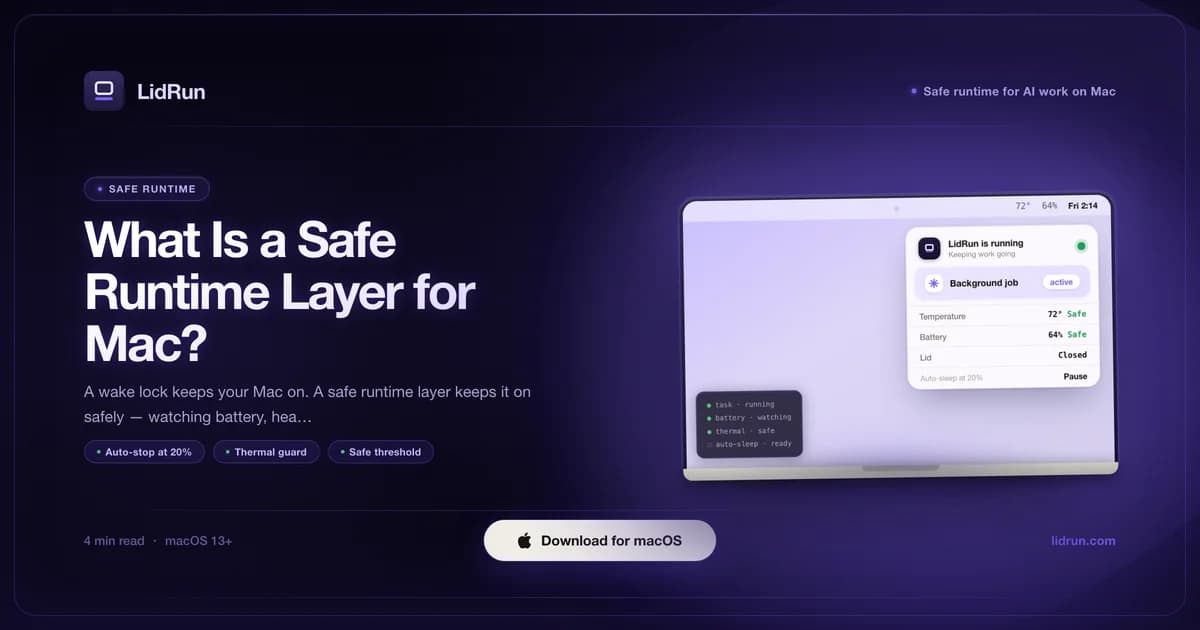
A safe runtime layer for AI work on Mac is a keep-awake system that also watches battery, heat, and process state - and lets the Mac sleep again automatically once the job finishes or a safety limit is crossed. It's the middle path between two bad options: let the Mac sleep mid-agent-run and lose the work, or force it to stay awake all night and hope nothing goes wrong. LidRun is built around exactly this pattern - agent running → stay awake; agent done or unsafe → release, let the Mac sleep - for long AI and dev runs on macOS 13 (Ventura) and newer.
What a safe runtime layer actually does
A safe runtime layer combines three things: a keep-awake assertion, active monitoring, and an auto-release trigger. The assertion part is the easy half - any tool can call IOPMAssertionCreateWithName and hold a kIOPMAssertionTypePreventUserIdleSystemSleep lock; macOS just does what it's told. The harder half is deciding when that hold should let go: when the battery gets too low, when the chip runs hot, when the job that justified staying awake is actually finished.
LidRun is one implementation of this pattern. It holds that assertion, tracks battery percentage and AC/battery state, reads a thermal signal from macOS, and watches process state - then releases the assertion the moment a configured threshold is crossed. The Mac sleeps when it should, on a rule you (or its defaults) set - not by luck, and not never.
Scale the need to the job. A 20-minute compile on a plugged-in desktop Mac needs almost none of this - sleep would never trigger anyway. A six-hour AI agent run on a battery-powered laptop that might get warm, might get unplugged, and that nobody's watching at 2am is a different situation entirely, and it's the one this pattern is built for.
Why your Mac sleeps mid-run in the first place
macOS doesn't know the difference between "nothing is happening" and "a background agent process has been thinking silently for 40 minutes with no keyboard or mouse input." Both look identical to the idle-sleep timer, which exists specifically to save battery on exactly that kind of inactivity. Left to its own defaults, it will trigger mid-run.
Closing the lid is a separate and more aggressive trigger. Without an external display attached - or without something explicitly telling macOS to ignore the lid switch - closing it puts the Mac to sleep almost immediately, no matter what's still running underneath.
And if neither of those catches it, a Mac left unattended on battery eventually hits its own low-power shutdown near empty - not a clean stop, just whatever state the job happened to be in when the power ran out.
Related guideThe mac keep-awake safety governor: why LidRun lets a hot or idle Mac sleepThe free, built-in workaround: caffeinate and pmset
macOS already ships a real answer for the first case. caffeinate -i python train.py wraps a command, holds a prevent-idle-sleep assertion for exactly as long as that command runs, and releases it automatically the moment the command exits - no install, no configuration. LidRun's own CLI wrapper actually borrows this same shape: lidrun -- python train.py --epochs 100 wraps a command the identical way; the difference is what LidRun does with the hold while it's active, covered below.
For the closed-lid case, the free path is sudo pmset -a disablesleep 1 with an external display connected - the classic clamshell-mode trick - then sudo pmset -a disablesleep 0 to turn it back off when you're done. This is the same underlying setting LidRun's own Closed-Lid mode uses; the difference is LidRun always pairs the 1 with a matching 0, on stop, on quit, and again at next launch, to reconcile anything left over from a crash.
Both are legitimate, and for short, attended work on AC power, either one is often all you actually need. Don't reach for more tool than the job calls for.
Where the free workaround runs out of road
caffeinate has no idea what your battery is doing. Wrap a multi-hour job, walk away, and if the battery drops to 2% at 3am, caffeinate is still holding the assertion - it was never built to know it should let go.
pmset disablesleep is riskier in one specific way: it's a global, persistent system setting, not something scoped to a session. It needs sudo. And it doesn't pair itself back to 0 on its own - if whatever set it crashes, or you just forget, the Mac is stuck refusing to sleep at all, silently draining its battery, until someone runs the revert command by hand.
Neither tool reads thermal pressure. Neither knows whether the process that justified the hold is still doing useful work or has quietly hung. They hold; they don't watch. That gap - not a flaw in either tool, just outside what they were built to do - is what a safe runtime layer adds on top.
The three signals a safe runtime layer actually watches
Battery state is graduated, not a single cutoff. LidRun's defaults: past 15% unplugged, a heads-up notification; past 5%, a stronger warning; past roughly 4% - a hard floor that can't be configured below 4% no matter your settings - LidRun releases every keep-awake hold and asks the Mac to sleep, rather than let it hard-shutdown mid-write. That floor exists to leave macOS enough headroom to write state to disk and sleep cleanly.
Thermal is read from ProcessInfo.thermalState - a public API (nominal / fair / serious / critical), no special entitlement, available since macOS 12. That's the signal that actually drives the auto-stop decision. It can lag reality, though: in LidRun's own testing it reported "fair" while a bagged Mac had already throttled to 24%. So elsewhere - on Macs where the SMC sensor is readable - LidRun also cross-checks real SoC temperature and CPU throttle percentage against calibrated thresholds, as a second opinion the coarse OS bucket alone can't always give. When the SoC does hit "critical," LidRun releases the hold immediately; if it stays critical for two minutes while you've been away from the keyboard for five minutes or more, or the lid is physically closed, LidRun escalates to actually putting the Mac to sleep, since a Mac on AC power won't necessarily idle-sleep on its own.
Process state ties the hold to the job itself. Auto Mode watches for a specific process - a Claude Code session, a Cursor agent, a build - and releases the moment the last watched process exits. Underneath that, an independent Safety Governor can release any keep-awake session, even one started manually, if the Mac is on battery, offline, and has shown no confirmed active workload for 15 minutes, or sits idle with no confirmed workload for 20 minutes. It's deliberately fail-safe in one direction only: those releases fire on a CONFIRMED absence of work, never on an unknown state - an earlier build released on "unknown" too, and it slept the Mac mid-Claude-Code-run; that's a hard-learned rule now, not a guess.
What a safe runtime layer does not do
It doesn't reduce the actual battery draw. Keeping a Mac awake and running always costs more power than letting it sleep - that's true of any keep-awake tool, LidRun included. The point isn't zero drain; sleep remains the most efficient state a Mac can be in. The point is that the run stops on a floor someone chose, instead of an unsupervised drain to 0%.
It doesn't rescue a hung process. Auto Mode and the CLI wrapper release on process exit, not on "stopped making progress." A script that's frozen but hasn't crashed still reads as running. For a long unattended job, pair process-watch with a battery floor or a timer as a backstop - don't rely on process-watch alone to notice something's actually wrong.
And it doesn't control cooling. The thermal signal is read-only from this layer's point of view: it can choose to stop holding the Mac awake so macOS can throttle and cool down, but - on Apple Silicon in particular - it can't spin the fans up to cool the machine faster. Keep the Mac somewhere ventilated; a safe runtime layer is a guardrail on when to stop, not a substitute for airflow.
Safe runtime layer vs caffeinate vs Amphetamine vs pmset
caffeinate ships with macOS, wraps a command, and holds a power assertion for a fixed duration or until a child process exits. It has no battery, thermal, or offline awareness by design - that was never its job. For short, attended work on AC power, it does exactly what it promises.
pmset disablesleep is the only free route to a genuinely closed-lid Mac with an external display. It's a blunt, admin-only, whole-system setting with no session concept at all - it doesn't know what triggered it, and it won't turn itself back off.
Amphetamine is a polished menu-bar app with schedules, triggers, and app allow-lists - it can start and stop sessions by time of day or which app is frontmost. What it doesn't do is monitor live battery percentage as a guardrail or respond to macOS thermal pressure mid-session; that's simply outside what it's built to track.
A safe runtime layer adds the watch tier on top of any of these: battery floor, thermal signal, process exit, and the offline/unattended checks, all feeding into whether the hold stays active. For a 20-minute plugged-in build, caffeinate or Amphetamine are genuinely enough - don't reach for more. The pattern earns its place on long, unattended runs, on hardware that can change state - battery, heat, network - in ways nobody's watching in real time.
Where LidRun fits
Keep Awake, Timer, and Charging-Only are free on LidRun - unlimited, no trial, no session cap - and they already run the core loop: hold the assertion, watch the graduated battery escalation (15% / 5% / ~4%), read the thermal signal, auto-stop on either. That's the baseline safe runtime layer, available from install.
Auto Mode (tying the hold to a watched process like Claude Code or Cursor) and closed-lid Clamshell mode are part of Pro, along with the ability to move the default battery and thermal thresholds instead of using LidRun's built-in defaults.
If your work fits the free lane - one keep-awake session, plugged in or watched by hand - that's genuinely enough; use it. If it's a multi-hour unattended agent run tied to a specific process, or the lid needs to stay closed, that's where the rest of the pattern (and the paid tier) starts to earn its keep. See the pricing breakdown, or read how the Safety Governor decides to release a session it didn't start, for the mechanism behind all of this.
LidRun keeps your work running with the lid closed, with battery and thermal safety built in.
Already have LidRun? Read the setup guide →
Frequently asked
It's a keep-awake system that also watches battery, heat, and process state, and lets go automatically - either when the job finishes or when a configured safety threshold is crossed. It's the combination of hold plus watch plus auto-stop, not a plain wake lock that holds indefinitely regardless of what's actually happening on the machine.
Not in the full sense. caffeinate -i <command> holds a power assertion and releases it when the wrapped command exits, but it never checks battery percentage or reads macOS's thermal signal while it's running. For short, attended work on AC power it's a solid, legitimate choice. For a multi-hour unattended run, it leaves the machine unguarded on exactly the signals that matter overnight.
Yes - running and holding an assertion always uses more power than sleep does; no keep-awake tool changes that. The goal of a safe runtime layer isn't zero drain, it's supervised drain: the session stops at a battery floor instead of running unsupervised down to 0% and a hard shutdown.
Process-watch (Auto Mode, or the CLI's lidrun -- <command>) releases on process exit - a hung-but-not-crashed process still counts as running, so the hold stays active. For long unattended jobs, pair process-watch with a battery floor or a timer as a backstop rather than relying on it alone to notice a stall.
Battery percentage and AC/battery state (graduated: 15% heads-up, 5% strong warning, ~4% hard floor that always releases every hold), macOS's thermal signal (nominal/fair/serious/critical, cross-checked against real SMC temperature where the sensor is readable), and - when Auto Mode or the CLI wrapper is active - whether the triggering process is still running. An independent Safety Governor can also release a session with no confirmed active workload after 15-20 minutes on battery, but never on an unknown state.
When macOS reports the SoC at "critical," LidRun releases the keep-awake hold immediately. If the critical state is sustained for two minutes while you've been away from the keyboard for five minutes or more, or the lid is physically closed, LidRun escalates to actually putting the Mac to sleep, since it may not idle-sleep on its own while on AC power. This helps reduce the risk of prolonged throttling; it doesn't prevent all heat build-up or promise a specific temperature ceiling - keep the Mac ventilated.
Yes to both chip families. LidRun targets macOS 13 (Ventura) and newer; the thermal signal (ProcessInfo.thermalState) and the power assertion API are both available on Intel and every Apple Silicon generation. Real SMC temperature cross-checking depends on what a given Mac's sensor exposes, which varies by model.