Developer Runtime Safety for AI Agents
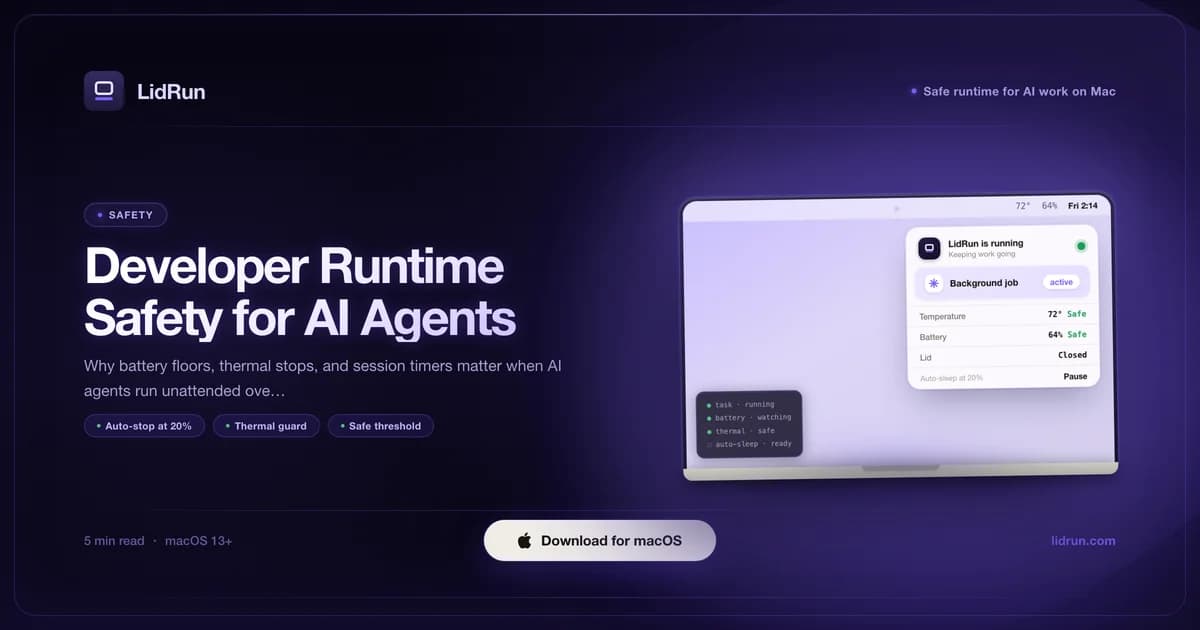
Developer runtime safety for AI agents means putting a hard floor under an unattended run: a battery percentage it won't cross, a thermal state it won't push past, and a way to know whether the agent is still doing useful work - not just a toggle that keeps the Mac awake and hopes for the best. You start a coding agent scaffolding a feature, an Ollama batch job, or a training run before bed, and by morning either it finished, or you wake up to a dead battery, a chassis too warm to touch, and no record of what happened in between. macOS's own tools - caffeinate, pmset - and third-party menu-bar apps like Amphetamine, KeepingYouAwake, Lungo, and Caffeine all solve half of that problem well: they stop the Mac from idle-sleeping. None of them watch battery level or heat while they do it. This guide covers both halves - the free, native ways to keep a Mac awake, where each one is genuinely strong, and the guardrails worth adding around them for any run you won't be sitting next to.
The real risks of long unattended AI agent runs
An overnight Ollama run, a Claude Code agent scaffolding a full feature, a build pipeline that re-runs on every file change - these workloads share one property: no human watching. macOS's standard idle-sleep guard has no concept of battery percentage or chip temperature; it only cares whether something is holding a wake assertion. Once one is held, the run continues until it finishes, until the battery is gone, or until the Mac protects itself by shutting down.
Battery risk is cumulative. Charging from near-empty repeatedly strains the charge-cycle count faster than topping up from 40-80%. A single overnight drain to 0% is rarely fatal on its own; a habit of it over weeks accelerates capacity loss. The more immediate danger is usually a stalled agent - a prompt loop, an API timeout that never retried, a build waiting on a locked port - consuming steady CPU for hours while you sleep, neither finishing nor surfacing an error.
Thermal risk on a MacBook is partly self-managed by macOS and partly dependent on the physical setup. The chip throttles itself under sustained load, but throttling means a longer, hotter run - not a safe one. A MacBook on a soft surface with vents blocked, or running lid-closed with poor airflow, concentrates heat in a smaller space. No keep-awake tool, free or paid, changes that physical reality - it can only decide when to stop trying.
The free, native way: caffeinate, pmset, and third-party menu-bar apps
macOS ships two tools built for exactly this, and they're worth knowing before reaching for anything else. caffeinate -i prevents idle sleep for as long as it runs in the foreground. caffeinate -w <pid> goes further and ties that same assertion to a specific process - a training job's PID, an agent's PID - releasing automatically the instant that process exits. That's the same idea behind LidRun's own CLI wrapper (lidrun -- python train.py --epochs 100, which holds an assertion, runs the command, and lets go when it's done). For a short run you're going to check on yourself, caffeinate -w $(pgrep ollama) or wrapping the command directly is genuinely enough. It's free, it's already on your Mac, and it does one job correctly.

For a lid-closed setup - external monitor, keyboard, and mouse, lid shut - the mechanism under the hood is pmset -a disablesleep 1, an undocumented but widely used system flag that tells macOS to ignore the lid-close sleep trigger entirely. It's what any clamshell-mode utility is built on, LidRun's own Closed-Lid mode included. It requires administrator privileges and, unlike the assertions above, isn't scoped to a single process - it changes sleep behavior for the whole machine until something sets it back to 0.
macOS's own battery settings are worth turning on for any long run regardless of which keep-awake tool you use. Low Power Mode and Optimized Battery Charging (System Settings → Battery) reduce background power draw and pace charge cycles - neither one prevents sleep or watches your workload, but they're free, native, and complementary to whatever else you're running.
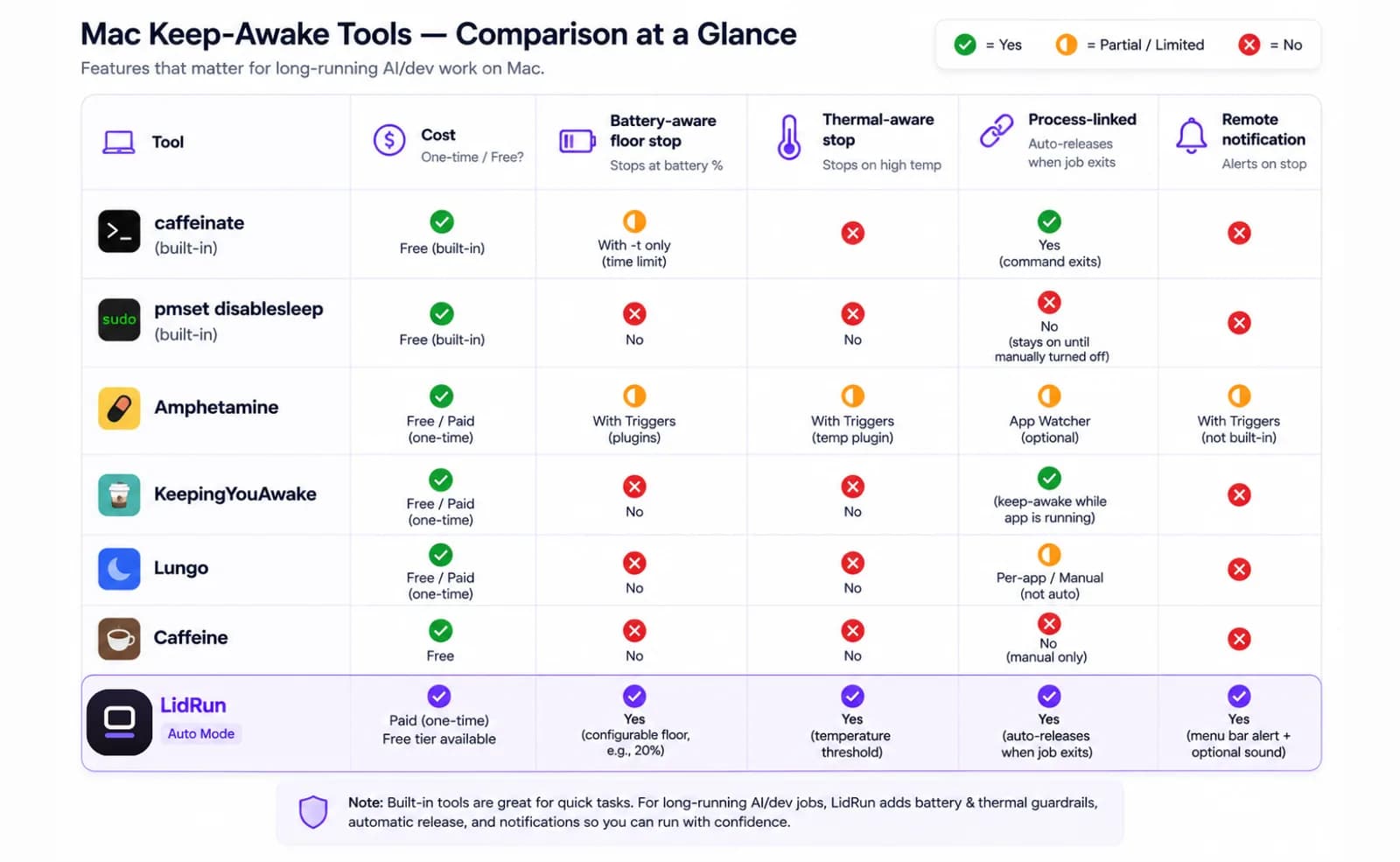
Third-party menu-bar apps fill the space between a terminal command and something you'd trust to run itself overnight. Amphetamine has the most capable trigger system of the group - you can arm it to activate when a specific app launches or a process starts, not just flip a manual switch. KeepingYouAwake is a small, open-source menu-bar toggle that does exactly one thing, free, no ads. Caffeine popularized the one-click "coffee cup" icon and is still the simplest option if a plain toggle is all you want. Lungo wraps the same idea in a clean countdown-timer interface. All four are solid, well-built tools for keeping a Mac from idle-sleeping - that part of the problem is genuinely solved several times over.
Related guideClosed-lid mode safety guide for MacBook workloadsWhere the free options run out for an unattended run
None of the tools above know your battery percentage or your Mac's temperature. caffeinate -w <pid> holds its assertion at 2% battery exactly as readily as at 80% - there's no floor built in. Amphetamine, KeepingYouAwake, Lungo, and Caffeine work the same way: a duration, a trigger, or a manual toggle, but nothing that watches charge level or thermal state and lets go early. For a job you're sitting in front of, that's a non-issue - you'll notice the battery warning and act on it. For something you start and walk away from for eight hours, it's the wrong shape.
pmset -a disablesleep 1 carries a sharper risk. Because the setting is global and persistent, if whatever is managing it - a script, a terminal session, an app - crashes or gets force-quit before it runs the matching pmset -a disablesleep 0, the flag stays stuck on. Sleep stops triggering on lid-close at all, on battery, indefinitely, until someone notices and clears it by hand with sudo pmset -a disablesleep 0. It's exactly why LidRun pairs every 1 it sets with a matching 0 - on stop, on quit, and again as a reconcile check the next time the app launches - instead of trusting one script to always reach its own cleanup line.
The other gap is knowing whether the run is still doing anything. A stalled agent - a prompt loop, an API call that never got a response, a build stuck on a locked port - looks identical to a healthy one from the outside: the process is still there, still holding its assertion. Every tool above, LidRun's own basic keep-awake included, will hold the Mac open for a stalled process exactly as faithfully as for a productive one, for as long as it sits there. Catching that requires watching the process itself, not just its presence.
Battery safety: why a low-charge floor matters
LidRun's battery auto-stop watches charge level via IOKit and releases the keep-awake hold once your Mac crosses a threshold you set - 20% by default, adjustable anywhere from 15% to 50%. Below your setting, whatever you were running loses its hold and the Mac reverts to normal sleep behavior. Underneath that, a second, non-configurable floor exists regardless of what you set: a true emergency force-sleep, clamped so it can never be pushed below 4%, because under that macOS doesn't reliably have enough headroom to finish shutting down cleanly before the battery is simply gone.
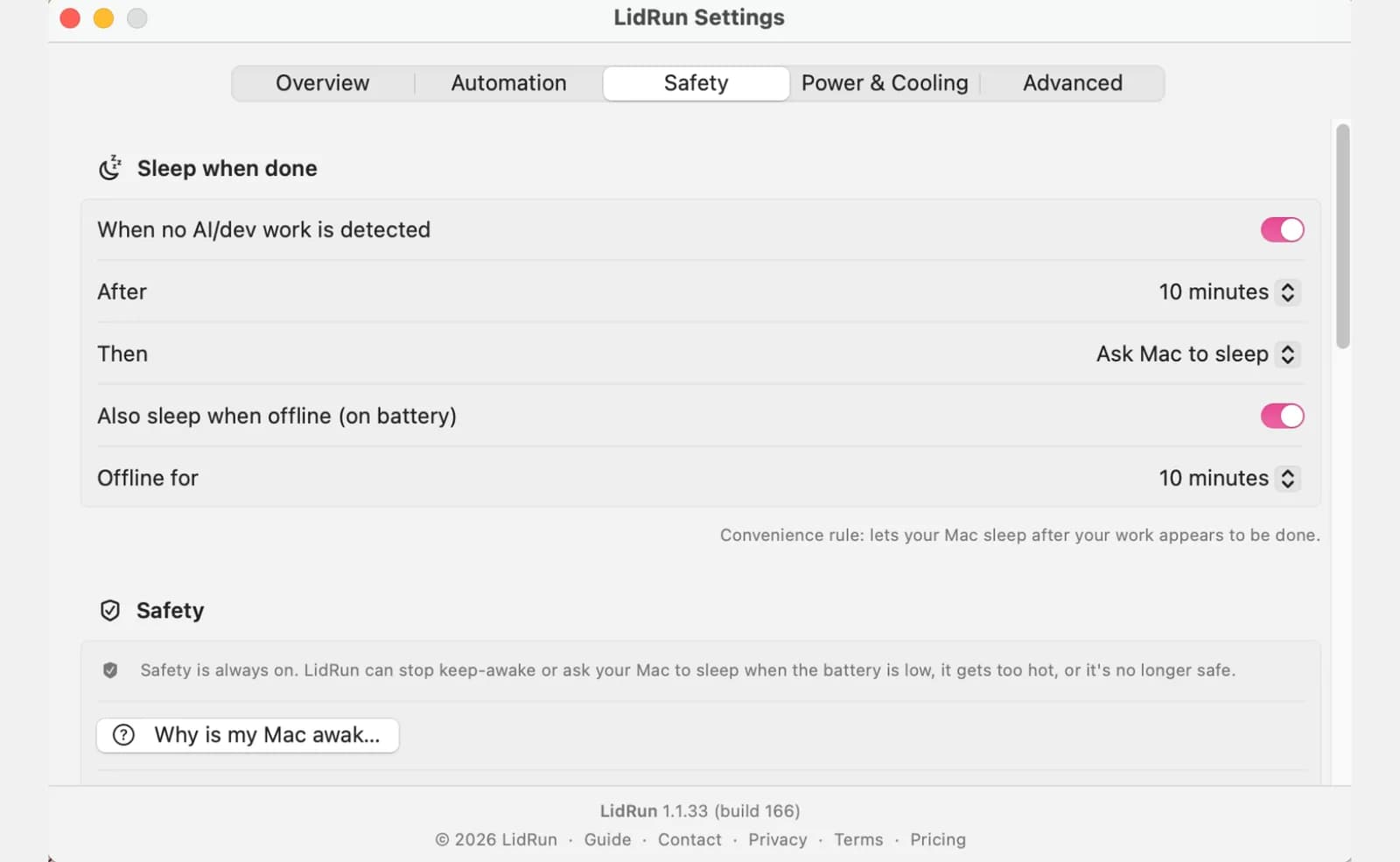
For a laptop-only overnight run - no charger, just the battery - we'd set the auto-stop floor higher than the 20% default: 25-30% gives real margin. At 10-15%, a brief CPU spike or a delayed fan response can push you into the zone where macOS forces an emergency shutdown with no clean exit; at 25-30%, there's runway for a clean stop plus margin against a load spike you weren't there to see coming.
The auto-stop floor itself is on every install, free tier included - LidRun never paywalls the basic low-battery stop. A second, earlier stage - a configurable "notify me at X%" warning before the hard stop, for people who want more cushion between the first heads-up and the actual cutoff - is part of the paid graduated-safety tier. Either way, for any run longer than a couple of hours, plug in first if you can: sustained high CPU load on battery compresses charge cycles faster than the same load on AC, and a floor still protects against the adapter coming loose mid-run even when you're plugged in.
Thermal safety: what the Mac tells you and what it does not
macOS exposes thermal pressure through ProcessInfo.thermalState: nominal, fair, serious, critical. LidRun surfaces a warning as soon as state reaches 'serious' and backs off for real once it reaches 'critical' - the Safety Governor releases the keep-awake hold immediately, on every tier, free or paid, with no waiting for you to notice. If Closed-Lid mode is active and the lid is physically shut, a plain release wouldn't do anything on its own (there's no idle-sleep left to trigger), so it escalates to actually putting the Mac to sleep instead.
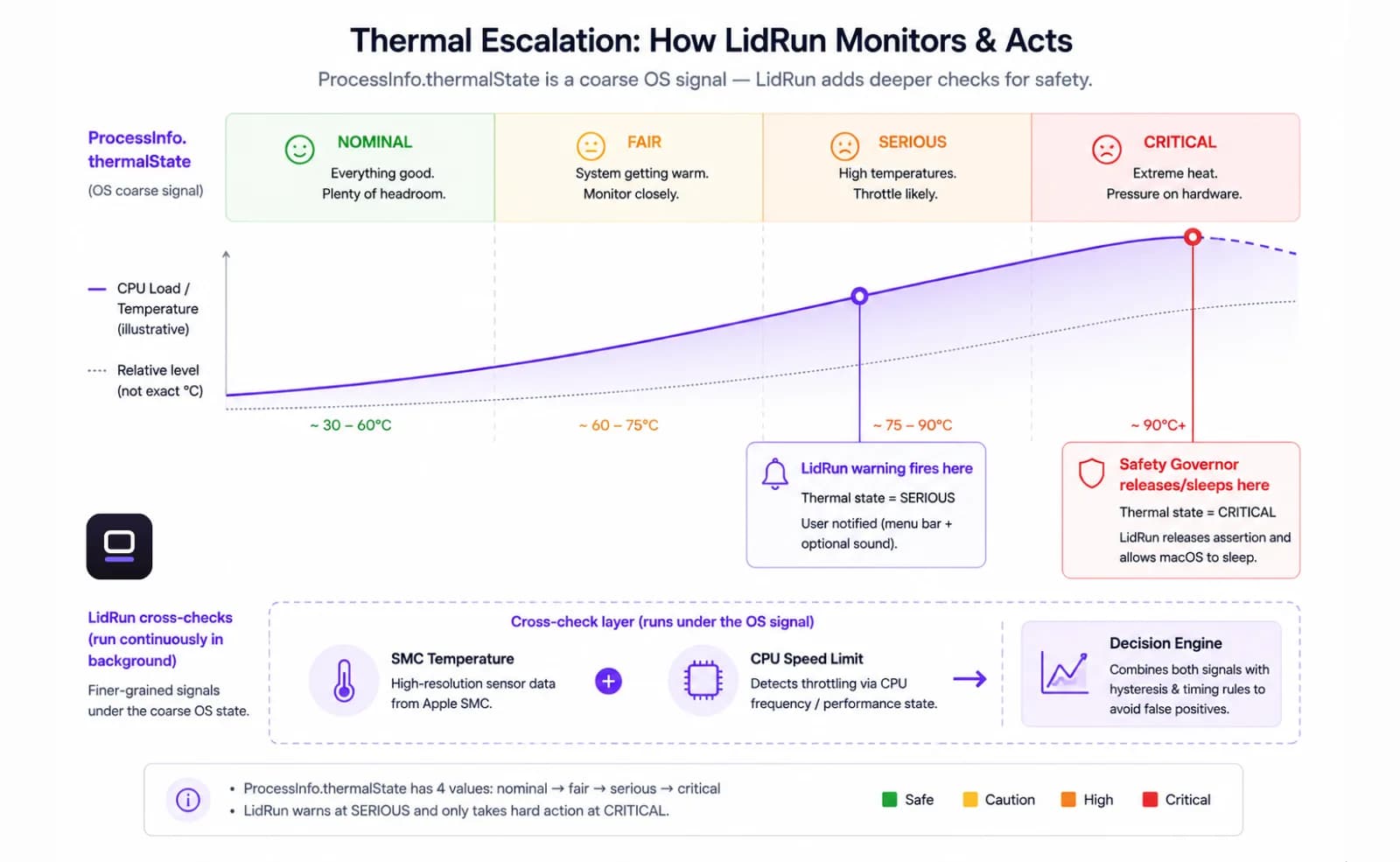
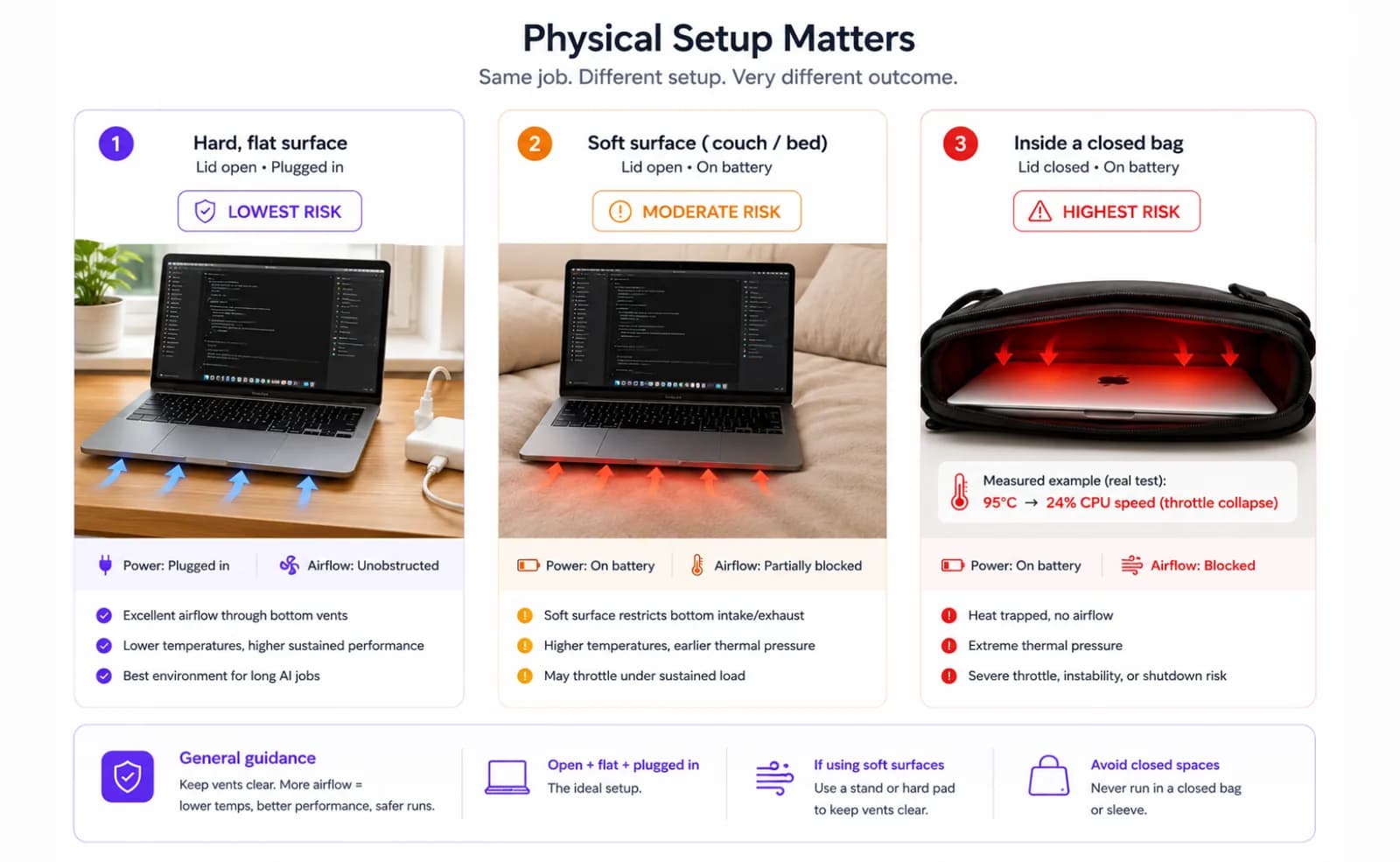
The catch is granularity: thermalState alone is a coarse signal. In our own testing on an Intel Mac, a normal lid-open session under heavy load settled around 95°C with the CPU still running above 80% of full speed - while the same workload closed into a bag crashed the CPU speed limit to roughly 24% within minutes, and thermalState itself briefly still read only 'fair.' That gap is why LidRun cross-checks the OS signal against the SMC temperature sensor and the CPU speed-limit reading (pmset -g therm) rather than trusting thermalState on its own - either signal reading critical is enough to trigger the backstop.
Fan RPM and SMC sensor data are readable on Intel Macs and most Apple Silicon configurations as a monitoring signal - a fan already at its ceiling tells you the system is already working hard, which is useful context alongside the temperature reading itself.
Software guardrails are a second line of defense; the first is physical. Hard flat surface, vents clear, lid open where you can manage it. Lid-closed running concentrates heat more than lid-open, which is worth knowing before setting up an overnight clamshell workflow - a laptop stand or even simple desk elevation makes a measurable difference. Running a long compute job in a bag or another enclosed space is the highest-risk configuration there is; no process monitor changes the heat trap that creates, so treat that setup with care regardless of which tool is watching.
Where a purpose-built layer fits: process-aware, battery-aware, thermal-aware
LidRun's premise is simple: agent running → stay awake; agent done or unsafe → release or sleep. Not a blind wake lock you set and have to remember to turn off, and not a session you have to babysit for a battery or heat line getting crossed while you're not looking. Everything above - caffeinate, pmset, Amphetamine, KeepingYouAwake, Lungo, Caffeine - does the 'stay awake' half well. This is the other half.
Auto Mode is the process-linked keep-awake: the same shape as caffeinate -w, but it ships already recognizing a long list of coding-agent and dev-tool processes - Claude Code, Codex, Cursor, GitHub Copilot, Windsurf, Aider, Ollama, and more - out of the box, no configuration needed. It also builds in a 30-minute holdoff specifically for matched agent processes, so a normal 'thinking' pause between tool calls doesn't get read as the job finishing (a plain open editor doesn't get that same grace period, so an idle-but-open Cursor window can't hold the Mac awake by presence alone). Auto Mode is a paid feature.
Watchdog goes a step further: it watches for an agent gone quiet. After 20 minutes of a matched agent process sitting near 0% CPU - versus 5 minutes for anything else, since agents idle normally while waiting on an API - it alerts you that the run might be stuck, with enough lead time that you'd hear about it before Auto Mode's own grace period would have let the assertion drop anyway. It only alerts; it never kills or restarts the process itself. It's also a paid feature.
The battery auto-stop and the critical-heat release described above are free on every install - that part is never paywalled. LidRun's Timer mode (free, alongside plain Keep Awake and Charging-only) holds the assertion until a set expiry and lets go on its own, useful as an upper bound whether or not Auto Mode recognizes the process. Push notifications through ntfy.sh (no account needed) or Pushover close the loop, so a run that stops at 3 AM from completion, low battery, or thermal state reaches your phone instead of waiting for you to find a cold Mac over breakfast. And because LidRun also watches for other apps holding their own wake lock - Amphetamine, a stray caffeinate process, anything else - it can tell you when something else is already keeping the Mac awake, which matters most exactly when you're switching over from one of the tools above and don't want to double up without realizing it.
Building safe defaults for overnight agent work
For a typical overnight AI agent run, a reasonable starting configuration: battery auto-stop at 25-30% rather than the 20% default, the 'serious' thermal warning as your early cue to check in, the 'critical' auto-release as the hard backstop, and - if the process is one Auto Mode already recognizes - let it link the assertion to the actual job instead of guessing at a fixed duration.
A fixed session timer still has a place alongside that: Timer mode holds the assertion until a set expiry and then lets go on its own, useful as an upper bound alongside process-linked watching, or on its own for anything Auto Mode doesn't recognize. The combination - whichever signal ends first, process exit or N hours - catches the case a plain toggle can't: an agent that stalled at hour two but nothing was there to notice, burning battery and heat on a process that stopped doing useful work hours earlier.
For short, attended runs, caffeinate and a watched terminal are genuinely enough - there's no need to reach for more. The gap opens up specifically for runs you won't be sitting next to: that's where a battery floor, a thermal backstop, process awareness, and a notification that reaches your phone start to matter more than which keep-awake tool is holding the assertion. Set the floor once, plug in when the run is long, keep the vents clear, and let the limits do the rest.
LidRun keeps your work running with the lid closed, with battery and thermal safety built in.
Already have LidRun? Read the setup guide →
Frequently asked
It depends on the setup. Running on AC power, on a hard flat surface with clear airflow, with a battery floor and either a session timer or process-linked keep-awake configured, helps reduce risk significantly. Running on battery only with no guardrails, on a soft surface, or lid-closed in an enclosed space raises both thermal and battery risk. No keep-awake tool - caffeinate, pmset, a menu-bar app, or LidRun - makes unattended overnight compute unconditionally safe; the goal is staying in the safer part of the operating range and being notified when a limit is reached.
LidRun's default auto-stop is 20%, adjustable from 15% to 50%; for a laptop-only overnight run we'd suggest raising it to 25-30% for extra margin. Below about 10-15%, a sustained CPU spike can push the Mac toward an emergency shutdown with no clean exit. Underneath any setting, macOS itself needs some headroom near empty to shut down cleanly - which is why LidRun's emergency force-sleep floor is clamped so it can never go below 4%, regardless of your other settings. On AC power the immediate drain concern drops, but a low-battery floor is still worth keeping in case the adapter comes loose mid-run.
Heat accumulates faster in a closed-lid configuration because the display can no longer act as a passive radiator. macOS will throttle the chip as temperatures climb, but throttling means a slower, hotter, longer run - not a safe one. In our own testing, a workload that held its CPU speed limit above 80% while lid-open at around 95°C saw that speed limit collapse to roughly 24% within minutes once the same setup was closed into a bag. Running on a hard flat surface with clear vents, preferably on AC, helps reduce that risk. Lid-closed on a soft surface or in a bag is the highest-risk configuration; no keep-awake tool changes a blocked airflow path.
For a short run you're going to check on yourself, yes - caffeinate -w <pid> or wrapping the command directly does the job well, for free. What it won't do is watch your battery percentage or thermal state while it holds the Mac awake, so it'll keep a stalled or overnight run going exactly as readily at 2% battery as at 80%. For anything you're not sitting next to for several hours, pair it with a battery floor and a thermal backstop, or use a tool that already has both built in.
Amphetamine, KeepingYouAwake, Lungo, and Caffeine are all genuinely well-built at the one job they do: keeping a Mac from idle-sleeping, via a schedule, a trigger, or a manual toggle. None of them read battery percentage or thermal state to decide when to let go - that's not a criticism, it's just outside what they're built for. LidRun adds that layer on top: a battery floor and a critical-heat release free on every install, and - on the paid tier - process-linked watching (Auto Mode) plus a stalled-agent alert (Watchdog), so the guardrail comes from a stack of checks rather than from remembering to turn a toggle off.
The battery auto-stop and the critical-heat release are free on every install: LidRun watches charge level and thermal state via IOKit and macOS's own APIs, and releases the keep-awake hold once either crosses your threshold. On the paid tier, Auto Mode links the assertion to a specific recognized process instead of a fixed duration, and Watchdog alerts you if that process goes quiet for longer than agents normally idle. Push notifications through ntfy.sh or Pushover, and a free Timer mode as a fixed upper bound, round out the stack. These guardrails help reduce the chance of waking up to a dead battery or a throttled Mac; they're not a guarantee, and your physical setup - surface, airflow, lid position - still matters as much as any setting.