How AI Agents Changed Laptop Power Management
AI agents changed laptop power management by breaking the one signal macOS has always used to decide when to sleep: user input. A coding agent that reads files, edits code, and runs tests for two or three hours generates no keystrokes and no mouse movement, so macOS reads all of that as idle time - and sleeps the machine mid-job, killing the agent and leaving a half-applied diff behind. That failure mode barely existed five years ago, because almost nothing used to run unattended for hours straight. Here is why it happens, what the free fixes actually do, and where they run out.
Why Idle Sleep Made Sense - Until AI Agents Broke the Assumption
Laptop power management was built for human rhythms. No keyboard input for a few minutes: dim the display. A bit longer: sleep. Apple's idle timers made sense because the machine's job was to wait for you, and waiting cost battery. The assertion an app holds to stay awake is process-bound - the moment the app quits or crashes, macOS releases it automatically. That's a deliberate design choice, and it's exactly why the model was safe to build this way for thirty years.
The model held through a decade of background downloads, long compiles, and video encodes because those tasks either finished quickly or held a power assertion to signal the OS while they ran. A video renderer holds a media assertion; xcodebuild completes in minutes and exits. The machine always had some signal to work with, and that signal always cleaned itself up.
Nothing in that design anticipated a workload that runs for hours with zero user input and no natural completion boundary. That scenario simply did not exist when the power model was written.
Why Your Mac Sleeps Mid-Agent-Run
AI coding agents - Claude Code, Cursor's background agent, Aider, GitHub Copilot Workspace - work by chaining dozens of steps: read a file, plan an edit, write code, run a test, interpret the output, loop. A single refactoring task can run for two or three hours with nobody at the keyboard.

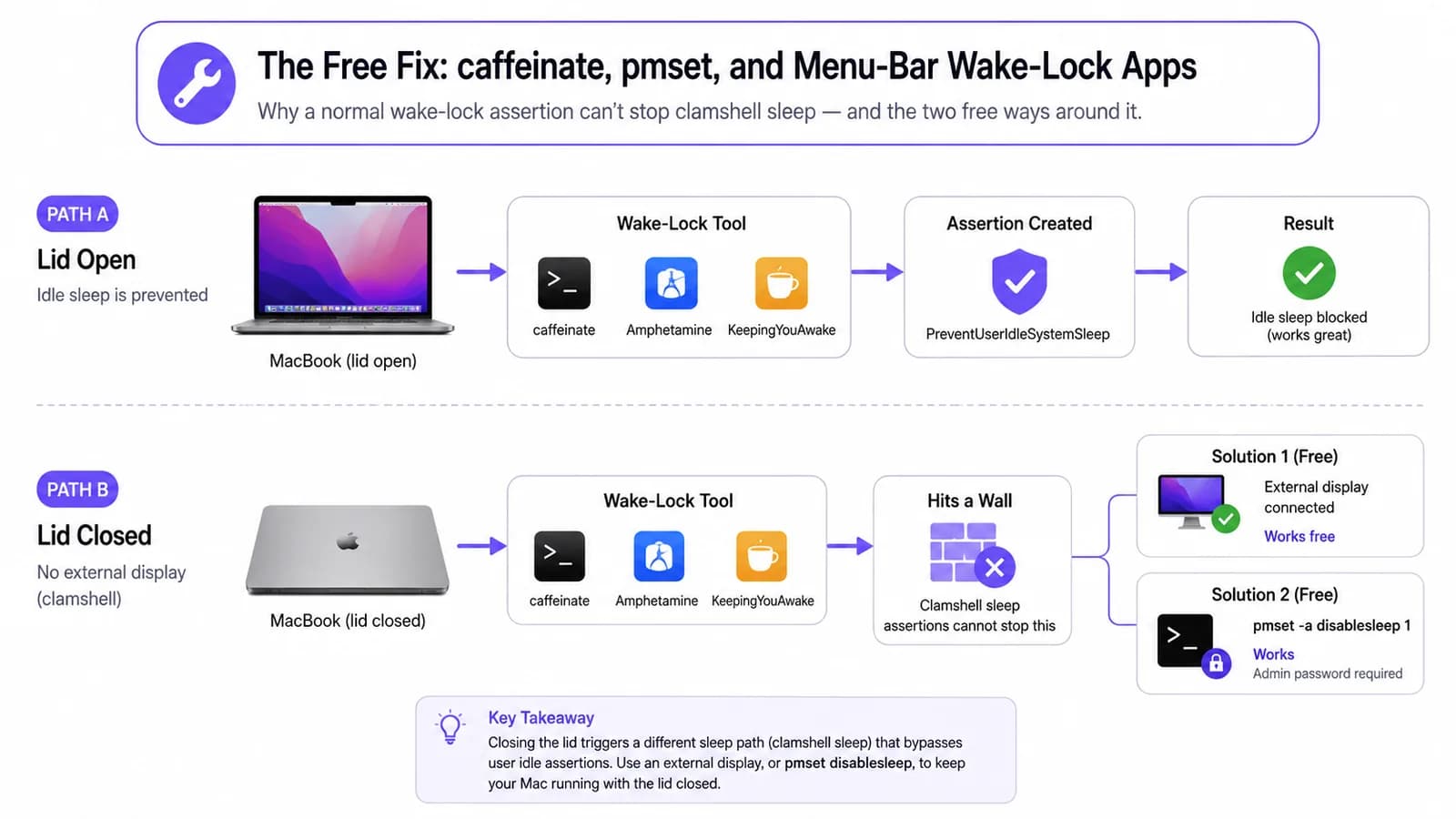
macOS sees none of that as activity. There is no keyboard event, no mouse movement, no display frame being rendered. The idle timer counts down to zero, the display sleeps, and the system follows shortly after - terminating the terminal session mid-job.
If you're not sure whether this actually happened to you, don't trust Activity Monitor after the fact; the process is simply gone from the list. The clearer evidence is in Terminal: pmset -g log | grep -i sleep lists real sleep and wake events with timestamps, so you can line up a gap in your agent's own log against a system sleep macOS logged at the same moment.
This is not a macOS bug. Idle sleep is correct behavior for a machine that is genuinely idle. The structural problem is that the OS has no built-in concept of a process doing cognitive work on the user's behalf - work the user actually wants to finish.
Related guideWhat Is a Safe Runtime Layer for Mac?The Free Fix: caffeinate, pmset, and Menu-Bar Wake-Lock Apps
The first thing worth trying costs nothing and ships with macOS. caffeinate -i holds the same kind of power assertion LidRun holds for the open-lid case - the system idle-sleep assertion - and the cleanest pattern is to hand it the agent command directly: caffeinate -i your-agent-command. The assertion is then tied to that process and releases automatically the moment the agent exits, instead of running until you remember to kill it.
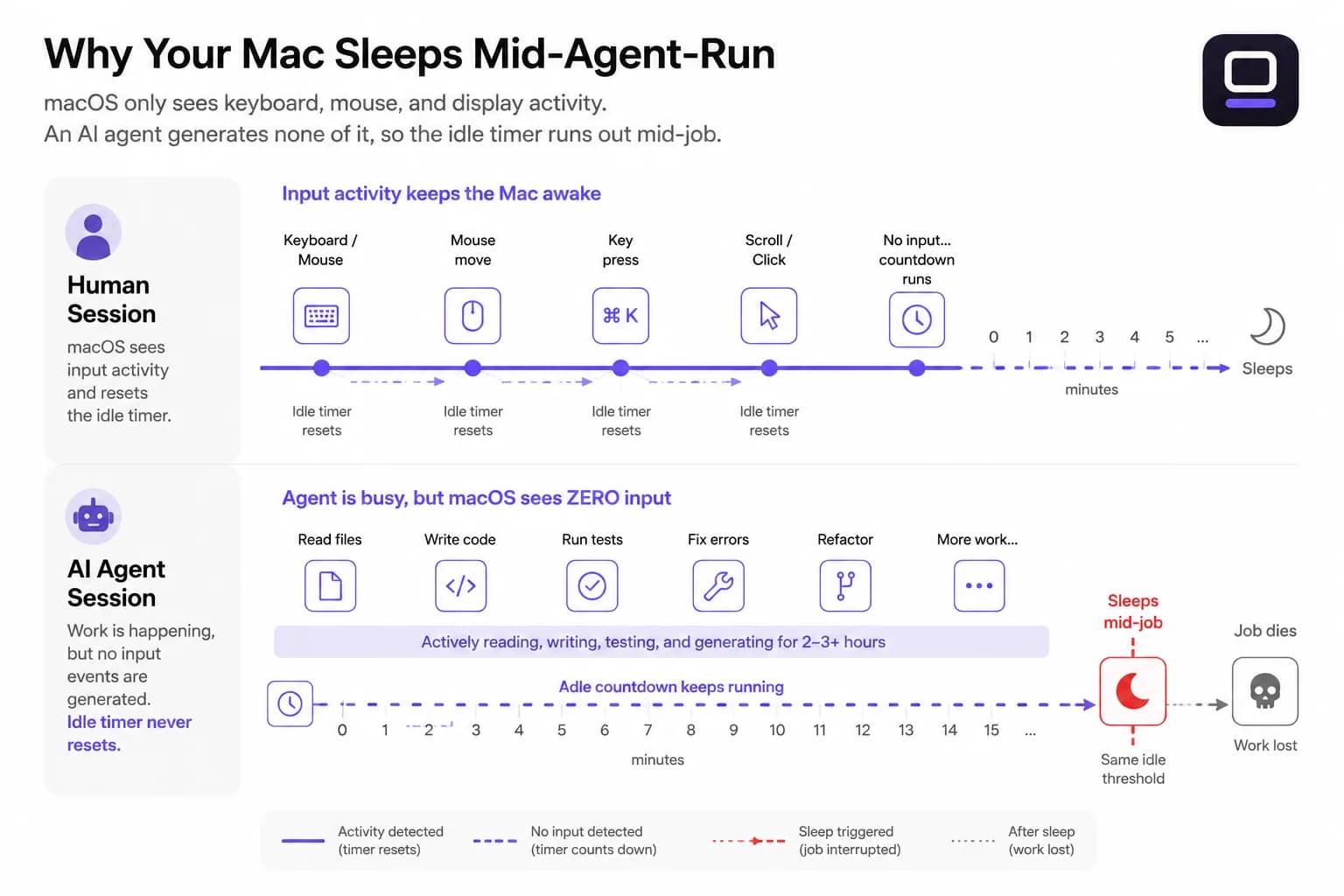
If you'd rather not touch Terminal, the same idea is one click away in a menu-bar app. Amphetamine, KeepingYouAwake, Lungo, and the aptly-named Caffeine app all hold the same kind of assertion caffeinate does, with a GUI toggle and a timer instead of a command line. For the case they're built for - a plugged-in Mac, lid open, someone around to notice if something looks wrong - any of them does the job well.
None of this - caffeinate included - keeps a MacBook running with the lid closed unless an external display is connected. Closing the lid triggers a separate, lower-level clamshell sleep path that idle-sleep assertions cannot stop; it's a different mechanism from the one caffeinate and LidRun both use for the open-lid case. If you have a desk setup, the free fix is genuinely free: plug in an external display (and a keyboard or mouse, if the Mac doesn't already see one), close the lid, and macOS treats it as a desktop - no extra tool required. Without a display, the only public lever is sudo pmset -a disablesleep 1, which asks for an admin password and comes with a real gotcha covered next.
Where the Free Fix Runs Out: Battery, Heat, and a Stuck pmset Setting
caffeinate and the menu-bar wake-lock apps have no battery floor. Leave a MacBook holding a wake assertion on a 40% charge with a heavy agent loop, and it's entirely possible to come back to a dead battery, a lost session, and a half-applied diff - the tool did exactly what it promised, it just had no way to stop before the power ran out. How fast that actually happens varies enormously: an agent that's mostly waiting on API responses barely taxes the CPU, while one running a local model can keep every core busy for hours. That unpredictability is exactly why a battery-percentage floor works better here than a fixed timer - you don't know in advance how long four hours of "AI work" will actually cost you.
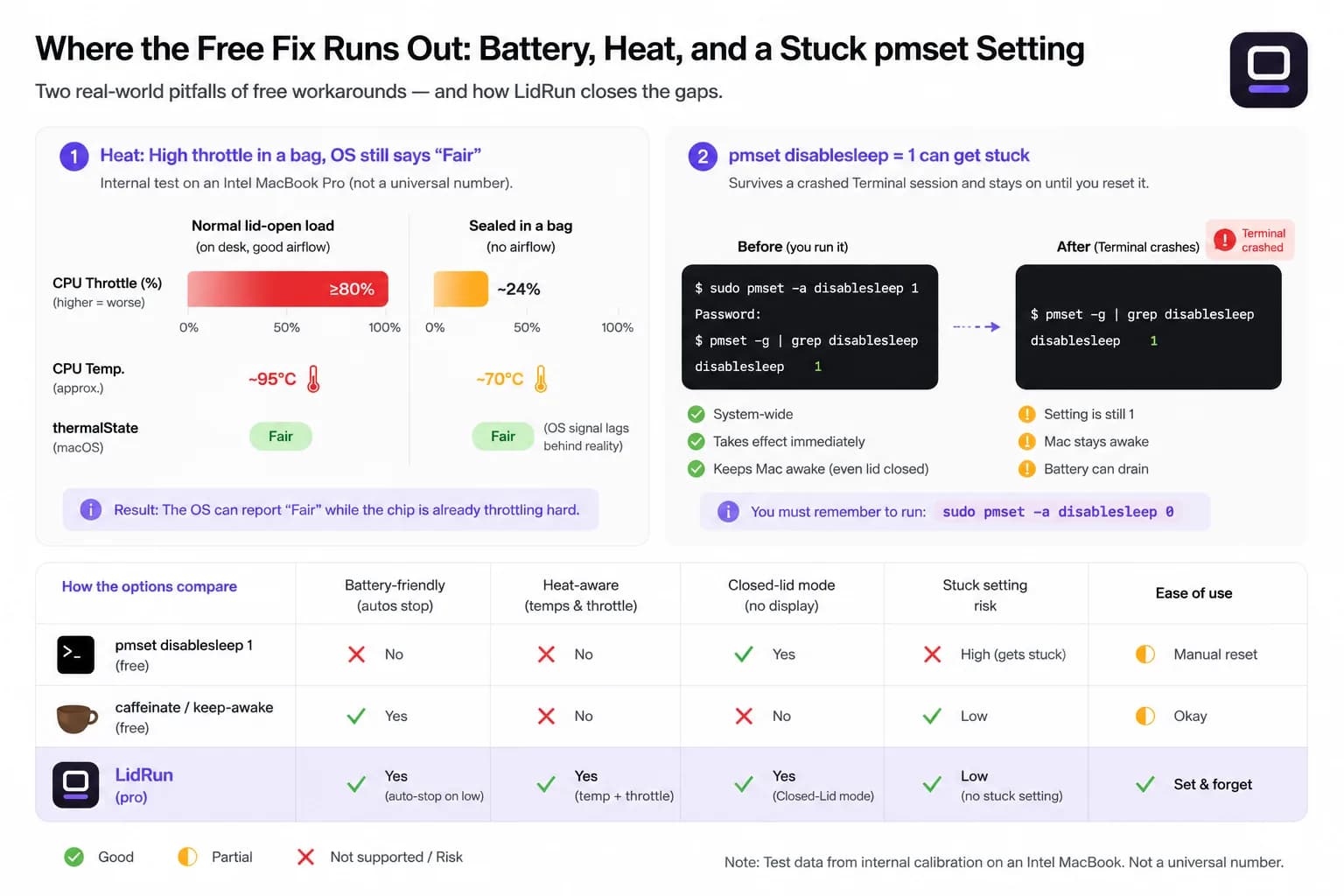
Heat is the subtler risk, and it's measurable, not just a vibe. macOS itself only exposes a coarse signal - ProcessInfo.thermalState, four buckets: Nominal, Fair, Serious, Critical - and that signal can lag reality. In one internal test on an Intel MacBook (i7-1068NG7), a normal lid-open workload held around 95°C with the CPU throttle staying above 80%; sealed inside a bag under the same load, the actual throttle dropped to roughly 24% while thermalState still read "Fair" - the chip had already started protecting itself well before the OS-level signal caught up. That gap is why a wake lock that only checks thermalState, or checks nothing at all, has no real guardrail in a confined space: a nearly-closed lid, a soft surface blocking the vents, or a bag.
The clamshell workaround has its own failure mode. pmset -a disablesleep 1 is a global, persistent setting with no connection to any specific process. If whatever turned it on crashes - a script, a Terminal session, an app - the setting stays at 1 and the Mac will not lid-sleep again until something explicitly sets it back to 0 (sudo pmset -a disablesleep 0) or you reboot. It's a real, documented gotcha, not a hypothetical: the setting simply has no idea the process that requested it is gone.
A Safer Workflow for Long AI Agent Runs
For a quick daytime run while you're at your desk and plugged in, caffeinate or a menu-bar app is genuinely fine - no extra tooling needed, and it's honest to say so.
For overnight, on-battery, or lid-closed sessions, you want three things the free tools don't combine: a battery floor so the run stops before the machine dies rather than after, awareness of actual thermal pressure rather than just the OS's coarse signal, and - if the lid is closed - a way to recover automatically if whatever holds disablesleep crashes instead of leaving the Mac stuck. That combination is roughly what a safe runtime layer for AI work on Mac is for: not a stronger wake lock, but one that watches the conditions that would make continued running unsafe and backs off gracefully instead of running blind.
If you'd rather not manage local power at all, there's a legitimate alternative: run the agent on a remote box - a cloud VM, a GitHub Codespace, or an always-on Mac mini you SSH into - and let your laptop sleep normally while the job runs elsewhere. The trade-off is real: you lose the convenience of working directly in your local checkout, and you're paying for compute you might not otherwise need. For a lot of local, repo-in-place workflows, keeping the laptop itself awake and guarded is still the simpler path.
Where LidRun Fits
LidRun's rule is simple: agent running, stay awake; agent done or unsafe, release and let the Mac sleep. The mechanism is a process watcher (Auto-Watch) that polls every ten seconds for the processes you tell it to track, holding the wake assertion only while at least one is actually using CPU above a threshold (20% by default) - with a 60-second grace period so a process that's momentarily idle waiting on a model response or disk I/O doesn't flap the assertion on and off. When nothing tracked is running anymore, the assertion releases on its own. That's the "agent done" half of the promise, and it's not a fixed timer or something you have to remember to turn off.
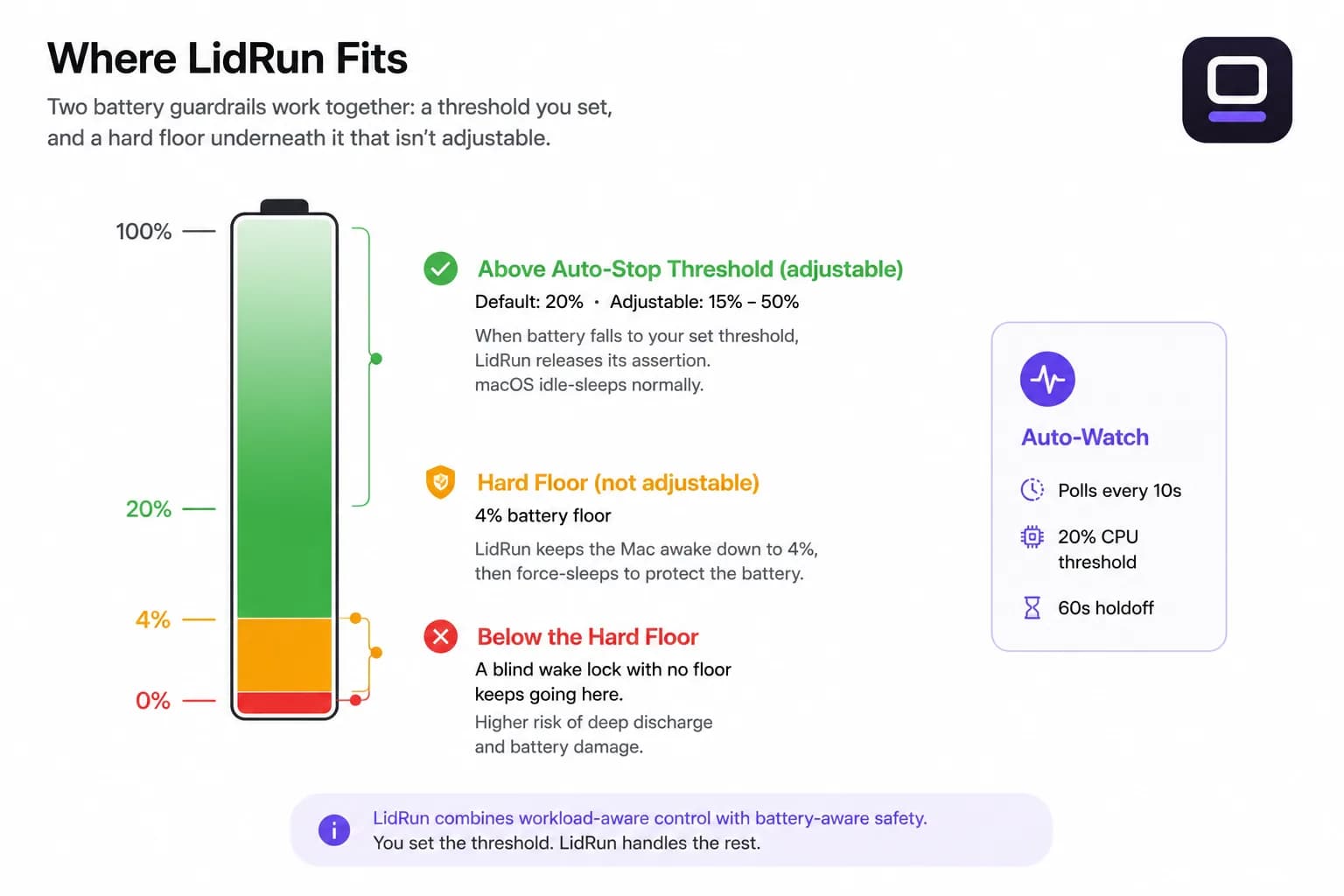
On the battery side, an auto-stop threshold you set - 20% by default, adjustable between 15% and 50% - releases the assertion so macOS can idle-sleep normally instead of running the battery down. Underneath that sits a non-adjustable floor around 4%: even with auto-stop set aggressively low, LidRun still asks the Mac to sleep near empty rather than let a session run to a dead shutdown. On the thermal side, LidRun reads the real SMC temperature and CPU throttle percentage alongside the OS-level signal, backing off at roughly 98°C or a throttle at or below 50% (serious) and 100°C or a throttle at or below 30% (critical) - closer to the actual hardware state than thermalState alone.
Closed-Lid mode uses the same pmset -a disablesleep lever described above, applied through a one-time-approved privileged helper so it's not an admin password prompt every time. Its "Sleep when done" mode auto-sleeps after 10, 20, or 30 minutes with nothing tracked running, and a crash-guard heartbeat detects a disablesleep value left stuck at 1 by a previous crashed session and resets it automatically the next time the app launches - the specific failure mode described above, closed automatically instead of left for you to find. A Safety Governor still applies underneath all of it: it can stop or request sleep when battery or heat becomes unsafe, lid open or closed.
Keep Awake, the battery auto-stop, and process watching are free with no time limit - LidRun doesn't gate the basics behind a trial. Closed-Lid mode, the heavier and riskier feature, gives you a limited number of free runs to try before it asks for a Pro unlock. If overnight and closed-lid AI agent runs are a regular part of your workflow rather than an occasional one, keeping AI agents running while you sleep is worth reading next.
LidRun keeps your work running with the lid closed, with battery and thermal safety built in.
Already have LidRun? Read the setup guide →
Frequently asked
Not always. For a short run while you're at your desk and plugged in, caffeinate -i your-agent-command or a menu-bar keep-awake app handles the main problem - the idle-sleep timer - and nothing else is needed. For longer runs, overnight sessions, or battery-only work, you also want a battery floor and some thermal awareness, since neither caffeinate nor a GUI wake-lock app has either one built in.
macOS measures idle time by user input - keyboard events, mouse movement, and display activity. An AI agent generates none of these; it runs in the background without touching any input device. Once the idle timer reaches its threshold, the system sleeps and terminates the agent's terminal session or suspends its process entirely.
For a plugged-in machine in a stable environment, caffeinate usually works well. It becomes a risk on battery, because it holds the wake assertion with no battery floor - a 40% charge and a multi-hour agent loop can end at 0% with the session lost. It also does nothing for a closed lid without an external display or pmset -a disablesleep; closing the lid triggers a different sleep path the same assertion can't stop. A tool that auto-stops at a low-battery threshold and treats the closed lid as a separate case reduces both risks without requiring you to babysit the run.
A long build runs for minutes, exits cleanly, and many build tools hold a power assertion during compilation. AI agents are open-ended: they loop, call external APIs, write and test code, and may run for hours with no defined completion time. The combination of long duration and unpredictable finish is what makes power management a real concern - a build finishing early costs you nothing; an agent dying overnight costs you the whole session.
Activity Monitor won't help after the fact - a killed process is just gone. The clearest signal is in Terminal: run pmset -g log | grep -i sleep to see real sleep and wake events with timestamps, and compare that against the last timestamp in your agent's own log or output. A gap that lines up with a logged sleep event confirms it.
Yes, but not with caffeinate alone. Closing the lid triggers clamshell sleep, a separate mechanism that ordinary idle-sleep assertions can't stop. The two free options are connecting an external display (macOS then treats the closed MacBook as a desktop, no extra tool needed) or running sudo pmset -a disablesleep 1, which requires an admin password and stays on until something explicitly turns it off. A safe runtime layer that offers a dedicated closed-lid mode - with an automatic reset if the setting gets stuck from a crash, plus the same battery and thermal guardrails - removes the babysitting from that second option.