What Is an AI Workstation Guard?
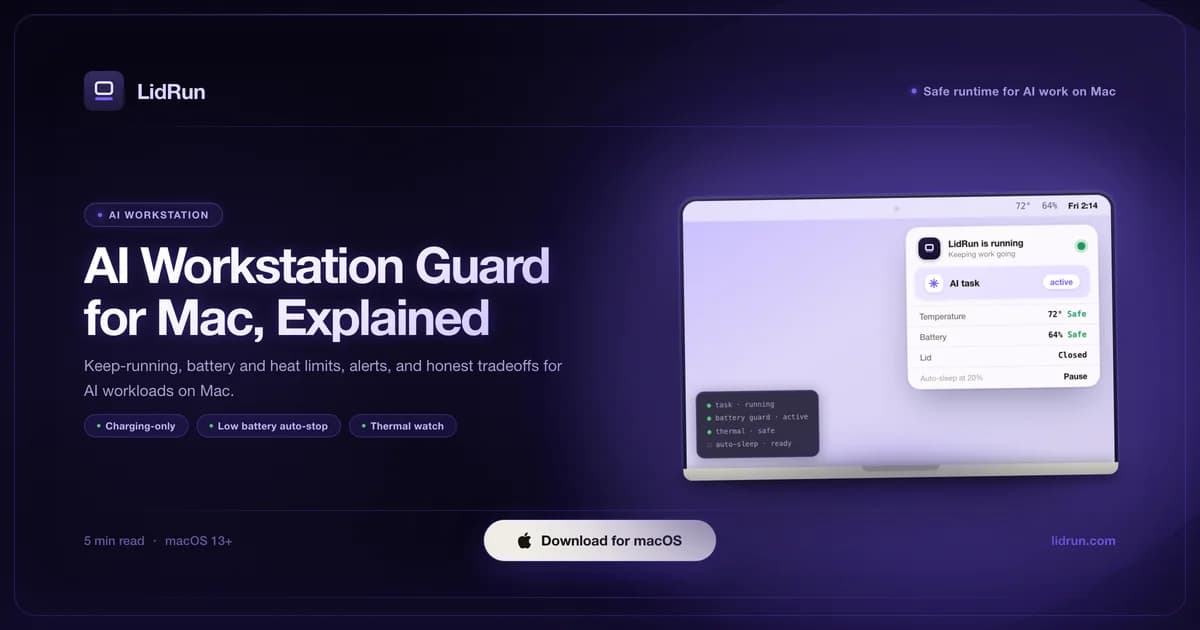
An AI workstation guard is software that keeps a Mac awake only while an AI job is actually running - watching battery and heat the whole time - then lets it sleep the moment the job finishes or a safety limit is hit. It's the layer above a plain keep-awake toggle: instead of holding the Mac awake indefinitely and hoping you remember to turn it off, it scopes itself to the workload and backs off when conditions call for it. The problem it solves is a familiar one: you start a fine-tune or an ollama pull, close the lid or step away, and come back to find either the Mac asleep mid-job or the battery run down further than you'd have allowed if you'd been watching. Running a Mac as a small AI workstation - especially headless, lid closed, with no one at the keyboard - means thinking past the keep-awake toggle: watching battery and heat for the duration, stopping gracefully when limits are reached, and getting a ping when the job actually finishes.
Why Macs sleep or throttle mid-AI-job
macOS actually has three separate mechanisms working against a long AI job, and a plain keep-awake toggle only touches one of them. Idle sleep is what happens when the Mac decides nothing is going on; it's what IOPMAssertionCreateWithName - the IOKit call every keep-awake tool, LidRun and caffeinate included, ultimately relies on - is built to block. Closing the lid triggers a separate, lower-level clamshell sleep that no ordinary power assertion can stop.

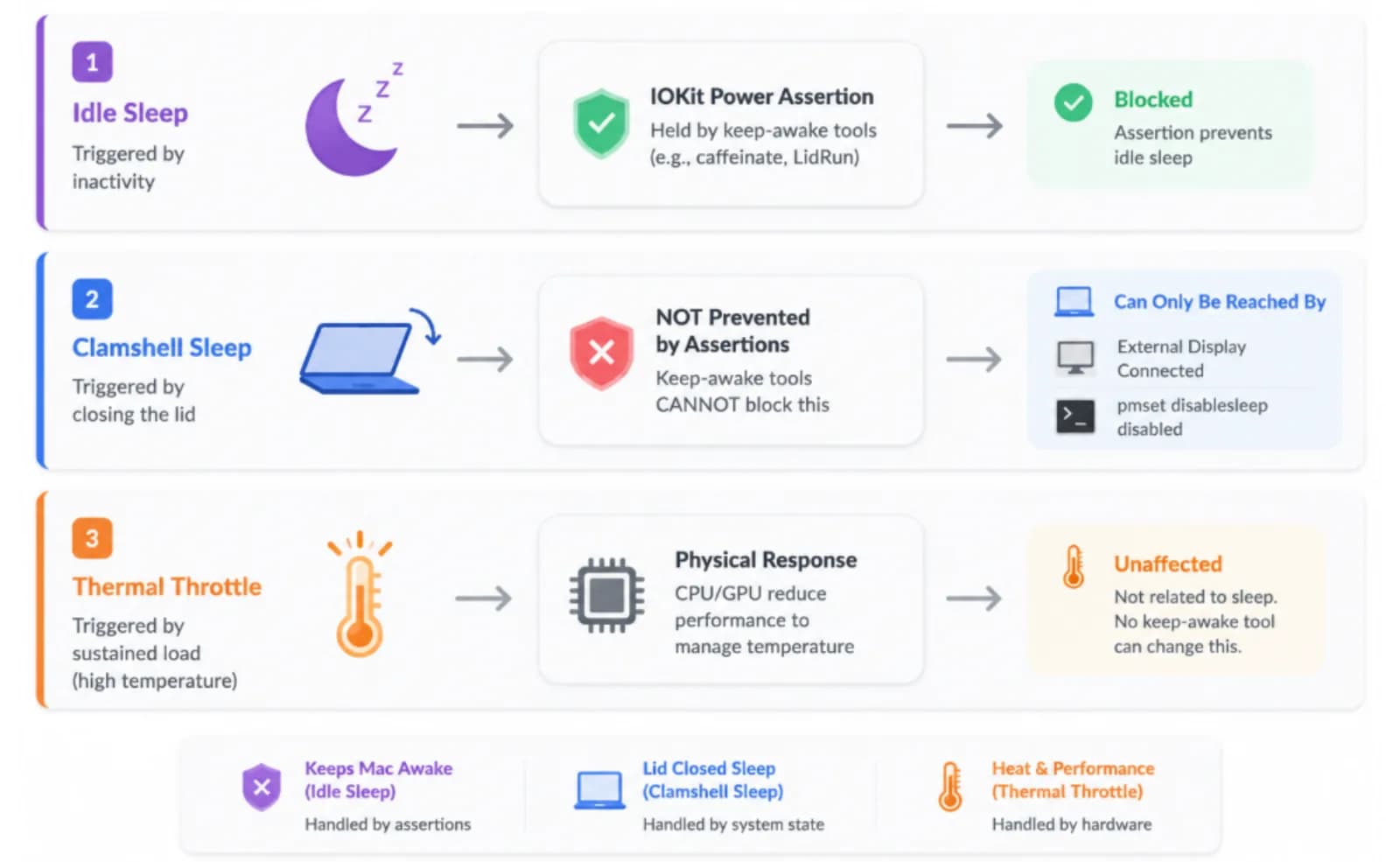
That second mechanism is why "just hold an assertion" isn't the whole story for lid-closed work. With an external display connected and the Mac on power, macOS's own clamshell support already keeps it running lid-closed - no extra tool needed. Take the display away and there's no built-in way to keep a lid-closed Mac awake; the only public lever is a system-wide sleep override, which is where the free workaround below comes in.
Thermal throttling is a third, physical mechanism, not a sleep mechanism, and nothing about keep-awake changes it. A sustained fine-tune or inference loop pushes CPU and GPU hard enough, for long enough, that the chip backs its own clock speed off to stay inside its thermal envelope. That happens regardless of what's holding the Mac awake - or whether anything is.
The free workaround: caffeinate, pmset, and clamshell tricks
macOS ships with everything you need to stop a Mac sleeping during a job, for free, with no extra app. caffeinate is the built-in command-line tool: caffeinate -i long_running_command holds an idle-sleep assertion for exactly as long as that command runs, or caffeinate -d -t 3600 holds it for a fixed hour regardless of what's running. pmset noidle does the same job as a single word - leave that terminal window open and idle sleep is blocked until you press Control-C.
For lid-closed work without an external display, the free lever is sudo pmset -a disablesleep 1 - the same system setting LidRun's own Closed-Lid mode flips under the hood. It requires administrator privileges and is meant to be paired with sudo pmset -a disablesleep 0 once you're done.
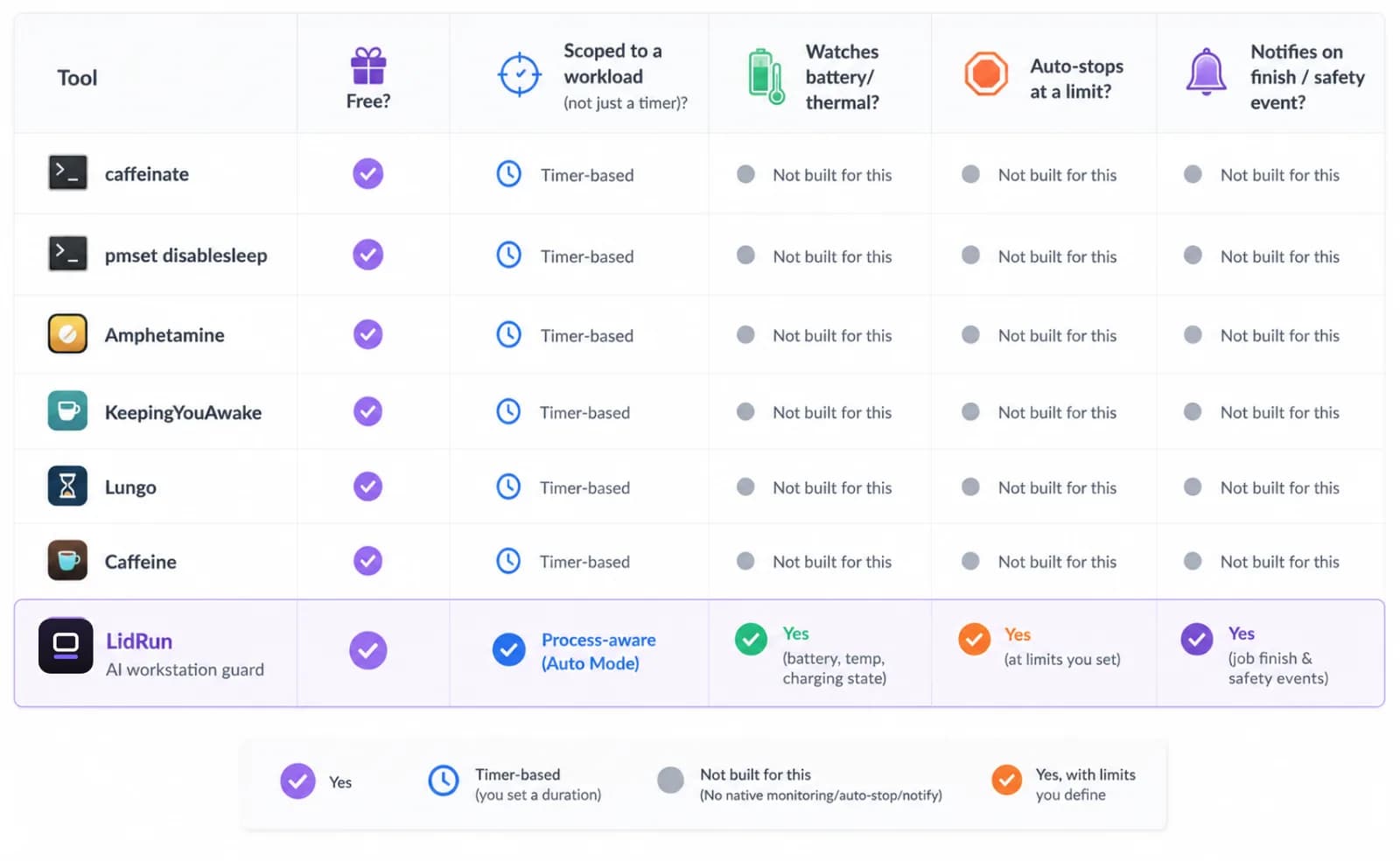
If a terminal command isn't your style, several free and low-cost menu bar apps wrap the same underlying assertion in a UI: Amphetamine (free on the Mac App Store, the most configurable of the bunch - timers, schedules, and trigger rules), KeepingYouAwake (free and open source, a clean caffeinate wrapper with a menu bar countdown), Lungo (a lightweight, mostly-free timer-preset tool), and Caffeine (one of the original one-click "keep this Mac awake" menu bar utilities). For a short task where you're sitting at the keyboard the whole time, any of these - or plain caffeinate - is a fine choice. LidRun isn't trying to replace that use case.
Where the free workaround runs out
The gap shows up once you stop watching the Mac yourself. None of the tools above are workload-aware: they hold an assertion for a time you set, or "until I turn it off," not "until the job I'm running actually finishes." Start a multi-hour fine-tune under caffeinate and walk away, and nothing is watching battery or heat on your behalf - the run keeps going until the battery's own emergency shutoff intervenes, which is a hard stop, not a soft one.
caffeinate has a quieter failure mode too: it's tied to the terminal session that launched it. Quit Terminal, or let that shell session get interrupted, and the assertion goes with it - mid-job, silently - unless you've explicitly detached the process first. That's the opposite problem from a Mac that won't sleep: a Mac that sleeps when you needed it not to.
disablesleep cuts the other way. It's a global, persistent system setting, not scoped to your job. If whatever set it crashes before resetting it - or you simply forget the pmset -a disablesleep 0 step - the Mac will not sleep, lid closed or not, until you reset it by hand or reboot. That's exactly the setup that leaves a hot machine running with no airflow if it ends up closed into a bag before it's cooled down. None of this makes the free tools a bad choice for a short, watched task - it just means that once a run gets long enough to walk away from, safety wins over convenience, and that's what an extra layer is for.
What a workstation guard adds: process-scoped keep-awake
A workstation guard starts from the same primitive as caffeinate - an IOKit power assertion - and adds the two things the free tools leave out: it scopes itself to the actual workload, and it backs off on its own when conditions call for it. LidRun's rule for itself is simple: agent running → stay awake; agent done or unsafe → release and let the Mac sleep. It's not a blind wake lock that holds the Mac awake indefinitely and waits for you to remember to turn it off.
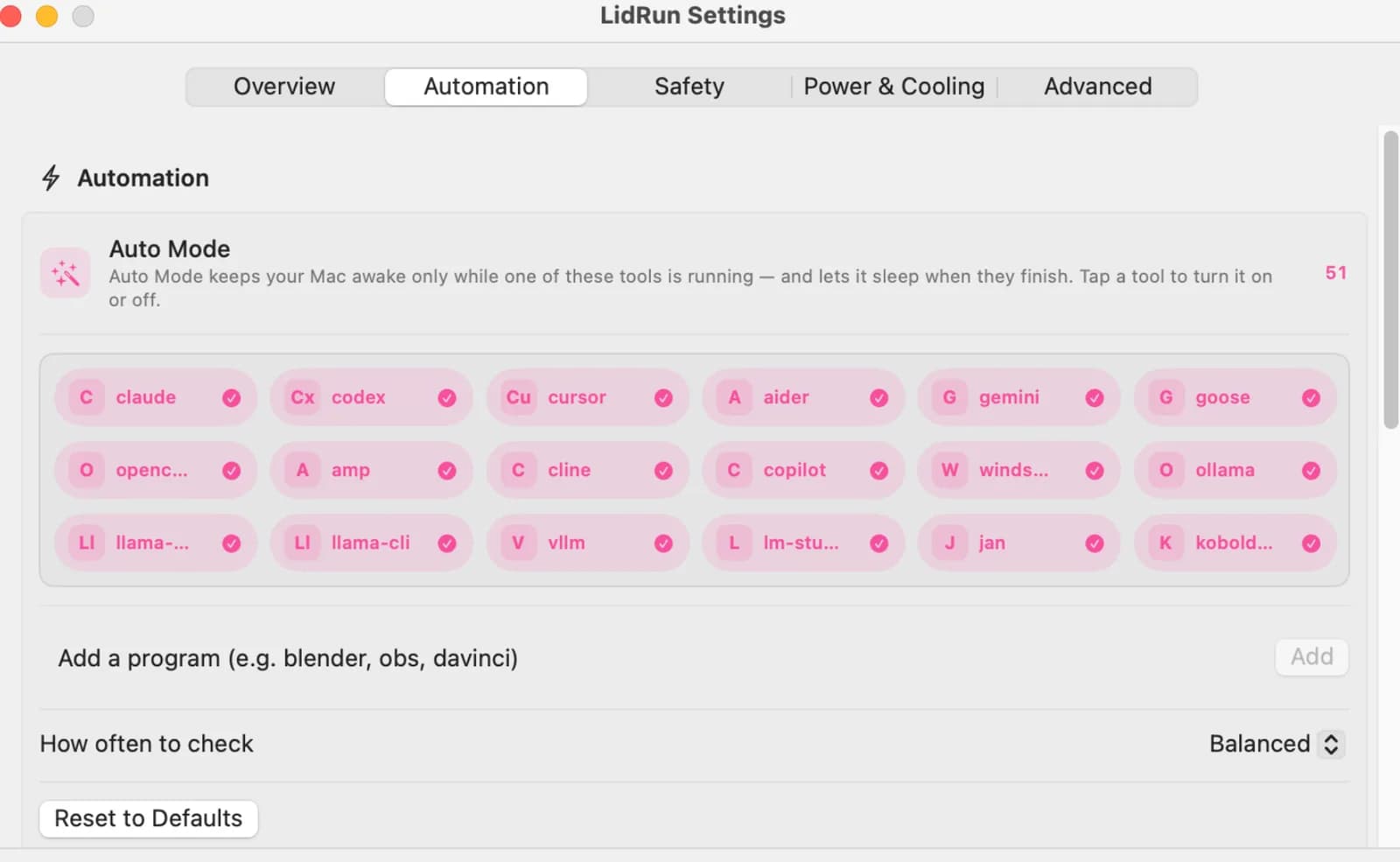
Process detection is what makes the "agent running" half concrete. Add a process to watch - ollama, python, node, xcodebuild - and LidRun looks for it by name; for interpreted languages it can also match a script argument, like train.py, so python train.py counts even though python alone would be too broad to watch safely. A CLI match has to clear a CPU threshold (5% by default) to count as active work rather than just present; a GUI app has to clear a higher 40% floor, so a merely-open editor or an idle model-runner window never holds the Mac awake by itself.
A short idle holdoff (60 seconds by default) rides through brief CPU dips - Ollama between tokens, a script pausing on I/O - without releasing early. Known AI coding agents get a much longer 30-minute holdoff for the same reason: an agent waiting on an API response can sit near 0% CPU for minutes while still mid-task, and releasing the Mac out from under it would defeat the point. When the watched process actually exits, the assertion lifts on its own - no separate step to remember.
Watching battery, heat, and power state during a run
During a run, LidRun monitors battery charge, the system thermal pressure level, and whether the Mac is on AC or battery. Any one of them can trigger a controlled stop at the limit you set.
On the battery side, the auto-stop threshold defaults to 20% and is yours to raise or lower; a low-battery warning fires around 15% either way. Underneath your own setting sits a hard floor - roughly 4% - that always triggers an emergency sleep no matter how you've configured auto-stop. It's a floor you can nudge slightly higher, not one you can switch off, so an unattended run can't quietly run the battery to empty. This helps reduce risk; it does not promise a specific runtime, because the workload itself is what's spending the charge.
On the heat side, LidRun watches the system thermal pressure level (normal, fair, hot, or very hot) and, on Macs that expose useful SMC data, checks it against measured temperature and CPU throttle so a coarse OS-level reading doesn't understate real pressure. A "very hot" reading automatically drops Closed-Lid mode so the hardware can throttle and sleep the way it's designed to. On Apple Silicon, the fans are largely firmware-controlled; LidRun reads SMC temperature keys as a monitoring signal and doesn't attempt to override the firmware's own fan curve. Treat the thermal guardrail as a trigger for a controlled stop, not as a way to hold the chip at a chosen temperature - placement and airflow affect real chip temps more than any software guardrail can.
Notifications and the weekly report for unattended runs
When a guarded session ends or a safety event fires, LidRun can ping Telegram, Discord, Slack, ntfy.sh, Pushover, or a generic webhook. Telegram takes the least setup: message the shared LidRun bot, tap Start, and paste back the Chat ID it gives you - there's no bot token to create or manage. Every channel carries the same event types: session complete, battery floor hit, thermal stop, session timer expired.
The difference between a completion event and a safety event is worth knowing. A clean completion means the work finished and the process exited normally. A thermal or battery stop means something cut the run short. Getting a labeled ping instead of silence means you know which one happened, not just that the Mac stopped.
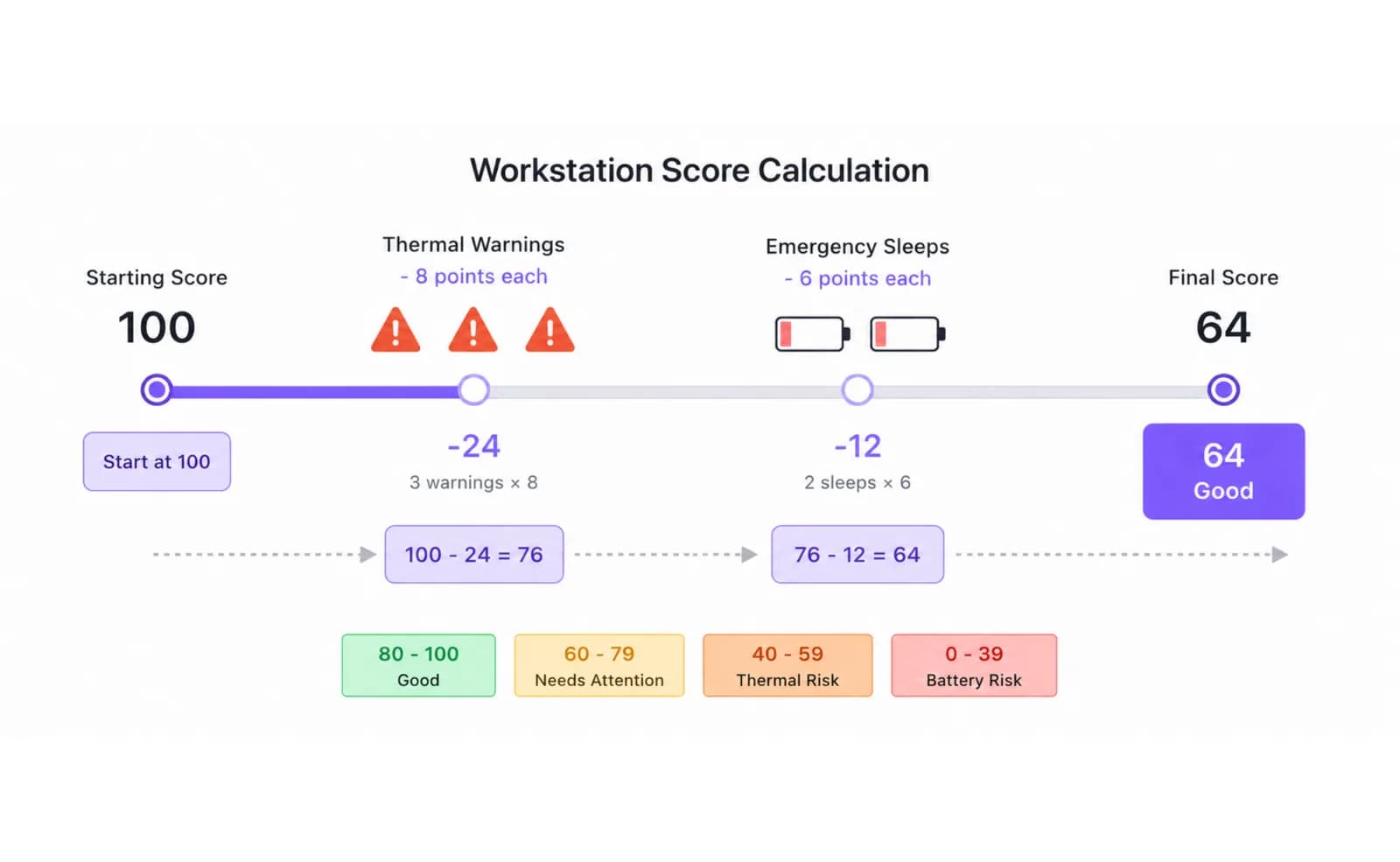
The weekly Mac workstation report rolls the last seven days of the Activity Log into total runtime, your longest single session, and a Workstation Score. The score starts at 100 and is docked 8 points for each thermal warning and 6 points for each emergency sleep the week produced, floored at 0. Three or more thermal warnings, or two or more emergency sleeps, flags the week as a genuine risk rather than a minor dip. A low score is a nudge to look at placement and airflow habits - it's not a diagnosis of anything being wrong with the hardware.
The honest limits of a laptop as an AI workstation
A MacBook is doing real compute when it runs an inference loop or a fine-tune. A guard helps reduce risk around that, but it does not change what the hardware is. Thermal throttling is real on sustained loads. Battery is finite. Apple Silicon fans are firmware-controlled and software cannot override them. None of that is specific to LidRun - it's true the moment a heavy workload starts, on any keep-awake tool, or none at all.
Placement is outside any software's reach, guarded or not. A Mac on a hard, flat surface with airflow underneath runs cooler than the same Mac on a bed, a couch, or zipped into a bag - the same setup that makes a forgotten disablesleep risky. For anything longer than a short run, especially lid-closed, keep the Mac ventilated; a firm surface and clearance underneath aren't optional. The safety limits respond to what they can measure; they can't fix a setup that traps heat by design.
At a certain scale - sustained GPU inference for many hours, or a fine-tune left running overnight - a dedicated workstation or a cloud GPU is the honest answer; a guarded MacBook is not a substitute for ECC RAM and server-grade cooling. What it is: a practical upgrade over both an unguarded MacBook and a plain keep-awake toggle, because it scopes itself to the job, watches the two things that actually go wrong - battery and heat - and tells you which one happened instead of leaving you to guess. That's the real value: reducing the chance of a quiet failure, not eliminating the tradeoffs of running real compute on laptop hardware. Use it with care, on a ventilated surface, and let it do the watching you can't do while you're away.
LidRun keeps your work running with the lid closed, with battery and thermal safety built in.
Already have LidRun? Read the setup guide →
Frequently asked
An AI workstation guard keeps a Mac awake only while an AI workload is actually running, watches battery charge and thermal pressure for the duration, auto-stops the session at limits you set, and notifies you when the job finishes or a safety event fires. It sits on top of a plain keep-awake toggle - the difference is that it's scoped to the workload and aware of the two things that actually go wrong on a laptop: heat and battery.
Not at the primitive level - LidRun holds the same kind of IOKit power assertion caffeinate does, and its Closed-Lid mode flips the same pmset disablesleep setting you could set by hand. The difference is scope and awareness: caffeinate and pmset hold an assertion for a time or a process you specify and nothing else, while a guard ties itself to a workload pattern, watches battery and thermal state the whole time, applies auto-stop limits, and tells you when it's done. For a short task at the keyboard, caffeinate alone is a fine choice.
Yes, with honest limits. A modern Apple Silicon MacBook handles local inference, model pulls, and shorter fine-tuning runs well. The constraints are thermal throttling on sustained loads, firmware-limited fan control on M-series, and a finite battery. A guard helps reduce risk during unattended runs; it does not change the hardware ceiling. For long, heavy workloads, a dedicated machine or cloud GPU may still be the better call.
Battery charge against your auto-stop threshold and a hard low-battery floor, the system thermal pressure level (plus SMC temperature on Macs that expose it), whether the Mac is on AC or battery, and the process pattern you've configured - so the guard is active while the matched work is running and lifts automatically when it stops. Every trigger is recorded in the Activity Log.
LidRun supports Telegram via a shared bot (no token setup required), Discord incoming webhooks, Slack webhooks, ntfy.sh topics, Pushover, and a generic JSON webhook. Configure the channel in Settings and LidRun sends a ping on session end or on a safety event like a battery floor or thermal stop. A clean finish and a forced stop are labeled differently so you know which one happened.
Yes - add any process by name (docker, xcodebuild, a custom binary) and LidRun watches for it directly. For interpreted languages - Python, Node, Ruby, Bash, and a few others - you can instead match a script argument, like train.py, so a generic interpreter name doesn't end up watching every Python process on the Mac.