Prevent Mac sleep during a Docker build
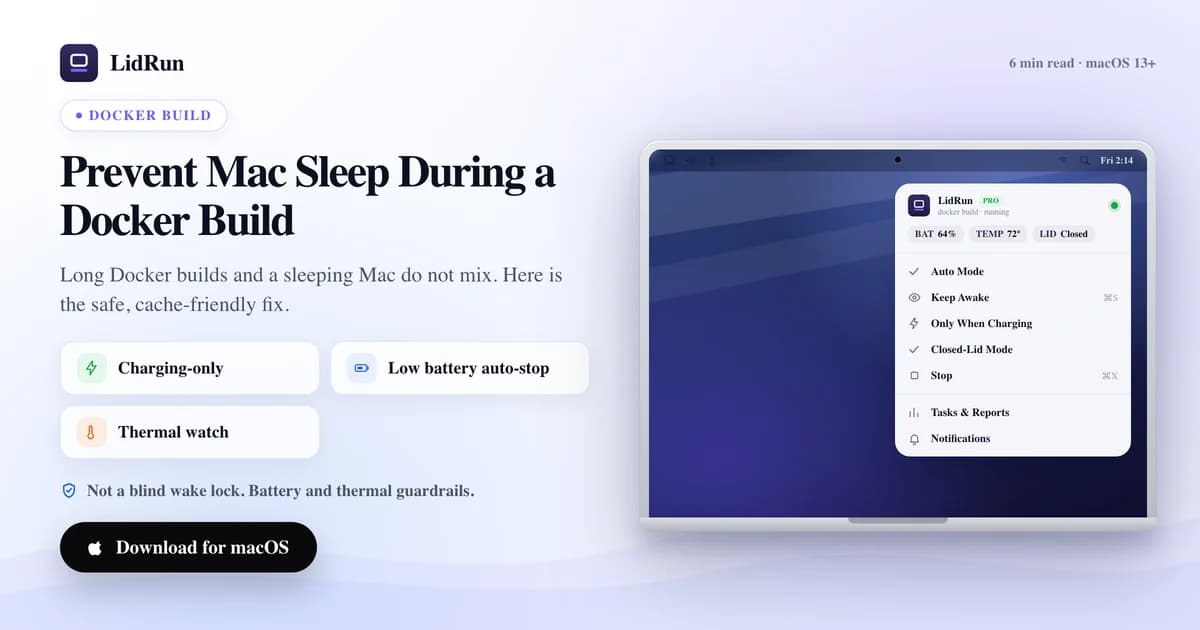
The fastest way to prevent Mac sleep during a Docker build is to wrap the build in an idle-sleep assertion: caffeinate -i docker build -t myapp . in Terminal, or LidRun's own free lidrun -- docker build -t myapp ., which does the same thing without a license. Both stop the Mac's idle timer from cutting off a build that can run for many minutes of sustained CPU work — but neither one watches your battery, watches the heat a long compile generates, or keeps a lid-closed build running by itself. Here's the free command-line fix, where it falls short on a real build, and how LidRun adds a safety layer on top of it.
Why sleep cancels a Docker build
A docker build runs in the background while you switch to something else — read code, answer a message, close the lid to walk to another room. That's exactly the situation where a default idle timer or a closed lid triggers sleep.

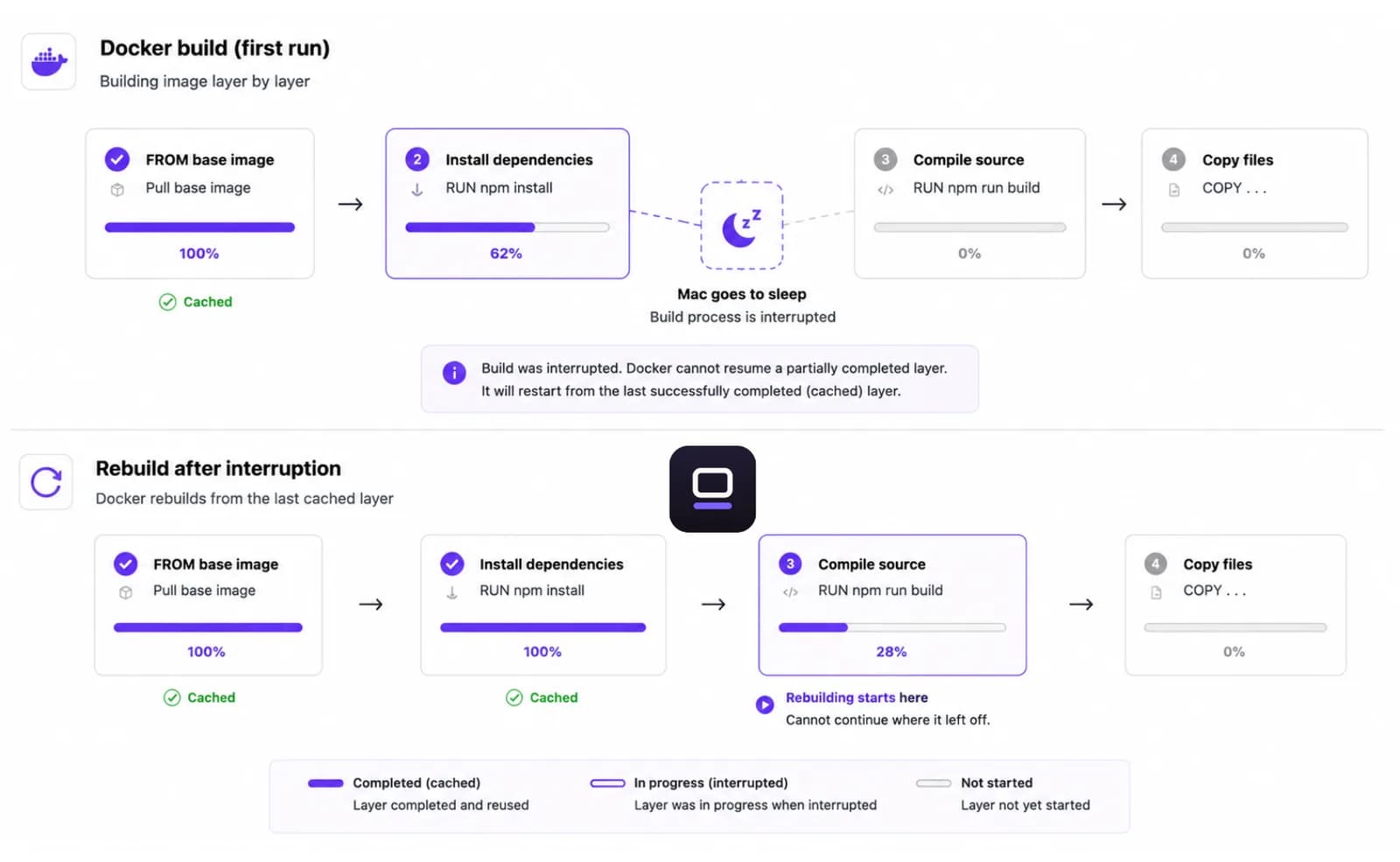
Sleep doesn't pause a build politely and pick back up. It cuts the process off mid-layer. Depending on where it stopped, you lose the layer cache you were waiting on and rebuild from further back than you'd like — sometimes the whole dependency-install layer, sometimes just the last RUN step.
The builds that actually hit this are multi-stage images with a slow dependency install or a big compile step, and cross-architecture builds — docker buildx build --platform linux/amd64,linux/arm64 -t myapp . runs each target through emulation on a Mac and can take several times longer than a native build. Those are exactly the runs that outlast a default idle timer.
The free, native fix: caffeinate and pmset
Two commands already on every Mac handle the common case, no install required. caffeinate -i docker build -t myapp . runs the build as caffeinate's child process, holds a 'prevent idle sleep' assertion for as long as it runs, and releases it automatically the moment docker build exits — success or failure. If the build is already running somewhere else, caffeinate -w <pid> attaches to that process id instead of starting a new command.
LidRun ships the exact same trick as a free CLI command: lidrun -- docker build -t myapp . grabs the identical macOS assertion (kIOPMAssertionTypePreventUserIdleSystemSleep — the same one caffeinate's -i uses) around the child process and releases it when the command exits. It needs no license and no app running in the background; it's a self-contained wrapper, the same idea as caffeinate with LidRun's name on it.
For a build kicked off in a terminal tab you're about to walk away from, sudo pmset noidle blocks idle sleep system-wide until you Ctrl-C it — no target command, just a blanket hold you're responsible for ending yourself.
Where caffeinate and pmset fall short on a real build
Neither command watches temperature or battery. caffeinate -i and lidrun -- ... hold the assertion at the same strength whether the SoC is idling cool or running hot, and whether the battery is at 80% or 3% — they have no opinion, they just hold until the wrapped command exits.
An idle-sleep assertion doesn't override lid-closed sleep. Close the lid mid-build without an external display attached and the Mac still sleeps out from under caffeinate or the CLI wrapper — that needs sudo pmset disablesleep 1, which affects the whole Mac's sleep behavior, not just the build. Forget to run pmset disablesleep 0 afterward and the Mac won't sleep on its own again, lid open or closed, until you do.
None of these clean up after themselves if you forget about them. A spare terminal tab still running caffeinate or pmset noidle from an hour-old build keeps the Mac awake — and on battery, warm — long after there's anything left to protect.
How LidRun adds the safety layer
The full LidRun app does the same detection with a governor watching over it. Auto Mode ships with docker and docker-compose already in its default watch list, so a build shows up the moment it starts — nothing to configure. Auto Mode also checks CPU: a matched process needs to clear roughly 20% CPU (the default threshold) before it counts as active, with about a minute of holdoff so a brief lull doesn't drop the hold mid-build.
That CPU check is usually a non-issue for a build's own compiler and package-manager processes, but depending on your Docker Desktop setup the heavy lifting can happen inside a background VM process while the docker client itself sits closer to idle streaming output. That's what the built-in "Docker → keep awake + balanced cooling" Smart Rule is for: it fires on docker simply being present, no CPU floor, and turns on Keep Awake plus a balanced cooling profile the moment it sees one running.
On top of detection, LidRun's Safety Governor watches the same build. If the SoC hits the critical thermal level, it releases the keep-awake hold immediately, on every mode and every power source. If it stays critical and you've stepped away — or the lid is closed — it escalates to letting the Mac actually sleep instead of leaving the fans to fight a losing battle. A present user with the lid open is never force-slept on heat alone; LidRun releases the hold so macOS can decide, it doesn't cut the session out from under you.
Battery gets the same graduated treatment: by default LidRun warns around 15%, escalates at 5%, and won't hold past a floor that can't go below 4% — a controlled stop beats an uncontrolled one. That baseline auto-stop is free for everyone; Pro adds the ability to tune each threshold. It's the same trade LidRun makes everywhere else: agent — or build — running, stay awake; done or unsafe, release.
Setting it up for a Docker build
Free, no license: lidrun -- docker build -t myapp . from Terminal gives the same protection as caffeinate -i, just with LidRun's own binary. It works standalone — the full app doesn't need to be open.
With the app open, Auto Mode already has docker in its default list, so a build gets picked up without touching Settings. If you'd rather use the presence-based version — useful when the client process itself runs cool — open Smart Rules from the menu and turn on the built-in "Docker → keep awake + balanced cooling" rule. Auto Mode and Smart Rules are Pro features; Keep Awake, Timer, and Charging-only run stay free and unlimited either way.
For a build you want to survive a closed lid, pair either of the above with Closed-Lid mode (also Pro), on a hard, ventilated surface and mains power. Closed-Lid mode is the only thing in the app allowed to call pmset disablesleep, and it always pairs the 'on' with a matching 'off' — on stop, on quit, and on the next launch — so reverting it isn't something you have to remember yourself.
For a one-off multi-platform build from a script, the CLI wrapper is usually simplest: lidrun -- docker buildx build --platform linux/amd64,linux/arm64 -t myapp . holds the Mac awake for exactly as long as the cross-architecture build takes and lets go the moment it's done.
When you actually need this
This is for the long ones — a from-scratch image, a CI-style full rebuild locally, a multi-platform buildx run through emulation, a base image you're iterating on that takes real time. Those are the builds that outlast an idle timer and are worth protecting.
A quick rebuild with a warm cache finishes in seconds and never gets near a sleep timer — none of this is needed for day-to-day iteration.
If a long build has died to a lid close or an idle timeout more than once, that's the signal: reach for the free CLI wrapper on a single run, or the full app with Auto Mode and the thermal watch running in the background if you'd rather it was handled without thinking about it.
Tips for heavy builds
Plug in for big builds. Sustained CPU — or, with buildx, emulated CPU across two architectures at once — drains a laptop fast, and mains power keeps the safety governor's attention on heat rather than charge.
Keep the Mac on a hard, ventilated surface, particularly with the lid closed. The heat from a long compile has to go somewhere, and a bag or a soft surface blocks the vents that would carry it away.
Treat multi-platform buildx builds as the 'long build' case even when the equivalent native build usually finishes fast — cross-compiling through emulation runs hotter and takes noticeably longer per target architecture.
If a build can hang or loop — a flaky RUN step retried indefinitely, a docker compose up left without --build — don't let it hold the Mac awake indefinitely by accident. The CLI wrapper releases the instant the command exits either way, and a Smart Rule's cooldown keeps LidRun from re-triggering nonstop on a crash-looping container.
LidRun keeps your work running with the lid closed, with battery and thermal safety built in.
Already have LidRun? Read the setup guide →
Frequently asked
Yes, while battery and thermal state stay within the active thresholds — by default a warn around 15%, escalation at 5%, and a force-sleep floor that can't go below 4%. If a limit is reached, or the SoC hits the critical thermal level, LidRun releases the hold (and, if you've stepped away or the lid is closed, lets the Mac actually sleep) rather than pushing through.
Mechanically, not much for a single command — LidRun's own lidrun -- docker build ... CLI holds the identical idle-sleep assertion caffeinate's -i flag uses, and it's free. The difference shows up once the full app is running: Auto Mode and the built-in Docker Smart Rule pick the build up without you typing a wrapper command, and the Safety Governor adds thermal and battery awareness that plain caffeinate doesn't have — caffeinate holds its assertion at the same strength no matter how hot the Mac gets.
The plain lidrun -- docker build ... CLI wrapper is free and needs no license — same idea as caffeinate. Automatic detection inside the app (Auto Mode's default watch list, and the built-in Docker Smart Rule) is part of LidRun Pro. Keep Awake, Timer, and Charging-only run stay free and unlimited either way.
With Closed-Lid mode on (Pro), yes, as long as conditions stay within your battery and thermal limits — a hard, ventilated surface and mains power are strongly recommended. Without Closed-Lid mode, closing the lid puts the Mac to sleep regardless of what caffeinate, lidrun -- , or Auto Mode are holding, because none of those override lid-closed sleep by themselves.
If a safety threshold ends the session — or the lid closes without Closed-Lid mode on — the build stops like any interrupted build, and you may lose the layer you were on. Keeping it plugged in, cool, and inside whichever keep-awake option you chose is what lets it run through to completion and keep the cache.
Not while the build is confirmed active. LidRun's unattended-idle guard only releases the hold when it has confirmed nothing is actually running — a genuinely active docker process, or one matched by the Smart Rule, keeps the hold regardless of how long you've been away from the keyboard. It's the thermal and battery limits, not idle time alone, that can end an active build early.
Not mechanically — a docker buildx build --platform ... process is still just docker to Auto Mode and the Smart Rule. The difference is practical: cross-architecture builds through emulation run longer and hotter than a native build, so they're the case most worth pairing with Closed-Lid mode, mains power, and a ventilated surface rather than running bare.