Keep Codex running overnight on a Mac
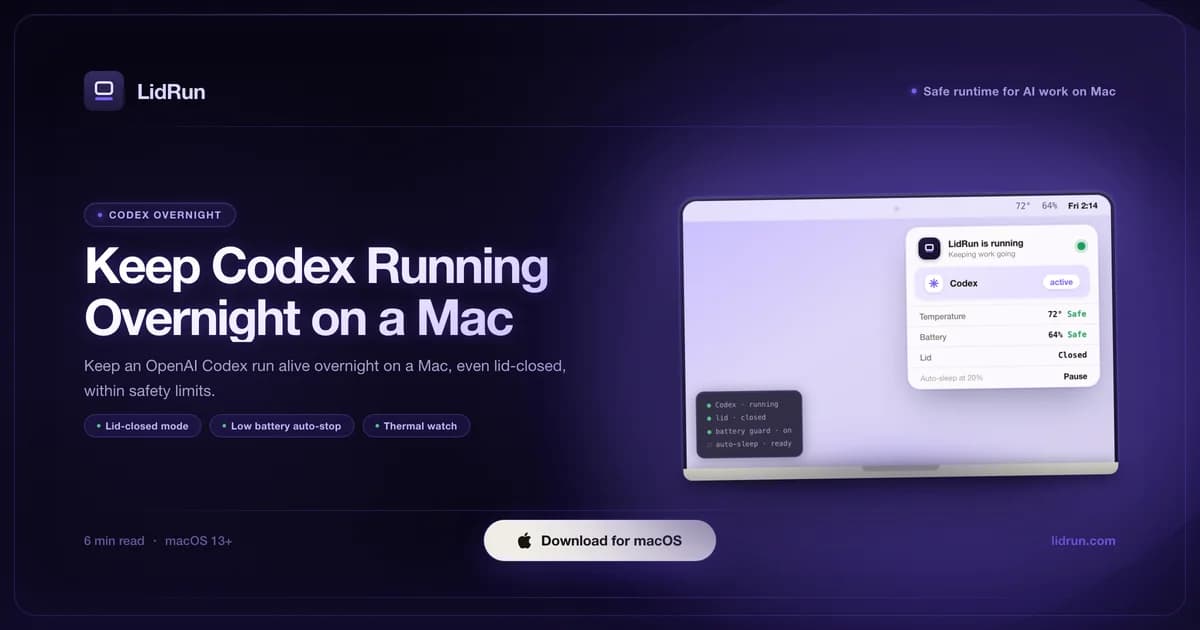
Keeping Codex running overnight on a Mac means blocking two different kinds of sleep - idle sleep and lid-closed clamshell sleep - without leaving a laptop to overheat in a bag while you're asleep. The idle-sleep half is free: caffeinate ships with macOS. The clamshell half needs pmset disablesleep, a global toggle that's easy to leave on by accident. LidRun wraps both behind one toggle plus battery and thermal guardrails that release the hold automatically, so the promise is agent running → stay awake, agent done or unsafe → release and sleep - not an unconditional wake lock.
Why an overnight Codex run stalls
macOS is built to sleep an idle laptop. After the idle timer, or the moment you shut the lid, the system suspends - and every running process suspends with it, Codex included.
Nothing is lost when that happens. The agent stops exactly where it was and waits for the next wake. But a multi-hour Codex run you wanted done by morning is now barely started, and the night is gone.
Two different mechanisms are at fault, and they need different fixes. Idle sleep fires on its own timer whenever you step away with the lid open. Lid-closed (clamshell) sleep is separate - it kicks in within seconds of shutting the lid, timer or not. Keeping Codex alive overnight means handling both, which is where a lone caffeinate command left running quietly misses half the problem.
The free way: caffeinate for idle sleep, pmset for the lid
caffeinate ships with macOS, no install required. Put it in front of however you already launch Codex - caffeinate -i codex - or, if Codex is already running, point it at the existing process with caffeinate -i -w $(pgrep -x codex). Either way it holds the same IOKit assertion, PreventUserIdleSystemSleep (that's what the -i flag asks for), that stops idle sleep, and it clears itself the moment the codex process exits. That's a real, free fix for the lid-open half of an overnight run.
The lid-closed half needs a different tool, because caffeinate does not touch clamshell sleep - closing the lid still suspends the Mac within seconds even with caffeinate running. The documented fix is sudo pmset -a disablesleep 1, which tells macOS to ignore the lid switch entirely, and it's the same primitive LidRun automates under the hood. If the Mac is on AC power with an external display connected, macOS already skips clamshell sleep at the lid on its own, no toggle needed - but that only helps at a desk, not for a laptop closed and left on a nightstand.
Put together, the fully free overnight recipe is: caffeinate -i codex before you start the run, sudo pmset -a disablesleep 1 before you close the lid, and sudo pmset -a disablesleep 0 when you're done. It works. What it doesn't do is know anything about the Mac underneath it.
Related guideA lid-closed developer workflow for the MacBookWhere the free workaround runs out
pmset disablesleep is a machine-wide, persistent setting, not something scoped to tonight's run. It has no idea Codex finished at 2 a.m. - it stays exactly as you left it until something sets it back to 0, reboot included. Forget the follow-up command in the morning and the Mac will happily stay lid-closed-awake all day for nothing.

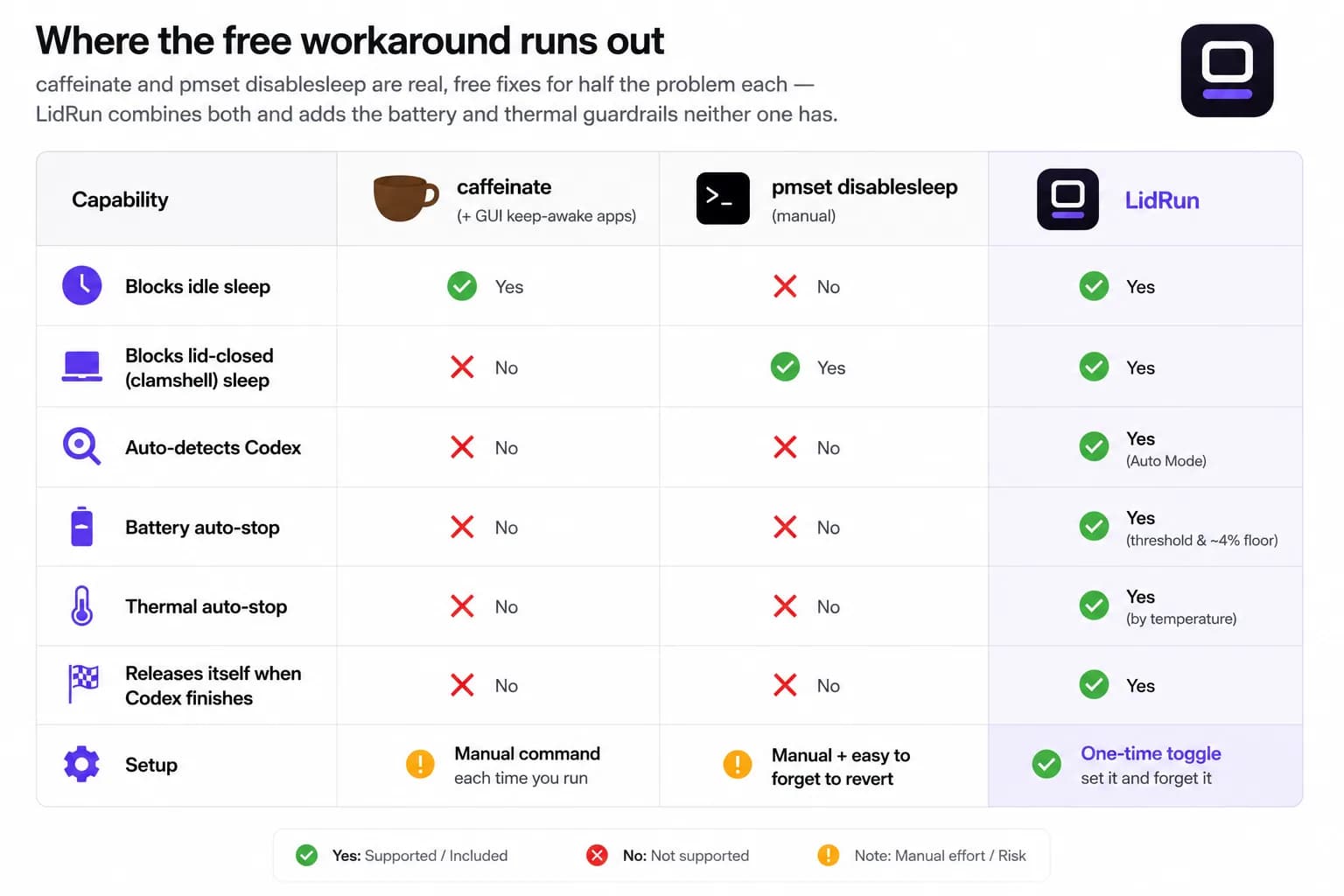
The same limit applies to GUI keep-awake tools like Amphetamine, KeepingYouAwake, Caffeine, or Lungo - a clean, free way to block idle sleep from the menu bar instead of a terminal command, and a fine choice for a lid-open session. They stop at the same wall as caffeinate: no clamshell handling, no battery or thermal awareness.
More importantly, neither caffeinate, the GUI tools, nor pmset knows anything about battery or heat. All of them hold the Mac awake unconditionally. If the charger comes loose overnight, caffeinate keeps the assertion up until the battery is flat. If disablesleep is on and the closed lid ends up under a duvet or in a bag, nothing steps in as the temperature climbs - that's the trade a blind wake lock makes: reliable, with no sense of when to stop.
That gap - real primitives, no safety sense - is what an overnight run actually needs closed.
How LidRun keeps Codex running overnight
For idle sleep, LidRun holds the same PreventUserIdleSystemSleep assertion caffeinate does - no new ground there, it's the well-trodden mechanism.
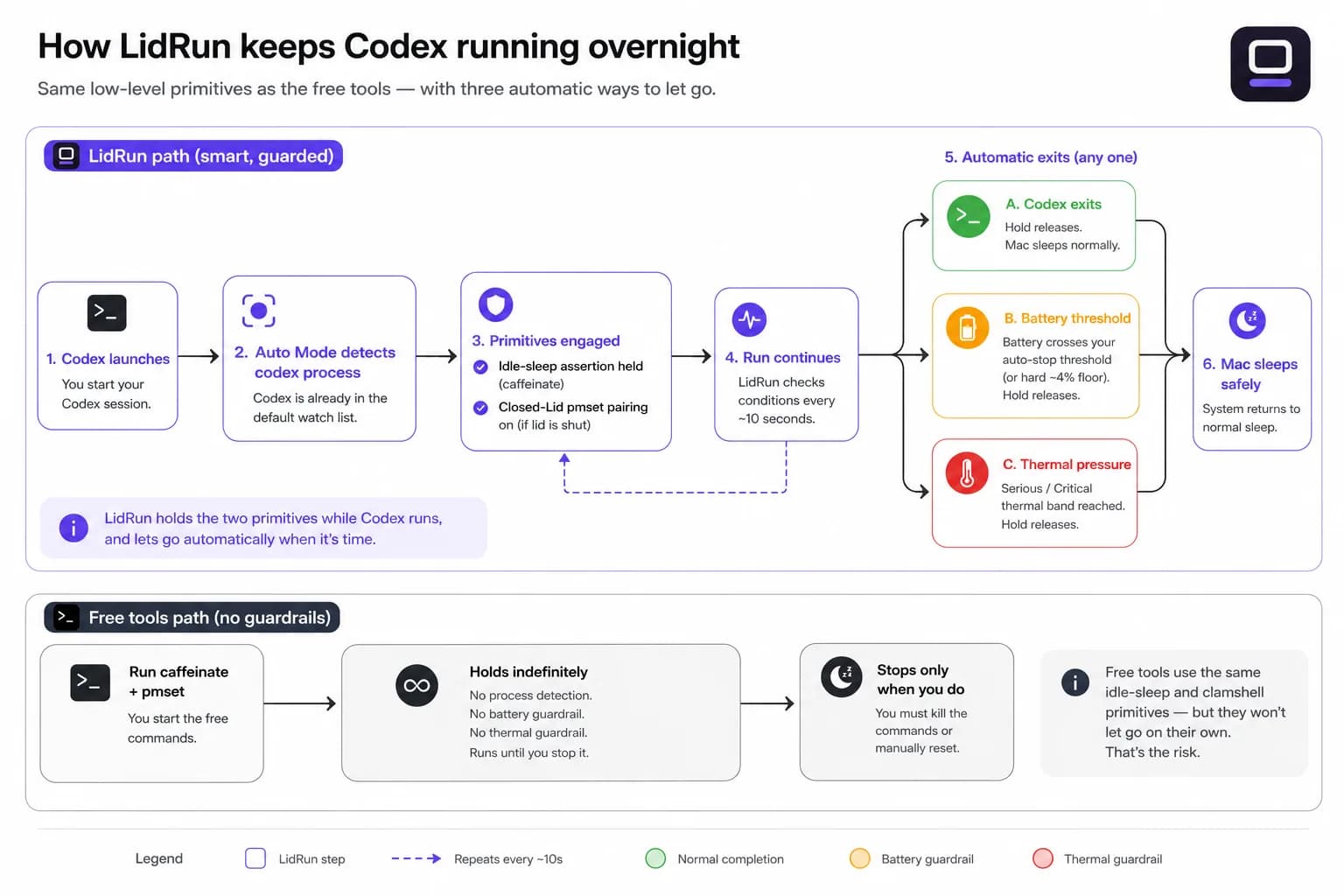
For the lid, LidRun automates the same pmset disablesleep toggle, but asks for it once through a native macOS admin prompt and always pairs it: on when you start a Closed-Lid session, off again when you stop, when you quit the app, and reconciled on next launch if it ever crashed mid-session - so it can't be left dangling the way a forgotten terminal command can.
For Codex specifically, Auto Mode already ships with codex in its default watch list - nothing to type in. It checks the process list every 10 seconds; the moment codex is no longer running, the hold releases and the Mac is free to sleep on its normal timers again. That's the honest version of the promise: agent running, stay awake; agent done, sleep - not a wake lock that outlives the thing it was holding open for.
The guardrails are the actual addition over the free path. Battery auto-stop defaults to 20% and is yours to move, but there's also a hard floor - around 4% - that fires regardless of what you've set, so a run can't run the battery to zero. On heat, LidRun reads real SMC temperature and CPU throttle rather than the coarse system thermal-state API alone, treating the Mac as under real pressure around 98°C or a throttle below 50%, and stepping back around 100°C or a throttle below 30%. None of this claims a closed lid can't get warm overnight - it can, a shut lid traps heat by design - the guardrails exist to release before that becomes a thermal shutdown, not to promise it never gets close.
Setting up an overnight Codex session in LidRun
Switch on Auto Mode. Codex is already in the watch list by default, so there's nothing to configure before you start the run - launch Codex and LidRun picks it up on the next scan.
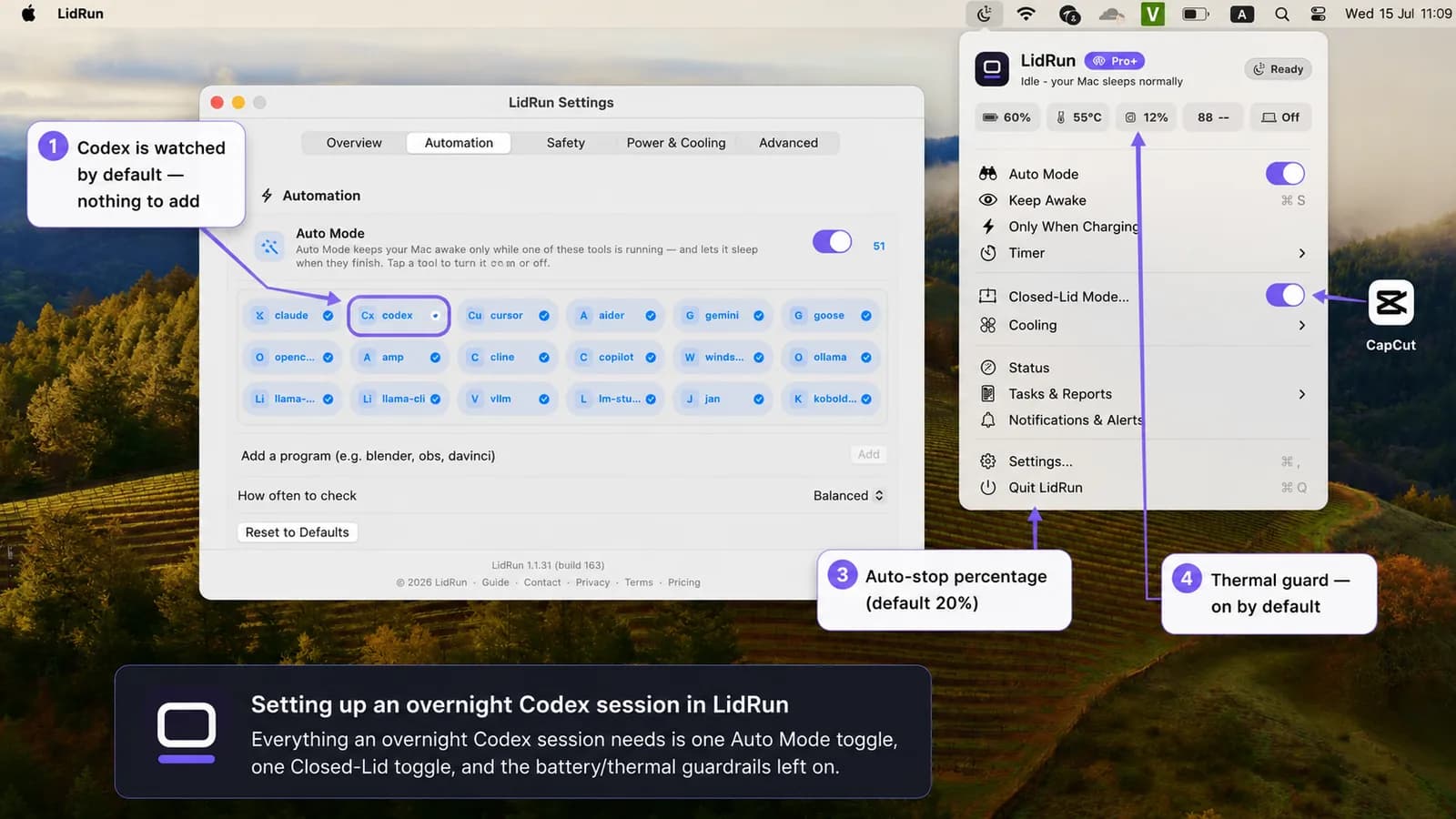
If you're closing the lid, turn on Closed-Lid mode alongside it. That's the toggle that puts the pmset disablesleep pairing in effect for the session, and takes it back out again when the session ends.
In Settings, leave the battery auto-stop percentage and the thermal guard switched on - they default to on for a reason. If you'd rather cap the whole thing at a fixed length instead of leaving it open-ended, Timer mode does that on its own schedule, releasing the hold when it expires whether or not Codex is still going. Auto Mode and Closed-Lid are part of LidRun Pro; the base Keep Awake, Timer, and Charging-only modes - with the battery auto-stop included - are free with no session cap.
When it's worth it, and when it isn't
If the Codex task finishes in a few minutes, none of this is necessary - leave the lid open and let it run.
Overnight keep-running earns its place for the long jobs: a large refactor, a batch of agent tasks, anything leaning on a slow model or a big repo - the kind you want finished by morning without sitting over it.
It's most worth turning on when the alternative is propping the lid open just so the run survives until you wake up, especially with the Mac on battery or somewhere that traps heat overnight.
A safe overnight setup checklist
Keep the Mac plugged in. Overnight runs on battery are possible - the low-battery auto-stop applies either way - but mains power removes the drain question entirely.
Put it on a hard, flat, ventilated surface. A closed lid already traps some heat by design; a bed, a couch cushion, or a bag makes that worse, and no software fixes airflow that isn't there.
Leave the guardrails on and let the session end itself - whether Codex finishes early, the battery drops below your floor, or the heat climbs - rather than relying on being awake to stop it yourself.
LidRun keeps your work running with the lid closed, with battery and thermal safety built in.
Already have LidRun? Read the setup guide →
Frequently asked
Yes. codex is in Auto Mode's default watch list, so there's nothing to add. Start Codex and Auto Mode holds the Mac awake for as long as the process is running, then releases the hold once it exits.
caffeinate blocks the same idle-sleep assertion LidRun uses, and it's genuinely free - for a lid-open run it's a fine choice. It doesn't touch lid-closed clamshell sleep, and neither caffeinate nor pmset disablesleep knows about battery or heat; both hold the Mac awake unconditionally until you stop them by hand. LidRun adds the clamshell handling plus the battery and thermal thresholds that release the hold on their own.
Safer with the guardrails on, the Mac plugged in, and on a ventilated surface - but a closed lid traps heat by design, so treat this as risk reduction, not a guarantee. Keep it out of a bag or under bedding, and leave the thermal guard on so the session steps back on its own if it gets close to real thermal pressure.
The battery auto-stop defaults to 20% and you can move it, but there's also a hard floor around 4% that always fires no matter your settings, so a run can't drain the Mac to zero. On heat, LidRun treats sustained pressure - roughly 98°C or the CPU throttled below 50% - as serious, and steps back at true critical pressure, around 100°C or throttle below 30%.
LidRun auto-stops below the battery threshold you set, so a long run doesn't run to zero. For an overnight session specifically, plugging in is still the calmer choice - it removes the drain question rather than managing it.
With Auto Mode, LidRun releases the wake lock the moment the codex process exits and lets the Mac sleep again on its normal timers. Timer mode gives the same outcome on a schedule you set, whether or not Codex is still running when it expires.