Why caffeinate isn't enough for closed-lid AI workflows
No - caffeinate only blocks idle sleep, and a closed lid triggers a different kind of sleep entirely, so an unattended AI agent or model job can die the moment you shut the lid and walk away. Here is exactly why that gap exists, the free command that closes it, the risk that command carries, and what a safer closed-lid workflow adds on top.
What caffeinate actually blocks
caffeinate is a small, dependable tool that ships with macOS at /usr/bin/caffeinate. Run caffeinate -i and it creates an assertion that prevents idle system sleep; -d keeps the display on; -s holds system sleep off, but only while the Mac is on AC power; -m stops the disk from idle-sleeping. Wrap a command with it - caffeinate -i make - and if you don't specify a flag, caffeinate assumes -i for you, holding the assertion for exactly as long as that process runs.
Under the hood, that's a call to IOPMAssertionCreateWithName requesting an assertion type like PreventUserIdleSystemSleep - the same low-level primitive LidRun's own lid-open Keep Awake mode is built on. This isn't a knock on caffeinate; it's the right tool, built correctly, for the thing it targets.
For a long build, a big download, a test suite, or an overnight Codex or Claude Code run with the lid open, that one line is genuinely enough. There's no reason to reach for anything heavier.
The word worth noticing is idle. caffeinate blocks the sleep that happens when you step away from an open laptop and macOS decides you're not using it. That's one specific kind of sleep - not all of them.
Why a closed lid is a different problem
Closing the lid doesn't trigger idle sleep - it triggers clamshell sleep, a separate, lower-level macOS behavior. Unless an external display, AC power, and a keyboard or mouse are actively driving a true closed-display desktop, macOS suspends the machine within seconds of the lid shutting, assertion or not.

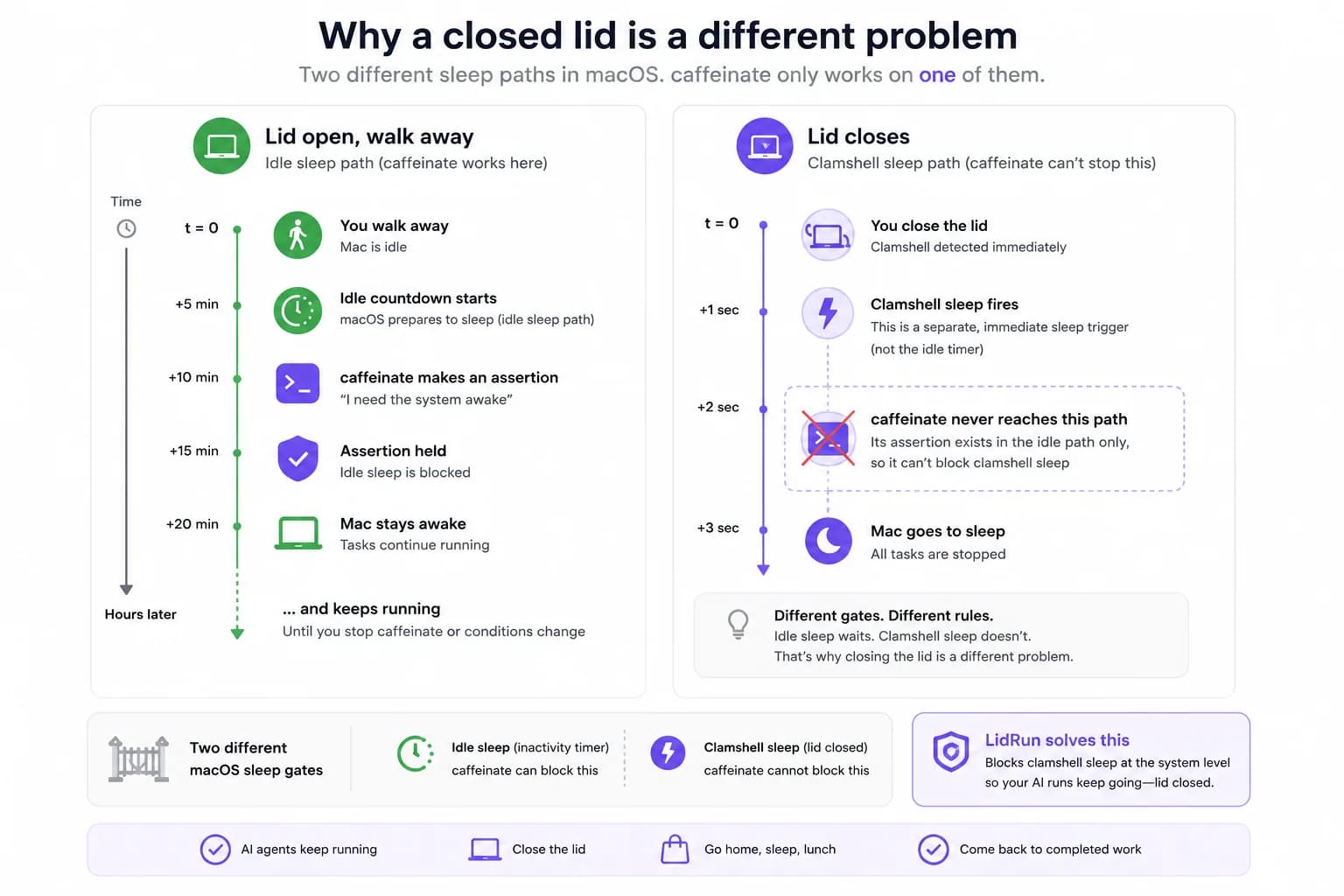
No IOPMAssertionCreateWithName-based assertion reaches that path - not caffeinate's, and not any app built on the same primitive. Even -s, caffeinate's strongest flag, is explicitly scoped in its own man page to "valid only when system is running on AC power," and it still says nothing about the lid.
So the increasingly common case - start an agent or a fine-tune job, close the laptop, walk into another room - leaves the run suspended the instant the lid shuts. caffeinate is still faithfully holding its assertion; the lid still wins, because idle sleep and clamshell sleep are answering two different questions.
Related guideClosed-lid mode on macOS, without a kextThe free fix: pmset disablesleep
The one documented, public lever that changes lid-close behavior on battery, without an external display, is the pmset disablesleep setting. The command is: sudo pmset -a disablesleep 1 lets the lid close without the Mac sleeping, and sudo pmset -a disablesleep 0 puts lid-close sleep back to normal.
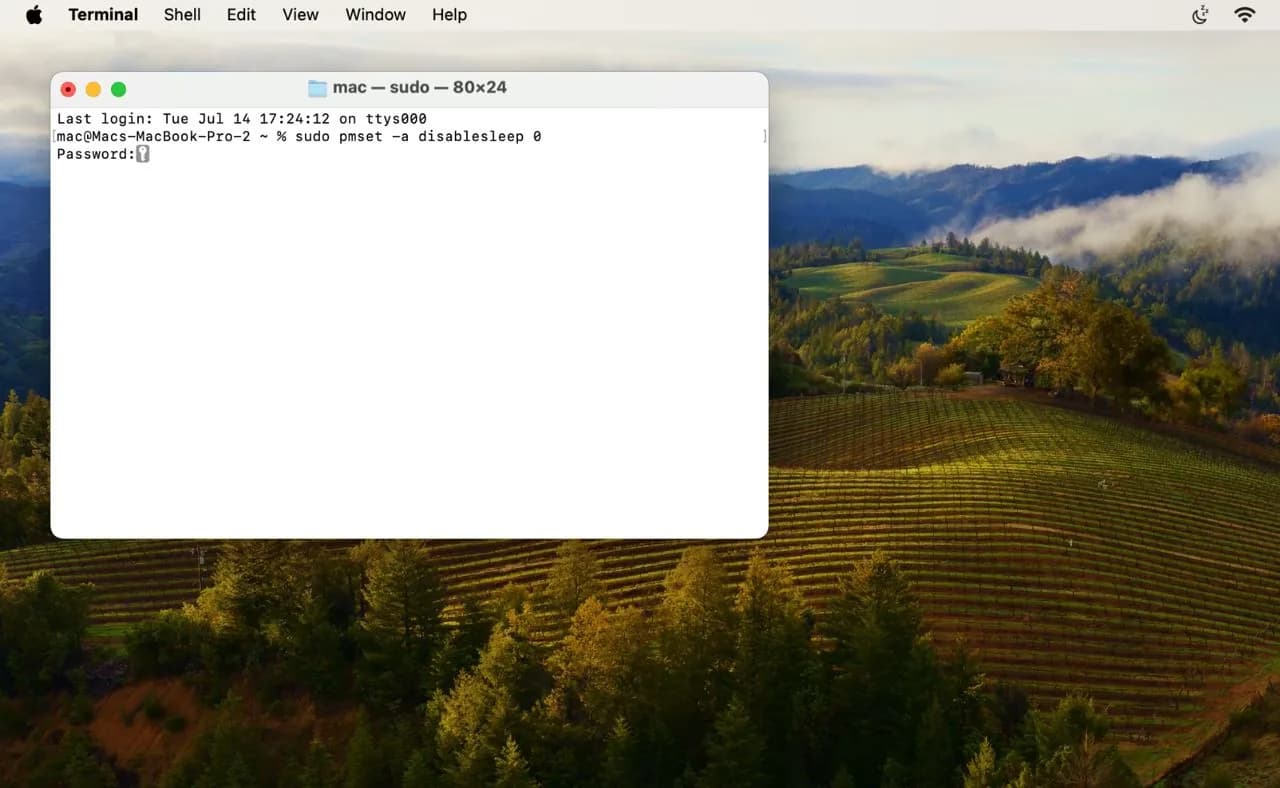
It asks for your admin password when you run it by hand (the -a flag makes it apply system-wide), and it takes effect immediately - no reboot required.
That's the actual mechanism LidRun's Closed-Lid mode flips under the hood, and running it yourself for a single overnight job costs nothing and works. If this is a one-off, that's often genuinely enough.
The risk of doing it by hand - and why other keep-awake apps hit the same wall
The catch is what pmset disablesleep doesn't do on its own: it's a global, persistent setting. It isn't scoped to your terminal session or the process you set it for - it stays on 1 until you explicitly flip it back to 0 or restart the Mac. Forget the second command, or have the terminal window or app you ran it from crash before you get to it, and the Mac will refuse to sleep with the lid closed - even sitting idle in a bag - until you notice and fix it by hand.
And with the lid closed, a Mac that's still awake can't dissipate heat the way it does lid-open. Running a session inside a sealed backpack is the case worth being careful about, regardless of which tool set disablesleep - the honest rule is to keep a running Mac ventilated, not sealed.
This also isn't a gap a nicer caffeinate replacement closes. Amphetamine, KeepingYouAwake, Lungo, and Caffeine are all solid, well-built menu-bar tools with real strengths - cleaner UI, session timers, app-triggered rules - but every one of them works through the same idle-sleep IOKit assertion primitive caffeinate does. None of them override clamshell sleep either: a closed lid on battery still sleeps the Mac under Amphetamine or KeepingYouAwake exactly the way it does under a bare caffeinate -i. That's not those apps missing a feature - overriding lid-close sleep needs the pmset disablesleep escalation (or an external-display clamshell setup), not a nicer assertion wrapper.
What a safer closed-lid AI workflow actually needs
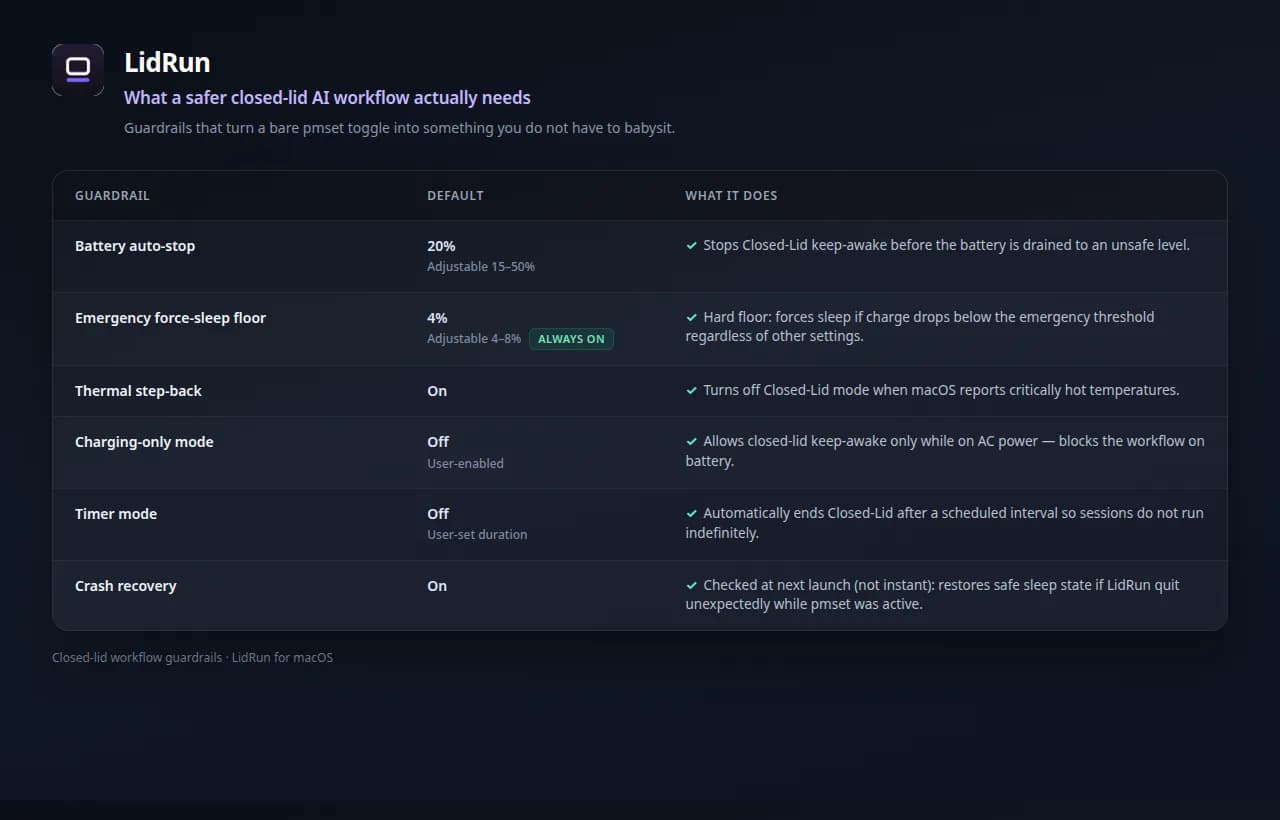
Flipping disablesleep by hand gets one job through the night, but "stays awake no matter what" is the wrong target for something running closed, on battery, possibly unattended. What that setting actually needs on top of it is reliable cleanup and limits that respect the battery and the heat.
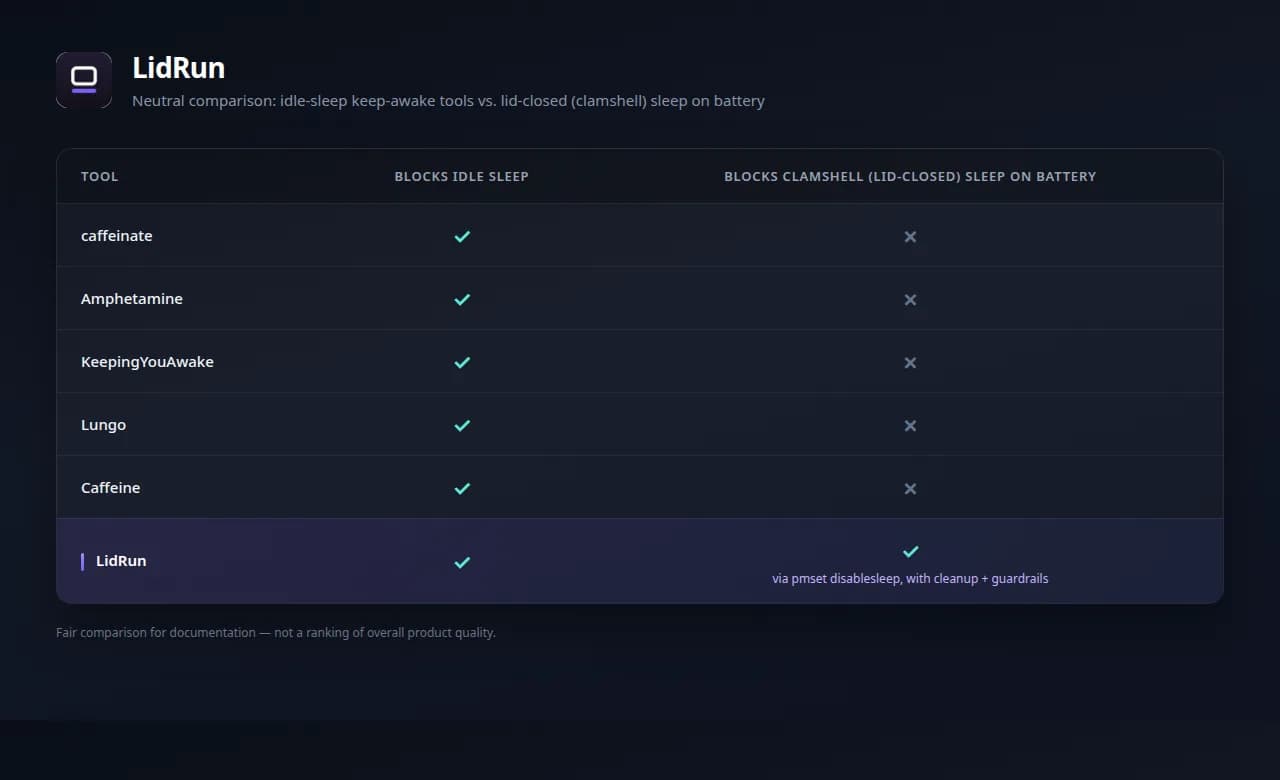
On cleanup: LidRun pairs enabling disablesleep with disabling it again on every stop, quit, and normal termination, and - once you've approved its privileged helper - does that without an admin password each time. If the app is killed before it can clean up, a small heartbeat file records that Closed-Lid was armed; the next time LidRun launches, it checks for that leftover state and resets disablesleep to 0. That reset happens at the next launch, not the instant a crash occurs, which is worth knowing rather than assuming.
On the battery: keep-awake auto-stops below a threshold you set, 20% by default and adjustable between 15% and 50%. Underneath that sits a separate emergency force-sleep floor - default 4%, adjustable between 4% and 8% - that runs regardless of the auto-stop setting, because macOS needs some headroom to actually finish sleeping before the battery runs out.
On heat: when macOS's own coarse thermal signal reports the chip is critically hot, LidRun turns Closed-Lid mode off by default and tells you why - the Mac got too hot, open the lid or improve airflow - rather than leaving a sealed, closed Mac to keep cooking. That's a step-back, not a claim that a closed Mac can't overheat; the underlying rule is still to keep a running Mac ventilated.
There are also charging-only and timer modes for runs where you'd rather the assertion only exist while plugged in, or expire on its own after a fixed window, instead of counting on you to remember to stop it. Put together, that's the shape of the promise: agent running, stay awake; agent done, or the run becomes unsafe, release and let the Mac sleep. Not a blind wake lock arguing with the battery and the thermal sensor - safety wins over convenience when the two disagree.
Using caffeinate (or Amphetamine) and LidRun together
This still isn't caffeinate versus LidRun. caffeinate is excellent at the job it was built for, and plenty of workflows never need more than its one-liner - the same is true of Amphetamine, KeepingYouAwake, or Lungo for lid-open keep-awake with a nicer menu-bar UI.
If you keep the lid open, caffeinate -i (or whichever of those apps you already like) is often the simplest answer. If you close the lid on long AI and dev runs and want battery and thermal guardrails around that, that's the specific gap LidRun fills.
Plenty of people run both: caffeinate for quick command-scoped tasks at the terminal, LidRun for the unattended closed-lid runs where forgetting to flip a system-wide setting back off actually matters.
LidRun keeps your work running with the lid closed, with battery and thermal safety built in.
Already have LidRun? Read the setup guide →
Frequently asked
Not on its own. caffeinate blocks idle system sleep; closing the lid triggers clamshell sleep instead, which no idle-sleep assertion - caffeinate's included - can touch. You need the pmset disablesleep path (or an external display actively driving a true clamshell desktop) for that.
Not at all. It's a reliable built-in tool and the right choice for plenty of lid-open keep-awake needs. The point here is scope, not quality: it was never built to handle a closed lid, and its own man page says as much - even its strongest flag, -s, is only valid on AC power and never mentions the lid.
It's the real, documented command: set it to 1 before closing the lid, back to 0 when you're done. It works, and for a single overnight job, running it by hand is fine. The risk is that it's global and persistent - it stays on until you explicitly turn it off or restart the Mac, so a forgotten cleanup, or a crash before you get to it, leaves the Mac unable to sleep with the lid closed until you notice and fix it.
No further than caffeinate does. They're good menu-bar keep-awake tools built on the same idle-sleep assertion primitive, and none of them override clamshell sleep on battery. A closed lid still sleeps the Mac under any of them unless pmset disablesleep, or an external-display clamshell setup, is also in play.
The toggle reliably turned back off, including after a crash; a battery floor so a long unattended run doesn't drain the pack to empty; a thermal step-back so a sealed, closed Mac doesn't keep pushing heat; and ideally charging-only or timer options so you're not relying on memory to stop it.
Yes. They sit side by side fine - caffeinate for quick, command-wrapped, lid-open tasks; LidRun for the closed-lid, unattended runs where the disablesleep cleanup and the battery and thermal guardrails matter.