Can you use a MacBook as a server with the lid closed?
Yes - a MacBook can work as a server with the lid closed, serving local APIs, LLM endpoints, and reverse tunnels. But "keep the Mac awake" undersells what's actually needed: closing the lid on battery fires a different sleep trigger than the one most keep-awake tools block, so the real question is which lever stops that trigger - and what happens if you forget it's on.
Running a local dev server on a closed MacBook
A MacBook can serve local HTTP traffic, LLM inference requests, and reverse-tunnel connections with the lid closed - the hardware and the process underneath don't care whether the display is up. Flask, FastAPI, Next.js, a local Ollama endpoint, an ngrok or cloudflared tunnel: none of that code changes when you close the lid. The limitation is entirely macOS's sleep policy, not the chip.

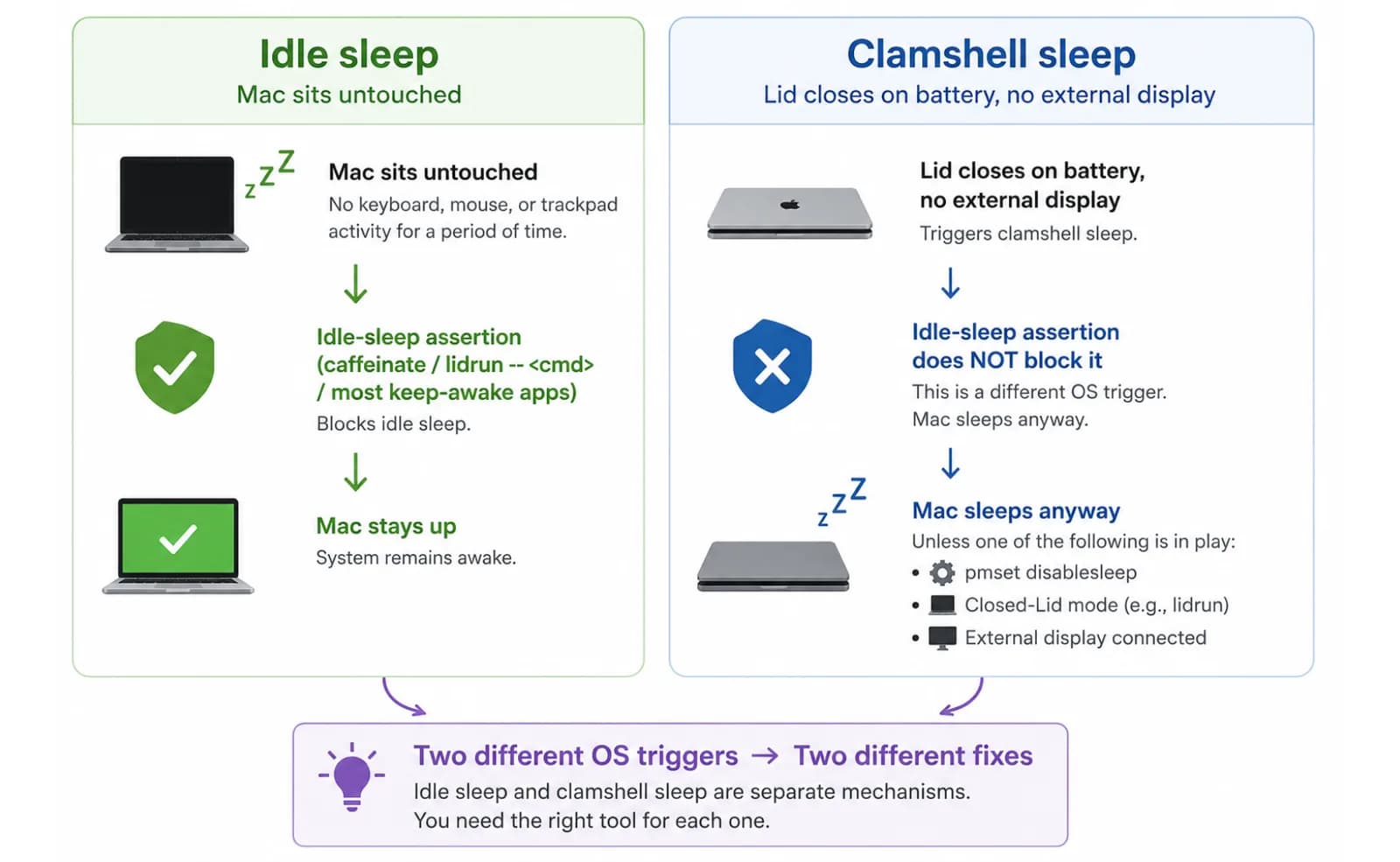
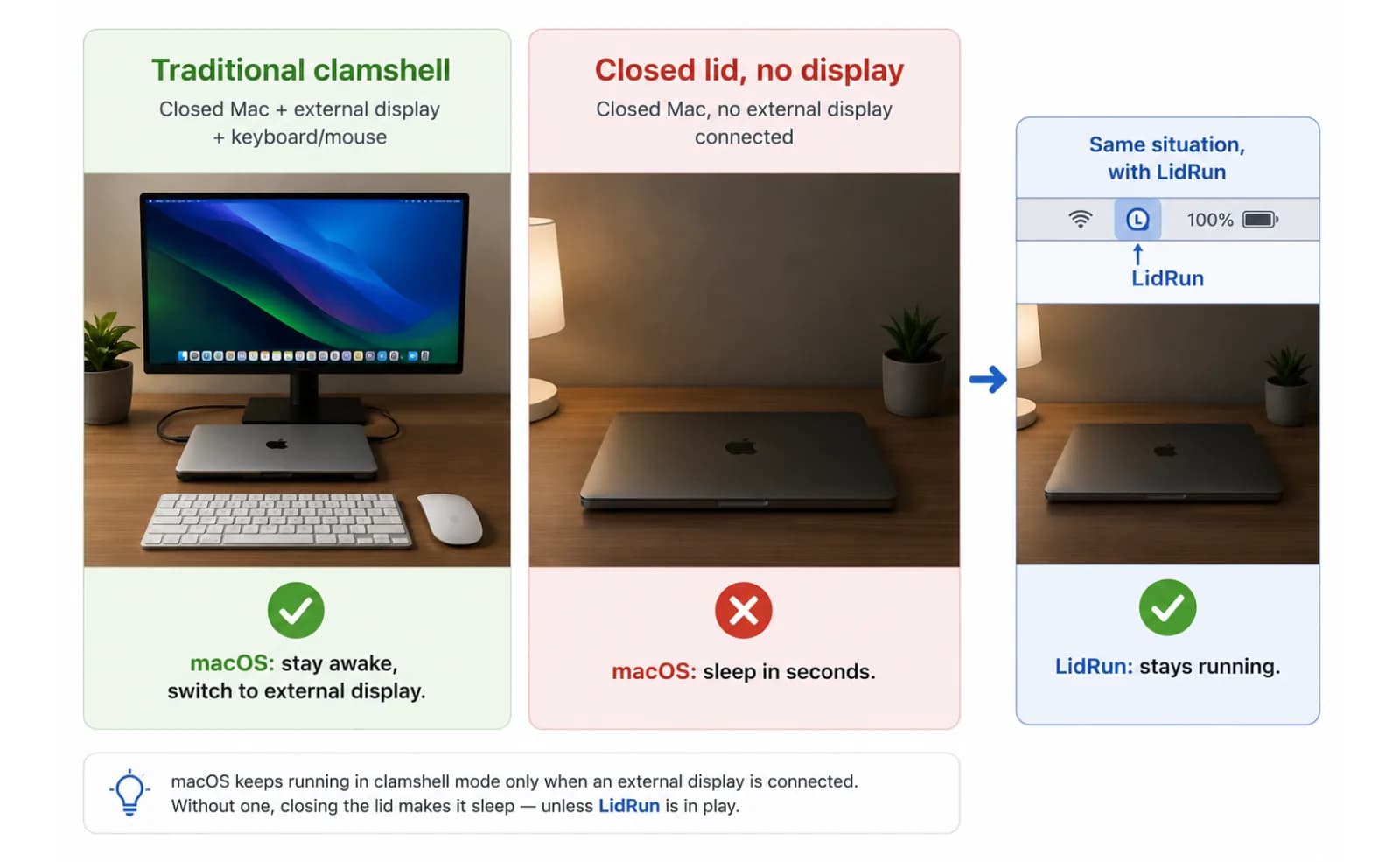
What macOS actually does is more specific than "it goes to sleep." Two different sleep triggers are involved. Idle sleep is the one caffeinate, a basic keep-awake app, and most menu-bar utilities are built to block - it's what happens when the Mac has sat untouched for a while, lid open or closed. Clamshell sleep is a separate, lower-level trigger fired by the lid switch itself when you're on battery with no external display attached. Blocking idle sleep does not block clamshell sleep. Close the lid on battery with only an idle-sleep assertion held, and the Mac still sleeps - the server, the tunnel, whatever was listening on a port, all suspend with it. The client on the other end just sees a timeout; nothing crashed, it's paused until the lid opens again.
That distinction is the real answer to "can I run a server with the lid closed": yes, but only if whatever you're using addresses clamshell sleep specifically, not just idle sleep. A basic power assertion - the mechanism behind caffeinate, lidrun -- <command>, and most keep-awake apps - covers idle sleep. That's genuinely useful for a Mac you're actively at, or one connected to an external display. With the lid actually down and the Mac running on battery, it isn't enough on its own.
One thing that does stay consistent either way: when the Mac is genuinely kept from sleeping - not just idle-blocked - its network stack behaves exactly as it would with the lid open. Wi-Fi stays associated, and anything listening on a port answers immediately, whether the request comes from another device on your LAN or through a tunnel. The moment the Mac actually sleeps, that stack goes quiet and stays quiet until you physically open the lid.
The free, built-in ways to stop lid-close sleep
macOS ships two command-line levers, and it's worth knowing what each one actually covers before reaching for a third-party app. caffeinate -d -i -s (or caffeinate -s while a foreground process runs) holds the same idle-sleep assertion any keep-awake app does - free, built in, no install. It's a genuinely good fit for a terminal session tied to one long-running command. It has the same limit described above: it doesn't touch clamshell sleep, so it won't keep a closed lid on battery from sleeping.
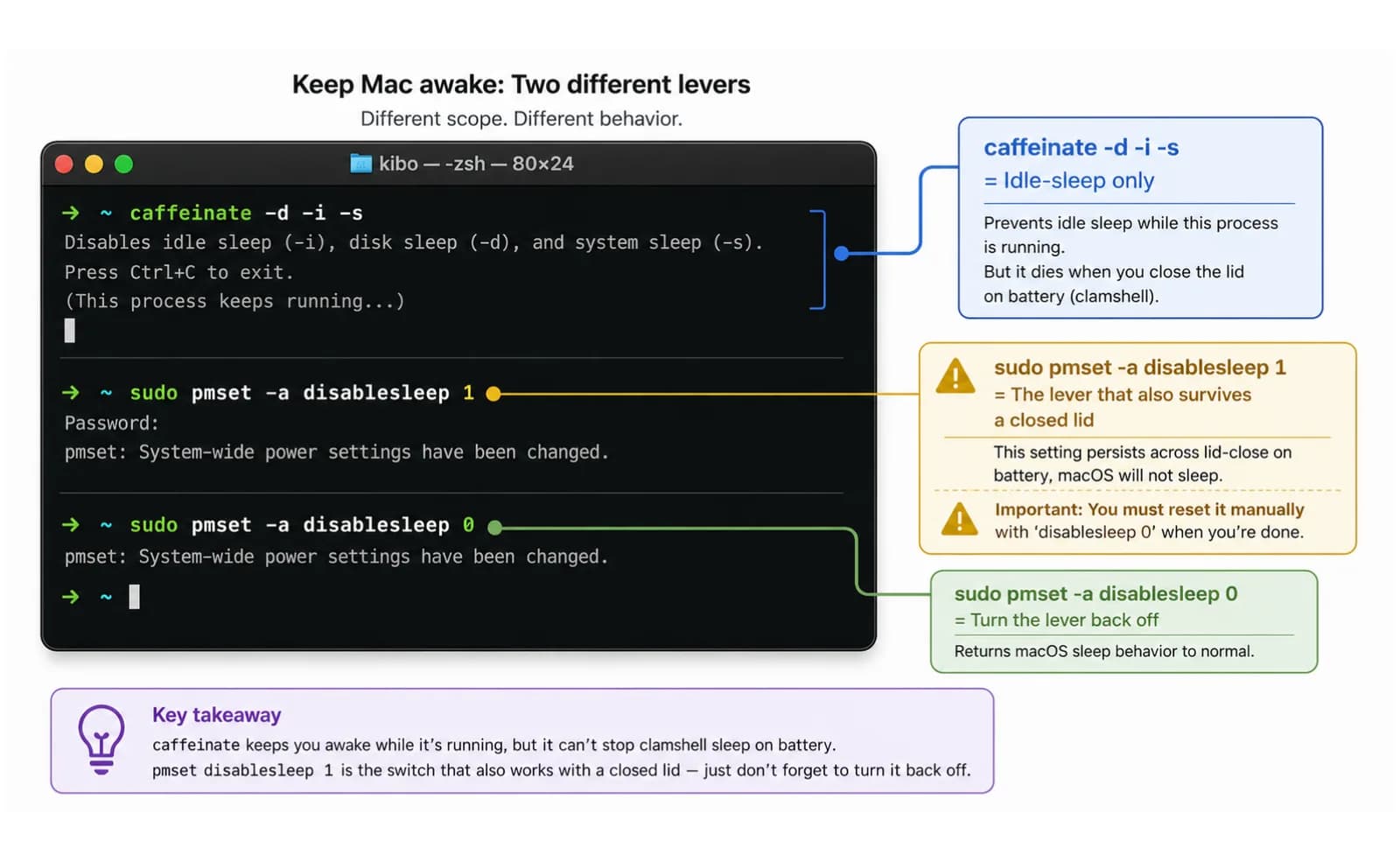
The lever that actually reaches clamshell sleep is sudo pmset -a disablesleep 1. It's also free and built into macOS, but it isn't an idle-sleep assertion at all - it's a global system setting that tells the whole Mac not to sleep, period, regardless of the lid switch. Run it, close the lid, and the Mac stays up. It's the same lever LidRun's Closed-Lid mode uses under the hood.
There's a third, hardware-only option: connect an external display, keyboard, and mouse, plug into power, and close the lid. macOS treats that as its own documented closed-display setup and won't sleep on lid close at all - no terminal command, no admin prompt. It's the cleanest option if you already have a desk with a monitor, and useless if the whole point was leaving the MacBook somewhere on its own.
Every keep-awake tool - free CLI or paid menu-bar app - is built on some combination of these same three levers: an idle-sleep assertion, the disablesleep system setting, or the external-display exception. Amphetamine, KeepingYouAwake, Lungo, Caffeine, and LidRun all sit on top of the same public macOS APIs; none of them invented a fourth way past the lid switch. They're worth knowing about and picking between based on how much you want a session timer, a battery floor, or just a toggle you manage yourself - not on which one has a secret trick the others don't.
Related guideKeep a MacBook running with the lid closedThe catch with the manual disablesleep trick
pmset -a disablesleep 1 is free and it works, but it comes with a footgun a lot of terminal one-liners skip mentioning: it's global and it persists. It isn't tied to your terminal session, your SSH connection, or the process that set it. If you close the lid, the server runs overnight, and then you forget to run pmset -a disablesleep 0 afterward - or the SSH session drops before you get to it, or something crashes uncleanly - the setting stays at 1. The Mac will not sleep on its own again until you manually reset it or reboot.
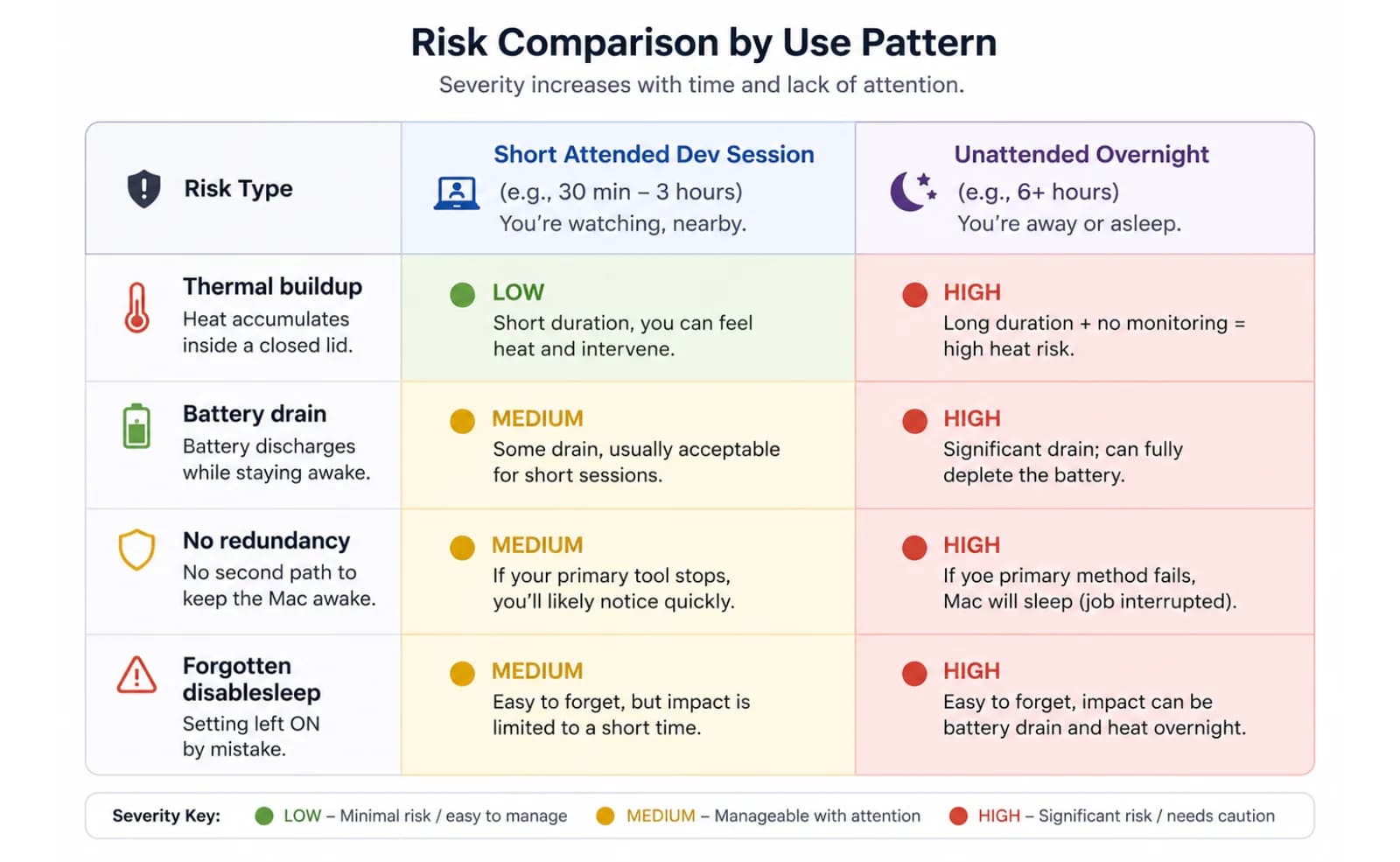
In practice that means a laptop that can quietly run its battery to zero with the lid down and nobody watching, or one that sits at a sustained working temperature under load without macOS's own low-battery or thermal responses ever getting a chance to act - you turned all of them off along with idle sleep. That's not damage in the sense of destroying hardware, but it removes every one of macOS's built-in safety nets in exchange for one that keeps serving requests. That's a reasonable trade for a session you're actively monitoring. It's a bad trade for something you set once and walk away from for a week.
This is the specific gap a keep-awake tool with its own guardrails is for: use the same lever, but pair it with limits that reset it automatically instead of leaving it armed and forgotten.
Keeping the Mac alive while it serves requests
LidRun's free tier - Keep Awake, Timer, and Charging-only - holds the plain idle-sleep assertion described above. It's unlimited and free forever, no session cap, and it's the right tool for a Mac you're at, a lid propped open, or a command wrapped with lidrun -- <command> so the assertion is held only for as long as that process runs. For an actually-closed lid on battery, that's Closed-Lid mode, a paid feature: it flips the same pmset disablesleep lever as the manual trick above, through a privileged helper you approve once so you're not typing a password every time you toggle it.
The difference from running pmset by hand isn't the toggle itself - it's what happens around it. A battery floor (20% by default, adjustable) auto-stops the session before the charge gets dangerously low, and an emergency force-sleep floor near empty (4%) applies no matter what you've configured, so a session can't be set up to ignore it. A thermal watch drops Closed-Lid mode if the SoC reports critical pressure, so a Mac that's genuinely struggling to cool itself gets to sleep instead of continuing to serve requests. And if LidRun or the Mac dies while Closed-Lid mode is armed, the next launch detects that stale state and resets disablesleep back to 0 automatically - the cleanup step the manual trick relies on you remembering.
The activity log records why each session actually ended - timer finished, auto-stopped at a battery percentage, or Closed-Lid mode turned off - so checking in the next morning tells you what happened instead of guessing. That's the shape of it: agent running, stay awake; agent done or unsafe, release or sleep. Not a blind wake lock you set once and forget - safety wins over convenience when the two conflict. New users get a handful of free Closed-Lid sessions to try that before deciding whether it's worth paying for. For more on how the keep-running mode works day to day, see the guide on keeping a MacBook running with the lid closed.
What works well and what is out of scope
For developer use, the range of server-style tasks that work well is broad. Local HTTP APIs, webhook listeners, small FastAPI or Flask dev servers, Ollama inference endpoints, and reverse tunnels via ngrok or cloudflared all run reliably on a closed MacBook as long as whatever's holding it awake actually addresses clamshell sleep. These are the workloads this setup is built for.
Production traffic is a different story regardless of which lever holds the Mac awake. A MacBook has no redundancy, no hot-swap storage, and a finite battery even when the auto-stop floor never trips because you stayed plugged in. A macOS update, a kernel panic, or someone unplugging the charger can take the service offline in a way no keep-awake tool prevents. For occasional development sessions that's a manageable tradeoff. For external users or anything business-critical, it isn't - that traffic belongs on real server infrastructure.
The honest framing: this is a dev workstation doubling as a local server for a session, not a production server. That scope is genuinely useful - testing webhooks from an external service, serving a local LLM to other devices on your network, or keeping a dev API reachable while you step away from your desk.
Safety limits for server-style use on a laptop
Server-style use tends to mean sustained load, and sustained load makes the thermal picture matter more than in a short build. A closed lid retains more heat than an open one. Keep the Mac on a hard, flat surface with clearance underneath - not a bed, a couch, or anywhere airflow is blocked - and keep it ventilated rather than sealed away in a bag.
Plug in for anything more than a short session. A dev server handling network I/O and running inference draws more power than an idle machine, and a low-battery auto-stop mid-session is an interruption you don't want to discover halfway through an overnight test run.
Set a battery floor even when plugged in. A power outage or an accidental unplug can happen, and a floor means the Mac sleeps at a safe charge level instead of draining flat before the session ends. None of this makes lid-closed serving something you walk away from indefinitely without a check-in - it's a way to reduce the risk of the two failure modes, heat and battery, that are specific to running a laptop this way.
LidRun keeps your work running with the lid closed, with battery and thermal safety built in.
Already have LidRun? Read the setup guide →
Frequently asked
Yes, but a plain idle-sleep block - caffeinate, or a basic keep-awake assertion - isn't enough on its own. Closing the lid on battery triggers a separate clamshell sleep that idle-sleep tools don't stop; you need something that also disables that trigger, such as pmset -a disablesleep 1, a Closed-Lid mode built on it, or an external display connected. With one of those active, HTTP servers, LLM endpoints, and reverse tunnels keep responding normally through a lid close.
Only partly. caffeinate holds an idle-sleep assertion, which stops the Mac from sleeping due to inactivity - useful with the lid open or on an external display. On battery with the lid actually closed, that assertion doesn't stop clamshell sleep, so the Mac (and anything it's serving) suspends anyway. Reaching a closed lid on battery needs pmset -a disablesleep, a tool built on it, or a physical external display.
It can be, with the right setup. Ollama draws real CPU and GPU load, so thermal pressure can climb during sustained inference. Running on a hard, ventilated surface while plugged in, with a battery floor and thermal auto-stop active, helps reduce risk. An unattended session on battery in a bag overnight is where problems tend to start.
Plug in, start the server, turn on Closed-Lid mode - or run sudo pmset -a disablesleep 1 yourself if you're comfortable resetting it afterward - then close the lid. Set a session length that matches the window you actually need, and keep a battery floor and thermal watch active so a hung or forgotten process can't hold the Mac awake indefinitely. LidRun logs which one ended the session, timer, battery threshold, or a manual stop, so you can check in the morning.
Thermal buildup with the lid closed, battery drain if left unplugged, and - specific to the manual pmset disablesleep route - a global setting that stays armed if you forget to reset it or the session dies uncleanly, silently disabling all of macOS's own sleep protections along with it. For occasional dev sessions these are manageable with the right setup. For production traffic serving external users, none of it is acceptable - that work belongs on dedicated server hardware.