Does a Mac alarm go off with the lid closed?
Yes - on macOS 13 Ventura and later, a Clock alarm set before you close the lid will still sound, because it schedules a system wake event rather than checking whether the lid is open. What changes the outcome is battery level, Focus/Do Not Disturb, and - if you're already keeping the Mac from lid-sleeping for some other reason - which mechanism you used to do that.
How macOS Clock alarms wake a closed lid
The Clock app, added in macOS 13 Ventura, lets you set alarms that register a scheduled system wake event with macOS. When the alarm time arrives, the OS wakes the Mac briefly to play the sound - through the built-in speakers, as long as volume isn't muted and Focus or Do Not Disturb isn't suppressing it - then can return the Mac to sleep. It's the same class of mechanism the system uses for a Time Machine backup window or an Energy Saver scheduled event: a wake that's triggered by a clock, not by the lid.

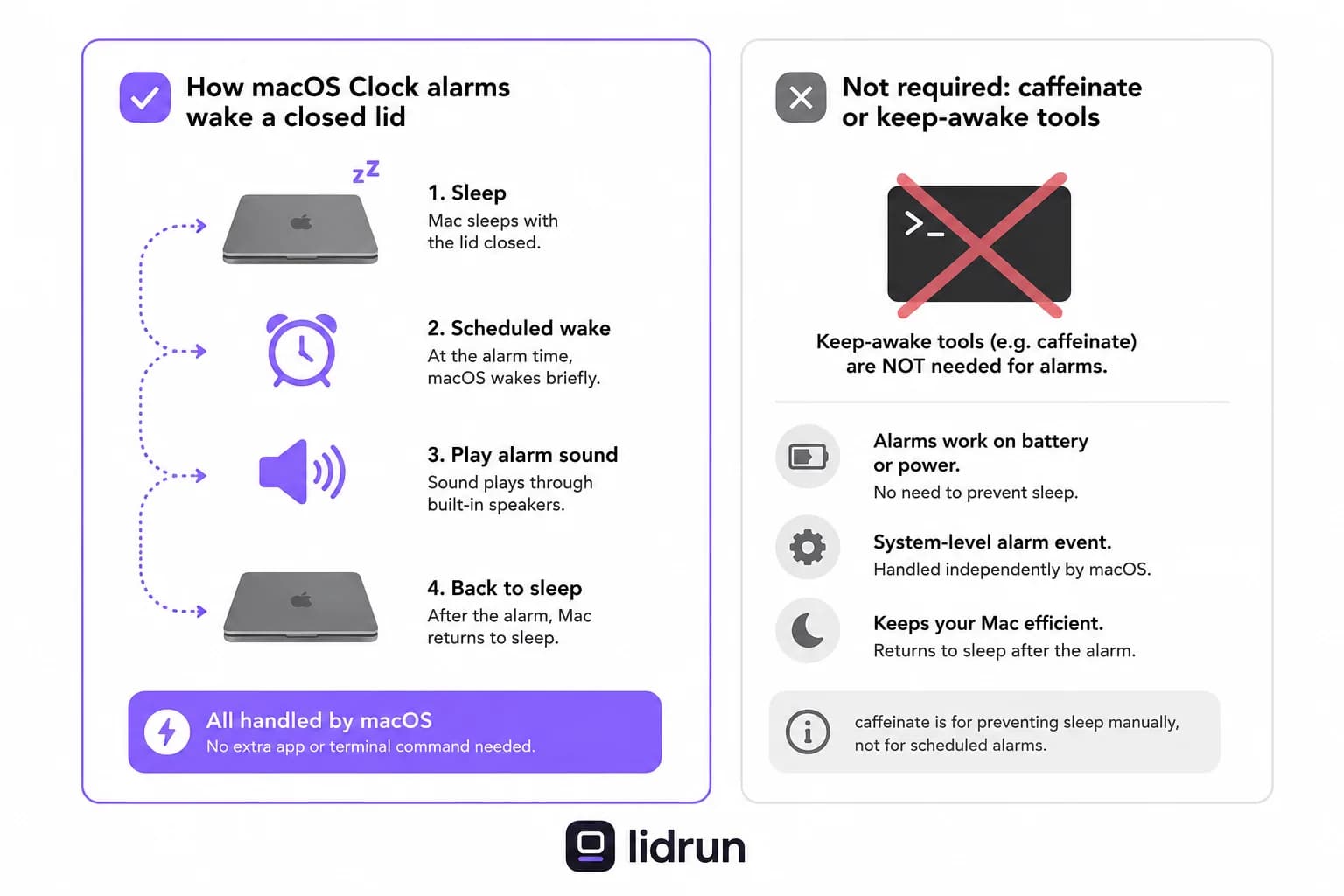
That's why the lid doesn't matter to the alarm itself. The wake is system-level - it doesn't need a display attached, a keypress, or the lid to be up. It fires the same way whether the Mac has been sitting closed on a desk or open the whole time.
There's a common mix-up worth clearing up directly: running something like caffeinate, or any app that holds a keep-awake assertion, has nothing to do with whether this scheduled wake can fire. Alarm wake and idle-sleep prevention are two separate macOS systems. You don't need a keep-awake tool running for the alarm to work, and having one running doesn't make the alarm itself any more or less likely to fire on time.
If you're on macOS 12 Monterey or earlier, none of this applies - Clock didn't have alarms yet, so there's no scheduled wake to rely on.
When alarm reliability actually drops
The two real variables are battery and Focus. On a nearly empty battery, macOS may defer or skip the scheduled wake outright to protect what charge is left - this is the same underlying caution that shows up elsewhere in macOS's power management, not something specific to alarms. Leaving the Mac plugged in for anything you're depending on removes that variable.
Focus mode and Do Not Disturb can suppress alarm audio even when the wake itself happens exactly on schedule - the Mac wakes, the alarm 'fires' internally, but you don't hear it. If you rely on a Clock alarm for something that matters, check that Clock is allowed to break through your active Focus.
If you want to sanity-check that scheduled wake is actually registered on your Mac - useful when troubleshooting one that isn't waking on time for anything, not just alarms - run pmset -g sched in Terminal. It lists the Mac's queued wake and sleep events, each tagged by the process that scheduled it; an active alarm usually shows up in that list alongside things like Time Machine. It's a real debugging step, not a guarantee - the absence of Focus interference or a dead battery still matters more than what the list shows.
The free, native way to stop the Mac from lid-sleeping at all
If you'd rather not depend on scheduled wake - you want the Mac to simply never lid-sleep in the first place, so the alarm is just normal audio from a running machine - macOS has a free, built-in path, but it's not the one people usually reach for first.
Closing the lid triggers a lower-level sleep (clamshell sleep) that ordinary idle-sleep tools can't touch. caffeinate, and any app built on the same IOPMAssertionCreateWithName keep-awake API, only blocks *idle* sleep. Close the lid without an external display attached and the Mac drops into clamshell sleep regardless of any assertion being held - this is why 'I ran caffeinate and it still slept when I closed the lid' is a real, expected outcome, not a bug.
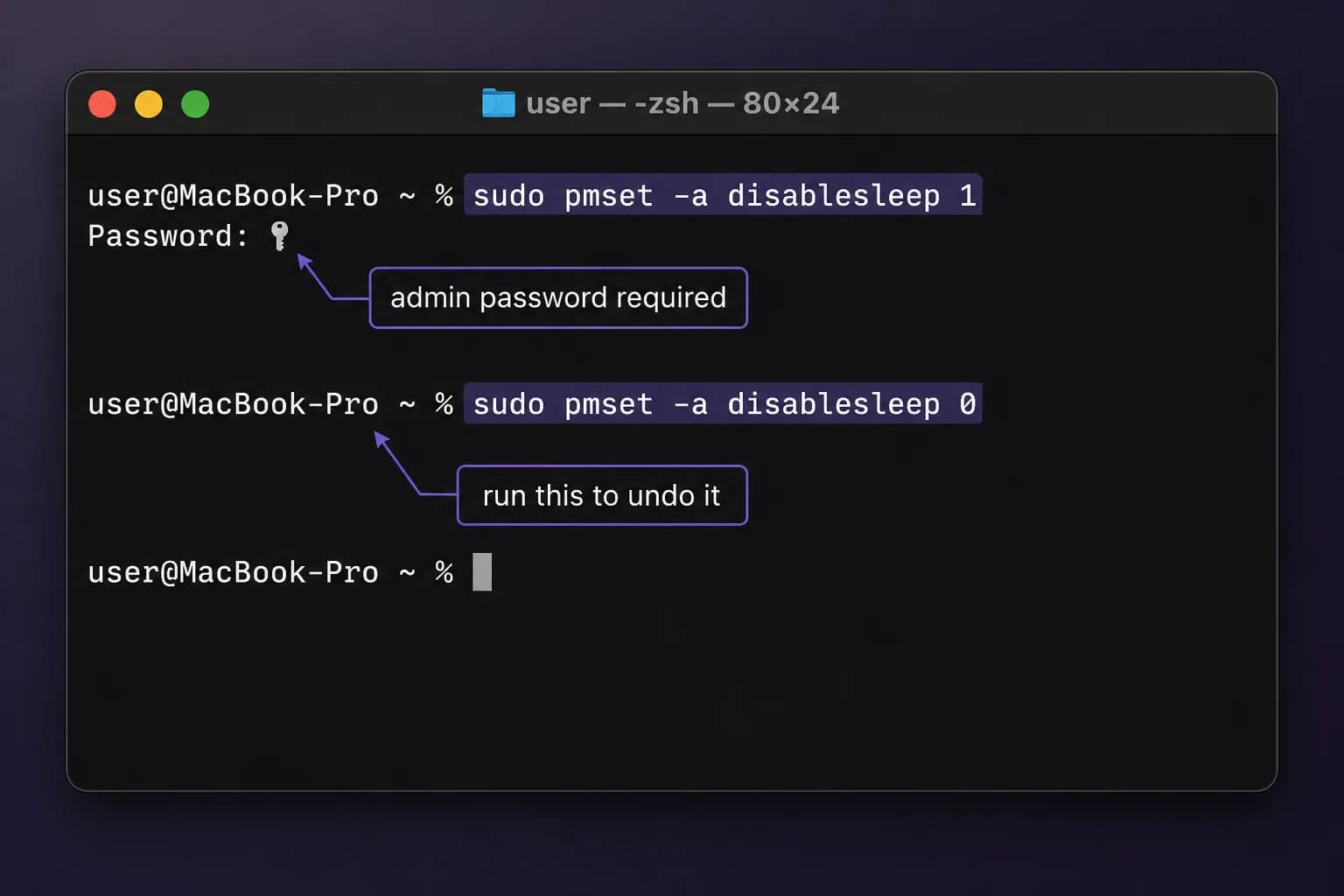
Two things actually stop that. The first is attaching an external display: with a monitor connected, macOS runs the standard clamshell mode and the Mac stays fully awake with the lid down - no scheduled-wake question at all, because it was never asleep. The second, for a closed lid with no monitor, is a single Terminal command: sudo pmset -a disablesleep 1. That's the literal system setting that overrides lid-close sleep on battery, and it requires an admin password because it's a global override, not a per-app permission.
The catch with flipping that switch by hand
disablesleep isn't scoped to one nap or one session - it's a global, persistent setting. Once you set it to 1, it stays in effect until you explicitly set it back (sudo pmset -a disablesleep 0) or reboot the Mac.
Set it before a short wait for an alarm and forget about it, and the Mac keeps ignoring lid-close sleep indefinitely - not just for the hour you needed, but every time you close the lid afterward, including if it ends up back in a bag. There's nothing about the raw toggle that watches battery level or temperature on your behalf; it does exactly what you told it, for as long as you leave it that way.
That's a real risk, not a hypothetical one: continued power draw and heat with no software checking in. It's the same tradeoff LidRun's own Closed-Lid mode is built to avoid - flip the switch on your own and safety wins over convenience only if you remember to reverse it yourself.
A safer way to run it: workload-aware Closed-Lid mode
LidRun's Closed-Lid mode uses that exact same pmset -a disablesleep toggle - through a privileged helper, so you're not typing sudo commands by hand - but it always pairs turning it on with turning it back off: when the session stops, when you quit the app, and it reconciles again on every launch in case a previous run didn't exit cleanly. You're not left holding a global setting you have to remember to undo.
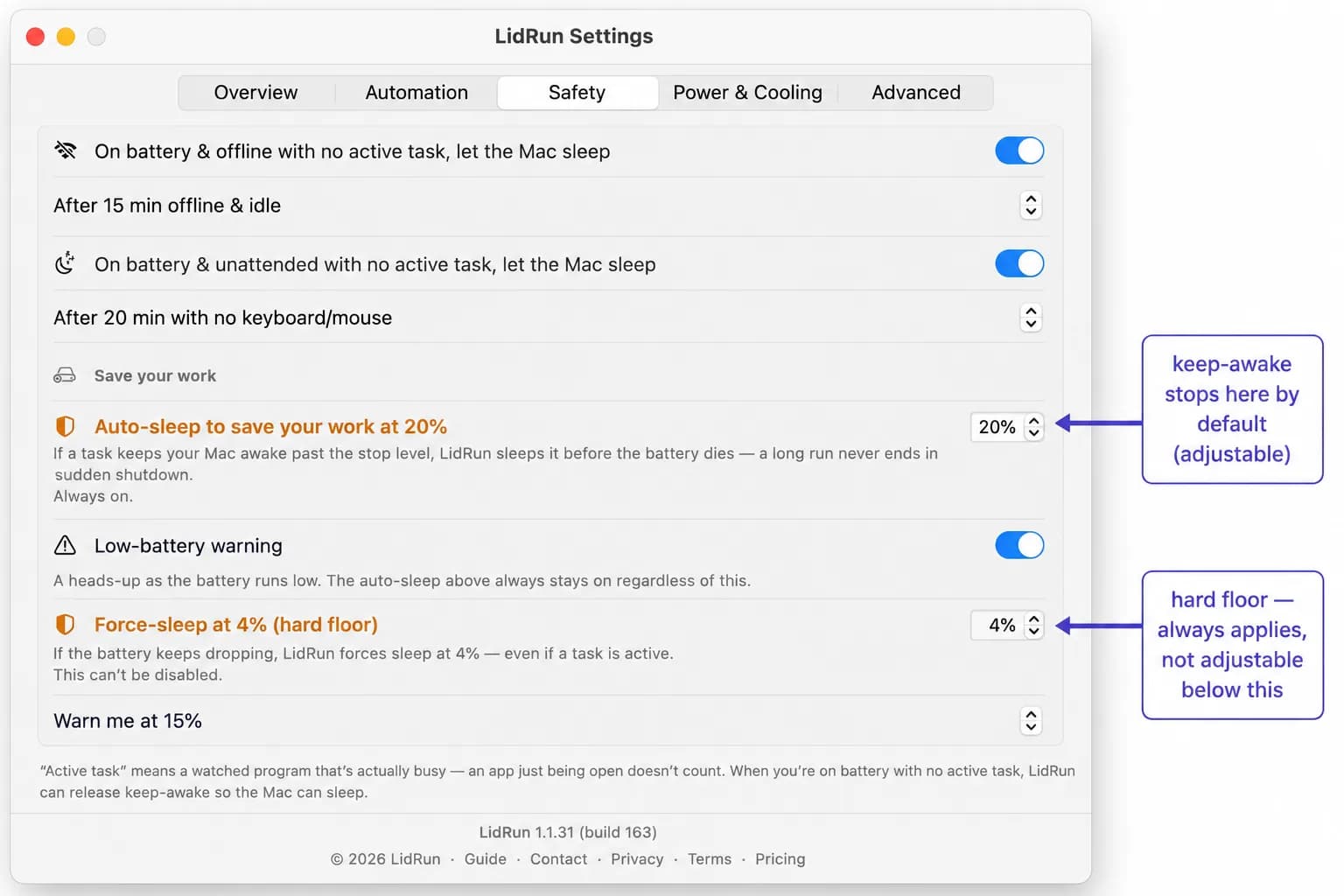
It's also gated, not a blind wake lock. Any LidRun keep-awake session - Closed-Lid included - stops by default once battery drops below 20% (adjustable in Settings), and a hard floor at 4% forces the Mac to sleep no matter what you've configured, because below that there may not be reliably enough charge left to finish the job safely - the same basic caution that makes macOS itself defer a scheduled alarm wake on a near-empty battery. If thermal pressure climbs to the system's critical level, the safety governor releases the keep-awake hold so the Mac can throttle and cool, and can optionally push it to actual sleep if it stays critical - covering the in-a-bag overheat case the raw pmset toggle has no opinion about.
Where this connects back to the alarm question: if a Closed-Lid or Keep Awake session is already running for a real reason - a Claude Code agent finishing a task, a long build, a model download - the alarm question becomes moot as a side effect. The Mac is already awake, so the alarm plays through the normal audio path with no wake step involved. That's the same promise LidRun makes generally - agent running, stay awake; agent done or unsafe, release and let it sleep - it's not something that turns on just to babysit an alarm. If a reliable alarm is your only goal, the built-in scheduled-wake behavior in the first section already covers it on AC power; LidRun's value shows up when you already have a workload keeping the lid down for other reasons.
The placement rule still applies
Running a MacBook lid-closed generates more heat than running it lid-open - the built-in display and part of the case's airflow path are covered either way. No software changes that physics, LidRun included.
For a short wait - an alarm 30 minutes out while a small job finishes - the added heat is rarely significant. For an overnight run, the usual guidance holds: stay on power, keep the Mac on a hard, flat, ventilated surface, and avoid soft furniture or a closed bag where heat has nowhere to go. Set a session timer so it doesn't stay awake longer than you actually intended.
LidRun's thermal release helps reduce risk if things do climb, but it doesn't replace placement - use it with care and treat airflow as your job, not the app's.
LidRun keeps your work running with the lid closed, with battery and thermal safety built in.
Already have LidRun? Read the setup guide →
Frequently asked
Yes. On macOS 13 Ventura and later, Clock alarms schedule a system wake event, so the Mac wakes briefly to sound it even with the lid shut - no display or lid-open state required. Reliability is highest on AC power; a very low battery can cause macOS to defer the wake.
The most common reasons are Focus mode or Do Not Disturb suppressing alarm audio even though the wake happened on schedule, a nearly empty battery causing macOS to defer the wake, or being on macOS 12 or earlier, where Clock alarms don't exist yet.
No, and it's not needed either way. Caffeinate blocks idle sleep, which is a different macOS mechanism from the lid-close (clamshell) sleep that closing the lid triggers - caffeinate alone won't stop that without an external display attached. Clock alarms use a separate scheduled-wake path that doesn't depend on any keep-awake tool running.
Two native options: attach an external display, which puts the Mac in standard clamshell mode and keeps it fully awake lid-closed, or run sudo pmset -a disablesleep 1 in Terminal without a monitor. The second one is a global, persistent setting - it stays on until you run sudo pmset -a disablesleep 0 or reboot, so it's easy to forget engaged.
Yes, indirectly. If LidRun is already holding the Mac awake for a real workload, the alarm plays through the normal audio path without needing a scheduled wake at all. LidRun doesn't start a session just to guarantee an alarm, though - it's driven by workload detection or a manual Keep Awake, and stops on the same battery and thermal thresholds either way.
LidRun's battery and thermal thresholds - a 20% auto-stop, a 4% hard floor, and a thermal release at critical - help reduce risk on a lid-closed run, but placement is still on you. Use a hard, ventilated surface, stay plugged in for anything overnight, and avoid an enclosed bag.
Yes. macOS briefly wakes a sleeping MacBook to sound a Clock or Calendar alarm, then lets it sleep again - a shut lid doesn't stop it, and the sound plays through the speakers with the screen dark. It only fails if the Mac is fully shut down, out of battery, or muted.
It does. The alarm audio plays through the built-in speakers even with the lid closed, because macOS wakes just far enough to play the sound before sleeping again. If you hear nothing, check the system volume and that the Mac is asleep (not shut down) and has charge.
In almost all cases, yes - a scheduled Clock alarm wakes the Mac from sleep and rings on time with the lid closed. The exceptions are a Mac that's powered off, drained, or set to skip scheduled wake. If you're counting on it, leave the Mac on power and just close the lid rather than shutting it down.