Enable the LidRun Helper (and Why It Matters)
The LidRun Helper is a small background service that does two things: it lets Closed-Lid mode turn on and off without an administrator password every time, and it automatically restores normal sleep - usually within about a minute - if LidRun ever quits or crashes while your Mac is still meant to stay awake. It takes about 20 seconds to turn on, and it's worth doing before your first closed-lid run.
What the Helper actually does
Closed-Lid mode works by flipping a macOS-wide setting (pmset -a disablesleep) that requires administrator rights to touch. Without the Helper, macOS pops an admin-password prompt every time that setting flips - both when Closed-Lid mode turns on and when it turns back off. Fine once in a while, tedious if you run Closed-Lid mode often.
Technically, the Helper is a small background service - a LaunchDaemon registered through Apple's own Service Management framework, approved once in System Settings like any other login item, not a hidden install. Because it runs with root-level privileges, it can flip that setting without a password each time - but it isn't a general backdoor: it only understands a small, fixed set of requests built into LidRun (flip the Closed-Lid setting, force an immediate sleep, and answer a periodic check-in), and it only accepts them from LidRun's own signed app. Nothing else can talk to it.
The bigger reason to enable it: disablesleep is a global, persistent setting. If LidRun ever quits unexpectedly - a crash, a forced quit, a system hiccup - while it's still on, the Mac would otherwise keep ignoring the lid closing with no app left to turn the setting back off. The Helper prevents that from lingering: while LidRun is running, it checks in with the Helper every 30 seconds; if 45 seconds pass with no check-in, the Helper - which keeps running independently of the app - automatically restores normal sleep on its own. In practice, that means the Mac becomes sleepable again within roughly a minute of LidRun disappearing, not whenever you happen to relaunch it.
There's also a manual version of the same fix: once the Helper is enabled, Settings gets a 'Safe reset' button that forces normal sleep back on immediately. You'll rarely need it - the automatic watchdog usually gets there first - but it's there if you want to confirm the state yourself.
Turn it on
No special setup needed first - the Helper works on the same macOS 13 Ventura-or-later that the rest of LidRun requires, and approving it is a toggle, not a password.
Open LidRun's Overview tab. You'll see a line that says 'Turn on the LidRun helper' - click it.

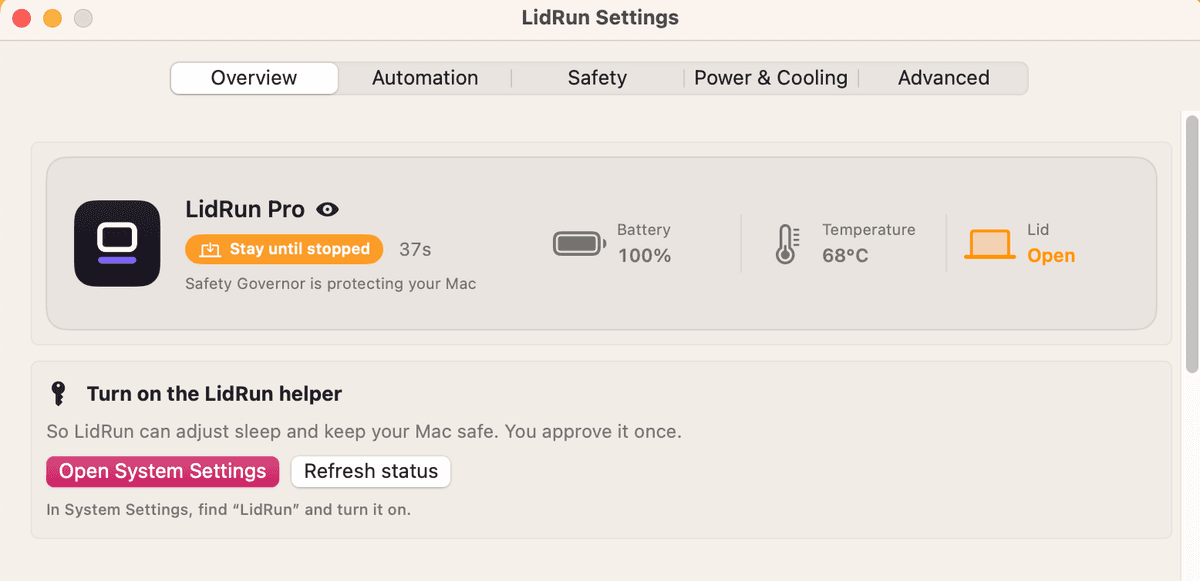
macOS will open System Settings to the Login Items panel, where you approve the helper like any other background item.
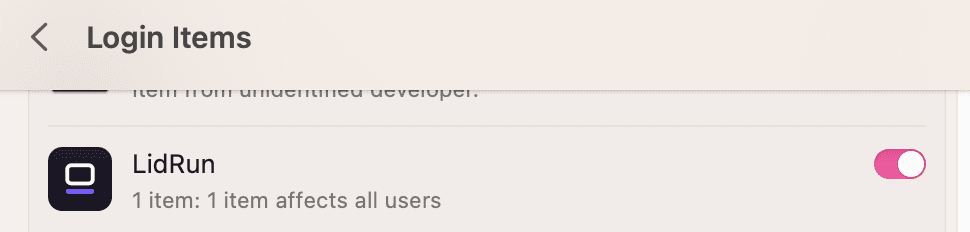
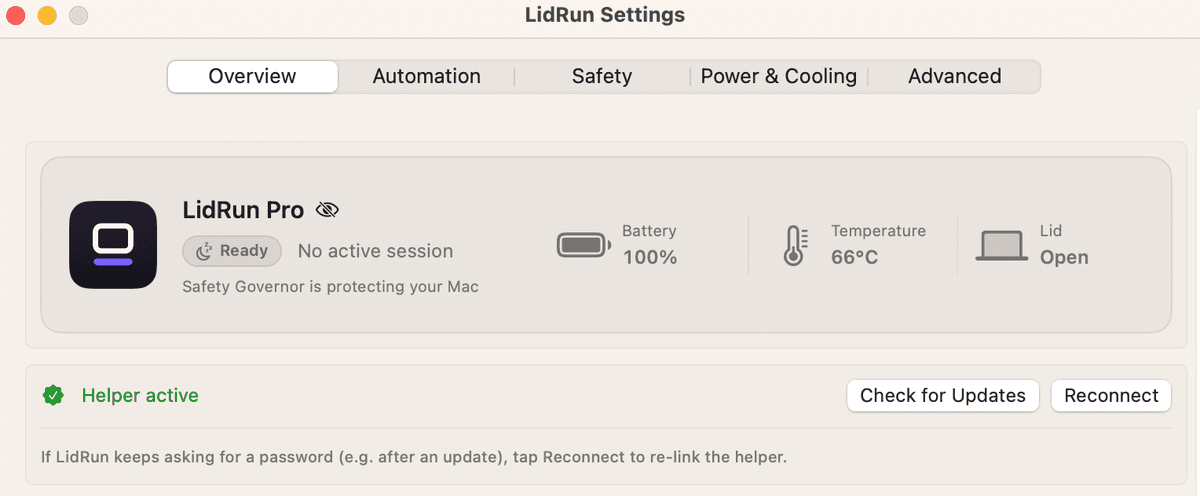
Once it's approved, the Overview tab updates to show 'Helper active.' That's the whole process - no restart needed, and it only has to be done once.
If it doesn't turn on right away
Two things can look stuck but aren't. If you approved LidRun in Login Items and the Overview tab still shows the old prompt, tap 'Refresh status' - the same control is always available in Settings, under 'Closed-Lid without repeated password prompts.'
If LidRun starts asking for the password again after you install an update, that's not a lost approval - a new build reloads the Helper's daemon binary, and the connection just needs re-linking. Tap 'Reconnect' in Settings; it doesn't send you back to System Settings or ask you to approve anything again.
And if you decline the Login Items prompt, or switch LidRun off there later, nothing breaks - LidRun simply falls back to the admin-password prompt for Closed-Lid mode, exactly like before you turned the Helper on.
What it doesn't change
The Helper is scoped tightly. Keep Awake, the Timer, Charging Only, and Auto-Watch all hold a plain macOS power assertion that never needed administrator rights in the first place, so the Helper makes no difference to them either way - it only touches Closed-Lid mode. Force-sleep (the 'Sleep Now' action) doesn't depend on it either; LidRun already has a helper-free path for that. And the safety thresholds you set - battery floor, thermal limit, auto-stop - work exactly the same with or without it.
There's no in-app switch to turn the Helper off yet. To remove it, go to System Settings → Login Items (labeled 'Login Items & Extensions' on newer macOS), find LidRun, and turn it off there - LidRun notices on its own and reverts to the password-prompt behavior for Closed-Lid mode.
Need a license for another Mac? See pricing →
Frequently asked
No - Keep Awake, Timer, Charging Only, and Auto-Watch all work without it; they only need a standard power assertion, not administrator rights. The Helper only matters once you use Closed-Lid mode.
It still works. macOS asks for your administrator password every time the Closed-Lid setting flips on or off, and if LidRun ever quits unexpectedly mid-session, there's no background watchdog to catch it - the lid-closed setting can stay stuck until you relaunch LidRun (or reset it yourself with sudo pmset -a disablesleep 0).
Within roughly 45 to 60 seconds. LidRun checks in with the Helper every 30 seconds while it's running; if 45 seconds pass with no check-in, the Helper - which runs independently of the app - restores normal sleep on its own, no relaunch or password required.
LidRun's Overview tab - look for 'Turn on the LidRun helper' and click it, then approve it in the System Settings panel that opens. The same control also lives permanently in Settings, under 'Closed-Lid without repeated password prompts,' once you've enabled it.
No. The Helper is scoped to a small, fixed set of operations - Closed-Lid's on/off toggle, force-sleep, and crash recovery - and only ever accepts requests from LidRun's own signed app. The safety thresholds you set, like battery floor and thermal limit, work exactly the same either way.
There's no in-app switch yet - go to System Settings → Login Items (or Login Items & Extensions on newer macOS), find LidRun, and turn it off there. LidRun notices and falls back to the admin-password prompt for Closed-Lid mode automatically.