Mantenha o Ollama rodando em um MacBook
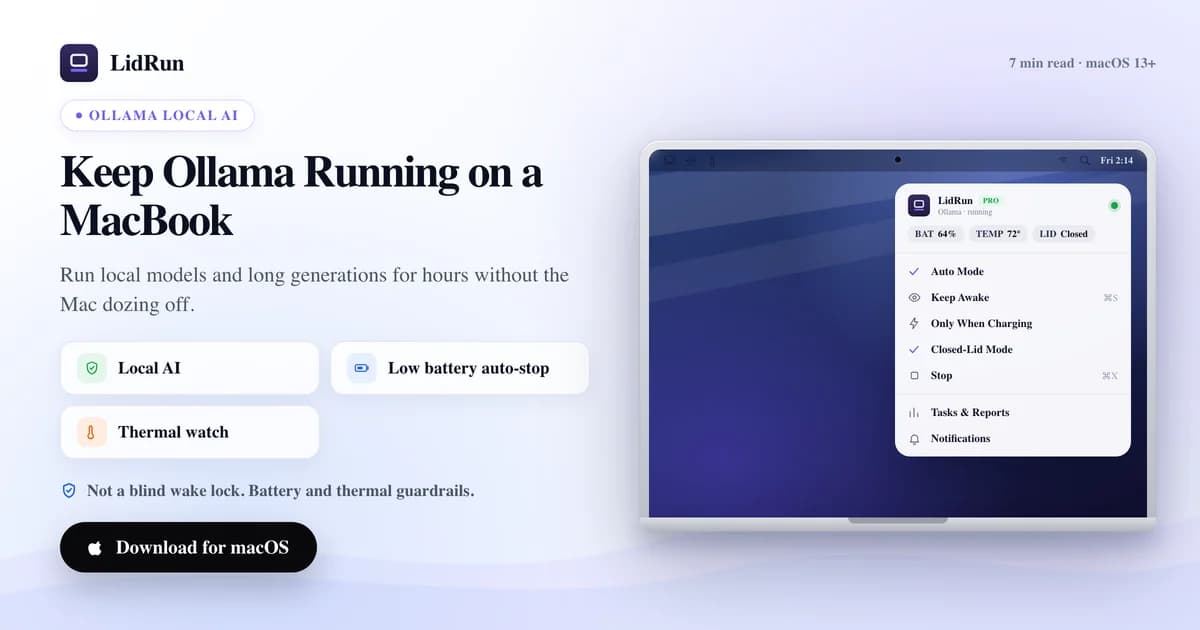
Manter o Ollama rodando em um MacBook durante uma geração longa ou um lote overnight significa vencer dois tipos diferentes de sleep — o idle sleep e, se a tampa fechar, o clamshell sleep — e as ferramentas gratuitas do macOS só resolvem a primeira de forma confiável. O LidRun resolve as duas: ele detecta o Ollama automaticamente, mantém o Mac acordado enquanto ele está de fato trabalhando, e deixa o Mac voltar a dormir assim que a execução termina ou um limite de bateria ou temperatura é ultrapassado. Veja como funcionam as opções gratuitas, onde elas ficam devendo numa execução longa e sem supervisão, e exatamente como o LidRun se encaixa especificamente com o Ollama.
Por que o Ollama trava quando o Mac dorme
O Ollama roda como um processo comum em segundo plano — ollama serve mais o modelo que estiver carregado. Ele não tem nenhuma isenção especial do sleep do macOS. Quando o Mac dorme, esse processo é suspenso junto com tudo o mais, e uma geração longa ou um download de modelo para exatamente onde estava.
O macOS na verdade tem dois gatilhos de sleep separados que vale a pena distinguir aqui. O idle sleep entra em ação depois de um período sem atividade de teclado, mouse ou tela, e qualquer app segurando uma assertion de energia do tipo "prevent idle sleep" — caffeinate, o Keep Awake do LidRun — consegue bloqueá-lo. O sleep por tampa fechada (clamshell) é um gatilho diferente, de nível mais baixo: fechar a tampa sem um monitor externo conectado coloca o Mac para dormir independentemente de quais assertions de idle sleep estejam ativas. Essa distinção é a parte que a maioria dos conselhos do tipo "só rode o caffeinate" deixa passar, e é por isso que uma correção de idle sleep só resolve metade do caminho para de fato rodar o Ollama com a tampa fechada.
O jeito gratuito: caffeinate, pmset e o próprio modo clamshell da Apple
Para uma sessão com a tampa aberta, a solução nativa é o caffeinate. Rode caffeinate -i ollama serve e a assertion dura exatamente o tempo em que esse comando estiver rodando; caffeinate -w <pid> faz o mesmo para um processo que você iniciou separadamente, como um daemon ollama serve já em execução. É gratuito, dá para automatizar em script, e já vem instalado no macOS — sem precisar instalar nada.
O LidRun tem seu próprio equivalente gratuito, com um passo a menos: lidrun -- ollama serve encapsula o comando, mantém uma assertion de idle sleep só enquanto esse processo exato estiver vivo, e a libera no instante em que o Ollama encerra. Sem licença, sem interface do app, sem conta — é um comando de CLI autocontido que funciona quer o app LidRun esteja rodando ou não.
Se você quer fechar a tampa sem nada disso, a Apple tem uma resposta nativa que não precisa de nenhuma ferramenta de terceiros: ligue o Mac na energia, conecte um monitor externo e use um teclado ou mouse externo. Nessa configuração, o Mac roda com a tampa fechada indefinidamente — esse é o modo clamshell fechado da própria Apple, não algo que o LidRun ou qualquer app de keep-awake precise simular.
Sem um monitor externo, a única alavanca que impede o sleep por tampa fechada é sudo pmset -a disablesleep 1 no Terminal — um truque gratuito genuíno, e exatamente a mesma configuração do macOS que o Closed-Lid Mode do LidRun automatiza por baixo dos panos.
Ferramentas de menu bar como Amphetamine, KeepingYouAwake, Lungo e o Caffeine original usam a mesma API pública de assertion de idle sleep que o caffeinate. São bem-acabadas, distribuídas pela App Store, e boas naquilo para que foram feitas — um toggle de um clique, prevenção de sleep agendada, gatilhos por app. Mas compartilham a mesma limitação do caffeinate com a tampa fechada: nenhuma delas mexe no disablesleep, então fechar a tampa sem um monitor externo continua colocando o Mac para dormir mesmo com uma delas ativada.
Onde a solução gratuita falha numa execução sem supervisão
O caffeinate, o lidrun -- e todo app de keep-awake de menu bar mantêm o Mac acordado de forma estrutural — eles não sabem o que o Ollama está fazendo, só que algo pediu para ficar acordado. Rodar um download de modelo por vinte minutos com caffeinate -w <pid> é tranquilo. Mas deixar o caffeinate -i rodando manualmente para um lote overnight de oito horas e esquecer de pará-lo faz com que ele continue mantendo o Mac acordado tranquilamente muito depois da execução ter terminado — gastando bateria sem ninguém por perto, e sem nada observando.
Definir pmset -a disablesleep 1 manualmente carrega um risco mais sério. É uma configuração global e persistente do macOS — não é restrita ao Ollama, nem à sua sessão do Terminal. Feche a tampa, esqueça de rodar sudo pmset -a disablesleep 0 depois, ou deixe o script que gerencia isso morrer, e o Mac não vai dormir sozinho até você desfazer isso manualmente ou reiniciar. É um Mac que pode ficar com a tampa fechada, totalmente acordado, sem nada checando a bateria ou o calor se acumulando atrás das saídas de ventilação fechadas.
Nenhuma das opções gratuitas leva em conta o nível de bateria ou o estado térmico — elas são um interruptor, não um regulador. Essa é a lacuna real numa execução overnight do Ollama sem supervisão: um modelo residente mantém a memória e a GPU ocupadas por horas, e não tem ninguém ali para notar se a bateria está caindo rápido ou o chassi está esquentando.
Como o LidRun mantém o Ollama rodando sem o mesmo risco
A lista de observação padrão do Auto Mode já inclui "ollama" ao lado de llama-server, vllm e lm-studio — ative pelo menu bar e o LidRun já começa a manter o Mac acordado no momento em que detecta o Ollama rodando, sem você precisar digitar nenhum padrão. Por padrão, a detecção amostra o uso de CPU a cada 10 segundos; um processo conta como ativo acima de um limite de 20% de CPU, e um holdoff de inatividade de 60 segundos — ajustado especificamente para intervalos como o Ollama parado entre tokens — mantém a assertion segurada durante pausas curtas, em vez de fazer o Mac oscilar entre dormir e acordar.

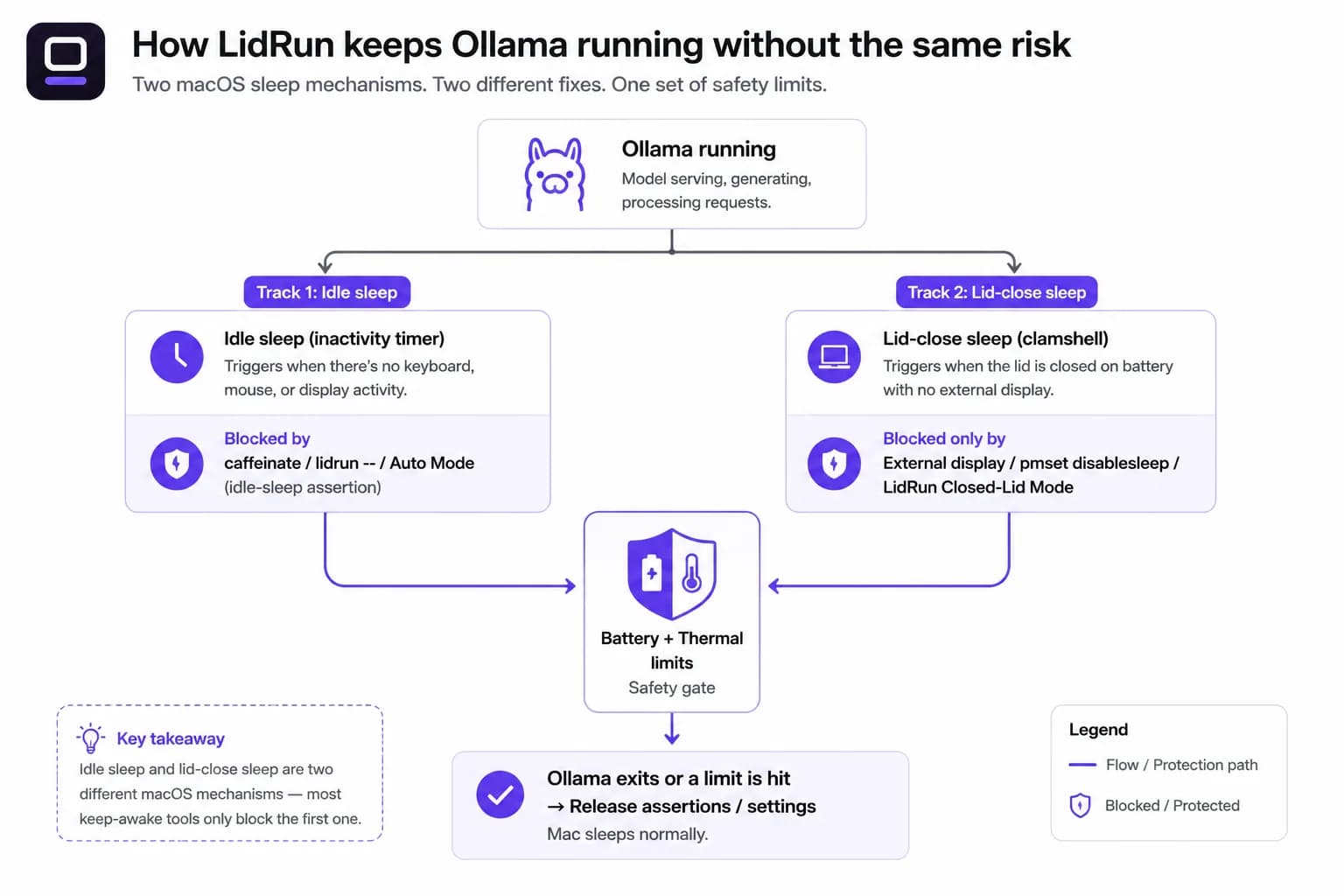
O Closed-Lid Mode é a peça que substitui o pmset -a disablesleep 1 manual. É a mesma alavanca do macOS por baixo, mas o LidRun sempre pareia o ativar com um desativar automático quando você para o modo, fecha o app, ou relança depois de uma queda — ele não fica travado desativado globalmente do jeito que um comando esquecido no Terminal pode ficar.
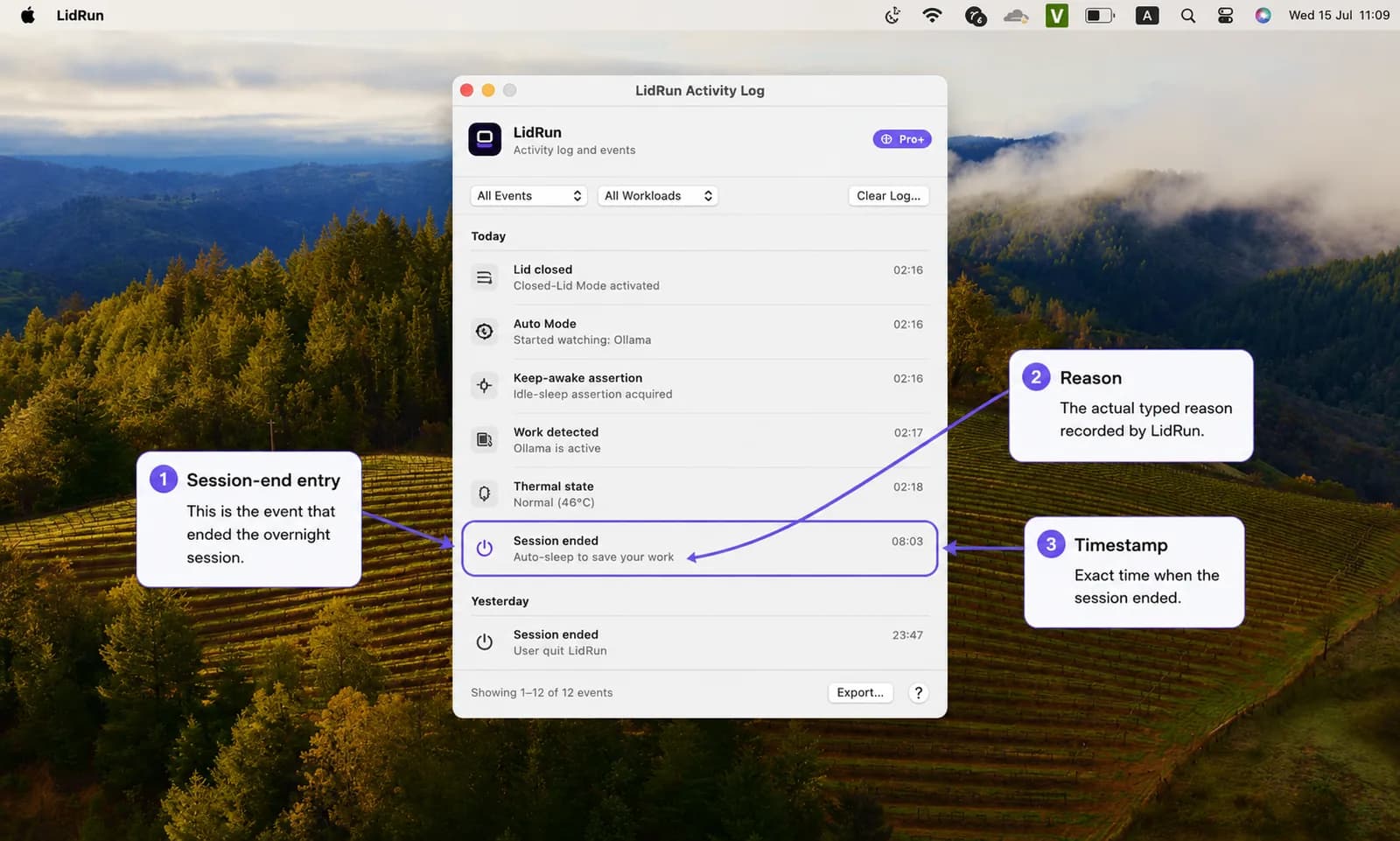
Limites de bateria e temperatura ficam por baixo dos dois. Por padrão, o LidRun para de manter o Mac acordado aos 20% de bateria, sempre sai de uma sessão sem supervisão se o Mac atinge um estado térmico crítico, e força o sleep num piso de 4% de bateria não importa o quê — uma execução de inferência longa não termina em um desligamento forçado. O log de atividade registra exatamente por que uma sessão terminou (piso de bateria atingido, limite térmico, tarefa concluída), então uma execução overnight travada não vira um mistério na manhã seguinte. A regra por baixo de tudo isso é simples: Ollama rodando → fica acordado; Ollama terminou, ou algo ficou inseguro → libera e deixa o Mac dormir.
Grátis vs Pro, com honestidade
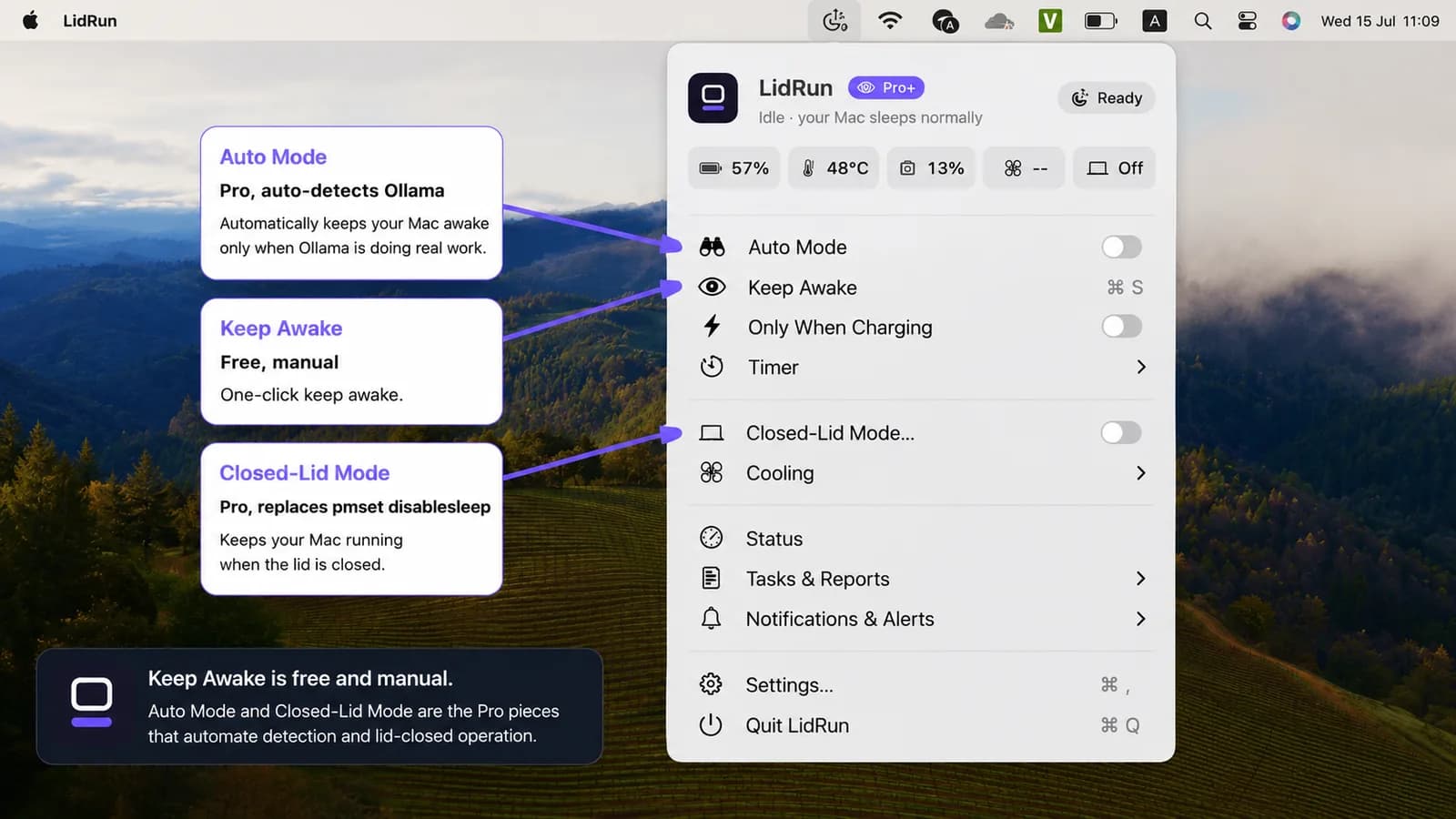
Keep Awake, Timer e Charging-only rodam sem limite, grátis para sempre, sem período de teste. Inicie o Keep Awake manualmente antes de abrir o Ollama, deixe a tampa aberta, pare quando terminar — só isso já cobre a maior parte do uso do dia a dia, assim como o wrapper de CLI gratuito lidrun -- ollama serve.
O que é Pro é a automação: a detecção automática do Auto Mode, para você não precisar lembrar de ativar o Keep Awake na mão, e o Closed-Lid Mode, que é o que permite rodar com a tampa fechada. O Closed-Lid Mode inclui um número limitado de execuções gratuitas de teste antes de pedir upgrade, então dá para experimentar uma execução overnight com a tampa fechada antes de pagar por isso.
Os próprios limites de segurança — a parada automática em 20%, a proteção térmica sempre ativa, o piso de force-sleep em 4% — são iguais em todos os planos e não podem ser desligados. Só o ajuste dos números exatos é um recurso Pro; os padrões seguros protegem os usuários gratuitos também.
Execuções overnight e quando vale a pena
Isso vale a pena para as coisas longas: um download grande de modelo, um lote de gerações, ou um model server que você quer deixar rodando enquanto se afasta. Se você está conversando com um modelo pequeno de forma interativa, não precisa de nada disso — a atividade normal de digitação já mantém o Mac acordado, e um prompt rápido termina bem antes de o idle sleep sequer entrar em ação.
É durante a noite que essa lacuna mais importa. De quatro a oito horas de inferência local enquanto você dorme é uma execução totalmente sem supervisão — não tem ninguém ali para notar uma subida de temperatura ou uma queda de bateria. É exatamente para isso que existem a vigilância térmica e o piso de bateria: interromper a execução antes que um limite seja ultrapassado, em vez de deixar o hardware rodando sem supervisão a noite inteira, protegido só por uma flag disablesleep definida manualmente.
Uma configuração prática
Ative o Closed-Lid Mode primeiro (menu bar → Closed-Lid Mode). Na primeira vez, o macOS pede para você aprovar o helper privilegiado do LidRun uma única vez — depois disso, não pede senha de novo. Em seguida, ative o Auto Mode (menu bar → Auto Mode) para que ele detecte o Ollama automaticamente, ou simplesmente inicie o Keep Awake manualmente se preferir pular a automação Pro e gerenciar tudo por conta própria.
A lista de padrões de observação, o intervalo de checagem e o idle holdoff ficam em Settings → Automation; os limites de bateria e temperatura ficam em Settings → Safety. Você não precisa mexer em nenhum dos dois especificamente para o Ollama — os padrões já cobrem isso.
Ligue na tomada antes de uma execução overnight. Um modelo residente consome energia de forma constante, e o Charging-only é a opção padrão mais segura aqui: na bateria, oito horas de inferência podem atingir a parada automática de 20% ou o piso de force-sleep de 4% e encerrar a execução antes da hora. Ligado na tomada, só a vigilância térmica decide quando pausar.
Mantenha o Mac sobre uma superfície rígida e ventilada, com a tampa fechada ou não — uma tampa fechada bloqueia as saídas de ventilação usuais, então uma inferência sustentada precisa de algum lugar para o calor escapar. E defina um timer de sessão que combine com a duração da execução, para que um model server esquecido não mantenha o Mac acordado a noite inteira à toa. É essa a configuração inteira: dois toggles, um carregador, e os limites de segurança fazendo a vigilância para você não precisar.
O LidRun mantém seu trabalho rodando com a tampa fechada, com proteção de bateria e temperatura embutida.
Já tem o LidRun? Leia o guia de configuração →
Novo no LidRun? Veja os preços →
Perguntas frequentes
Sim — a lista de observação padrão do Auto Mode inclui ollama, llama-server, vllm e lm-studio, então basta ativá-lo; você não precisa adicionar nenhum padrão manualmente. O Auto Mode é um recurso Pro.
O caffeinate — e o próprio wrapper de CLI gratuito do LidRun, lidrun -- ollama serve — bloqueiam o idle sleep, o que é suficiente se a tampa ficar aberta. Nenhum dos dois impede o sleep por tampa fechada; para isso é preciso o Closed-Lid Mode, o modo clamshell com monitor externo da Apple, ou um pmset -a disablesleep 1 manual, que é um mecanismo completamente separado do macOS.
Não. Keep Awake, Timer e Charging-only são grátis para sempre com a tampa aberta — inicie o Keep Awake manualmente antes de uma execução e pare depois. A detecção automática do Auto Mode e o Closed-Lid Mode (rodar com a tampa fechada) são Pro, com um número limitado de execuções gratuitas de Closed-Lid para experimentar antes.
O LidRun monitora o estado térmico e encerra uma sessão sem supervisão se o Mac atinge um estado térmico crítico — isso é uma parada de segurança, não resfriamento ativo, e não gerencia a RAM. A pressão de memória de modelos locais depende do modelo e das especificações do seu Mac, não é algo que uma ferramenta de keep-awake consiga resolver.
Sim — ative o Closed-Lid Mode junto com o Auto Mode (ou o Keep Awake manual), mantenha o Mac na tomada, e ele continua ativo enquanto as condições de bateria e temperatura permanecerem dentro dos seus limites. O Closed-Lid Mode é o que realmente impede o sleep por tampa fechada que o macOS acionaria de outra forma.
Quando o Auto Mode deixa de ver o Ollama ativo, o LidRun libera a assertion de keep-awake para o Mac voltar a dormir normalmente — ele não mantém o Mac acordado indefinidamente só porque o Ollama foi visto uma vez.
Sim, ligado na tomada com o Auto Mode e o Closed-Lid Mode ativos — o LidRun mantém a sessão por horas enquanto os limites de bateria e temperatura permanecerem dentro da faixa. Para uma execução overnight sem supervisão, charging-only é a escolha mais segura, já que a parada térmica existe especificamente para encerrar a execução antes que um limite seja ultrapassado, em vez de deixá-la rodar a noite toda sem vigilância.
Funciona, mas é algo global e persistente, sem nenhuma rede de segurança — esqueça de voltar o valor para 0 e o Mac simplesmente não vai dormir sozinho, não importa a bateria ou a temperatura, até você desfazer isso ou reiniciar. O Closed-Lid Mode usa a mesma configuração, mas sempre pareia o ativar com um desativar quando a tarefa para, o app fecha, ou depois de relançar após uma queda.