Como manter o Mac acordado com a tampa fechada
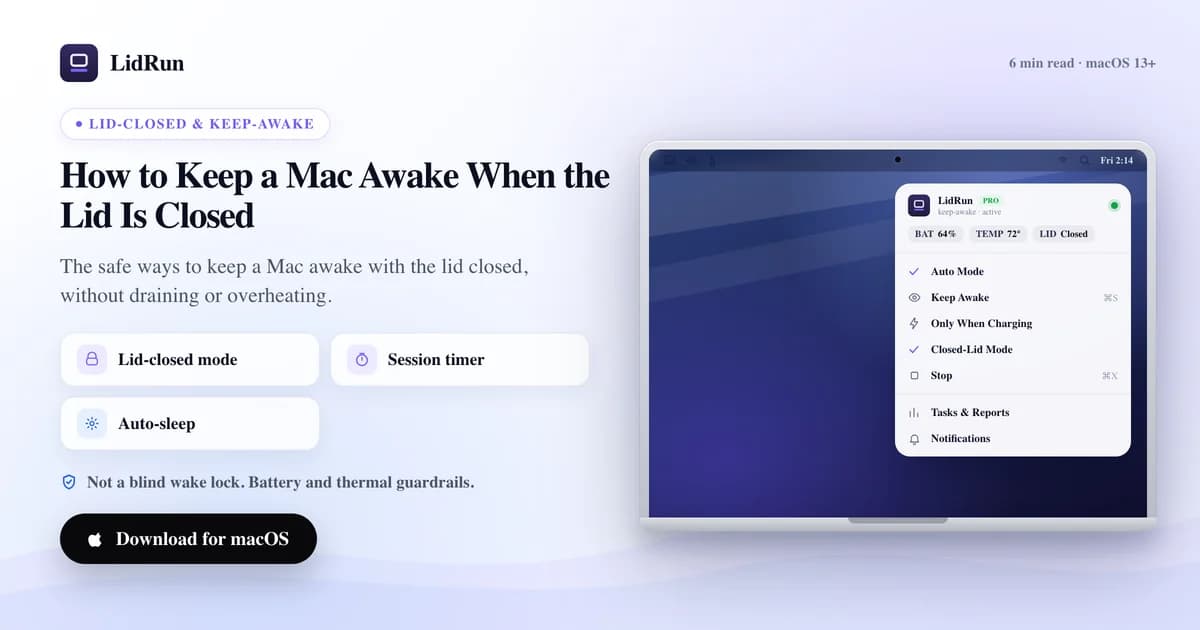
Dá para manter o Mac acordado com a tampa fechada sobrescrevendo o clamshell sleep do macOS — com o comando nativo pmset disablesleep, o próprio modo clamshell da Apple para monitor externo, um app de terceiros para manter o Mac acordado, ou o Closed-Lid Mode da LidRun. O caffeinate sozinho, e a maioria dos apps simples desse tipo, não dão conta disso, porque fechar a tampa aciona um sleep separado, de nível mais baixo, que power assertions comuns não bloqueiam.
Por que fechar a tampa para tudo
Fechar a tampa de um MacBook não é só escurecer a tela — isso aciona o clamshell sleep, um suspend de nível mais baixo, separado do idle sleep que acontece quando você deixa a tampa aberta sem mexer no Mac. O macOS lê o sensor da tampa pela propriedade AppleClamshellState do IOPMrootDomain, e no instante em que ela vira "fechada" com o Mac na bateria, o sistema suspende em questão de segundos para economizar energia e deixar o chassi começar a esfriar.

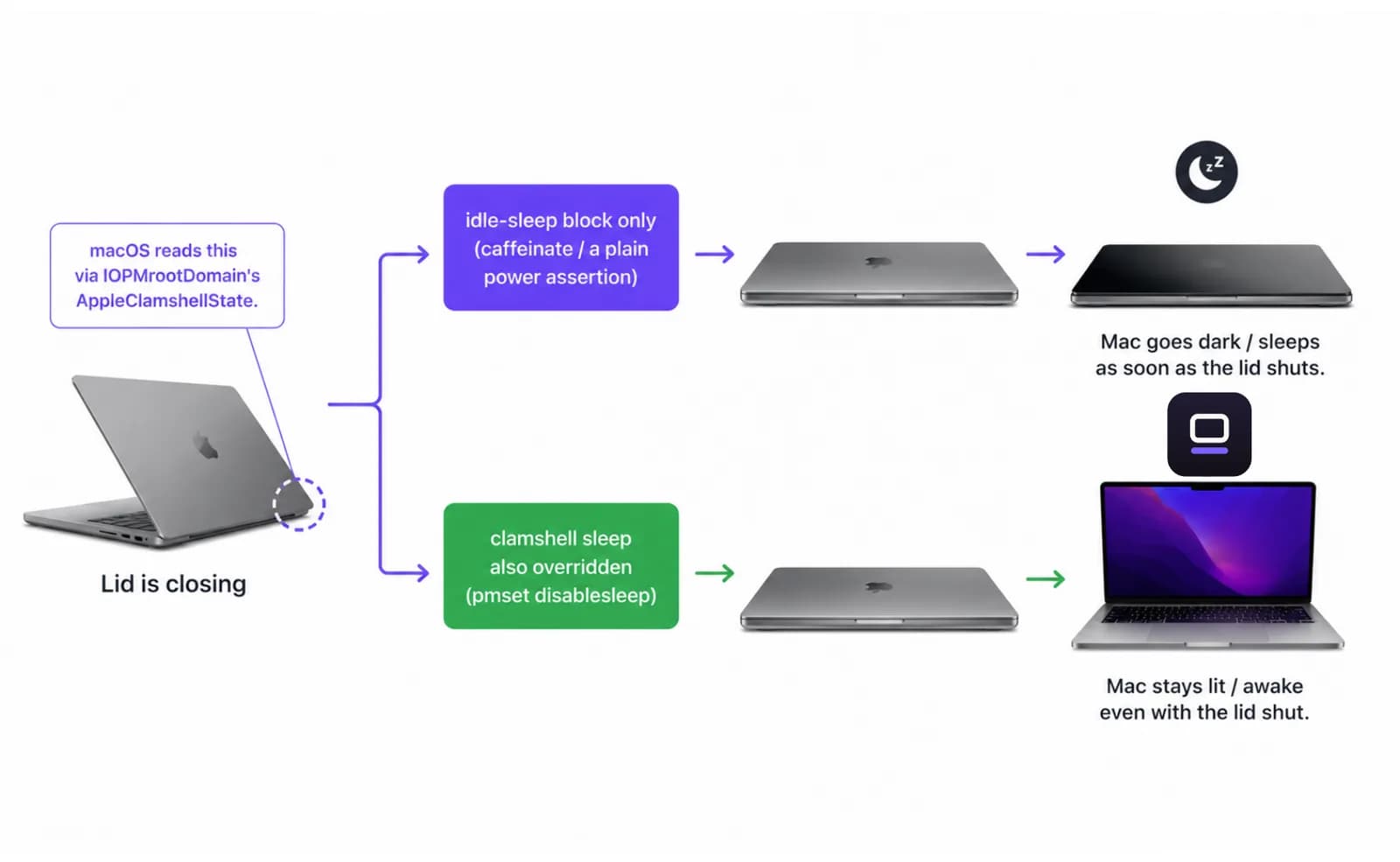
Ferramentas comuns de power assertion — incluindo o comando nativo caffeinate — só bloqueiam o idle sleep. Elas não têm efeito nenhum sobre o clamshell sleep, e é por isso que rodar caffeinate -i no Terminal e depois fechar a tampa ainda coloca o Mac para dormir na bateria.
Quando ele dorme, tudo o que estava rodando pausa junto — o build, o download que estava em 80%, o agente que estava no meio de uma tarefa. Nada se perde, mas nada avança também, e só volta a rodar quando você abre a tampa de novo ou conecta algo que acorde o Mac.
As formas gratuitas de manter o Mac acordado com a tampa fechada
Existem três opções gratuitas antes de você recorrer a qualquer app, LidRun incluído.
caffeinate é a ferramenta de linha de comando nativa do macOS para manter o Mac acordado — não precisa instalar nada. caffeinate -i bloqueia o idle sleep enquanto estiver rodando, caffeinate -s faz o mesmo mas só com o Mac na tomada, e caffeinate -t 3600 expira depois de uma hora, então você não precisa lembrar de encerrar o processo. É a ferramenta certa para um terminal com a tampa aberta que você não quer que "cochile" — só que ele não toca no clamshell sleep, como vimos acima.
pmset disablesleep é a alavanca de verdade para o sleep com a tampa fechada. Rodar sudo pmset -a disablesleep 1 no Terminal desliga o sleep no sistema inteiro, incluindo o gatilho do clamshell — a mesma configuração de sistema que o Closed-Lid Mode da LidRun aciona por baixo dos panos. Pede senha de administrador e funciona tanto na bateria quanto na tomada.
O próprio modo clamshell da Apple é a terceira opção, e não precisa de nenhum software extra: conecte o Mac na tomada, conecte um monitor externo (tradicionalmente também um teclado ou mouse) e feche a tampa. O macOS trata isso como uma sessão de desktop e nunca aciona o clamshell sleep — mas só enquanto todas essas condições se mantêm. Desconecte a energia ou o monitor e o sleep normal ao fechar a tampa volta a valer na hora.
Guia relacionadoUm workflow para desenvolvedores com a tampa fechada no MacBookOnde as opções gratuitas param de dar conta
Cada um desses caminhos gratuitos faz uma única coisa — impedir o sleep — e nada além disso.
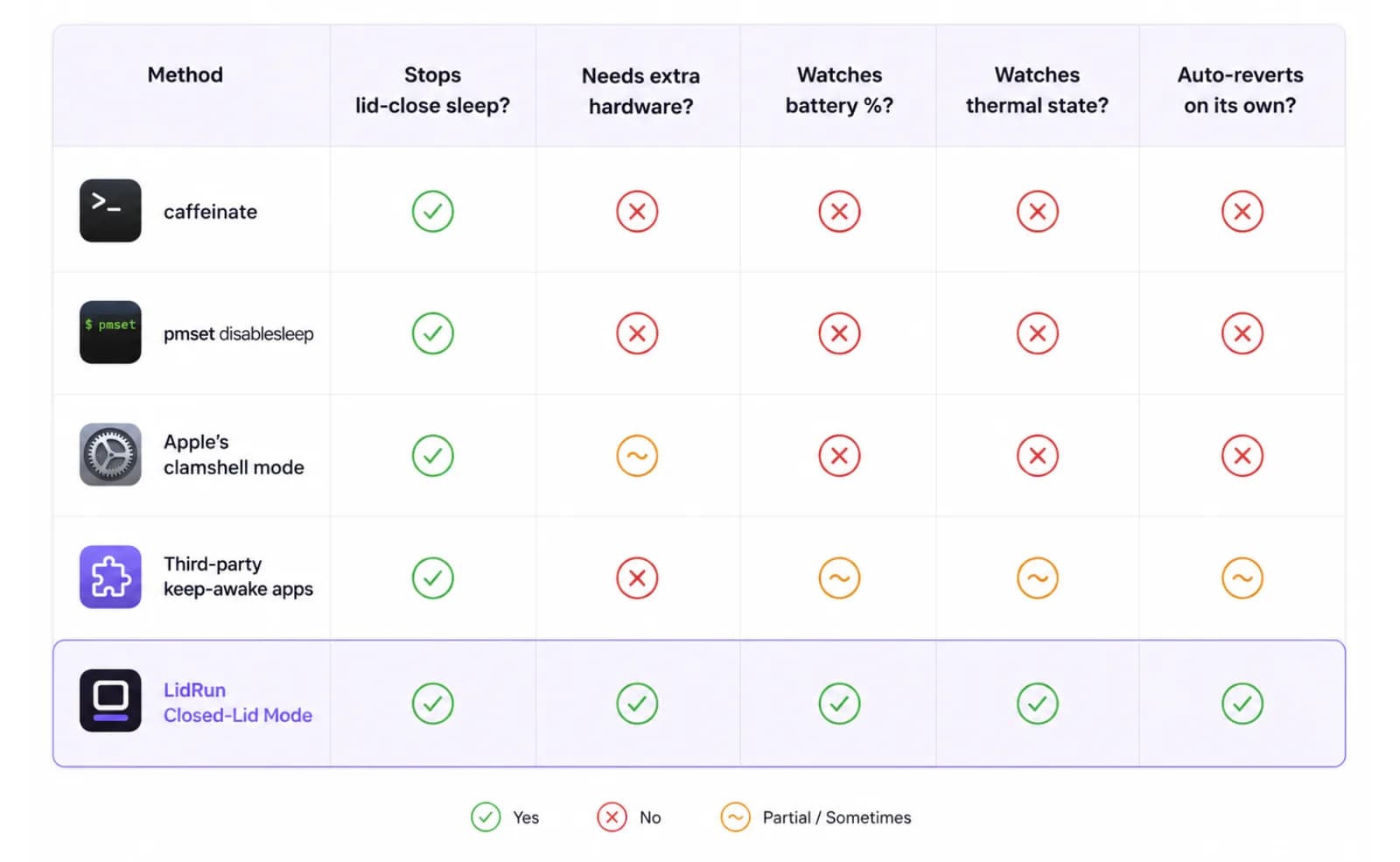
pmset disablesleep é uma configuração global e persistente. Uma vez em 1, o macOS simplesmente não dorme mais, tampa aberta ou fechada, até que algo devolva o valor para 0 — um script, um app, ou você mesmo digitando o comando de novo. Esqueça de reverter, e um Mac dentro de uma mochila rodando uma tarefa pesada não tem nenhum ponto automático em que ele recua; nada está de olho em quanta bateria sobrou ou o quanto o chassi está esquentando.
Apps de terceiros para manter o Mac acordado — Amphetamine, Caffeine, KeepingYouAwake, Lungo — são um salto real em conveniência. Toggles na menu bar, agendamentos e gatilhos por app batem de longe digitar comandos no Terminal, e alguns oferecem uma opção para tampa fechada construída sobre o mesmo tipo de override em nível de sistema. O que não vimos nessa categoria é esse override combinado com uma leitura de bateria e estado térmico em tempo real que encerre a sessão sozinha — essa combinação, não o override em si, é a parte que vale a pena ter em qualquer tarefa longa o suficiente para importar.
O modo clamshell da Apple tem o problema oposto: é o mais seguro dos três porque o macOS está fazendo exatamente o que foi projetado para fazer, mas exige um hardware que a maioria das pessoas não tem à mão para uma tarefa longa e espontânea — energia na tomada e um monitor externo, conectados antes de fechar a tampa.
A forma segura de manter tudo rodando
Manter o Mac acordado é fácil; manter isso seguro, não.
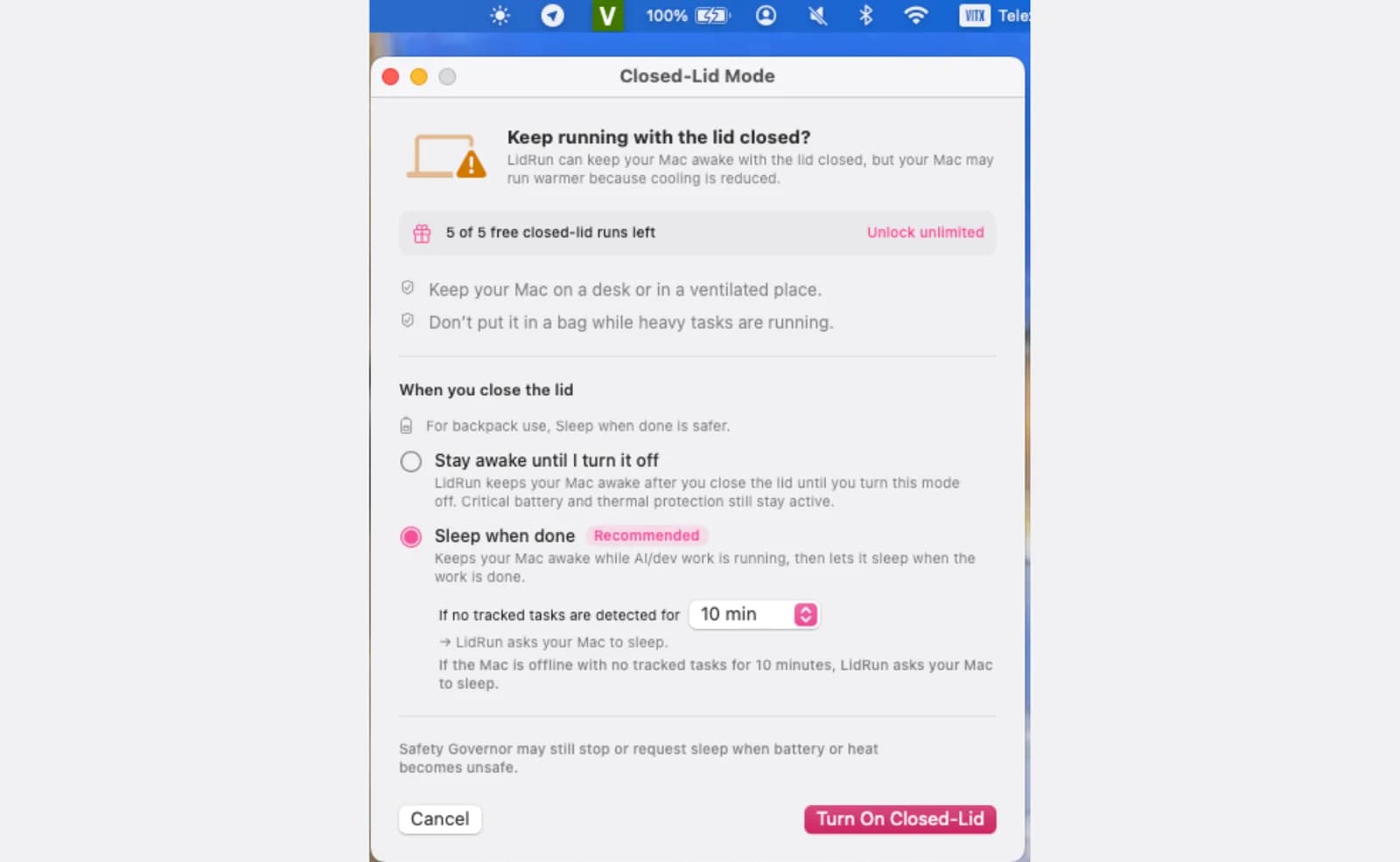
O Closed-Lid Mode da LidRun mantém uma power assertion do IOKit para o idle sleep e combina isso com o mesmo override de pmset disablesleep visto acima, aplicado através do helper privilegiado da LidRun, para que o macOS não peça senha de administrador toda vez — depois que esse helper é aprovado, com um único prompt.
Dois modos decidem o que fechar a tampa realmente faz. O modo "Dormir ao terminar" — o padrão — mantém o Mac acordado só enquanto detecta uma tarefa de IA ou de dev rodando, e deixa ele dormir assim que não sobra nada para acompanhar (10, 20 ou 30 minutos sem atividade rastreada, à sua escolha). O modo "Ficar acordado até eu desligar" mantém a assertion indefinidamente, para qualquer coisa que o Auto-Watch não consiga enxergar, com um limite de sessão opcional de 30 minutos até 8 horas, para que uma tarefa não fique acordada a noite inteira só porque você esqueceu dela.
Por trás dos dois modos, um Safety Governor monitora a carga da bateria e o estado térmico o tempo todo. Defina um limite de auto-stop entre 15% e 50% (20% por padrão) e o Mac tem permissão para dormir assim que a carga passa desse ponto, em vez de continuar drenando a bateria. No lado térmico, a LidRun observa o próprio sinal de pressão térmica do macOS e avisa no nível Hot; se subir para Very Hot, o Closed-Lid Mode se desliga sozinho para que o hardware possa fazer throttle e esfriar do jeito normal. Isso não é uma promessa de que o Mac vai continuar frio com a tampa baixada — fechar a tampa sempre corta o fluxo de ar — é uma proteção para que um posicionamento ruim não vire um problema sério enquanto você não está lá para perceber.
O Closed-Lid Mode é um recurso Pro. Instalações novas também ganham um número limitado de sessões Closed-Lid gratuitas para testar antes de precisar de uma licença.
Quando você realmente precisa disso
Se você só quer que a tela e o timer de inatividade esperem durante uma apresentação ou uma leitura longa com a tampa aberta, caffeinate -d ou um app simples de manter acordado já resolve — você não precisa de nada disso.
Manter o Mac acordado com a tampa fechada é para um caso mais específico: você quer fechar o laptop de verdade e sair de perto. Uma compilação longa, o download de um modelo, uma tarefa de dados rodando de madrugada, uma execução de agente que você não quer ficar vigiando na mesa. É justamente o caso que nenhuma das opções gratuitas de linha de comando lida bem sem alguém por perto — elas impedem o sleep, mas nada fica de olho no Mac enquanto você está longe.
Vale a pena experimentar o Closed-Lid Mode principalmente quando você se pega deixando a tampa entreaberta só para a tarefa não morrer, ainda mais se o Mac estiver na bateria ou num lugar quente enquanto trabalha.
Hábitos que ajudam
Isso vale não importa qual dos métodos acima você use, LidRun incluído.
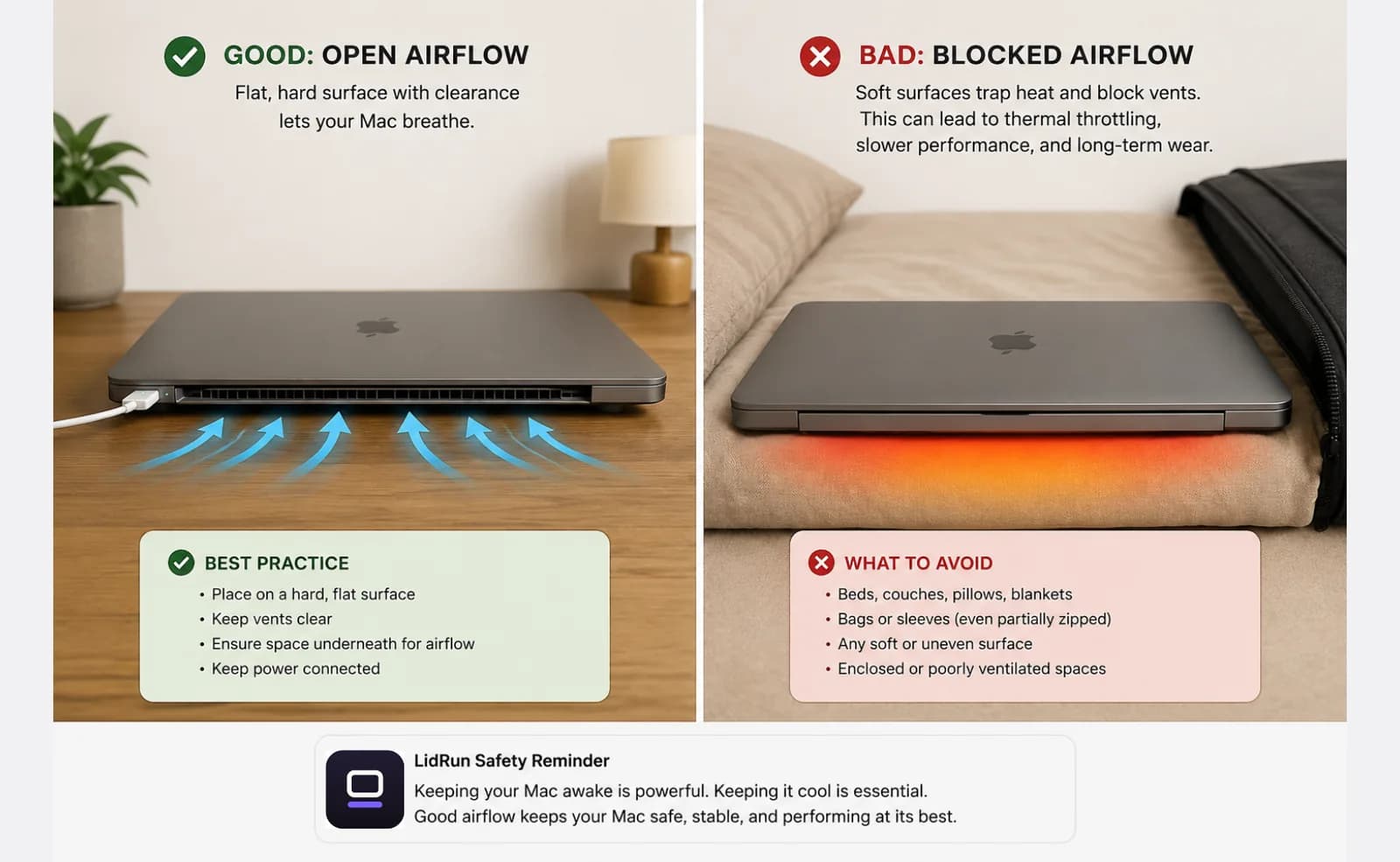
Deixe o Mac sobre uma superfície dura e plana, com espaço para o ar circular embaixo. Uma tampa fechada já retém um pouco de calor perto do teclado; uma cama, uma almofada de sofá ou uma mochila fechada pioram isso ao bloquear as últimas saídas de ar que ainda estavam livres.
Fique na tomada para qualquer tarefa longa. Rodar com a tampa fechada na bateria é tranquilo para uma execução curta, mas a energia da tomada tira a questão da carga completamente da equação naquela sessão e mantém tudo rodando num ciclo normal, em vez do sistema tentando economizar bateria.
Deixe o limite de auto-stop da bateria ativado mesmo estando na tomada, para que uma queda de energia inesperada ou um cabo solto encerre a sessão de forma limpa, em vez de descarregar a bateria por completo durante a noite.
Se você usou o pmset disablesleep na mão em vez de um app, crie um lembrete para rodar sudo pmset -a disablesleep 0 quando a tarefa terminar — é o único passo que nada faz por você automaticamente.
Mantenha o Mac acordado com a tampa fechada usando uma tecla
Para manter um Mac acordado com a tampa fechada, normalmente você tem que ativar um ajuste primeiro. O LidRun 1.2 transforma isso em uma tecla: aperte ⌥L (Option-L), ou só Caps Lock, e feche a tampa — o Mac fica acordado e seu trabalho segue rodando.
O Caps Lock é reaproveitado aqui porque, com a tampa fechada, ninguém está digitando no Mac, e ele não pede nenhuma permissão de acessibilidade extra. Prefere o Caps Lock para digitar? O atalho global ⌥L faz o mesmo serviço.
É a mesma sessão protegida de qualquer jeito: timer, charging-only, auto-stop por bateria baixa e travas térmicas seguem ativos, e o LidRun avisa antes de colocar o Mac para dormir. Aperte a tecla de novo para deixá-lo dormir.
O LidRun mantém seu trabalho rodando com a tampa fechada, com proteção de bateria e temperatura embutida.
Já tem o LidRun? Leia o guia de configuração →
Novo no LidRun? Veja os preços →
Perguntas frequentes
Os limites de bateria e temperatura da LidRun ajudam a reduzir esse risco, mas o posicionamento e a ventilação continuam sendo responsabilidade sua — use uma superfície plana e ventilada e evite móveis estofados ou uma mochila fechada. Uma tampa fechada já retém um pouco de calor perto do teclado; um posicionamento ruim só piora isso.
Sim. A LidRun é compatível com macOS 13 Ventura ou mais recente, tanto em Macs Apple Silicon quanto Intel.
Você define um limite de auto-stop entre 15% e 50% (20% por padrão). Quando a carga passa desse ponto, a LidRun deixa o Mac dormir em vez de continuar drenando a bateria, com um aviso antes de chegar lá.
Só para o truque de clamshell da própria Apple, que exige o Mac na tomada com um monitor externo conectado — tradicionalmente também um teclado ou mouse — antes de fechar a tampa. O Closed-Lid Mode da LidRun dispensa tudo isso; ele mantém o Mac acordado só com a tampa fechada, na bateria ou na tomada.
O caffeinate bloqueia o idle sleep, aquele tipo que acontece quando o Mac fica parado, sem atividade, com a tampa aberta. Ele não tem efeito nenhum sobre o clamshell sleep, o suspend separado e de nível mais baixo que o macOS aciona no instante em que você fecha a tampa fisicamente na bateria. Sobrescrever isso exige o pmset disablesleep ou o modo clamshell com monitor externo da Apple — que é justamente o que o caffeinate sozinho não faz, e o que o Closed-Lid Mode da LidRun resolve para você.
Sim — sudo pmset -a disablesleep 1 é o mesmo override em nível de sistema que a LidRun usa, e é uma forma gratuita e legítima de manter o Mac acordado com a tampa fechada. O ponto negativo é que ele é global e persistente: o macOS simplesmente não dorme, tampa aberta ou fechada, até você rodar sudo pmset -a disablesleep 0 (ou reiniciar), e nada nesse comando monitora sua porcentagem de bateria ou o estado térmico enquanto você está longe.
Desligar o modo ou fechar a LidRun restaura o sleep normal automaticamente. Se em algum momento ele travar — depois de um crash, por exemplo — rodar sudo pmset -a disablesleep 0 no Terminal reseta na hora.
Sim — no LidRun 1.2+, aperte ⌥L (Option-L) ou toque no Caps Lock para manter o Mac acordado com a tampa fechada e depois feche a tampa. Aperte a mesma tecla de novo para liberar e deixar o Mac dormir.