LidRun CLI: menjaga Mac tetap menyala dari terminal
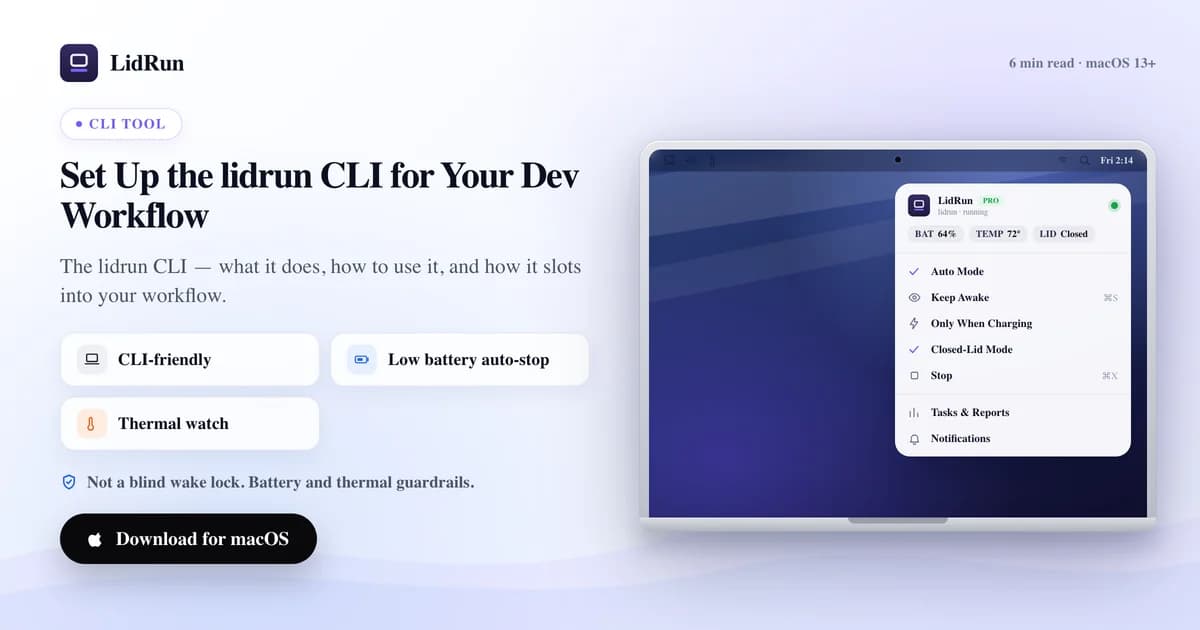
Alat command line lidrun menghadirkan kontrol keep-awake LidRun langsung di terminal Anda: lidrun status menampilkan status saat ini, lidrun start dan stop menyalakan atau mematikannya, dan lidrun -- <command> membungkus satu perintah dalam hold keep-awake selama perintah itu berjalan — tidak lebih, tidak kurang. Ini adalah hal yang paling mendekati caffeinate yang dimiliki LidRun, dan artikel ini membahas semua perintah yang benar-benar ada, cara menginstalnya, dua cara menyisipkannya ke skrip, dan — secara jujur — bagian mana dari sesi lidrun yang mendapat perlindungan baterai dan termal LidRun, serta bagian mana yang berjalan telanjang, sama seperti caffeinate.
Apa sebenarnya lidrun CLI itu
lidrun bukan program terpisah dengan logikanya sendiri — ini adalah skrip wrapper kecil, terinstal di ~/.local/bin/lidrun atau /usr/local/bin/lidrun, yang menjalankan binary LidRun.app yang sama dengan yang sudah Anda miliki, dipanggil dengan flag --cli alih-alih diklik dua kali. Memindahkan aplikasi nanti, dari Downloads ke Applications, tidak merusak wrapper ini, karena wrapper dibuat untuk menunjuk ke lokasi app bundle yang sebenarnya pada saat instalasi.

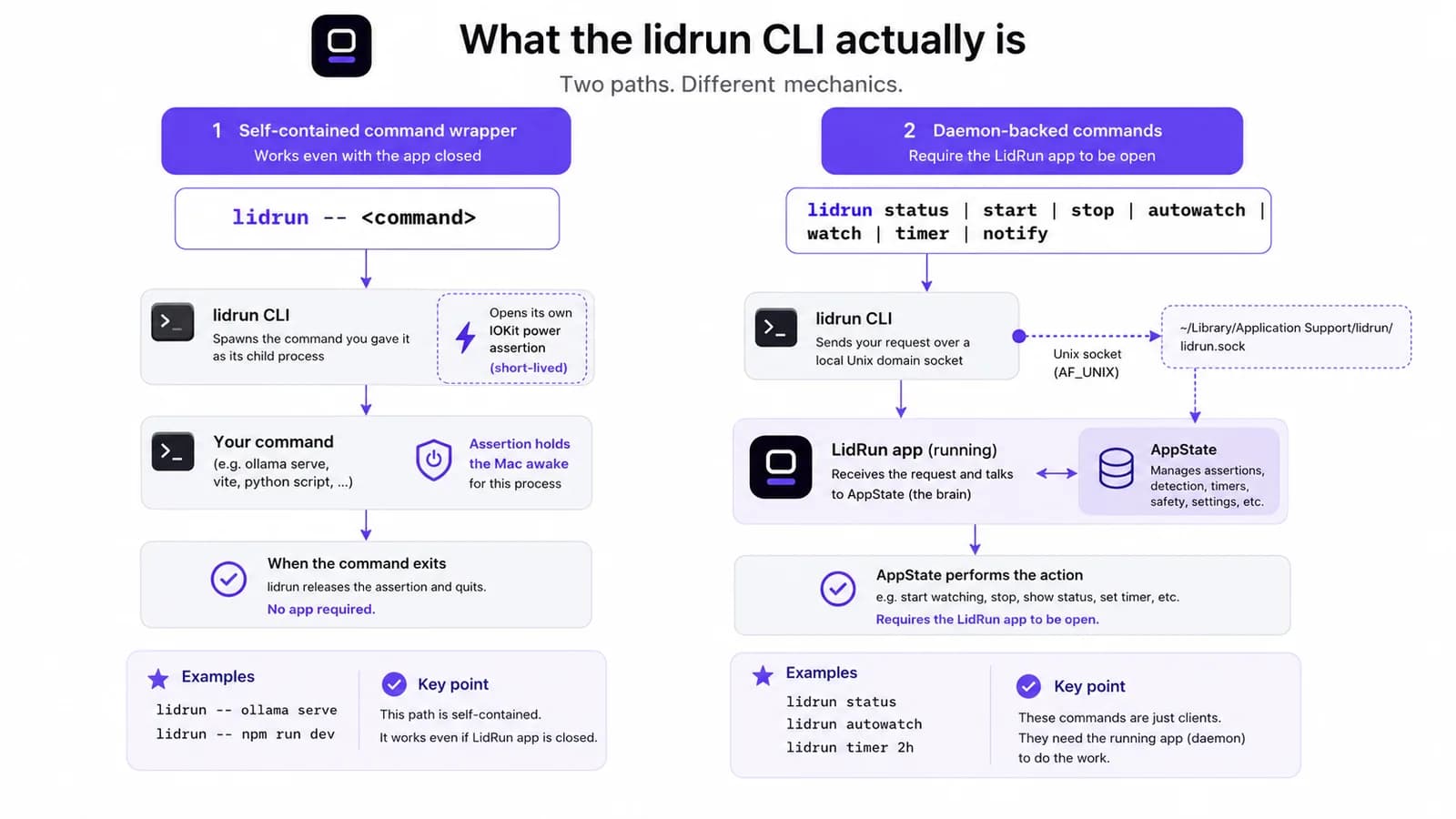
Di baliknya, ada dua perilaku yang benar-benar berbeda, dan mencampuradukkan keduanya adalah cara termudah untuk salah membaca apa yang sedang dilakukan sebuah perintah. lidrun -- <command> bersifat mandiri: ia membuka power assertion singkat miliknya sendiri untuk proses anak, dan melepaskannya begitu proses itu selesai, tanpa perlu aplikasi LidRun terbuka sama sekali. Semua perintah lainnya — status, start, stop, autowatch, watch, unwatch, patterns, timer, notify — bergantung pada daemon: ia membuka koneksi Unix socket lokal ke aplikasi yang sedang berjalan dan memintanya mengubah status. Jika aplikasi tidak terbuka, perintah-perintah itu langsung gagal dengan error, bukan diam-diam tidak melakukan apa-apa.
Perbedaan ini penting untuk memahami apa arti sebenarnya dari "diatur demi keamanan" di bagian selanjutnya artikel ini — artinya tidak sama untuk setiap perintah, dan berpura-pura sebaliknya adalah jenis klaim yang hanya bertahan sampai baterai Mac seseorang habis di dalam tas.
Cara gratis: caffeinate dan pmset
Sebelum menjangkau alat apa pun, macOS sudah menyediakan dua cara untuk melakukan ini dari terminal, dan ini layak dijelaskan apa adanya — keduanya benar-benar mumpuni, bukan sekadar akal-akalan. caffeinate -i your-command, atau caffeinate -i yang dibiarkan berjalan sendiri di tab terminal cadangan, menahan idle-sleep assertion selama utilitas itu berjalan. Tanpa instalasi, tanpa perlu dipercaya lebih dulu, dan sudah menjadi bagian dari macOS selama lebih dari satu dekade — banyak orang yang sudah pernah melakukan ini bahkan sudah hafal di luar kepala.
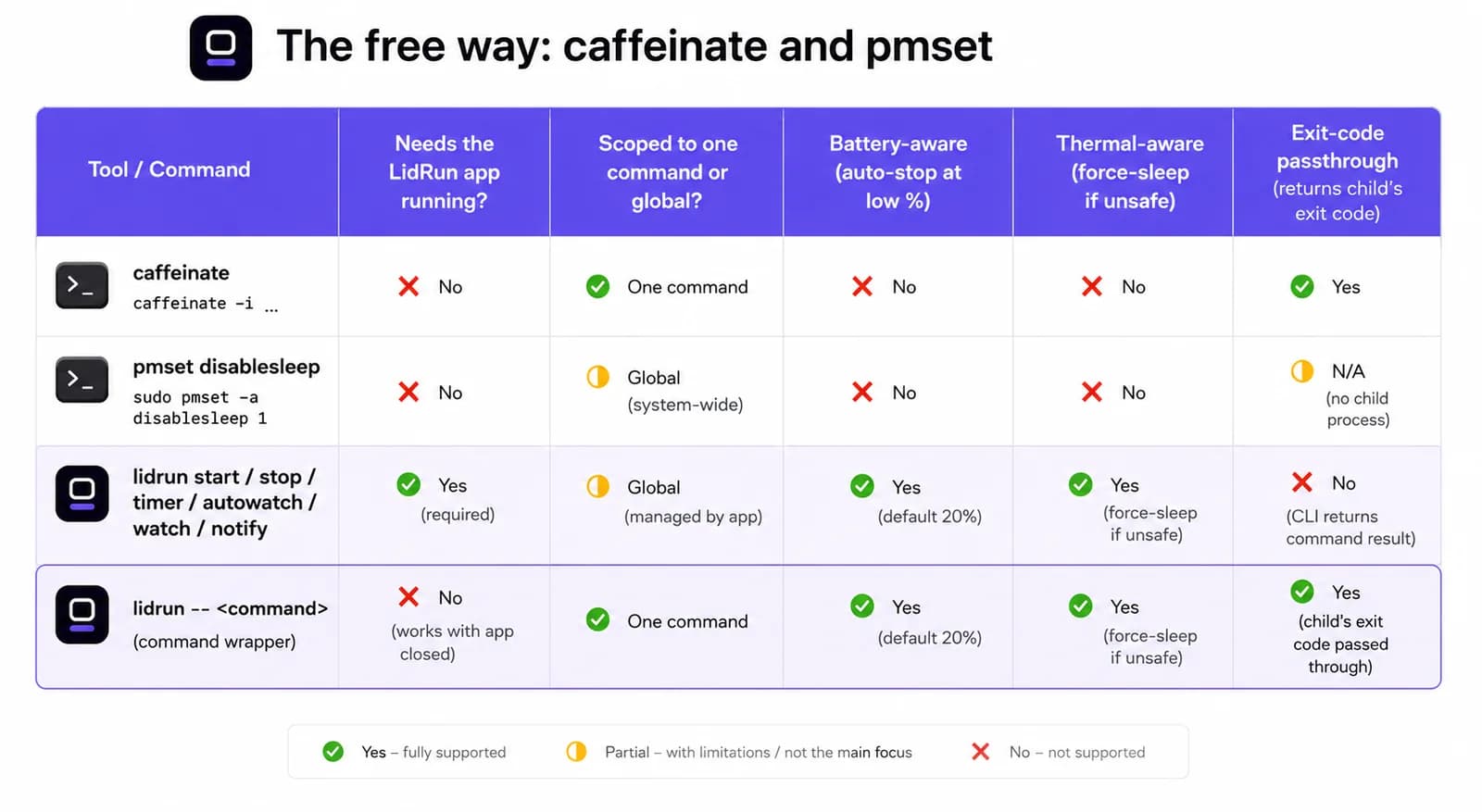
Khusus untuk penggunaan lid tertutup, pmset disablesleep 1 memerintahkan macOS untuk mengabaikan semua pemicu sleep di seluruh sistem, termasuk saklar lid — mekanisme persis yang digunakan Closed-Lid mode milik LidRun sendiri di baliknya, itulah sebabnya LidRun selalu berhati-hati memasangkan disablesleep 1 dengan disablesleep 0 yang sesuai saat sesi clamshell berakhir: saat stop, saat quit, dan sekali lagi saat aplikasi dijalankan untuk berjaga-jaga kalau sesi sebelumnya tidak dibersihkan dengan benar. Dijalankan secara manual, ini benar-benar perintah satu baris untuk build dengan lid tertutup tanpa perlu menginstal apa pun.
Untuk satu perintah yang Anda pantau langsung di depan layar, caffeinate -i npm run build sejujurnya sama baiknya dengan apa pun di sini, termasuk LidRun.
Panduan terkaitJalankan perintah panjang, lalu biarkan Mac Anda tidur setelah selesaiDi mana caffeinate dan pmset mencapai batasnya
Celahnya muncul ketika tidak ada lagi yang mengawasi sesi tersebut. Tidak satu pun dari kedua alat ini tahu persentase baterai atau seberapa panas Mac sedang berjalan — keduanya menahan persis apa yang diperintahkan untuk ditahan, selama yang diperintahkan, titik.
disablesleep adalah versi yang lebih tajam dari risiko itu, karena ini pengaturan global, bukan terbatas pada satu tab terminal. Jika skrip yang menjalankan pmset disablesleep 1 crash, dihentikan paksa sebelum mencapai angka 0 yang seharusnya, atau sesi SSH terputus di tengah jalan, Mac akan tetap menolak untuk sleep — lid tertutup, tanpa pengawasan, sepanas apa pun ia berjalan — sampai seseorang menyadarinya dan membersihkannya secara manual. Mode kegagalan persis inilah yang membuat penggunaan disablesleep oleh LidRun sendiri dipasangkan secara defensif di tiga tempat terpisah, bukan hanya satu.
Versi risiko dari caffeinate lebih senyap tapi sama nyatanya: caffeinate -i di latar belakang dari tiga deploy yang lalu, masih hidup di tab terminal yang tidak pernah ditutup siapa pun, membuat baterai laptop terus terkuras di dalam tas tanpa ada yang mengeceknya. Bukan berarti kedua alat ini salah bekerja seperti ini — caffeinate memang dirancang untuk melakukan satu pekerjaan saja, dengan bersih. Hanya saja itu bukan batas bawah baterai atau termal, dan memang tidak pernah dimaksudkan untuk menjadi itu.
Menginstal lidrun CLI
CLI ini bukan unduhan terpisah. Buka LidRun, masuk ke Settings, lalu Command Line, dan klik Install lidrun CLI… — ini akan menulis skrip wrapper yang dijelaskan di atas dan menawarkan pilihan cakupan instalasi.
Menginstal ke ~/.local/bin/lidrun sama sekali tidak memerlukan password admin; Anda mungkin perlu menambahkan ~/.local/bin ke PATH sekali saja jika belum ada di sana, dan dialog installer sendiri sudah menyebutkan ini secara langsung. Menginstal ke /usr/local/bin/lidrun menempatkan lidrun di PATH untuk setiap shell tanpa langkah tambahan itu, tetapi memerlukan password admin satu kali, karena menulis ke lokasi itu membutuhkan akses root.
lidrun --version memastikan build mana yang sebenarnya sedang berjalan — ia membaca nomor versi yang sama dengan aplikasinya sendiri, sehingga CLI tidak bisa diam-diam tidak sinkron dengan GUI — dan lidrun help mencetak daftar perintah lengkap tanpa perlu meninggalkan terminal.
Semua perintah yang benar-benar dimiliki lidrun CLI
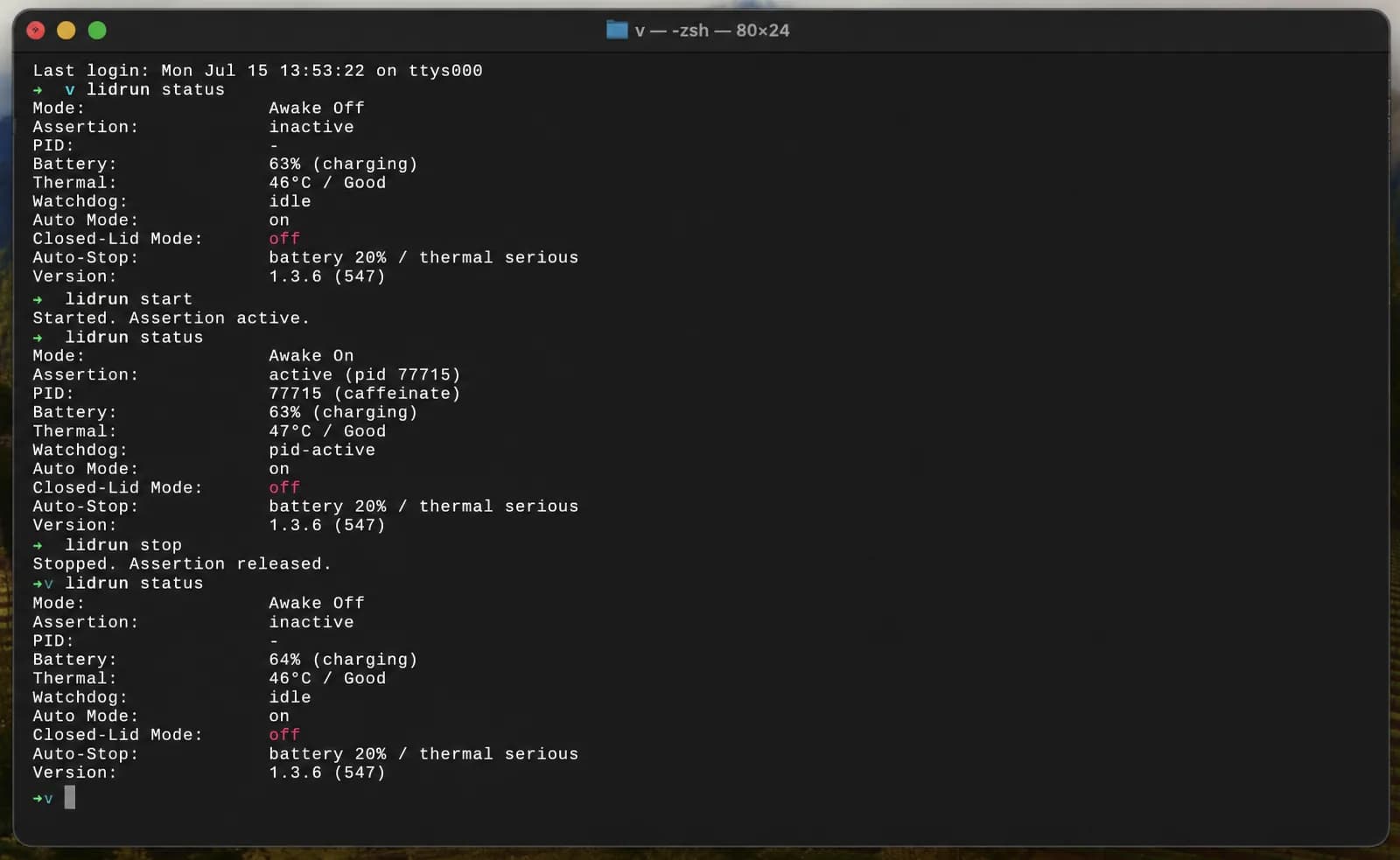
lidrun status layak dijalankan pertama kali dan paling sering. Dalam kondisi awal, ia mencetak Mode: Awake Off, Assertion: inactive, Clamshell: off; jalankan lagi setelah lidrun start dan Mode akan berbunyi Awake On dengan Assertion active — ia juga menambahkan baris Battery dan Thermal setiap kali Mac punya baterai dan status termal yang layak ditampilkan. lidrun start dan lidrun stop adalah pasangan on/off yang eksplisit, dan lidrun -- <command> adalah wrapper, yang menahan keep-awake selama persis masa hidup proses tersebut dan mengembalikan exit code aslinya begitu selesai — periksa $? setelahnya dan Anda akan membaca hasil dari perintah yang dibungkus itu sendiri, bukan hasil dari lidrun.
Satu koreksi yang perlu ditegaskan: tidak ada lidrun on, lidrun off, atau lidrun toggle yang berdiri sendiri. Kata-kata itu hanya ada sebagai argumen untuk autowatch — lidrun autowatch on, off, atau toggle menyalakan atau mematikan Auto Mode, mode yang menahan keep-awake hanya selama nama proses yang diawasi benar-benar berjalan dan melepaskannya sendiri begitu proses itu berhenti. lidrun watch <pattern> dan lidrun unwatch <pattern> menambahkan atau menghapus nama dari daftar pengawasan itu, dan lidrun patterns menampilkan daftar yang sedang aktif saat ini.
Dua lagi melengkapi daftar ini: lidrun timer 3600 menahan keep-awake selama jumlah detik tertentu dan melepaskannya sendiri saat waktunya habis, dan lidrun notify "Build done" "exit 0" mengirimkan notifikasi lokal dan push melalui kanal yang sama dengan yang digunakan peringatan bawaan aplikasi — baris terakhir yang masuk akal dalam sebuah skrip yang dibungkus.
Dua pola scripting, dan jebakan tanda kutip
Untuk skrip utuh dengan lebih dari satu langkah, apit dengan bracket: lidrun start di bagian atas, lidrun stop di bagian bawah, dan semua yang lain berjalan di antaranya persis seperti tanpa keterlibatan LidRun. Karena keduanya adalah perintah daemon yang langsung kembali, tidak masalah apakah skrip berjalan di terminal foreground atau headless lewat SSH — aplikasilah yang menahan status sebenarnya.
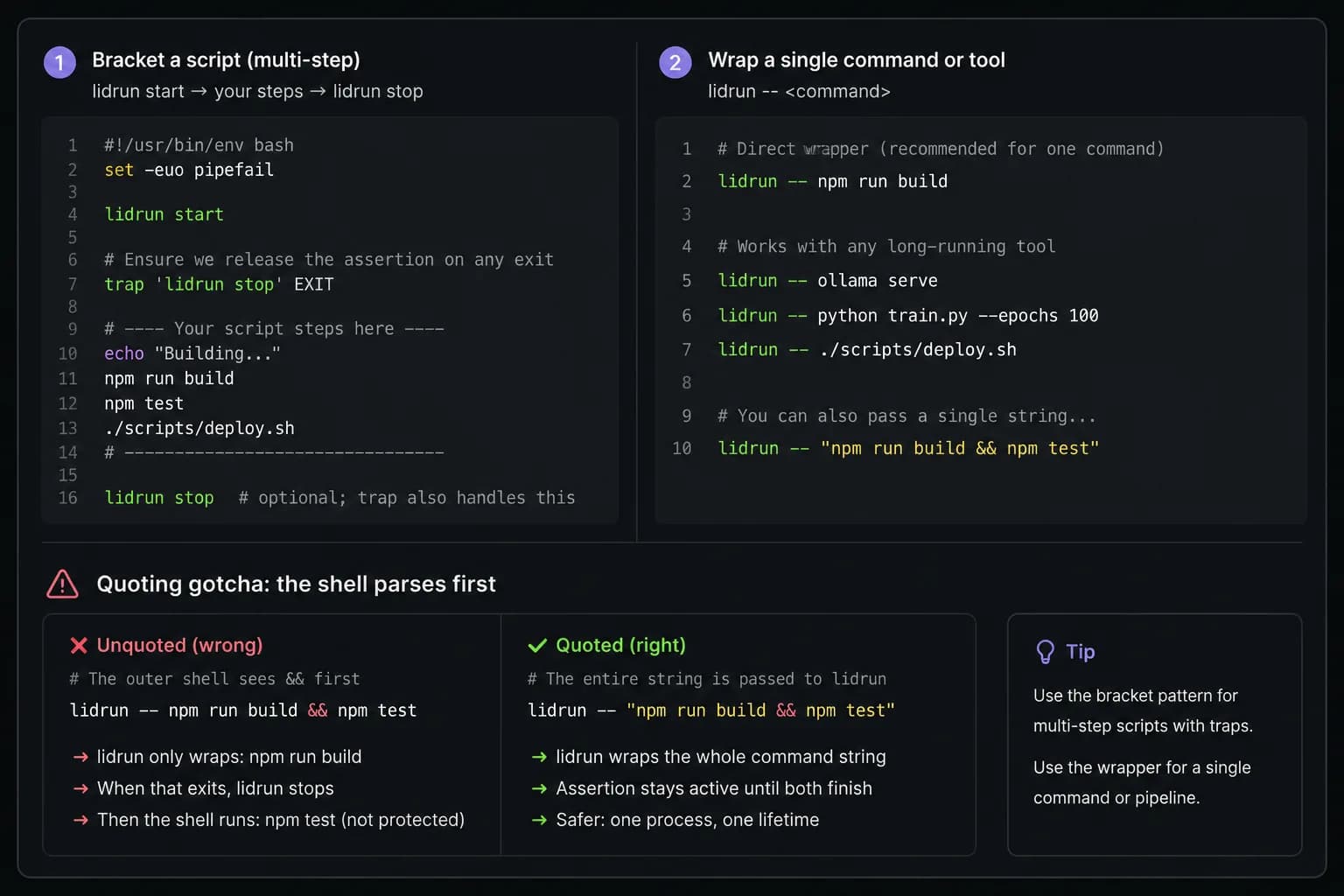
Risiko sebenarnya dari pengapitan ini sama dengan yang dimiliki caffeinate dan disablesleep: jika langkah sebelumnya gagal dan skrip keluar sebelum mencapai lidrun stop, Mac akan tertahan dalam kondisi always-on yang tidak akan diingat siapa pun untuk dibersihkan. Perbaikan standarnya adalah trap satu baris di bagian atas skrip — trap 'lidrun stop' EXIT — yang menjalankan lidrun stop apa pun cara skrip itu keluar, termasuk saat crash.
Untuk satu langkah saja, bentuk wrapper menghindari kebutuhan trap sama sekali: lidrun -- ./build.sh menahan assertion selama persis masa hidup satu proses itu dan melepaskannya begitu proses selesai, berhasil atau gagal — bentuknya sama dengan caffeinate ./build.sh.
Ada satu detail yang perlu diketahui sebelum mengejutkan Anda: lidrun -- menjalankan argumen yang digabungkan melalui login shell sungguhan, sehingga operator shell di dalam satu string bertanda kutip bekerja seperti yang diharapkan. lidrun -- "npm run build && npm test" menahan satu keep-awake untuk kedua langkah tersebut. Hilangkan tanda kutipnya dan tulis lidrun -- npm run build && npm test saja, maka shell luar Anda akan mem-parsing && lebih dulu — hanya npm run build yang diteruskan ke lidrun, dan npm test berjalan sesudahnya, tanpa dibungkus, setelah lidrun sudah selesai. Karena berjalan melalui login shell, entri PATH dari Homebrew, pyenv, atau nvm juga ter-resolve sama seperti di terminal interaktif, yang menghindari jebakan umum pada alat yang menjalankan shell secara langsung.
Apa yang benar-benar dicakup perlindungan keamanan LidRun dalam sesi CLI
Ini bagian yang perlu dijelaskan dengan tepat, karena jawaban jujurnya tergantung pada perintah mana yang Anda gunakan, bukan pada "CLI" sebagai satu kesatuan. Perlindungan baterai dan termal LidRun berada dalam pelacakan status aplikasi yang sedang berjalan, bukan pada power assertion mentah itu sendiri — jadi apa yang didapat sebuah sesi lidrun tergantung apakah aplikasi sedang mengawasi assertion tersebut.
lidrun start, timer, dan autowatch menahan assertion yang secara aktif dilacak oleh aplikasi. Secara default, jika baterai turun di bawah 20% saat salah satunya aktif, aplikasi akan melepaskan hold itu sendiri — hal yang sama seperti yang akan dilakukan lidrun stop — sehingga Mac bisa sleep secara normal sebelum keadaan menjadi mendesak. Itu batas bawah lunak yang sama dengan yang didapat toggle Always On di menu bar, karena keduanya berbagi status terlacak yang sama di baliknya.
lidrun -- <command> tidak mendapat batas bawah lunak itu, karena assertion-nya berada di proses singkat milik CLI itu sendiri, di luar apa pun yang dilacak aplikasi — tidak ada status yang bisa dilepaskan aplikasi lebih awal. Jika aplikasi LidRun kebetulan sedang terbuka pada saat yang sama, yang cukup umum karena ini adalah utilitas menu bar, batas darurat kerasnya sendiri tetap berlaku di seluruh sistem: mendekati 4% baterai secara default (dapat dikonfigurasi antara 4% dan 8%), LidRun memanggil pmset sleepnow secara langsung, yang memaksa seluruh Mac untuk sleep terlepas dari siapa yang sedang menahan assertion, termasuk milik perintah yang dibungkus itu sendiri. Jika aplikasinya sama sekali tidak berjalan, tidak ada yang turun tangan, dan lidrun -- <command> berperilaku persis seperti hold caffeinate -i <command> telanjang: tanpa batas bawah baterai, tanpa pemeriksaan termal, hanya pencegahan idle-sleep selama proses itu berjalan.
Secara praktis, itu pertukaran yang cukup wajar untuk build atau test yang Anda pantau langsung di depan layar — Anda sendiri adalah pemeriksaan keamanannya. Untuk sesi semalaman yang benar-benar tanpa pengawasan, di mana batas bawah baterai perlu berarti sepanjang waktu, lidrun start yang dipasangkan dengan lidrun stop, atau Auto Mode, dengan aplikasi terbuka, adalah versi yang diawasi secara terus-menerus, bukan sekadar dijaga sebagai jaring pengaman kalau keadaan menjadi kritis.
CI di laptop, sesi tanpa pengawasan, dan di mana posisi CLI di antara yang lainnya
Alasan sebenarnya untuk menjangkau semua ini adalah self-hosted runner atau job semalaman pada Mac yang benar-benar duduk di atas meja di suatu tempat — jenis mesin tanpa pengawasan yang idle dan sleep dengan sendirinya, tidak seperti VM CI cloud yang bersifat sementara. Membungkus job itu dengan lidrun -- ./nightly.sh, atau mengapitnya dengan start dan stop, mencegah Mac idle di tengah proses.
CLI ini adalah satu titik sambung dari sekumpulan kecil alat yang sengaja saling bertumpang tindih. Auto Mode (lidrun autowatch on) menjaga Mac tetap menyala hanya selama nama proses yang diawasi benar-benar berjalan, tanpa perlu mengingat apa pun untuk diseimbangkan sesudahnya. Run Command view pada GUI melakukan pekerjaan yang sama seperti lidrun -- <command> tapi dari sebuah jendela, bukan terminal, dan menampilkan exit code serta durasi dari apa yang dijalankannya saat selesai — informasi yang sama dengan yang diberikan $? pada CLI. Mana yang dipilih sebagian besar tergantung dari mana job itu dimulai: skrip menjangkau CLI, pekerjaan manual satu kali menjangkau GUI.
Jika workflow-nya sepenuhnya hidup dalam bentuk toggle menu bar dan bukan skrip, Amphetamine, KeepingYouAwake, Lungo, dan Caffeine adalah alat-alat mapan yang benar-benar mumpuni dengan aturan pemicu sendiri — peluncuran aplikasi, jaringan Wi-Fi, waktu dalam sehari. Alat-alat itu tidak dibangun terutama di sekitar workflow terminal yang dapat diskripkan dan sadar exit-code seperti lidrun -- dan caffeinate, jadi kalau job dimulai dari skrip atau Makefile dan bukan dari sebuah klik, alat-alat CLI lebih cocok untuk pekerjaan spesifik itu.
Peringatan yang sama berlaku di sini seperti di tempat lain: permukaan keras yang berventilasi dan daya dari listrik langsung adalah setup yang tepat untuk apa pun yang berjalan lama, dan CLI ini membantu mengurangi friksi dalam menjaga Mac tetap menyala dari terminal. Ini tidak menggantikan kebutuhan untuk benar-benar mengecek mesin yang Anda minta berjalan tanpa pengawasan semalaman.
LidRun menjaga pekerjaan Anda tetap jalan saat layar tertutup, dengan perlindungan baterai dan suhu bawaan.
Sudah punya LidRun? Baca panduan setup-nya →
Baru kenal LidRun? Lihat harga →
Sering ditanyakan
lidrun status, start, stop, autowatch [on|off|toggle], watch <pattern>, unwatch <pattern>, patterns, timer <seconds>, dan notify "<title>" ["<body>"], ditambah wrapper lidrun -- <command>, --version, dan help. Tidak ada lidrun on, off, atau toggle yang berdiri sendiri — kata-kata itu hanya ada sebagai argumen untuk autowatch.
Tidak. Ini bersifat mandiri — ia membuka power assertion singkat miliknya sendiri untuk perintah yang dibungkus dan melepaskannya saat perintah itu selesai, terlepas dari aplikasi. status, start, stop, dan perintah daemon lainnya memang memerlukan aplikasi terbuka; mereka berkomunikasi dengannya lewat socket lokal dan mengembalikan error jika aplikasinya tidak terbuka.
Tergantung perintah mana yang digunakan. start, timer, dan autowatch menahan assertion yang secara aktif dilacak aplikasi, termasuk auto-stop baterai default di 20%. lidrun -- <command> menahan assertion terpisah miliknya sendiri yang tidak bisa dilepaskan lebih awal oleh aplikasi — jika aplikasi terbuka, batas darurat kerasnya yang mendekati 4% baterai tetap memaksa seluruh Mac untuk sleep terlepas dari siapa yang sedang menahan assertion; jika aplikasinya tidak berjalan, tidak ada yang turun tangan dan ia berperilaku seperti hold caffeinate telanjang.
lidrun -- your-command. Ini menunggu perintah tersebut selesai, melepaskan hold, dan mengembalikan exit code milik perintah itu sendiri — $? setelah lidrun -- npm test mencerminkan hasil dari npm test, bukan hasil dari lidrun.
Tidak untuk instalasi default. Settings, Command Line, Install lidrun CLI… bisa menulis ke ~/.local/bin/lidrun tanpa prompt admin sama sekali — cukup tambahkan folder itu ke PATH sekali saja. Menginstal secara system-wide ke /usr/local/bin/lidrun meminta password admin satu kali, karena menulis ke lokasi itu membutuhkan akses root.
Secara mekanis, lidrun -- <command> dan caffeinate <command> melakukan hal yang hampir sama — menahan idle-sleep assertion selama masa hidup proses tersebut. Bedanya ada pada bagian lain dari CLI: start, stop, timer, dan autowatch terhubung ke aplikasi, ambang baterai, status termal, dan notifikasi yang sama seperti yang sudah terlihat di menu bar, sehingga skrip dan GUI membaca satu status yang sama, bukan dua alat yang tidak saling terkait.
Ya — itu adalah kasus penggunaan nyata utamanya: self-hosted runner atau job semalaman pada Mac yang kalau tidak, akan idle dan sleep dengan sendirinya. Bungkus job itu atau apit dengan start dan stop, dan perlakukan seperti sesi tanpa pengawasan lainnya — berventilasi, terhubung ke listrik langsung, dan diawasi lewat lidrun start alih-alih wrapper telanjang, jika batas bawah baterai perlu aktif sepanjang waktu, bukan hanya sebagai upaya terakhir.