Dapatkan ping saat training run atau build Anda selesai
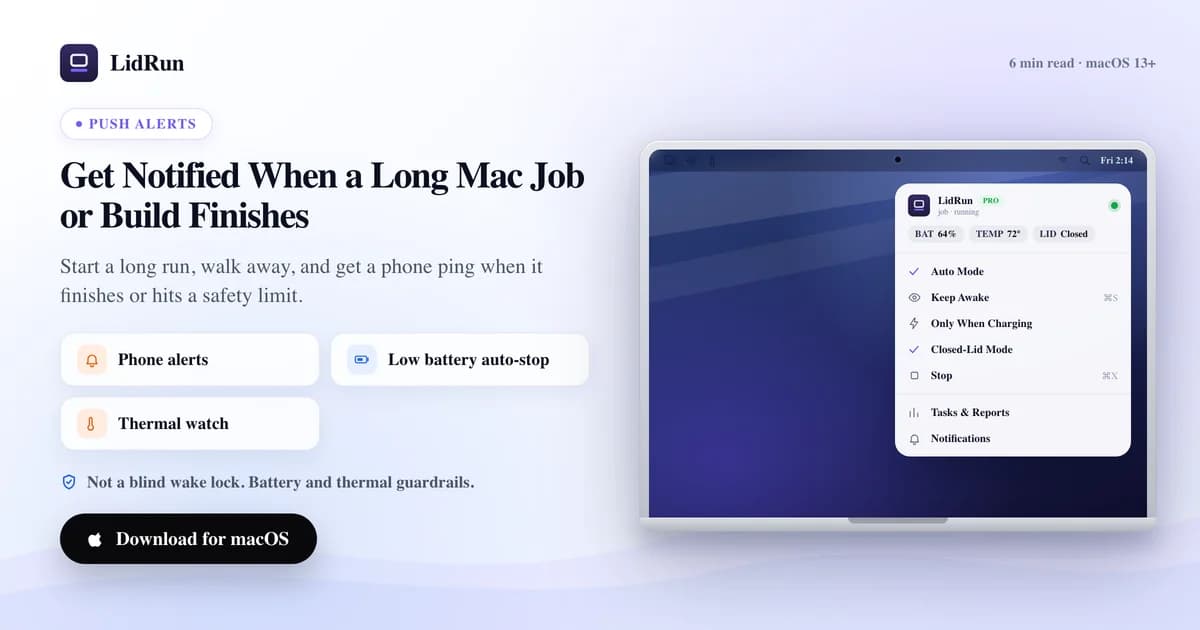
Jalankan job Anda di bawah LidRun, dan begitu proses berakhir Anda langsung dikirimi ping — lengkap dengan exit code dan berapa lama proses berjalan — jadi Anda dapat notifikasi saat job di Mac selesai, bukannya harus mengawasi jendela terminal terus-menerus. Push ke ponsel (ntfy.sh atau Pushover) gratis; Telegram, Discord, Slack, dan webhook kustom adalah bagian dari Pro. Kalau Anda tidak mau menginstal apa pun, macOS sebenarnya sudah punya beberapa perintah yang bisa memberi tahu Anda saat sebuah perintah shell selesai — panduan ini membahas keduanya: cara native yang gratis, dan bagaimana persisnya kanal-kanal LidRun bekerja dari ujung ke ujung.
Kenapa Anda terus-menerus mengecek terminal
macOS tidak punya cara bawaan untuk bilang "beri tahu saya kalau ini selesai." Terminal.app memang bisa mengedipkan ikon Dock-nya saat perintah shell di latar belakang selesai (Preferences → Profiles → Shell → "Notify when process completes"), tapi itu hanya membantu kalau Anda sedang duduk di depan Mac untuk melihatnya — tidak sampai ke ponsel Anda, dan sama sekali tidak memberi tahu apakah perintahnya benar-benar berhasil. Sebuah ollama pull, cargo build, training loop, atau sesi Claude Code / Codex yang berjalan tanpa pengawasan akan selesai dalam kesunyian total kalau begitu.
Jadi Anda hanya punya dua pilihan: duduk dan mengecek berulang kali, atau pergi dan menebak-nebak — kembali terlalu cepat berarti masih harus menunggu lagi, kembali terlalu lambat berarti kehilangan waktu yang bisa dipakai untuk hal berikutnya. Aplikasi keep-awake generik — Amphetamine, Caffeine, KeepingYouAwake, Lungo — menyelesaikan separuh pertama masalah ini dengan baik, yaitu mencegah Mac tidur, tapi tidak satu pun dari mereka mengawasi perintah tertentu atau memberi tahu Anda saat perintah itu selesai. Itu pekerjaan yang berbeda dari sekadar toggle di menu bar.
Solusinya adalah satu pesan tepat saat proses berakhir, yang menyatakan apakah prosesnya benar-benar berhasil. Sisa panduan ini membahas dua cara mendapatkannya: membangunnya sendiri dengan apa yang sudah ada di Mac Anda, atau membiarkan LidRun yang mengurusnya.
Cara native dan gratis untuk mendapat ping
macOS sudah membawa cukup banyak alat untuk membangun versi kasar dari ini tanpa menginstal apa pun. say "build finished" mengucapkan sebuah frasa dengan suara — cukup berguna kalau Anda ada di ruangan sebelah. osascript -e 'display notification "Build finished, exit 0" with title "Terminal"' memunculkan banner Notification Center sungguhan, jenis yang sama seperti yang dihasilkan aplikasi mana pun. Rangkai salah satunya ke sebuah perintah dengan ; (jalan terlepas dari berhasil atau tidak) atau && (hanya jalan kalau berhasil): npm run build && osascript -e 'display notification "Build finished" with title "npm"'.
Untuk sesuatu yang sedikit lebih rapi, terminal-notifier (brew install terminal-notifier) adalah alat gratis standar untuk ini — terminal-notifier -title "Build" -message "Finished" memunculkan banner sejenis dengan API command-line yang lebih enak dipakai. Tapi ketiga alat ini sama-sama tidak sampai ke ponsel Anda; semuanya hanya Notification Center, di Mac tempat Anda sedang duduk.
Bagian yang biasanya luput dari perhatian orang: say, osascript, maupun terminal-notifier sama-sama tidak menjaga Mac tetap terjaga. Kalau layar tidur dan idle sleep aktif sebelum job selesai, macOS bisa menjeda seluruh proses — build-nya macet, dan perintah notifikasi di ujung rangkaian tidak pernah berjalan. caffeinate -i di depan sebuah perintah menahan idle sleep persis selama perintah itu berjalan — bagian yang tidak disediakan sendiri oleh alat-alat notifikasi tadi.
Digabungkan, itulah resep native gratis yang lengkap — tetap terjaga selama job berjalan, lalu memberi tahu saat sudah selesai:
caffeinate -i npm run build; osascript -e 'display notification "Build finished" with title "npm"'
Di mana rangkaian DIY ini bisa gagal
Tiga hal bisa jadi masalah dengan caffeinate plus perintah notifikasi dalam praktiknya. Pertama, caffeinate adalah wake lock yang buta — ia tidak tahu sama sekali kondisi baterai atau suhu Anda, dan akan menahan MacBook tetap terjaga pada level baterai atau suhu berapa pun selama perintah yang dibungkusnya masih berjalan. Itu tidak masalah untuk build lima menit di meja kerja; tapi pada run tanpa pengawasan yang lebih panjang, ini bisa benar-benar berujung pada baterai habis atau thermal shutdown, apalagi kalau ventilasinya tertutup di bawah laptop stand atau di dalam tas. Menjaga Mac tetap berventilasi tetap tanggung jawab Anda — tidak ada notifikasi, dari alat mana pun, yang mendinginkan bodinya.
Kedua, osascript, terminal-notifier, dan say hanya sampai ke Mac tempat Anda berada. Kalau Anda sedang tidak di tempat, Anda baru melihat banner-nya saat kebetulan melihat layar lagi — persis masalah yang tadinya ingin Anda selesaikan.
Ketiga, menutup lid menghentikan seluruh rangkaian ini. Kecuali Anda sudah menjalankan pmset disablesleep 1 secara terpisah — yang butuh otorisasi admin dan merupakan toggle standing yang lebih berat, harus Anda ingat sendiri untuk mengembalikannya ke 0, bukan sesuatu yang berlaku hanya untuk satu perintah — menutup lid akan menangguhkan Mac, job-nya, dan perintah notifikasinya sekaligus.
Versi gratis LidRun: perintah yang dibungkus plus satu panggilan notify
Ini celah yang diisi LidRun, dan tier gratisnya sudah mencakup versi dasarnya. Aturannya sederhana: agent atau perintah sedang berjalan → tetap terjaga; perintah selesai, atau ada sesuatu yang jadi tidak aman → lepaskan dan biarkan Mac tidur. Resep CLI gratisnya:
lidrun -- npm run build; lidrun notify "Build finished" "exit $?"
lidrun -- <command> membungkus perintah dalam sebuah keep-awake assertion selama masa hidupnya — ini berdiri sendiri, dan untuk bagian ini tidak perlu aplikasi LidRun sedang berjalan. Perlu ditegaskan: dengan sendirinya, bungkusan ini hanyalah wake lock biasa seperti caffeinate, tanpa kesadaran baterai atau suhu bawaan, dan dilepaskan begitu proses anaknya berakhir. lidrun notify "<title>" "<body>" adalah bagian yang menambahkan notifikasi sungguhan, dan ini memang butuh aplikasi LidRun berjalan di menu bar — ia memunculkan banner lokal, ditambah, kalau Anda sudah mengaktifkan push ke ponsel di Notifications & Alerts, mengirimkannya ke ponsel Anda lewat ntfy.sh (gratis, berbasis topic — instal aplikasi ntfy, subscribe ke topic pilihan Anda, LidRun akan mem-posting ke situ) atau Pushover (aplikasi berbayar sekali beli, bukan langganan). Kedua perintah ini gratis — tidak perlu tier Pro.
Baseline safety floor milik LidRun — auto-stop begitu baterai turun ke sekitar 4%, mengendur di bawah tekanan panas yang berkelanjutan — adalah milik mode-mode aplikasi itu sendiri: Keep Awake, Timer, dan Run & Watch a Command, semuanya berjalan di bawah state machine LidRun, bukan sekadar IOKit assertion telanjang. Kalau Anda ingin job itu sendiri diawasi dengan jaring pengaman itu, bukan cuma dibungkus, itulah yang diberikan Keep Awake/Timer gratis atau Run & Watch Pro dibanding CLI wrap mentah — bukan wake lock buta yang dibiarkan berjalan tanpa peduli apa yang terjadi pada Mac.
Telegram, Discord, Slack, dan webhook — lapisan Pro
Kalau Anda ingin alert benar-benar keluar dari Mac — mendarat di kanal yang sudah diawasi tim Anda, atau sampai ke aplikasi yang tidak perlu Anda instal — itulah integrasi Pro LidRun: Telegram, Discord, Slack, dan webhook generik, semuanya dikonfigurasi dari jendela Notifications & Alerts di menu bar. Push ke ponsel di atas tetap gratis apa pun yang terjadi; keempat kanal ini ada di tier yang sama dengan yang membuka Run & Watch a Command, closed-lid mode, dan Smart Rules.
Untuk Telegram, tanpa perlu membuat bot sendiri: buka bot LidRun yang sudah disediakan bersama di Telegram (@Libruntest_bot, atau tombol "Open the LidRun bot" di aplikasi) lalu ketuk Start, kemudian buka @userinfobot untuk mendapatkan Chat ID numerik Anda sendiri, dan tempelkan Chat ID itu ke LidRun. Itu saja seluruh setupnya — tidak ada bot token, tidak ada BotFather. Ada kolom lanjutan yang memungkinkan Anda memakai bot sendiri sebagai gantinya; biarkan kosong untuk memakai bot bersama tadi.
Discord dan Slack bekerja dengan cara yang sama dari sisi LidRun: buat URL incoming webhook dari pengaturan integrasi kanal (Discord: channel settings → Integrations → Webhooks → New Webhook; Slack: aplikasi Incoming Webhooks di workspace Anda) lalu tempelkan URL-nya. Pesan Discord dikirim sebagai {"content": "..."}; Slack sebagai {"text": "..."} — JSON yang sama seperti yang dijelaskan di dokumentasi webhook masing-masing layanan, jadi tidak ada hal khusus LidRun yang perlu dipelajari.
Webhook generik ini untuk semua kebutuhan lainnya — Zapier, IFTTT, Home Assistant, endpoint Anda sendiri. LidRun mengirim POST ini ke URL yang Anda berikan:
{"title": "Task finished ✅", "body": "npm run build (exit 0) after 2m 14s", "event": "session_finished", "app": "LidRun"}
event adalah kunci mesin yang singkat, yang bisa Anda pakai untuk routing — session_finished dan all_tasks_finished untuk pekerjaan yang selesai, thermal_critical dan sleep_failed untuk sisi keamanan.
Pengiriman bersifat fire-and-forget dengan satu kali percobaan ulang: kalau sebuah kanal menolak pesannya, LidRun menunggu 5 detik lalu mencoba sekali lagi, kemudian mencatat kegagalannya alih-alih mencoba berulang kali tanpa henti. Setiap permintaan timeout setelah 15 detik. Pakai "Send test" di sebelah masing-masing kanal sebelum run yang sesungguhnya, supaya Chat ID atau URL webhook yang salah tidak diam-diam menelan alert pertama Anda.
Apa yang sebenarnya memicu sebuah alert
Ada dua jenis event besar yang perlu Anda ketahui. Pertama adalah perintah yang selesai. Run & Watch a Command (Pro, di dalam aplikasi) menjalankan perintah Anda, menahan keep-awake selama masa hidupnya, dan saat keluar memicu alert yang sudah berisi exit code dan durasinya — "Task finished" atau "Task failed," bukan sekadar "prosesnya berhenti." Auto Mode (Pro) melakukan hal yang sama untuk seluruh watch-list proses dan mengirim ping begitu semuanya selesai, tapi hanya saat Anda benar-benar sedang tidak di tempat — lid tertutup, atau idle beberapa menit — jadi tidak menambah banner setiap kali Anda sedang duduk di meja kerja.
Kedua adalah safety event, dan ini punya dua tingkatan. Baseline safety floor milik LidRun — melepaskan keep-awake karena Mac jadi sangat panas atau baterai menyentuh ambang darurat, atau LidRun gagal memulihkan sleep normal setelah closed-lid mode — dikirim ke ponsel Anda lewat toggle gratis "Critical safety alerts," terlepas dari lisensi. Watchdog (Pro) menambahkan deteksi yang lebih spesifik di atasnya: agent yang tampak macet menunggu Anda, koneksi jaringan yang terputus, dan kondisi thermal/battery-critical yang sama namun terdeteksi lebih awal dan dilaporkan lebih rinci.
Satu aturan mengikat semuanya: push ke ponsel — banner lokal plus ntfy atau Pushover — gratis untuk setiap event yang bisa dipicu LidRun. Telegram, Discord, Slack, dan webhook adalah lapisan Pro di atasnya, menyebarkan event yang persis sama ke lebih banyak tempat.
Kalau Anda juga mengaktifkan "Away notifications" (gratis), menutup lid saat ada sesuatu yang sedang berjalan akan mengirim pesan singkat yang menyebutkan apa yang sedang berjalan dan apa yang akan dilakukan LidRun soal baterai dan panas, lalu rekap singkat saat Anda membuka lid lagi — satu pesan per momen, bukan aliran pembaruan terus-menerus.
LidRun menjaga pekerjaan Anda tetap jalan saat layar tertutup, dengan perlindungan baterai dan suhu bawaan.
Sudah punya LidRun? Baca panduan setup-nya →
Baru kenal LidRun? Lihat harga →
Sering ditanyakan
Tidak. Buka bot LidRun bersama (@Libruntest_bot) di Telegram, ketuk Start, lalu tempelkan Chat ID numerik yang diberikan @userinfobot ke jendela Notifications & Alerts LidRun. Tidak ada bot token yang perlu dibuat dan tidak ada yang perlu didaftarkan ke BotFather. Ada kolom lanjutan yang memungkinkan Anda memakai bot sendiri sebagai gantinya — biarkan kosong untuk memakai bot bersama tadi.
Push ke ponsel — banner lokal plus ntfy.sh atau Pushover — gratis, dan mencakup ping saat task selesai, baseline safety floor LidRun (baterai lemah, overheating), dan away notifications. Telegram, Discord, Slack, dan webhook kustom ada di Pro, bersama Run & Watch a Command (mode yang otomatis menyusun alert berisi exit code dan durasi), Auto Mode, dan Watchdog.
Webhook generik mengirim POST JSON: {"title": "...", "body": "...", "event": "...", "app": "LidRun"}, di mana event adalah kunci mesin singkat seperti session_finished yang bisa Anda pakai untuk routing. Discord menerima {"content": "..."} dan Slack menerima {"text": "..."} — bentuk standar yang dijelaskan di dokumentasi incoming-webhook masing-masing layanan.
Ya, untuk Run & Watch a Command (Pro): judulnya berbunyi "Task finished" atau "Task failed," dan isinya mencantumkan exit code serta berapa lama perintahnya berjalan. CLI wrap gratis lidrun -- <command> tidak menyusun pesan itu secara otomatis — rangkai dengan lidrun notify "title" "exit $?" untuk mendapatkan informasi yang sama secara gratis.
Untuk pengiriman Telegram/Discord/Slack/webhook: satu kali. Kalau sebuah kanal menolak pesannya, LidRun menunggu 5 detik lalu mencoba lagi, kemudian mencatat kegagalannya alih-alih mencoba berulang kali tanpa henti. Banner lokal dan push ke ponsel via ntfy/Pushover adalah satu permintaan fire-and-forget, tidak dicoba ulang dengan cara yang sama.
Bisa. caffeinate -i your-command; osascript -e 'display notification "Done" with title "Job"' mencegah Mac idle-sleep selama perintah berjalan, lalu memunculkan banner Notification Center saat selesai. Ini hanya lokal — tidak akan sampai ke ponsel Anda kalau Anda sedang tidak di tempat, dan tidak punya kesadaran apakah kondisi baterai atau suhu Anda masih aman untuk terus dipaksa.
Ya. Saat baseline safety floor LidRun melepaskan keep-awake — karena sangat panas, atau baterai mendekati ambang darurat — itu dikirim ke ponsel Anda lewat toggle gratis "Critical safety alerts," terlepas dari ping task-finished. Watchdog (Pro) menambahkan alert yang lebih spesifik di atasnya, seperti agent yang tampak macet menunggu Anda atau koneksi jaringan yang terputus.