Faire tourner un MacBook avec le capot fermé
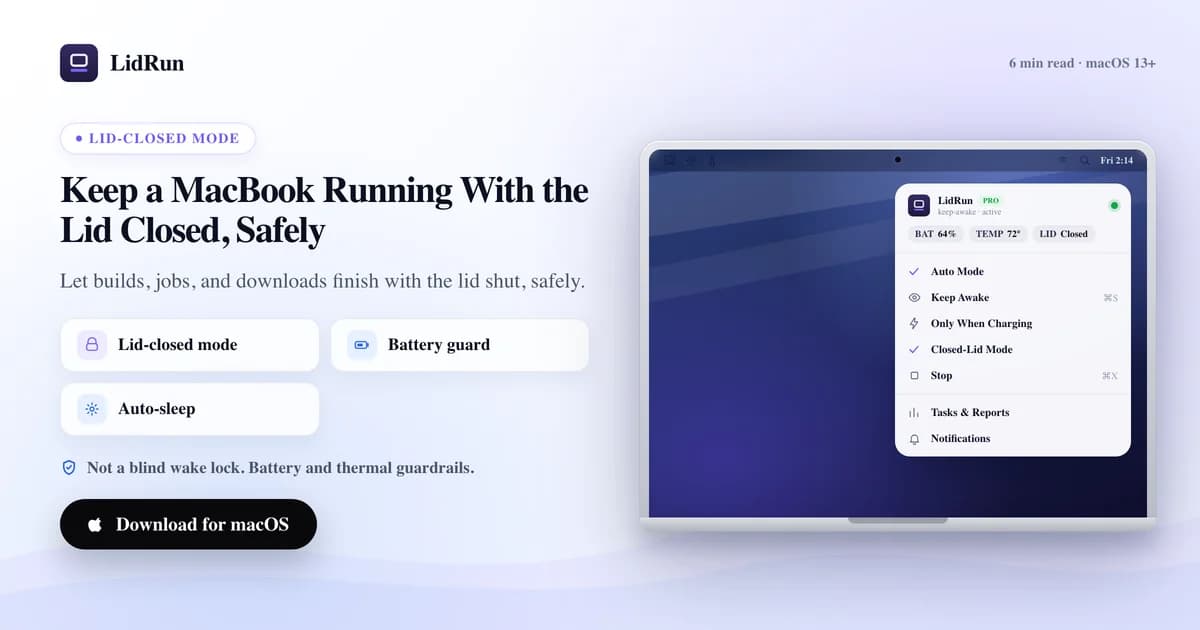
Un capot fermé ne doit pas forcément mettre fin à une tâche qui dure des heures. Faire tourner un MacBook capot fermé pour un build de nuit, une longue session d'agent IA ou un téléchargement de plusieurs heures demande plus que de simplement bloquer la première mise en veille — il faut quelque chose qui surveille la batterie et la chaleur pendant toute la durée réelle de la tâche. Voici ce que cela implique, et à partir de quand ce n'est plus prudent de s'en remettre à une seule commande de terminal.
Rester éveillé n'est pas la même chose que continuer à tourner
Dès que macOS se met en veille à la fermeture du capot, tous les processus en cours sur le Mac s'arrêtent avec lui — pas seulement l'écran. Un build s'interrompt en pleine compilation, un téléchargement se fige au pourcentage atteint, un agent s'arrête en plein milieu d'une tâche. Rien ne plante, mais rien n'avance non plus, et ça reste comme ça jusqu'à ce que quelqu'un rouvre le capot.
Pour une tâche de deux minutes, ça ne change presque rien — la veille par inactivité ne se serait de toute façon pas déclenchée avant la fin. Ça commence à compter dès qu'on parle d'une tâche qui tourne pendant une heure, plusieurs heures, ou toute la nuit, parce que c'est justement le genre de durée pendant laquelle personne ne va rester là à tenir le capot ouvert.
Faire tourner un MacBook capot fermé, c'est donc en réalité deux tâches empilées l'une sur l'autre : garder le système actif malgré la fermeture, et faire en sorte que ça reste sûr pendant toute la durée réelle du travail. Un outil qui ne règle que le premier point n'est qu'une demi-solution dès que la tâche dépasse quelques minutes.
Pourquoi les sessions longues et sans surveillance échouent différemment des sessions courtes
Une astuce anti-veille de cinq minutes tourne rarement mal — vous êtes encore à proximité, la batterie bouge à peine, et le Mac n'a pas le temps d'accumuler de la chaleur. Étirez la même session sur plusieurs heures ou toute une nuit, et les modes de défaillance se multiplient. Un capot fermé retient déjà une partie de sa propre chaleur par construction, donc des heures de charge poussent le bilan thermique plus loin qu'une session capot ouvert. Un build censé prendre 40 minutes peut se bloquer sur une dépendance capricieuse et tourner toute la nuit sans que rien ne bouge. Un téléchargement sur batterie peut vider complètement la batterie bien avant que vous ne reveniez le constater. Et si c'est vous qui êtes censé penser à mettre fin à la session, un Mac sans surveillance est aussi un Mac qu'on oublie.
Rien de tout ça ne rend les sessions longues capot fermé imprudentes en soi. Ça veut simplement dire que l'outillage adapté à une tâche de 20 minutes — se contenter de bloquer la veille — n'est pas automatiquement le bon outillage pour une tâche de 8 heures. La différence se voit après les dix premières minutes, pas après les dix premières secondes.
Guide associéUne alarme Mac sonne-t-elle avec le couvercle fermé ?La méthode gratuite, et où elle atteint ses limites pendant la nuit
Le mécanisme sous-jacent tient en un seul indicateur : sudo pmset -a disablesleep 1 dit à macOS de ne pas se mettre en veille à la fermeture du capot, point final. C'est exactement la même primitive que le Closed-Lid Mode de LidRun appelle en coulisses — il n'y a pas de truc caché derrière, et la lancer à la main ne coûte rien.
Ce qu'elle ne fait pas, c'est tout le reste. Pas de minuteur, donc une tâche qui plante garde le Mac éveillé indéfiniment jusqu'à ce que vous pensiez vous-même à sudo pmset -a disablesleep 0. Pas de seuil batterie, donc sur batterie, ça vide complètement la batterie plutôt que de s'arrêter tout seul. Pas de prise en compte thermique, donc un Mac qui travaille six heures capot fermé ne reçoit aucun signal pour ralentir. caffeinate -i ou caffeinate -s ne vous emmènent même pas jusque-là — ces commandes bloquent la veille par inactivité, pas la veille clamshell, ce qui explique pourquoi une tâche lancée avec caffeinate meurt quand même dès que le capot se ferme sur du matériel fonctionnant sur batterie sans écran externe branché.
Pour une session que vous vérifiez toutes les vingt minutes, c'est un compromis gérable. Pour quelque chose que vous lancez avant d'aller dormir ou avant de quitter le bureau, « gérable » n'est plus le bon mot — vous ne serez pas là pour remarquer le blocage, la décharge ou la chaleur. (Le guide complémentaire sur toutes les façons de garder un Mac éveillé capot fermé couvre le paysage complet des méthodes — options de caffeinate, vrai mode clamshell avec écran externe, applications tierces ; cet article porte spécifiquement sur les sessions longues et sans surveillance.)
Ce dont une session sans surveillance a vraiment besoin
Le Closed-Lid Mode de LidRun repose sur une seule promesse : agent en cours, on reste éveillé ; agent terminé ou situation dangereuse, on relâche et on laisse le Mac se mettre en veille. Pour une session que vous laissez tourner seule, cette promesse doit tenir pendant toute la durée de votre absence, pas seulement les premières minutes après la fermeture du capot.

Il y a deux façons de lancer une session. « Sleep when done » — le mode par défaut — suit le processus que vous avez réellement lancé et demande au Mac de se mettre en veille dès que rien de suivi n'a été actif pendant 10, 20 ou 30 minutes, à votre choix. « Stay awake until I turn it off » maintient au contraire l'éveil pour une durée fixe que vous choisissez à l'avance, de 30 minutes à 8 heures, ou indéfiniment jusqu'à ce que vous y mettiez fin vous-même. Pour une tâche de nuit dont vous ne connaissez pas la durée exacte — un téléchargement de modèle, un agent qui traite une file d'attente — c'est « Sleep when done » qui est fait pour ça : elle se termine d'elle-même au lieu de vous obliger à deviner un minuteur à l'avance.
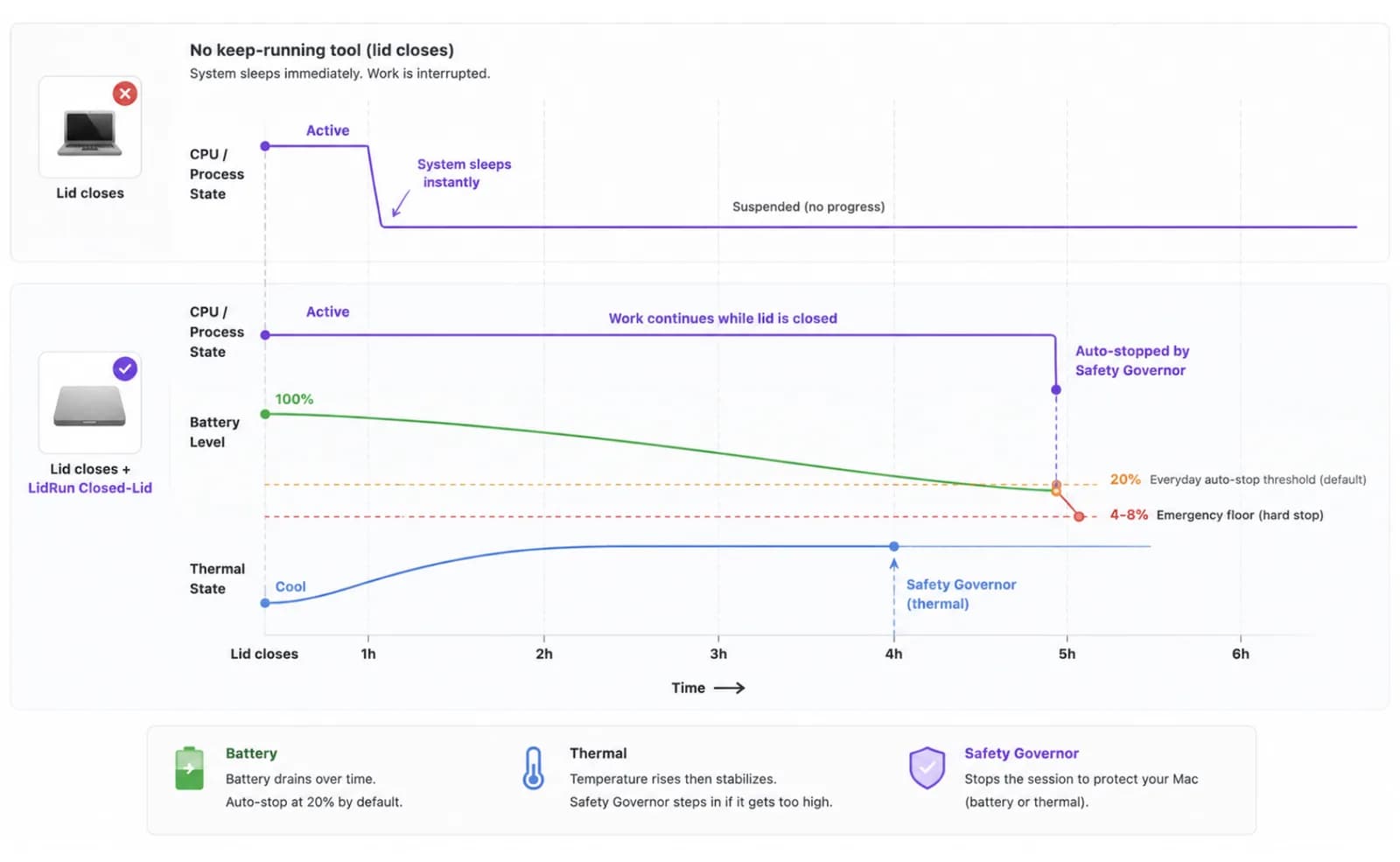
Au quotidien, ce qui met concrètement fin à une session sur batterie, c'est le seuil d'arrêt automatique que vous réglez — 20 % par défaut. En dessous, il y a un plancher d'urgence bloqué entre 4 % et 8 % : vous pouvez resserrer le seuil du quotidien, mais vous ne pouvez pas descendre le plancher assez bas pour risquer que le Mac s'éteigne en pleine demande de veille au lieu de se mettre en veille proprement.
Un Safety Governor tourne indépendamment du mode choisi, et son seul rôle est de décider quand relâcher — jamais quand retenir. Il intervient en cas de chaleur critique soutenue, au plancher batterie, ou, si vous activez les garde-fous optionnels dans Réglages, après que le Mac est resté sur batterie hors ligne sans rien en cours, ou sans aucune saisie clavier ou souris et sans charge de travail confirmée, pendant une durée que vous fixez entre 5 et 120 minutes. Choisissez « Stay awake until I turn it off » et ces garde-fous de confort s'effacent — seuls les planchers chaleur et batterie stricts subsistent, parce que vous avez explicitement demandé à retenir la veille. Choisissez « Sleep when done » et tous les garde-fous restent actifs, ce qui est le réglage le plus prudent pour une session que personne ne surveille.
Le Closed-Lid Mode en lui-même est une fonctionnalité Pro — les installations sans licence disposent d'un petit nombre de sessions gratuites pour l'essayer avant de se décider, puis il fait partie du palier payant avec le reste de l'automatisation de LidRun.
Configurer une session que vous pouvez laisser tourner seule pendant des heures
Si c'est votre première session sans surveillance, réglez un point avant de lancer le chrono : approuvez l'assistant privilégié de LidRun dans Réglages. Sans lui, LidRun peut toujours relâcher son propre maintien d'éveil, mais il risque de ne pas pouvoir forcer une vraie mise en veille sur un Mac capot fermé une fois disablesleep activé — ce qui compte bien plus sur une session où personne n'est assis à côté que sur une session que vous surveillez.
Lancez d'abord la tâche elle-même — le build, la synchronisation, l'agent, le téléchargement — puis activez le Closed-Lid Mode et fermez le capot. Lancer le travail en premier donne à la détection de processus de LidRun quelque chose de réel à suivre dès le premier cycle, au lieu de deviner pendant une fenêtre vide.
Pour tout ce dont vous ne connaissez pas la durée — la plupart des tâches IA/dev de nuit — choisissez « Sleep when done » et réglez la fenêtre d'inactivité selon l'irrégularité de la tâche : un téléchargement régulier peut se contenter de la fenêtre courte de 10 minutes, tandis qu'un agent qui marque des pauses entre les étapes en attendant une API lente devrait avoir 20 ou 30 minutes, pour qu'une pause normale ne soit pas lue comme « terminé ».
Pour une tâche dont vous connaissez la durée — un rendu planifié, une sauvegarde que vous voulez plafonner quoi qu'il arrive — choisissez « Stay awake until I turn it off » et réglez la durée correspondante, de 30 minutes jusqu'à 8 heures. Ce mode désactive les garde-fous de confort liés au hors ligne et à l'inactivité sans surveillance, donc ne l'utilisez que lorsque vous voulez vraiment que le Mac tienne toute la durée.
Si le Mac chauffe déjà quand vous ouvrez la boîte de dialogue avec une durée fixe sélectionnée, LidRun le signale et vous pousse vers une durée plus courte — un conseil à suivre avant de fermer le capot sur une tâche qui génère déjà de la chaleur.
Réglez votre seuil d'arrêt automatique sur batterie selon la marge que vous voulez garder (20 % par défaut), branchez le chargeur si la tâche dépasse une heure ou deux, et posez le Mac sur une surface dure et ventilée — un bureau, pas un lit, un canapé ou un sac fermé. Un capot fermé coupe déjà la circulation d'air ; inutile d'ajouter une couverture par-dessus.
Ce que vous trouverez à votre retour
Une session qui fonctionne comme prévu se termine elle-même de l'une de ces trois façons : la tâche suivie se termine et « Sleep when done » relâche la prise, la durée plafond que vous avez fixée arrive à son terme, ou un seuil batterie ou thermique se déclenche en premier et le Governor prend le relais. Chacun de ces cas est un résultat normal et fonctionnel, pas un échec.
Quand cela arrive, LidRun réinitialise aussi l'indicateur disablesleep qu'il avait activé — la même mise en paire qui empêche une commande pmset manuelle de transformer le Mac en machine qui, silencieusement, ne se remet plus jamais en veille à la fermeture du capot. Vous n'avez pas besoin de vous souvenir de l'étape d'annulation, contrairement à ce qui se passerait en lançant la commande brute vous-même.
Si vous avez activé les notifications d'absence, LidRun peut envoyer une alerte sur votre téléphone quand un événement de sécurité se déclenche ou que la session se termine, pour que vous le sachiez avant de revenir au bureau plutôt qu'après. Et le journal d'activité horodate ensuite toute la session — quand le Closed-Lid s'est activé, si un garde-fou batterie ou thermique est intervenu, quand la tâche suivie a été marquée comme terminée — donc « ce qui s'est vraiment passé cette nuit » n'est plus une supposition.
Quand c'est (et quand ce n'est pas) le bon choix
Optez pour une session longue ou de nuit capot fermé quand la tâche est réelle et sans surveillance : un build de release, une synchronisation nocturne, le téléchargement d'un gros modèle, une session d'agent en plusieurs étapes, une file de rendu. Ce sont exactement les cas où fermer le capot et partir est tout l'intérêt.
Évitez-le pour tout ce qui est interactif — vous êtes de toute façon devant l'écran — ou pour tout ce qui se termine en quelques minutes, avant même que la veille par inactivité ne se déclenche. Et évitez spécifiquement la version de plusieurs heures quand vous ne pouvez pas garantir que le Mac restera dans un endroit ventilé aussi longtemps ; une tâche qui doit tourner huit heures dans un sac à dos ou sur un lit est un cas où la sécurité prime sur le confort, et une session plus courte et surveillée est le meilleur choix.
Si vous êtes encore en train de comparer ceci aux méthodes anti-veille en général — pas spécifiquement au cas des sessions longues et sans surveillance — la comparaison complète se trouve dans le guide complémentaire sur comment garder un Mac éveillé capot fermé. Cet article traite la version de cette question qui commence par « et je ne serai pas là pendant les prochaines heures ».
LidRun garde votre travail actif capot fermé, avec une protection batterie et thermique intégrée.
Vous avez déjà LidRun ? Lisez le guide d'installation →
Nouveau sur LidRun ? Voir les tarifs →
Questions fréquentes
Oui, avec des garde-fous qui surveillent à votre place. Le Closed-Lid Mode de LidRun garde le système actif malgré la fermeture du capot et ajoute par-dessus un seuil batterie, un plancher de sécurité thermique et un Safety Governor indépendant, de sorte que la session se termine d'elle-même si les conditions deviennent dangereuses, au lieu d'attendre que vous le remarquiez. Ce n'est pas un simple verrou anti-veille laissé actif sans surveillance — il est conçu pour surveiller à votre place.
Parce que caffeinate bloque la veille par inactivité, et que la veille à la fermeture du capot sur un Mac fonctionnant sur batterie est un mécanisme distinct. Sans écran externe pilotant une véritable session clamshell, ou sans pmset disablesleep activé, macOS se met en veille à la fermeture du capot quelle que soit l'assertion caffeinate en cours — ce qui explique pourquoi une tâche lancée avec caffeinate, qui semblait fonctionner normalement à votre bureau, s'arrête quand même dès que vous fermez le capot et partez.
Pas avec « Sleep when done », le mode par défaut. Il suit le processus que vous avez lancé et laisse le Mac se mettre en veille dès que rien de suivi n'a été actif pendant la fenêtre d'inactivité que vous avez réglée — 10, 20 ou 30 minutes — pour qu'un build qui se termine à 2h du matin ne reste pas éveillé à consommer de la batterie jusqu'à ce que vous rouvriez le capot à 9h.
Le plafond que vous avez réglé s'en charge, si vous en avez fixé un — même « Stay awake until I turn it off » propose des options de 30 minutes à 8 heures, pas seulement l'indéfini. Et quel que soit le mode, votre seuil d'arrêt automatique sur batterie (20 % par défaut) et le plancher strict de 4-8 % en dessous ne sont pas négociables : une session n'a pas le droit d'ignorer une batterie presque vide ou une chaleur critique soutenue simplement parce que personne n'est là pour y mettre fin à la main.
Un capot fermé réduit la circulation d'air, donc un MacBook qui travaille dur pendant des heures dans ces conditions chauffe plus que la même tâche capot ouvert — c'est de la physique, pas une particularité de LidRun. Posez-le sur une surface dure et ventilée plutôt que sur un lit ou dans un sac, et s'il chauffe déjà quand vous démarrez une session à durée fixe, LidRun vous pousse vers une durée plus courte. Le plancher de sécurité thermique est le filet de secours, pas le plan principal — c'est toujours à vous de veiller à ce que le Mac reste ventilé.
Pas obligatoirement, mais ça élimine la principale variable. Sur batterie, une session de plusieurs heures ou de toute une nuit est exactement le genre de cas où votre seuil batterie travaille vraiment — brancher le chargeur pour tout ce qui dépasse une heure ou deux retire cette variable de l'équation.
Vous en fixez une, ou pas. Les sessions à durée fixe plafonnent à 8 heures, avec des options intermédiaires de 30 minutes, 1, 2, 4, 5 et 6 heures. « Sleep when done » se termine d'elle-même dès que le travail suivi s'arrête. « Until I turn it off » n'a pas de plafond intégré au-delà des planchers de sécurité batterie et thermique sous-jacents.
Oui — approuvez l'assistant privilégié de LidRun dans Réglages avant une session où vous ne serez pas à côté. Sans lui, LidRun peut toujours relâcher son propre maintien d'éveil, mais il risque de ne pas pouvoir forcer une vraie mise en veille sur un Mac capot fermé une fois disablesleep activé. L'application vous le signale directement si l'assistant n'est pas activé.