Ejecuta un comando largo y deja que tu Mac duerma cuando termine
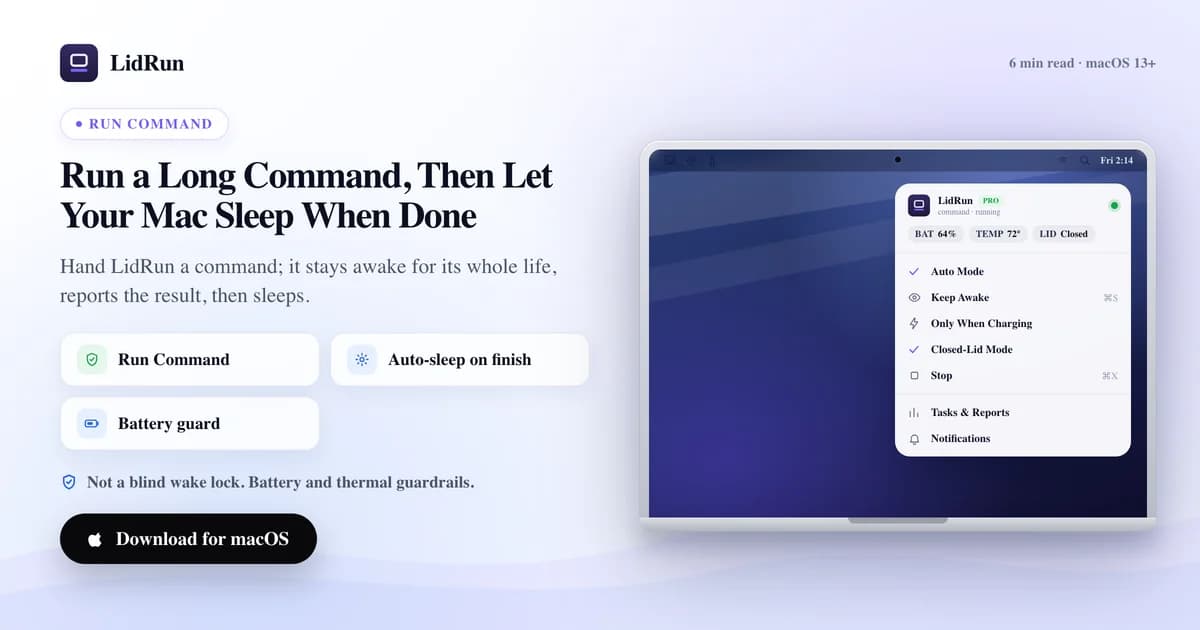
Para ejecutar un comando y dejar que tu Mac duerma en el momento en que termina, la herramienta nativa es caffeinate: le pasas tu comando como argumento (caffeinate -i your-command) y macOS mantiene la Mac despierta exactamente durante la vida de ese proceso, y luego la suelta sola — sin un paso separado de encender/apagar. Eso es genuinamente útil y no cuesta nada. Donde se queda corto es en todo lo que pasa después de que el comando termina: caffeinate no te dice si el trabajo tuvo éxito, no vigila tu batería mientras corre, y no te avisa cuando termina. Run & Watch a Command de LidRun (y su gemelo de CLI, lidrun --) hacen el mismo amarre de ciclo de vida, y además agregan el código de salida, la duración, una notificación, y un gobernador de seguridad que sí detiene el trabajo si la Mac no debería seguir corriéndolo.
El problema del keep-awake manual
El ritual habitual son dos pasos que tienes que recordar en el orden correcto: activar el keep-awake, iniciar el trabajo y, más tarde, con suerte, desactivar el keep-awake cuando termina. El segundo paso es el que se te olvida.

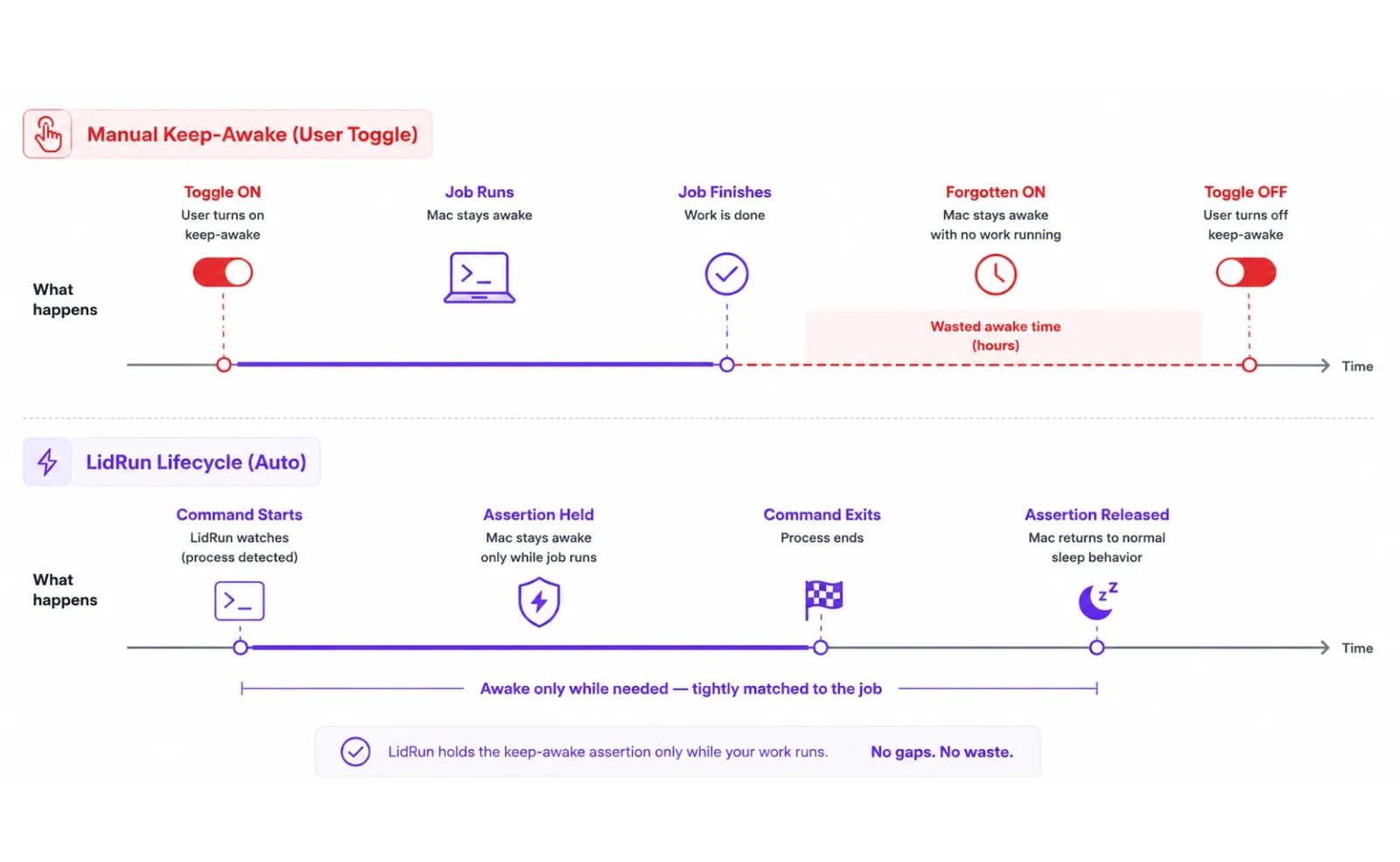
Si lo olvidas, la Mac se queda despierta horas después de que un trabajo de cuarenta minutos ya terminó — gastando batería, o simplemente sin descansar sobre el escritorio. Si lo desactivas demasiado pronto, cortas el trabajo de raíz. Ninguna de las dos es lo que realmente querías, que era algo más simple de lo que permiten los controles: mantener la Mac despierta mientras corre este comando, y luego parar. Atar el estado de keep-awake a la vida del trabajo mismo, no a un interruptor que alguien mueve a mano.
La forma gratuita y nativa: caffeinate
Antes de recurrir a cualquier app, vale la pena saber que macOS ya hace el truco central gratis. caffeinate viene instalado en toda Mac, y según su propio manual: "Si se especifica una utilidad, caffeinate crea las aserciones en nombre de esa utilidad, y esas aserciones persisten durante la ejecución de la utilidad." Su propio ejemplo es exactamente este patrón: caffeinate -i make bifurca make, mantiene una aserción de idle-sleep mientras dura la ejecución, y la libera cuando termina. Cambia por tu propio trabajo — caffeinate -i ./run-migrations.sh o caffeinate -i npm test — y obtienes el mismo keep-awake del largo del comando que ofrece LidRun, sin instalar nada.
Las flags importan: -i evita el sueño por inactividad (el caso más común), -d además mantiene la pantalla encendida, -s evita el sueño del sistema por completo pero solo funciona con corriente conectada, y -m evita que el disco se detenga. Si dejas todas las flags fuera, un simple caffeinate your-command de todos modos evita el sueño por inactividad por defecto. Es una herramienta genuinamente sólida para un trabajo en primer plano que estás vigilando.
Lo que caffeinate no toca es la tapa cerrada. Sus aserciones detienen el sueño por inactividad, no el sueño forzado que macOS dispara en el momento en que cierras físicamente la tapa de una Mac sin pantalla externa conectada. La solución gratuita tradicional ahí es el clásico montaje clamshell — monitor externo más teclado/mouse externos, tapa cerrada, y la Mac sigue corriendo porque macOS la trata como si estuviera efectivamente conectada a una estación. La otra palanca, la que el propio Closed-Lid mode de LidRun usa por debajo, es el comando no documentado pero bien conocido sudo pmset disablesleep 1 — una bandera a nivel de todo el sistema que bloquea el sueño por completo hasta que algo la regresa a 0.
Dónde la vía gratuita se queda corta
caffeinate no te dice nada cuando el trabajo termina. No imprime código de salida, no hay duración, no hay notificación — vuelves a vigilar una pestaña de terminal, o a escribir tu propio wrapper como caffeinate -i ./job.sh; echo "exit $?" y acordarte de revisarlo después. Para una migración de cuarenta minutos es una molestia menor; para una exportación nocturna que dejaste corriendo antes de dormir, significa despertar frente a una ventana de terminal y hacer scroll, no una respuesta clara.
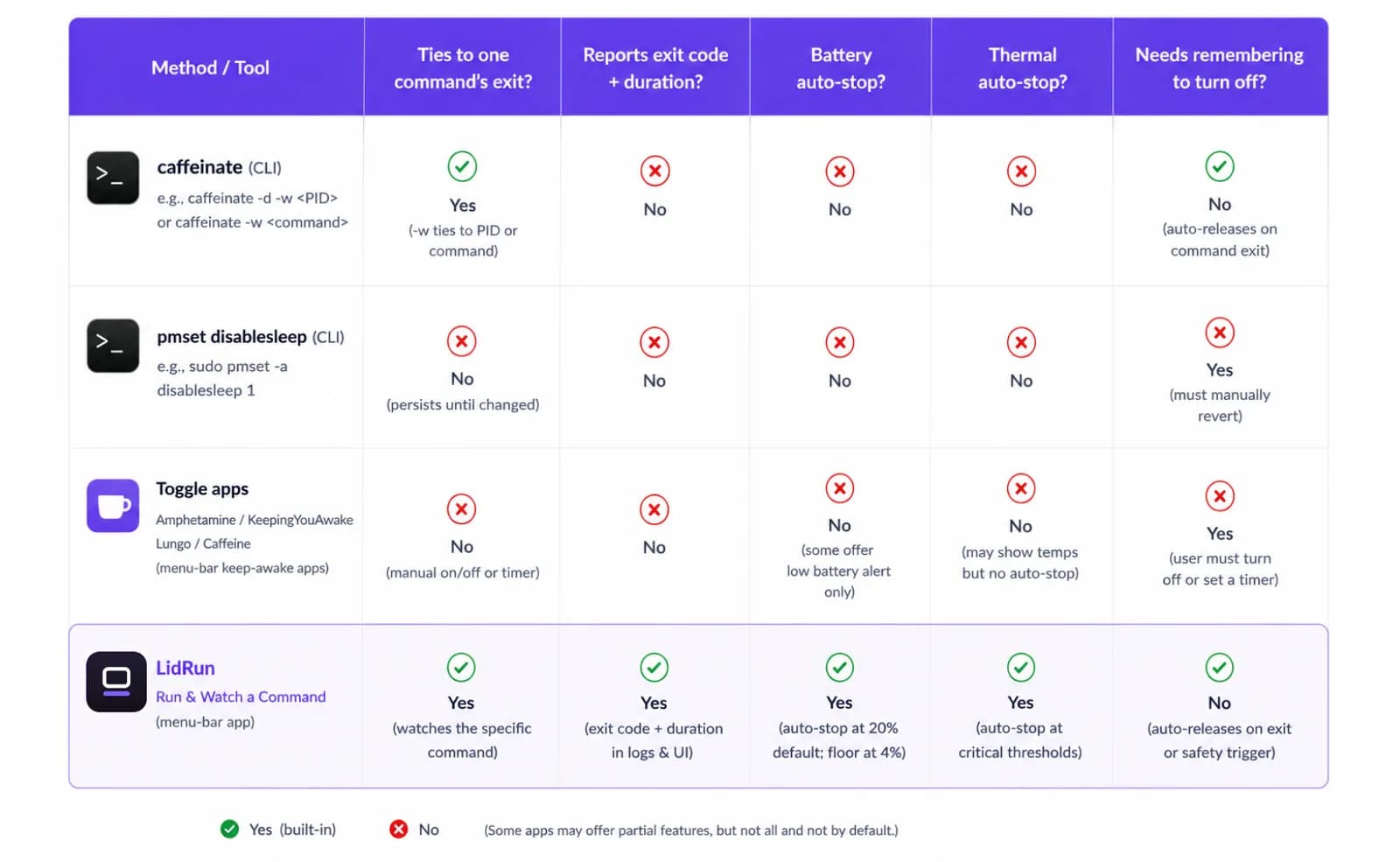
caffeinate tampoco sabe nada sobre tu batería ni el estado térmico de tu Mac. Mantiene la aserción a ciegas mientras el proceso corre — que es exactamente lo que le pediste, pero significa que un trabajo caffeinate -i desatendido, corriendo con batería toda la noche, no tiene a nadie vigilando tu piso de batería baja configurado. pmset disablesleep es todavía más tosco: necesita sudo, es a nivel de todo el sistema (bloquea el sueño para todo, no solo para tu trabajo), y se queda en 1 hasta que algo lo revierte explícitamente — te saltas ese paso y la Mac no va a dormir por nada hasta que te acuerdes.
Vale la pena nombrar con justicia, no descartar sin más, a las apps de terceros que funcionan como interruptor — Amphetamine, KeepingYouAwake, Lungo, la Caffeine original. Amphetamine en particular tiene un sistema de disparadores muy completo: puede activarse al abrir una app, según un horario, o por nivel de batería, lo cual es más configurable que cualquier cosa que ofrece LidRun aquí. KeepingYouAwake y Lungo son interruptores de barra de menú deliberadamente mínimos; Caffeine es el clásico de un clic. Lo que ninguna de ellas hace es vigilar el código de salida de un comando específico — manejan un estado de "despierto" persistente que tú mismo enciendes y apagas, o que se dispara por algo sin relación con si tu trabajo sigue corriendo de verdad. Es el mismo problema de "se me olvidó apagarlo" de la primera sección, solo que con un ícono de barra de menú más bonito.
Mejor, dale el comando a LidRun
Run & Watch a Command es una función Pro que invierte el modelo de caffeinate: en vez de que tú manejes el estado de keep-awake, le entregas el comando a LidRun y es LidRun quien lo maneja por ti. Por debajo, lanza tu comando a través del mismo shell de login que usa tu Terminal (/bin/zsh -l -c), así que las herramientas de PATH — Homebrew, pyenv, nvm, lo que sea que claude u ollama necesiten resolver — funcionan igual que si hubieras escrito el comando tú mismo. Mantiene el keep-awake durante toda la vida del comando y lo libera en el instante en que termina, la misma promesa que LidRun hace en cualquier otra parte de la app: comando corriendo → se mantiene despierta, comando terminado o inseguro → se libera.
Mientras corre, LidRun captura una cola rodante de la salida — las últimas 200 líneas, visibles en vivo en la ventana de la barra de menú — para que no te quedes mirando una terminal en blanco esperando que siga viva. Es una vista en vivo, no un archivo de log guardado, así que si necesitas la transcripción completa para después, redirige la salida del comando a un archivo como harías normalmente. Si escribes un intérprete solo, sin nada que ejecutar de verdad (python3 sin script), el runner lo marca en vez de fingir que una salida de cero segundos fue un trabajo real.
Cuando termina, obtienes la parte que más importa: el código de salida y cuánto tardó, en un formato simple (12m 34s, 1h 23m). Siempre recibes una notificación local; si configuraste un proveedor de push — ntfy.sh (gratis) o Pushover — también llega a tu teléfono, y en Pro además puedes reenviarla a Telegram, Discord, Slack, o una URL de webhook genérica. Si inicias una sesión con batería, LidRun te avisa desde el principio cuál es tu piso de auto-stop configurado (20% por defecto) en vez de dejar que te enteres después.
Esta es también la diferencia honesta de seguridad frente a un simple bloqueo de caffeinate: si tu batería baja de ese umbral, o la Mac llega a presión térmica crítica, LidRun no se limita a soltar la aserción en silencio y esperar lo mejor — le manda al comando en ejecución una señal real de terminación, lo mismo que si hicieras clic en Stop. Es una interrupción real, no una sugerencia suave, así que es más protector que un bloqueo de sueño ciego, aunque un trabajo detenido unos minutos antes de que hubiera terminado por su cuenta sigue siendo una interrupción, no una garantía de que la corrida se complete. Y al igual que caffeinate, esto mantiene la Mac despierta frente al sueño por inactividad, no frente a una tapa físicamente cerrada — combínalo con Closed-Lid mode (o una pantalla externa) si la tapa va a estar cerrada.
Lo mismo desde la línea de comandos
Si vives en la terminal, lidrun -- <command> [args...] hace el mismo amarre de ciclo de vida, y a diferencia de Run & Watch, es gratis y totalmente autocontenido — funciona incluso si la app LidRun no está corriendo, porque mantiene su propia aserción IOKit de corta duración solo para el proceso envuelto, y la libera cuando el proceso termina. lidrun -- ./run-migrations.sh o lidrun -- npm test se lee exactamente igual que escribir el comando directamente, porque por debajo lo es — mismo shell de login, misma resolución de PATH. Ctrl-C lo aborta como cualquier trabajo en primer plano.
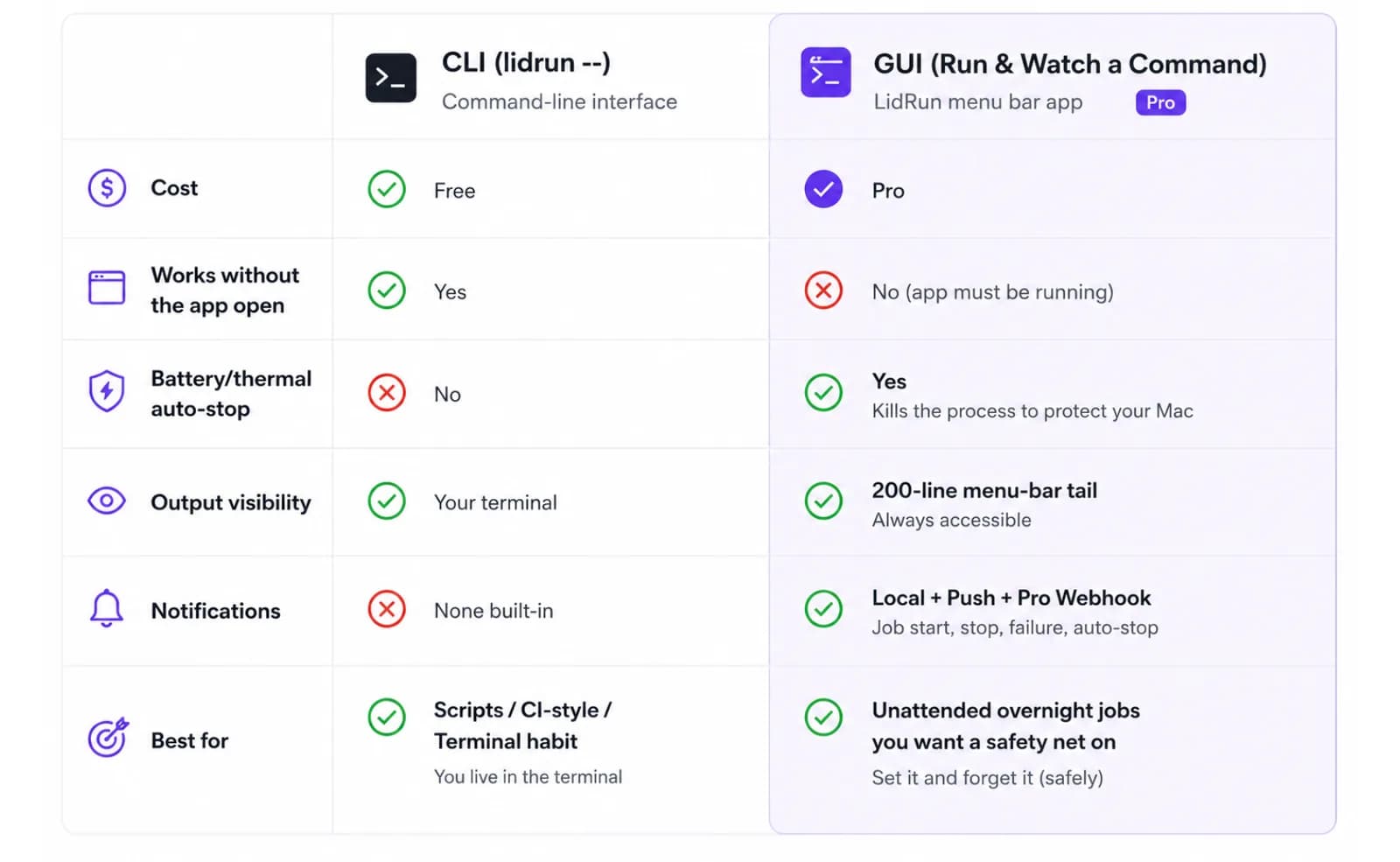
Precisamente porque es autocontenido, hay que decirlo con honestidad: lidrun -- no revisa por sí mismo tu porcentaje de batería ni el estado térmico — ese gobernador vive en la función GUI Run & Watch, atado a los ajustes de seguridad normales de la app. Con batería, para un trabajo de horas, vale la pena saberlo antes de mandarlo a segundo plano e irte; la corriente conectada sigue siendo la opción más segura de todos modos.
Un detalle real que vale la pena conocer si quieres encadenar más de un comando bajo un solo bloqueo de keep-awake: pon todo entre comillas como un único argumento de shell. lidrun -- 'npm test && npm run build' funciona correctamente — ambos comandos corren bajo una sola sesión envuelta. Envolverlo en un shell extra en cambio, como lidrun -- bash -c 'npm test && npm run build', no funciona: LidRun vuelve a unir la lista de argumentos con espacios simples antes de correrla de nuevo a través del shell de login, lo que elimina en silencio las comillas internas y puede saltarse parte del comando. Poner comillas en un solo argumento es el patrón confiable. Cualquiera de los dos caminos también devuelve el propio código de salida de tu comando como su propio código de salida, así que encaja directo en la cadena &&/|| de un script o en una revisión de $?, exactamente igual que correr el comando directamente.
Runner por CLI o por GUI: cuál elegir
Usa la CLI cuando de todos modos ya ibas a escribir el comando, cuando lo quieres dentro de un script o un workflow manejado desde terminal, o cuando no necesitas (o no tienes) Pro. El código de salida vuelve a tu propio shell de inmediato, y no hay nada que abrir ni configurar.
Usa la GUI Run & Watch a Command cuando quieres que el auto-stop de batería/térmico de verdad esté vigilando el trabajo — no solo sosteniendo una aserción y esperando — o cuando quieres una notificación al teléfono sin mantener una ventana de terminal abierta, o cuando una cola de salida en vivo en la barra de menú te resulta más cómoda que una pestaña de terminal. Cuesta una licencia Pro; la vía de CLI es el equivalente gratuito para todo excepto ese gobernador de seguridad y el reenvío de notificaciones.
De cualquier forma, el destino es el mismo: el trabajo termina, el resultado se conoce, y la Mac queda libre para dormir en vez de quedarse despierta por un interruptor que nadie volvió a apagar.
Dónde encaja esto
Piensa en los trabajos que inicias y luego te vas a hacer otra cosa: una migración de base de datos larga que quieres confirmar que terminó limpia, una suite de pruebas completa que tarda veinte minutos y preferirías no vigilar, una exportación de datos que dejaste corriendo antes de dormir y que debería estar lista para la mañana. Para todos esos casos, el reporte al final es la mitad del valor — saber el código de salida y la duración te dice si la migración se aplicó, si la suite pasó, si la exportación realmente terminó, sin tener que hacer scroll por la salida.
Cuando es la vía GUI, corre dentro del mismo límite de seguridad que todo lo demás en la app: cruzas tu piso de batería configurado, o llegas a presión térmica crítica, y LidRun detiene el comando de plano en vez de forzar al hardware a aguantarlo. La vía CLI no tiene ese gobernador integrado, así que para una corrida nocturna desatendida, la corriente conectada y una superficie firme y ventilada siguen siendo la decisión correcta sin importar qué vía uses — esto ayuda a reducir el riesgo en una corrida larga desatendida; no promete que el trabajo sobreviva sin importar lo que esté haciendo el hardware.
LidRun mantiene tu trabajo en marcha con la tapa cerrada, con protección de batería y temperatura integrada.
¿Ya tienes LidRun? Lee la guía de configuración →
¿Nuevo en LidRun? Consulta los precios →
Preguntas frecuentes
Sí. Run & Watch a Command mantiene el keep-awake durante toda la vida del comando y lo libera en el momento en que el comando termina, así que la Mac se mantiene despierta exactamente mientras dura el trabajo — el mismo comportamiento que caffeinate te da gratis cuando le pasas un comando, más el reporte y el gobernador de seguridad que caffeinate no tiene.
Reporta el código de salida y la duración (con un formato como 12m 34s o 1h 23m), y siempre publica una notificación local. Si configuraste un proveedor de push (ntfy.sh o Pushover) también llega a tu teléfono, y en Pro además puedes reenviarla a Telegram, Discord, Slack, o un webhook genérico.
Sí — corre lidrun -- your-command y LidRun mantiene una aserción de keep-awake de corta duración solo para ese comando, liberándola cuando termina. Es gratis y autocontenido, y funciona incluso sin la app corriendo. La función GUI Run & Watch a Command (cola de salida en la barra de menú, notificaciones, auto-stop de batería/térmico) es una función Pro; el wrapper de CLI es el equivalente gratuito menos ese gobernador de seguridad.
No, no por sí sola. Tanto la vía GUI como la CLI evitan el sueño por inactividad, no el sueño forzado que macOS dispara cuando cierras físicamente la tapa sin una pantalla externa conectada. Para un trabajo con la tapa cerrada, combínalo con Closed-Lid mode (o usa una pantalla externa, el clásico montaje clamshell) además de Run & Watch.
En la vía GUI, cruzar tu umbral de batería configurado (20% por defecto) o llegar a presión térmica crítica hace que LidRun de verdad termine el comando en ejecución, no solo que libere el bloqueo de keep-awake y lo deje corriendo sin protección en segundo plano. El wrapper lidrun -- de la CLI no tiene esa revisión integrada — mantiene una simple aserción durante toda la vida del proceso sin importar el nivel de batería — así que la corriente conectada es la opción más segura para cualquiera de las dos vías en un trabajo nocturno desatendido.
No hay tiempo límite integrado en ninguna de las dos vías. Un comando colgado mantiene la aserción activa hasta que termina, hasta que tú lo detienes (botón Stop en la GUI, Ctrl-C en la CLI), o — solo en la vía GUI — el gobernador de seguridad de batería/térmico lo termina por ti.
Sí, si pones todo entre comillas como un único argumento: lidrun -- 'npm test && npm run build' corre ambos correctamente bajo una sola sesión envuelta. Envolverlo en un shell extra en cambio, como lidrun -- bash -c '...', puede eliminar en silencio parte del comando por cómo se vuelve a unir la lista de argumentos — pon el comando compuesto entre comillas como un solo argumento, no como argumentos de un shell anidado.
La vista en vivo de la GUI muestra una cola rodante con las últimas 200 líneas de salida — suficiente para confirmar que el trabajo sigue vivo y ver el progreso reciente, pero es una vista en vivo, no un archivo de log guardado. Redirige la salida del comando a un archivo si después necesitas la transcripción completa.