LidRun CLI: mantén un Mac despierto desde la terminal
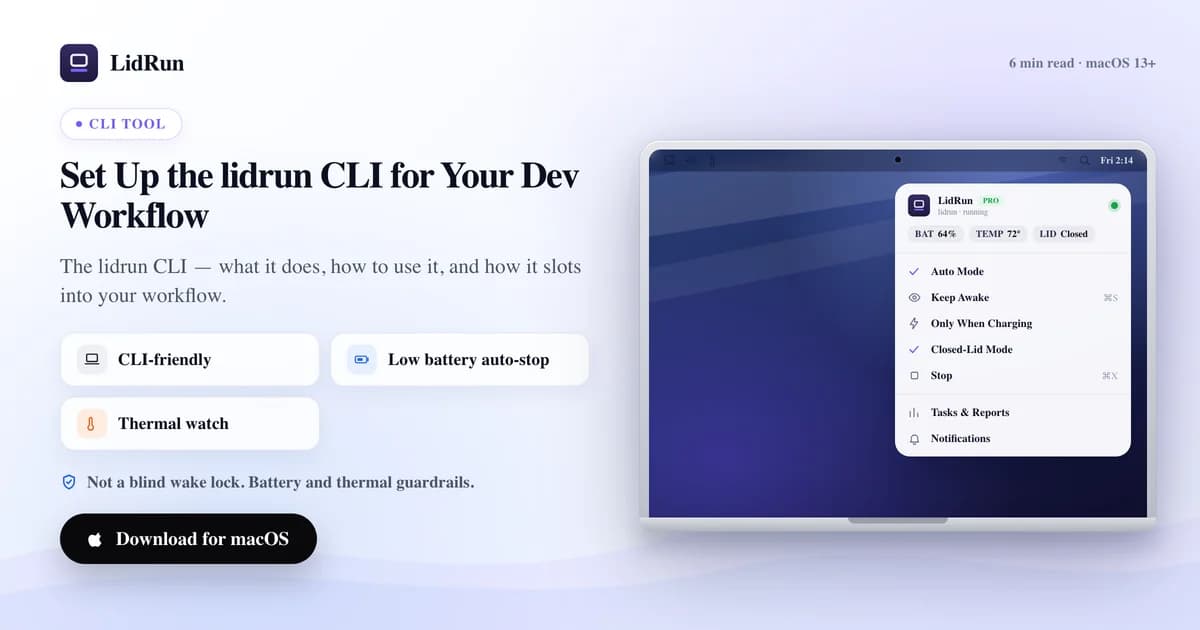
La herramienta de línea de comandos lidrun lleva el control keep-awake de LidRun a tu terminal: lidrun status muestra el estado actual, lidrun start y stop lo activan y desactivan, y lidrun -- <command> envuelve un solo comando en una retención keep-awake durante exactamente el tiempo que dure su ejecución. Es lo más parecido que tiene LidRun a caffeinate, y aquí cubrimos cada comando que realmente existe, cómo instalarlo, dos formas de usarlo en scripts y — siendo honestos — qué partes de una sesión de lidrun reciben las protecciones de batería y temperatura de LidRun, y cuáles corren sin red de seguridad, igual que caffeinate.
Qué es realmente el CLI de lidrun
lidrun no es un programa aparte con lógica propia — es un pequeño script wrapper, instalado en ~/.local/bin/lidrun o /usr/local/bin/lidrun, que ejecuta el mismo binario de LidRun.app que ya tienes, llamado con la bandera --cli en lugar de hacer doble clic. Mover la app después, de Descargas a Aplicaciones, no rompe el wrapper, porque se genera apuntando a donde realmente vive el app bundle en el momento de la instalación.

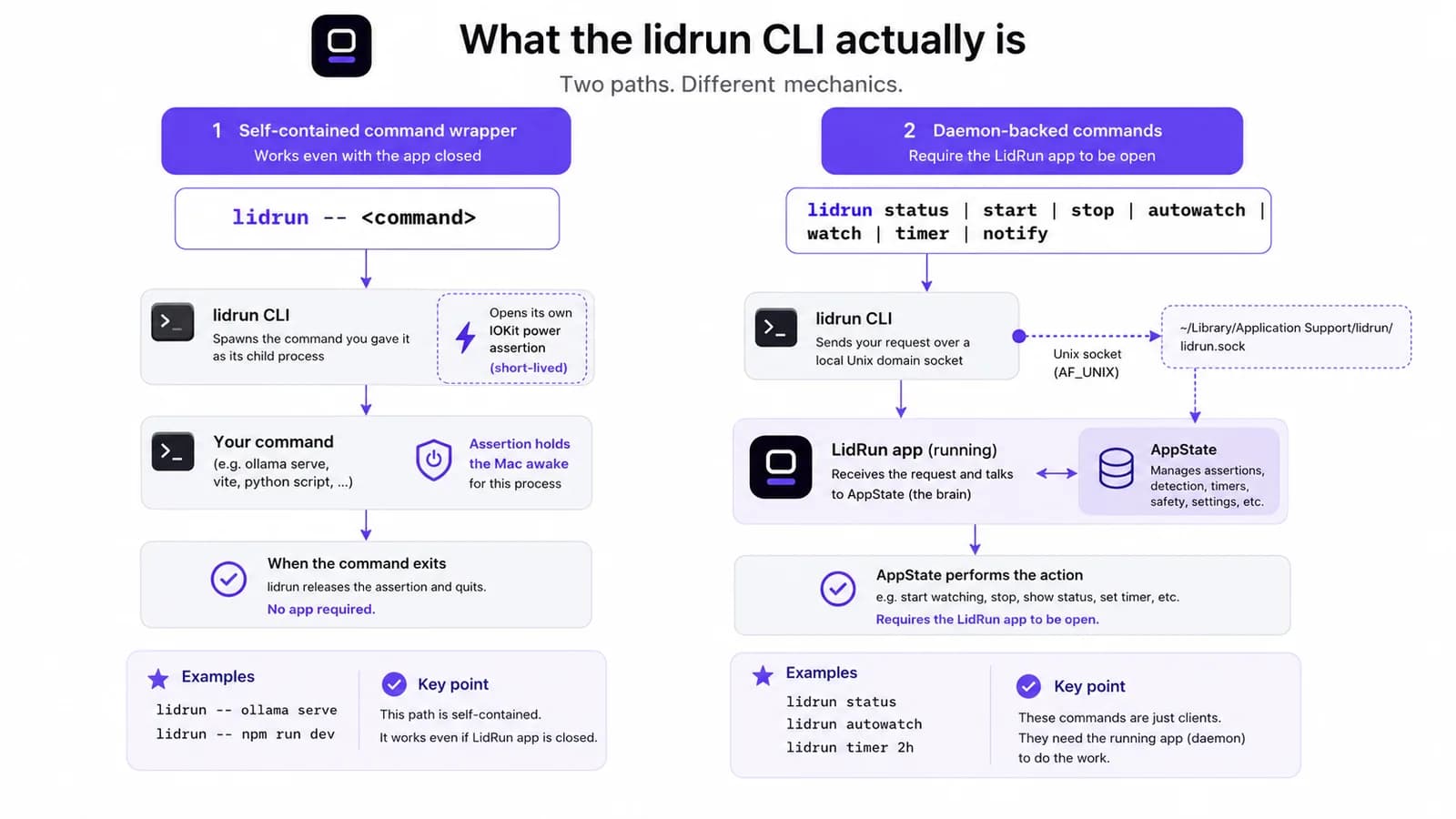
Por debajo, se divide en dos comportamientos genuinamente distintos, y confundirlos es la forma más fácil de malinterpretar lo que hace un comando. lidrun -- <command> es autocontenido: abre su propia power assertion de vida corta para el proceso hijo y la libera en el momento en que ese proceso termina, sin necesitar la app LidRun abierta en absoluto. Todos los demás comandos — status, start, stop, autowatch, watch, unwatch, patterns, timer, notify — dependen de un daemon: abren una conexión de socket Unix local a la app en ejecución y le piden que cambie de estado. Si la app no está abierta, esos comandos fallan directamente con un error, no con un no-op silencioso.
Esa división importa para lo que "gobernado por seguridad" significa más adelante en este artículo — no es lo mismo para cada comando, y afirmar lo contrario es el tipo de declaración que solo se sostiene hasta que a alguien se le agota la batería del Mac dentro de una mochila.
La forma gratuita: caffeinate y pmset
Antes de recurrir a cualquier herramienta, macOS ya trae dos formas de hacer esto desde una terminal, y vale la pena ser directos al respecto — son genuinamente capaces, no soluciones improvisadas. caffeinate -i your-command, o caffeinate -i dejado corriendo solo en una pestaña aparte, mantiene una idle-sleep assertion mientras dure la utilidad. Sin instalación, nada que confiar, y lleva más de una década siendo parte de macOS — mucha gente que ya lo ha hecho antes lo tiene grabado en los dedos.
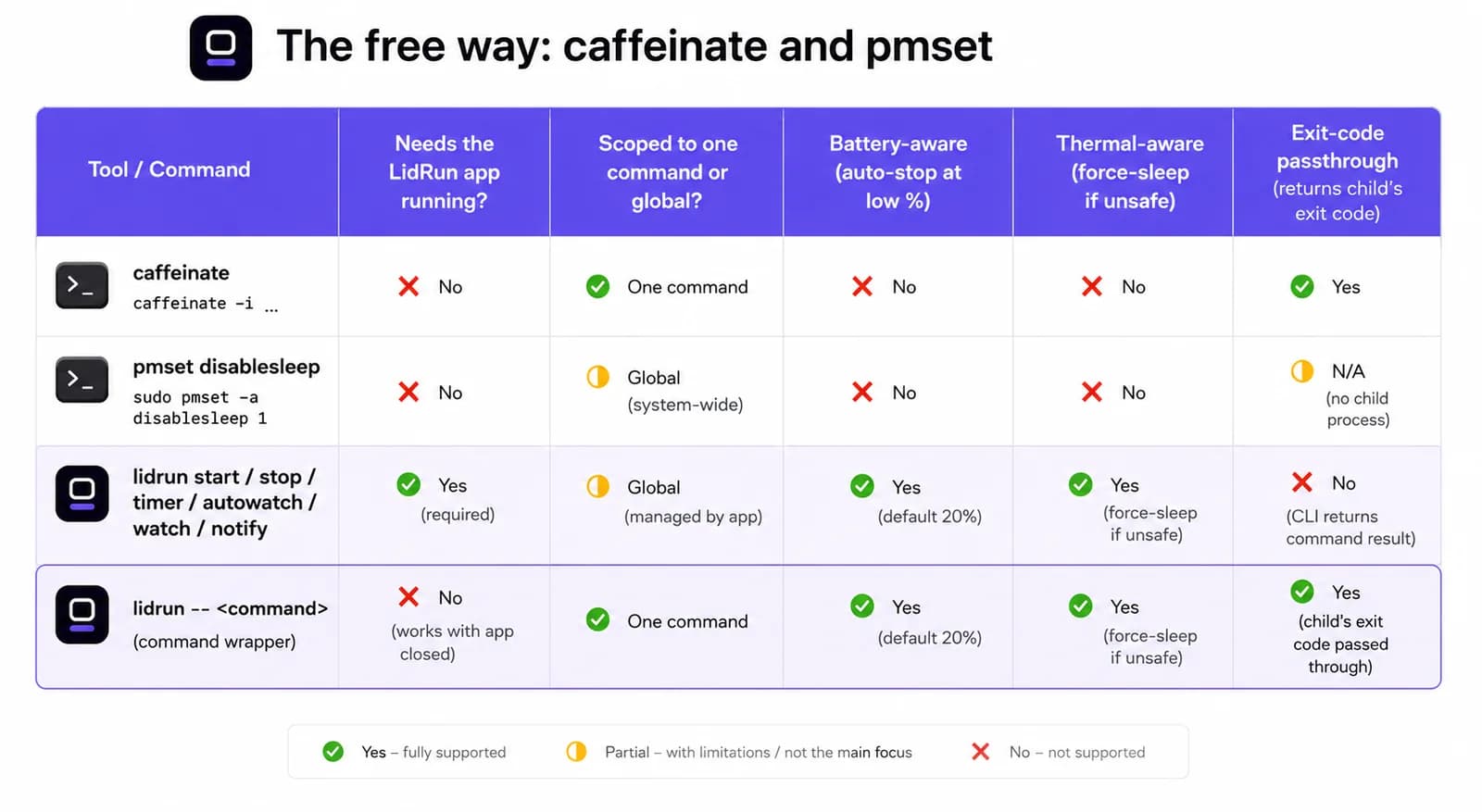
Específicamente para uso con la tapa cerrada, pmset disablesleep 1 le dice a macOS que ignore los disparadores de sueño en todo el sistema, incluido el sensor de la tapa — exactamente el mecanismo que usa por debajo el propio Closed-Lid mode de LidRun, por lo que LidRun tiene cuidado de siempre emparejar un disablesleep 1 con un disablesleep 0 correspondiente cuando termina una sesión clamshell: al detenerse, al salir, y de nuevo al iniciar por si la última ejecución no limpió bien. Ejecutado a mano, es un genuino one-liner para builds con la tapa cerrada sin instalar nada.
Para un solo comando frente al que estás sentado, caffeinate -i npm run build es honestamente tan bueno como cualquier otra opción aquí, LidRun incluido.
Guía relacionadaEjecuta un comando largo y deja que tu Mac duerma cuando termineDónde caffeinate y pmset se quedan sin margen
La brecha aparece cuando ya nadie está vigilando la sesión. Ninguna de las dos herramientas sabe el porcentaje de batería ni qué tan caliente está corriendo el Mac — mantienen exactamente lo que se les dijo que mantuvieran, durante el tiempo que se les dijo que lo mantuvieran, y punto.
disablesleep es la versión más aguda de ese riesgo, porque es un ajuste global, no limitado a una sola pestaña de terminal. Si el script que ejecutó pmset disablesleep 1 se cae, lo matan antes de llegar al 0 correspondiente, o una sesión SSH se corta a mitad de camino, el Mac queda negándose a dormir — con la tapa cerrada, sin nadie vigilando, sin importar qué tan caliente esté corriendo — hasta que alguien lo note y lo limpie a mano. Ese modo de falla exacto es la razón por la que el propio uso de disablesleep en LidRun está emparejado defensivamente en tres lugares distintos en vez de uno solo.
La versión de ese riesgo con caffeinate es más silenciosa pero igual de real: un caffeinate -i en segundo plano de hace tres deploys, todavía vivo en una pestaña de terminal que nadie cerró, drenando la batería de un laptop dentro de una mochila sin nada que lo esté vigilando. Ninguna de las dos herramientas está mal por funcionar así — caffeinate hace un solo trabajo, de forma limpia, por diseño. Simplemente no es un piso de batería ni de temperatura, y nunca pretendió serlo.
Instalar el CLI de lidrun
El CLI no es una descarga aparte. Abre LidRun, ve a Settings, luego Command Line, y haz clic en Install lidrun CLI… — eso escribe el script wrapper descrito arriba y te ofrece elegir el alcance de la instalación.
Instalar en ~/.local/bin/lidrun no necesita contraseña de administrador en absoluto; es posible que tengas que agregar ~/.local/bin a tu PATH una sola vez si todavía no está ahí, algo que el propio diálogo del instalador te avisa directamente. Instalar en /usr/local/bin/lidrun pone lidrun en el PATH de cada shell sin ese paso extra, pero pide una contraseña de administrador una sola vez, ya que escribir ahí necesita permisos de root.
lidrun --version confirma qué build está realmente corriendo — lee el mismo número de versión que la propia app, así que el CLI no puede desincronizarse en silencio de la GUI — y lidrun help imprime la lista completa de comandos sin salir de la terminal.
Todos los comandos que realmente tiene el CLI de lidrun
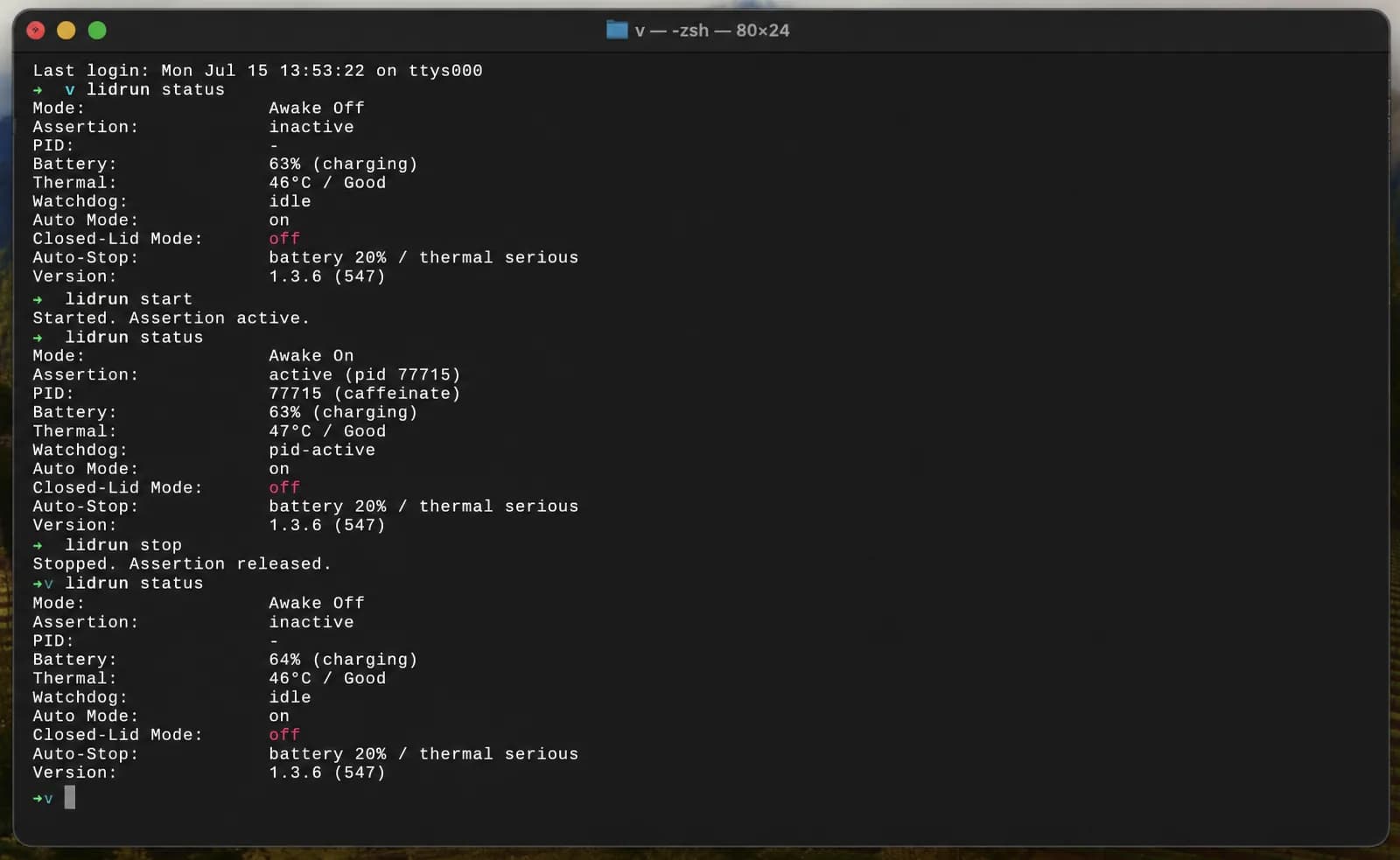
lidrun status vale la pena correrlo primero y con más frecuencia que ningún otro. En frío, imprime Mode: Awake Off, Assertion: inactive, Clamshell: off; vuelve a correrlo después de lidrun start y Mode dice Awake On con Assertion active — también agrega líneas de Battery y Thermal cada vez que el Mac tiene batería y un estado térmico que valga la pena mostrar. lidrun start y lidrun stop son el par explícito de encendido/apagado, y lidrun -- <command> es el wrapper, que mantiene un keep-awake durante exactamente la vida de ese proceso y devuelve su código de salida real cuando termina — revisa $? después y estarás leyendo el resultado del propio comando envuelto, no el de lidrun.
Una corrección que vale la pena hacer con claridad: no existe un lidrun on, lidrun off, ni lidrun toggle sueltos. Esas palabras solo existen como argumento de autowatch — lidrun autowatch on, off, o toggle activa o desactiva Auto Mode, el modo que mantiene un keep-awake solo mientras un nombre de proceso vigilado está realmente corriendo y lo suelta por su cuenta en cuanto deja de estarlo. lidrun watch <pattern> y lidrun unwatch <pattern> agregan o quitan un nombre de esa lista de vigilancia, y lidrun patterns muestra lo que hay en ella actualmente.
Dos más completan la lista: lidrun timer 3600 mantiene un keep-awake durante un número fijo de segundos y se libera solo cuando se acaba el tiempo, y lidrun notify "Build done" "exit 0" dispara una notificación local y push por el mismo canal que usan las alertas propias de la app — una última línea razonable en un script envuelto.
Dos patrones para usar en scripts, y una trampa con las comillas
Para un script completo con más de un paso, enciérralo entre corchetes: lidrun start al principio, lidrun stop al final, y todo lo demás corriendo en medio exactamente como lo haría sin LidRun de por medio. Como ambos son comandos de daemon que devuelven el control de inmediato, no importa si el script está en una terminal en primer plano o corre sin interfaz por SSH — la app es la que mantiene el estado real.
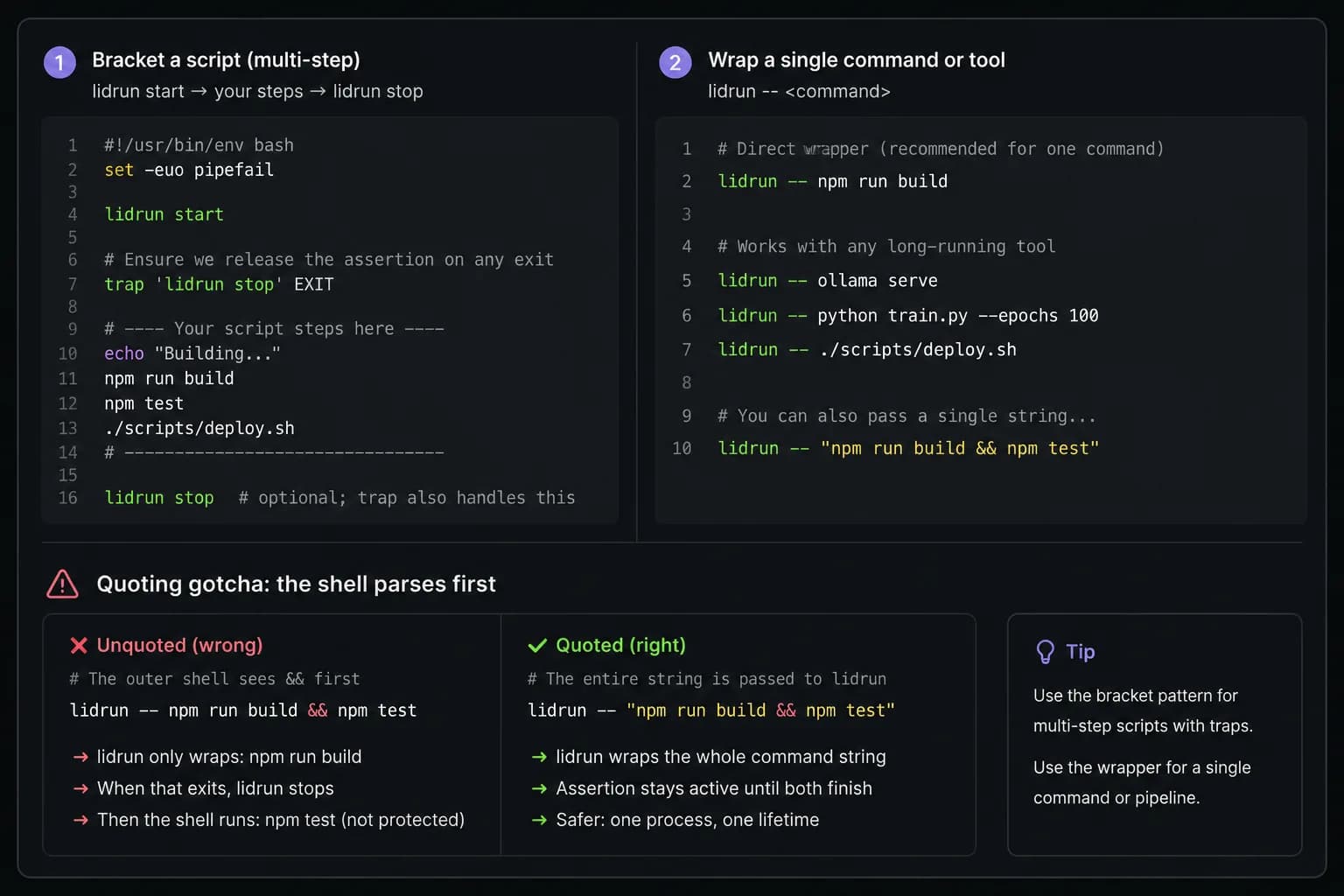
El riesgo real de encerrar el script así es el mismo que tienen caffeinate y disablesleep: si un paso anterior falla y el script termina antes de llegar a lidrun stop, el Mac queda bajo una retención siempre activa que nadie va a acordarse de liberar. El arreglo estándar es un trap de una sola línea al inicio del script — trap 'lidrun stop' EXIT — que ejecuta lidrun stop sin importar cómo termine el script, incluido un crash.
Para un solo paso, la forma wrapper evita el trap por completo: lidrun -- ./build.sh mantiene la assertion durante exactamente la vida de ese proceso y la libera en el momento en que termina, sea éxito o falla — la misma forma que caffeinate ./build.sh.
Un detalle que conviene conocer antes de que te sorprenda: lidrun -- pasa los argumentos unidos por un login shell real, así que los operadores de shell dentro de una sola cadena entre comillas funcionan como se espera. lidrun -- "npm run build && npm test" mantiene un solo keep-awake a lo largo de ambos pasos. Quita las comillas y escribe en cambio lidrun -- npm run build && npm test, y tu shell externo interpreta el && primero — solo npm run build se le pasa a lidrun, y npm test corre después, sin envolver, una vez que lidrun ya terminó. Como corre a través de un login shell, las entradas de PATH de Homebrew, pyenv o nvm también se resuelven igual que en una terminal interactiva, lo que evita una trampa común con herramientas que hacen shell out directamente.
Qué cubren realmente las protecciones de seguridad de LidRun en una sesión de CLI
Esta es la parte en la que vale la pena ser precisos, porque la respuesta honesta depende de qué comando usaste, no de "el CLI" como si fuera una sola cosa. La protección de batería y temperatura de LidRun vive en el propio seguimiento de estado de la app en ejecución, no en una power assertion cruda por sí sola — así que lo que recibe una sesión de lidrun depende de si la app está vigilando esa assertion en particular.
lidrun start, y timer, y autowatch, mantienen una assertion que la app rastrea activamente. Por defecto, si la batería baja de 20% mientras uno de esos está activo, la app libera la retención por su cuenta — lo mismo que haría lidrun stop — para que el Mac pueda dormir con normalidad antes de que la cosa se ponga urgente. Es el mismo piso suave que recibe el interruptor Always On de la barra de menú, porque por debajo es el mismo estado rastreado.
lidrun -- <command> no recibe ese piso suave, porque su assertion vive en el propio proceso de vida corta del CLI, fuera de todo lo que la app está rastreando — no hay estado que la app pueda liberar anticipadamente. Si la app LidRun resulta estar abierta al mismo tiempo, algo común ya que es una utilidad de la barra de menú, su propio piso de emergencia duro se sigue aplicando en todo el sistema: cerca de 4% de batería por defecto (configurable entre 4% y 8%), LidRun llama directamente a pmset sleepnow, lo que fuerza a dormir a todo el Mac sin importar quién esté sosteniendo una assertion, incluida la del propio comando envuelto. Si la app no está corriendo en absoluto, nada interviene, y lidrun -- <command> se comporta exactamente igual que una retención de caffeinate -i <command> desnuda: sin piso de batería, sin chequeo térmico, solo prevención de idle-sleep mientras dure el proceso.
En la práctica, ese es un intercambio razonable para un build o test frente al que estás sentado — tú eres el chequeo de seguridad. Para una corrida nocturna genuinamente desatendida donde el piso de batería necesita importar durante todo el proceso, lidrun start emparejado con lidrun stop, o Auto Mode, con la app abierta, es la versión que se vigila de forma continua, no solo respaldada si las cosas se ponen críticas.
CI en laptop, corridas desatendidas, y dónde encaja el CLI junto a todo lo demás
La razón real para recurrir a cualquiera de estas herramientas es un self-hosted runner o un job nocturno en un Mac que de verdad está sobre un escritorio en algún lado — el tipo de máquina desatendida que se duerme sola por inactividad, a diferencia de una VM de CI efímera en la nube. Envolver el job con lidrun -- ./nightly.sh, o encerrarlo entre start y stop, evita que el Mac se duerma por inactividad a mitad de la corrida.
El CLI es una costura más dentro de un pequeño conjunto de herramientas que se solapan a propósito. Auto Mode (lidrun autowatch on) mantiene el Mac despierto solo mientras un nombre de proceso vigilado está realmente corriendo, sin nada que recordar equilibrar después. La vista Run Command de la GUI hace el mismo trabajo que lidrun -- <command> pero desde una ventana en vez de una terminal, y muestra el código de salida y la duración de lo que corrió al terminar — la misma información que $? le da al CLI. Cuál usar depende sobre todo de dónde arranca el job: un script recurre al CLI, un caso puntual manual recurre a la GUI.
Si el workflow vive por completo en un interruptor de la barra de menú en lugar de un script, Amphetamine, KeepingYouAwake, Lungo y Caffeine son herramientas establecidas y genuinamente capaces, con sus propias reglas de disparo — apertura de una app, red Wi-Fi, hora del día. No están construidas principalmente alrededor de un workflow de terminal scriptable y consciente del código de salida, como sí lo son lidrun -- y caffeinate, así que si el job arranca en un script o un Makefile en vez de con un clic, las herramientas de CLI encajan mejor para ese trabajo en particular.
Aquí aplican las mismas salvedades que en todos lados: una superficie dura y ventilada y la corriente conectada son el setup correcto para cualquier cosa que corra por mucho tiempo, y el CLI ayuda a reducir la fricción de mantener un Mac despierto desde la terminal. No sustituye el hecho de revisar de verdad una máquina a la que le pediste correr sin supervisión durante la noche.
LidRun mantiene tu trabajo en marcha con la tapa cerrada, con protección de batería y temperatura integrada.
¿Ya tienes LidRun? Lee la guía de configuración →
¿Nuevo en LidRun? Consulta los precios →
Preguntas frecuentes
lidrun status, start, stop, autowatch [on|off|toggle], watch <pattern>, unwatch <pattern>, patterns, timer <seconds>, y notify "<title>" ["<body>"], más el wrapper lidrun -- <command>, --version, y help. No existe un lidrun on, off, o toggle sueltos — esas palabras solo existen como argumentos de autowatch.
No. Es autocontenido — abre su propia power assertion de vida corta para el comando envuelto y la libera cuando el comando termina, sin depender de la app. status, start, stop y los demás comandos de daemon sí necesitan la app abierta; hablan con ella por un socket local y devuelven un error si no lo está.
Depende del comando. start, timer y autowatch mantienen una assertion que la app rastrea activamente, incluido el auto-stop de batería por defecto en 20%. lidrun -- <command> mantiene su propia assertion separada que la app no puede liberar anticipadamente — si la app está abierta, su piso de emergencia más duro cerca de 4% de batería igual fuerza a dormir a todo el Mac sin importar quién esté sosteniendo una assertion; si la app no está corriendo, nada interviene y se comporta como una retención de caffeinate desnuda.
lidrun -- your-command. Espera a que termine el comando, libera la retención, y devuelve el propio código de salida del comando — $? después de lidrun -- npm test refleja el resultado de npm test, no el de lidrun.
No para la instalación por defecto. Settings, Command Line, Install lidrun CLI… puede escribir en ~/.local/bin/lidrun sin pedir contraseña de administrador — solo agrega esa carpeta al PATH una vez. Instalar a nivel de todo el sistema en /usr/local/bin/lidrun pide una contraseña de administrador una sola vez, ya que escribir ahí necesita permisos de root.
Mecánicamente, lidrun -- <command> y caffeinate <command> hacen casi lo mismo — mantener una idle-sleep assertion durante la vida del proceso. La diferencia está en el resto del CLI: start, stop, timer y autowatch están conectados a la misma app, el mismo umbral de batería, estado térmico y notificaciones que ya son visibles en la barra de menú, así que un script y la GUI están leyendo un solo estado compartido en vez de dos herramientas sin relación.
Sí — ese es el caso de uso real principal: un self-hosted runner o job nocturno en un Mac que de otro modo se dormiría por inactividad. Envuelve el job o enciérralo entre start y stop, y trátalo como cualquier corrida desatendida — ventilado, con corriente conectada, y vigilado con lidrun start en vez del wrapper desnudo si el piso de batería necesita estar activo todo el tiempo, no solo como último recurso.