Mantén un agente de Cursor corriendo en tu Mac
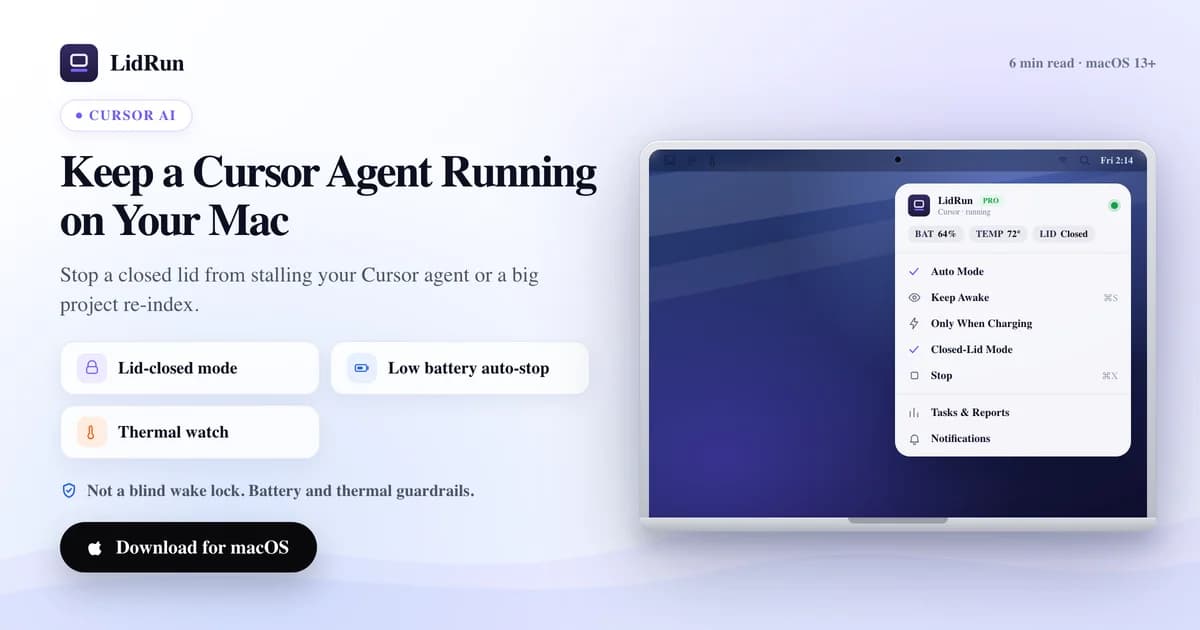
La solución directa es mantener la Mac despierta a nivel del sistema operativo solo mientras Cursor está trabajando de verdad, y soltarla en el momento en que se detiene — no un interruptor genérico de "nunca dormir" que tienes que acordarte de apagar. Los agentes en segundo plano de Cursor y su indexador corren como procesos locales normales, así que una sesión larga del composer, una tarea de agente sin supervisión, o una reindexación completa del proyecto se detienen en el instante en que tu Mac entra en reposo, ya sea por un tiempo de inactividad o por cerrar la tapa. Así puedes mantener un agente de Cursor corriendo en tu Mac, incluyendo dónde caffeinate y pmset ya te cubren y dónde no.
Qué interrumpe una ejecución de Cursor
Los agentes de Cursor y su indexador corren localmente en tu Mac — no hay un worker en la nube que retome el trabajo cuando tu equipo entra en reposo. El proceso simplemente queda suspendido donde estaba hasta que algo despierta la Mac de nuevo.

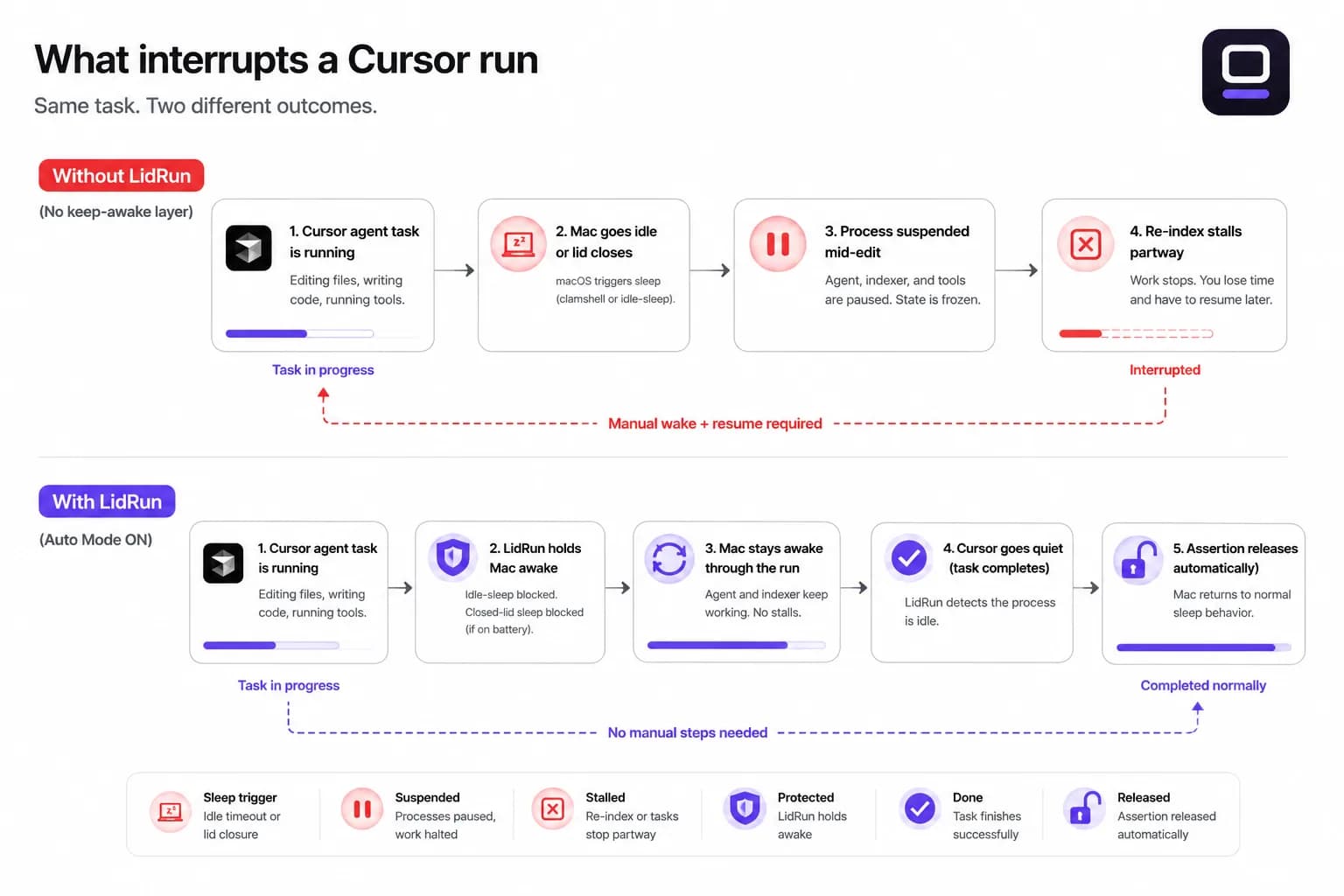
Eso golpea con más fuerza en dos casos: un agente en segundo plano que avanza por una tarea de varios pasos se detiene a mitad de una edición o de una llamada a herramienta, y una reindexación grande del workspace — de esas que toman varios minutos en un repo grande — se corta a medio camino y tiene que reanudarse después.
Estas son justo las ejecuciones que arrancas para poder alejarte del teclado, por eso un tiempo de inactividad o una tapa cerrada suelen caer en el peor momento: a la hora de un refactor nocturno, no a los cinco minutos.
Por qué caffeinate y pmset no lo cubren del todo
macOS en realidad tiene dos disparadores de reposo distintos, y la mayoría de las herramientas para mantener la Mac despierta solo detienen uno. caffeinate, y apps de la barra de menú como Amphetamine, KeepingYouAwake, Lungo y Caffeine, funcionan sosteniendo una power assertion del sistema — la misma primitiva. Eso bloquea el reposo por inactividad: la Mac no se duerme por estar quieta mientras esa assertion se mantiene activa.
Cerrar la tapa es un disparador distinto, de nivel más bajo — el reposo de tipo clamshell — y una power assertion por sí sola no lo detiene. Sin un monitor externo conectado, cerrar la tapa igual pone la Mac a dormir aunque caffeinate o una app para mantenerla despierta esté corriendo, sin importar si la iniciaste tú o algo más.
La única palanca pública que evita el reposo al cerrar la tapa con batería y sin monitor externo es el ajuste de sistema pmset -a disablesleep 1, y hace falta ser administrador para activarlo. Ese es el mecanismo detrás del propio modo Closed-Lid de LidRun — y también lo tienes disponible directo desde Terminal si prefieres probarlo a mano primero.
Guía relacionadaCómo mantener Claude Code funcionando con el MacBook cerradoLa solución gratuita: caffeinate, pmset y un monitor externo
Para una sesión corta de Cursor sin supervisión en tu escritorio, las opciones integradas pueden bastar. Conecta un monitor externo (hasta un adaptador sin nada enchufado funciona) y macOS mantiene toda la Mac despierta con la tapa cerrada de forma automática — sin software adicional, sin contraseña de administrador, el mismo modo clamshell que Apple diseñó para laptops en un dock.
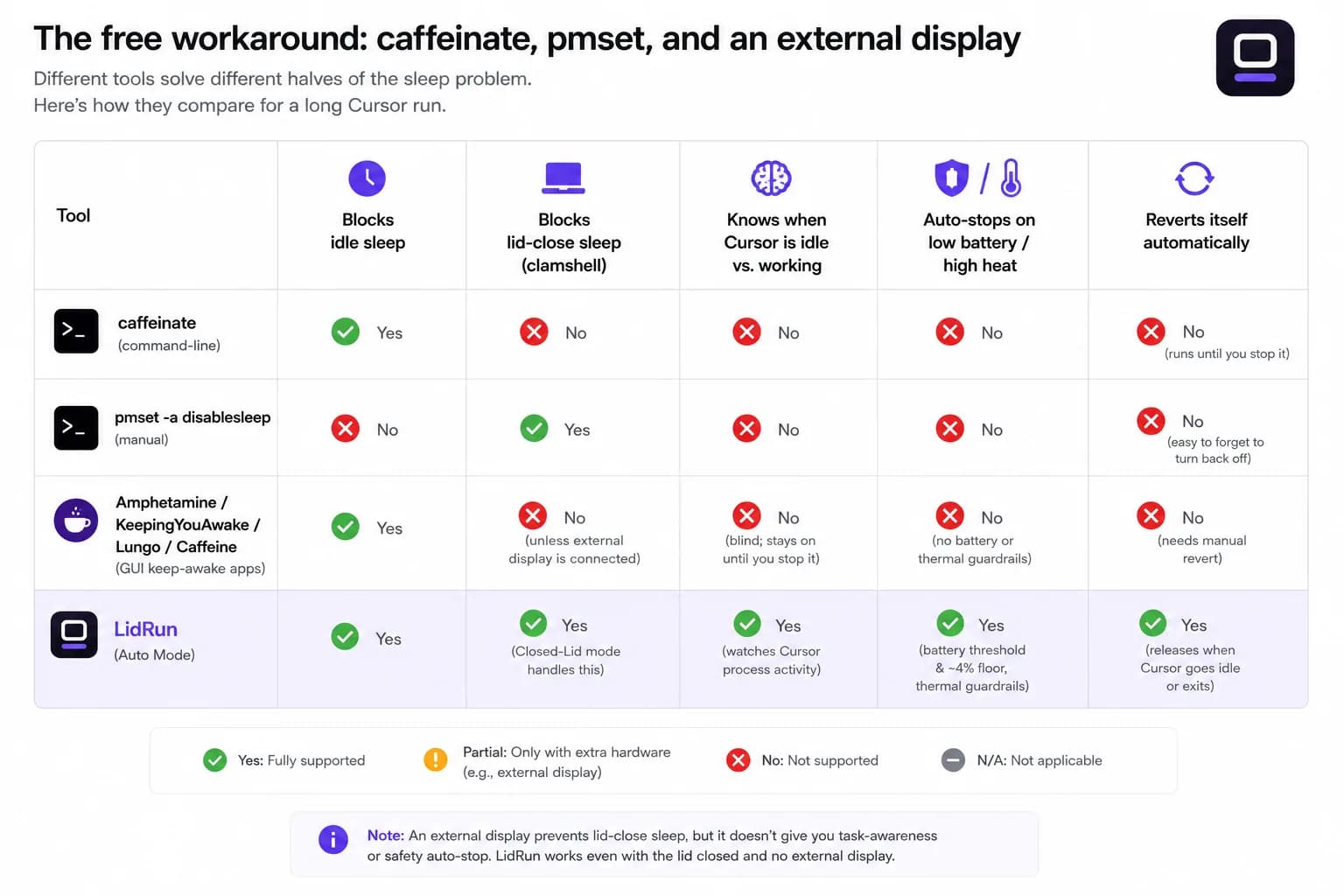
Lejos de un monitor, caffeinate -i en Terminal evita que la Mac entre en reposo por inactividad mientras corre, lo que cubre a un agente de Cursor siempre que la tapa se mantenga abierta. Para el caso específico de tapa cerrada, sudo pmset -a disablesleep 1 hace el mismo trabajo que el modo Closed-Lid de LidRun hace por debajo — solo recuerda devolverlo a 0 (sudo pmset -a disablesleep 0) cuando termine la ejecución.
Las apps de terceros para la barra de menú — Amphetamine, KeepingYouAwake, Lungo, Caffeine — son una mejora genuinamente cómoda frente a un comando de terminal a secas: un interruptor en la barra de menú, duraciones programadas, reglas por app. Son una buena opción si lo único que necesitas es 'no dejes que esta Mac se duerma por un rato', y no cuesta nada probarlas.
Dónde falla la solución gratuita
Ninguna de las herramientas anteriores sabe qué está haciendo Cursor en realidad. caffeinate -i y cualquier app basada en power assertions mantiene la Mac despierta de la misma forma, ya sea que el agente esté a mitad de una tarea o lleve dos horas sin hacer nada — tienes que acordarte de detenerla tú mismo, o simplemente sigue corriendo (y gastando batería) después de que el trabajo terminó.
pmset -a disablesleep es un ajuste de sistema global y persistente, no un interruptor por app. Si Terminal falla, cierras la ventana sin devolverlo a su valor original, o simplemente se te olvida, la Mac no entrará en reposo — con batería, en tu escritorio, dentro de una mochila — hasta que lo reviertas a mano o reinicies. Vale la pena tener cuidado con esto en una laptop que cierra plana: una Mac con la tapa cerrada ya tiene más dificultad para disipar calor, así que mantenla sobre una superficie dura y ventilada, no sobre una cama o dentro de una mochila cerrada.
Tampoco ninguna de estas herramientas vigila la batería o el estado térmico por ti. Arranca una reindexación nocturna desconectado de la corriente y caffeinate o una app de barra de menú mantendrán la Mac despierta hasta llegar al 0%. Ese es el vacío que los umbrales de seguridad de LidRun están hechos para cerrar — deteniéndose automáticamente antes de que se agote la batería o la Mac se sobrecaliente, en lugar de sostenerla a ciegas.
Configura LidRun para una sesión de Cursor
Instala LidRun y ábrelo — vive en la barra de menú, no en el Dock. Cursor ya está en la lista de vigilancia por defecto junto con Claude Code, Codex y unas 50 herramientas más de desarrollo e IA, así que no hay nada que escribir para el caso común.
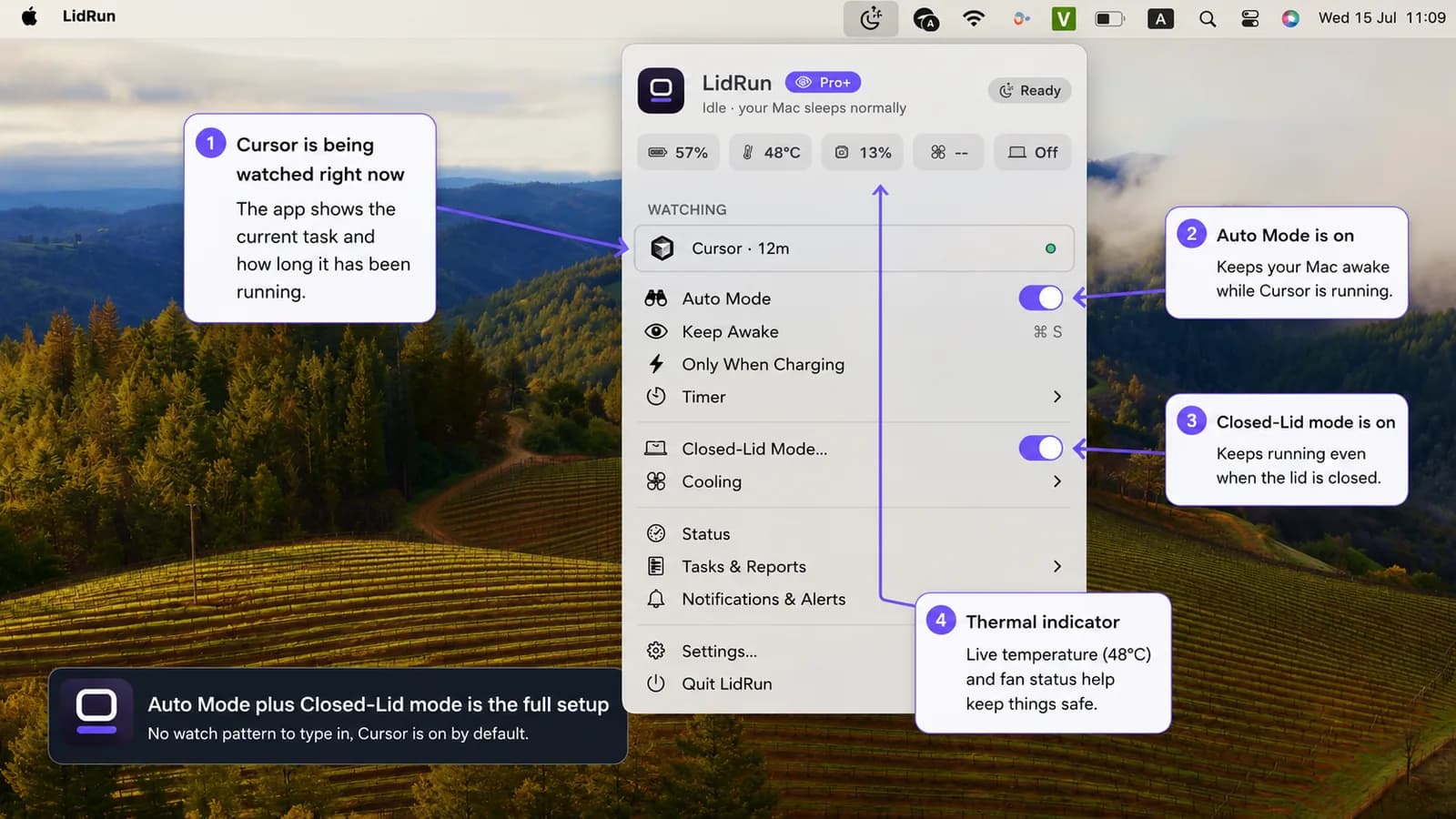
Activa Auto Mode desde la barra de menú. LidRun vigila el proceso de Cursor y mantiene la Mac despierta mientras está trabajando de verdad, y luego libera la assertion — dejando que la Mac duerma con normalidad — en cuanto termina la última tarea vigilada. Auto Mode es una función Pro; Keep Awake y el modo Timer (ambos gratis, sin límite de tiempo) cubren la misma sesión de Cursor de forma manual si aún no estás listo para desbloquearlo.
Para una ejecución con la tapa cerrada, activa también el modo Closed-Lid. La primera vez, macOS te pide aprobar un helper de una sola vez para que las siguientes ejecuciones no necesiten un aviso de contraseña. El modo Closed-Lid también es Pro, con un número limitado de ejecuciones gratis para probarlo antes de pedirte desbloquear el resto.
Los límites de batería y temperatura vienen configurados desde el inicio — detención automática por debajo del 20% de batería (ajustable entre 15% y 50%), más un piso de emergencia fijo entre 4% y 8% que fuerza el reposo de la Mac sin importar lo que hayas configurado. Estos aplican en todos los modos, incluidos los gratuitos, no solo en Auto Mode.
Qué significa realmente "vigilar a Cursor"
Cursor está en la lista integrada de agentes de IA de LidRun, no solo en su lista genérica de apps, y esa distinción importa. Una ventana de Cursor simplemente abierta no mantiene la Mac despierta por sí sola — primero tiene que demostrar que está haciendo algo. Una vez que lo hace, LidRun cambia a una detección basada en presencia: un agente que se queda cerca del 0% de CPU mientras espera la respuesta de un modelo sigue contando como activo, hasta por 30 minutos, así que un agente de Cursor a mitad de un razonamiento no se descarta solo porque se quedó callado un rato.
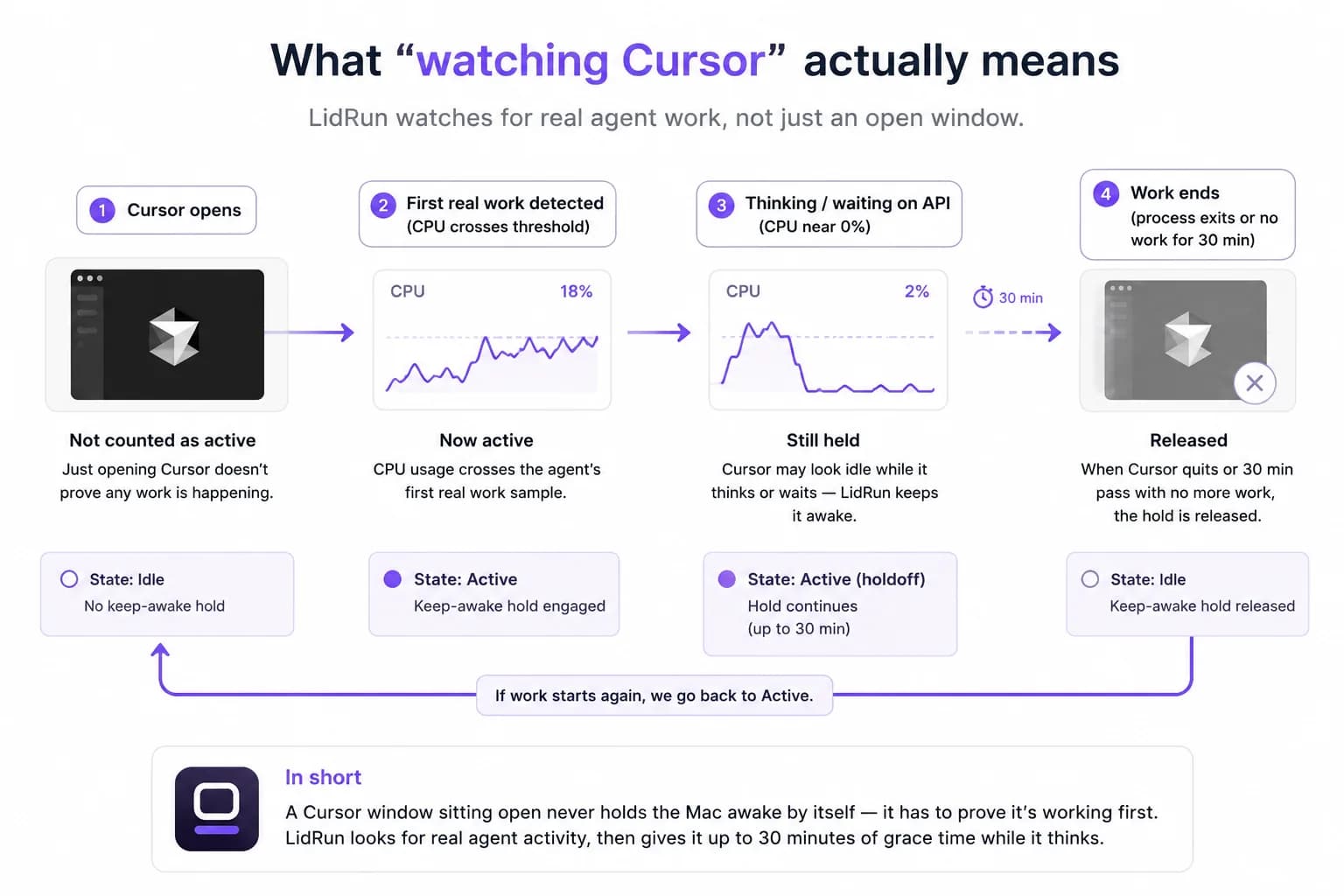
Una reindexación grande pasa por el mismo vigilante, sin ningún ajuste aparte, porque aparece como actividad de CPU del proceso de Cursor. Las ediciones rápidas y la indexación de archivos pequeños terminan tan rápido que el reposo ni siquiera entra en juego.
El estado térmico actual — Normal, Templado, Caliente, Muy caliente — se muestra en la barra de menú todo el tiempo, así que una ejecución que calienta la Mac durante una indexación larga es visible en lugar de pasar desapercibida. Si llega al nivel crítico, el modo Closed-Lid se apaga solo para que la Mac pueda bajar el rendimiento y enfriarse de forma normal, en lugar de atrapar el calor detrás de una tapa cerrada.
Cuándo vale la pena activarlo
Esto se gana su lugar en los tramos sin supervisión: un agente en segundo plano trabajando en una tarea larga, una indexación nueva de un repo grande, una pasada de limpieza nocturna que no quieres quedarte vigilando.
Si estás en Cursor trabajando activamente junto al agente, no necesitas nada de esto — la Mac se mantiene despierta mientras interactúas con ella sin importar el modo, y las tareas cortas que terminan en uno o dos minutos están bien por sí solas.
Si alguna vez has movido el trackpad solo para evitar que la Mac se duerma a mitad de una ejecución, ese hábito es la señal real de que vale la pena activar Auto Mode — o, si todavía no estás listo para desbloquearlo, simplemente correr un Timer gratis en su lugar.
Ajustes recomendados
Mantente conectado a la corriente en ejecuciones largas de agentes o de indexación — el umbral de detención automática por batería es una red de seguridad para cuando se te olvida, no un plan para una ejecución nocturna que arranca al 40%.
Si prefieres no desbloquear Auto Mode todavía, arranca un Timer por lo que calcules que va a durar la tarea. Es gratis y sin límite, y le da a la ejecución un tope duro incluso si el agente se traba o una indexación se queda pegada.
Mantén la Mac sobre una superficie dura y ventilada, con la tapa abierta o cerrada — una reindexación sostenida genera calor de verdad, y eso es cierto con o sin ninguna herramienta para mantenerla despierta corriendo.
Pruébalo en la próxima ejecución que sea lo bastante larga como para hacerte considerar dejar la tapa apoyada abierta. Ese es justo el caso para el que están hechos Auto Mode y el modo Closed-Lid, y Keep Awake o el modo Timer te dejan probar la idea central hoy mismo sin desbloquear nada.
LidRun mantiene tu trabajo en marcha con la tapa cerrada, con protección de batería y temperatura integrada.
¿Ya tienes LidRun? Lee la guía de configuración →
¿Nuevo en LidRun? Consulta los precios →
Preguntas frecuentes
Los agentes de Cursor y la indexación corren localmente en tu Mac — no hay un worker remoto manteniendo la tarea viva en otro lado — así que se pausan en el momento en que la Mac entra en reposo, ya sea por un tiempo de inactividad o por cerrar la tapa. LidRun mantiene la Mac despierta mientras Cursor está trabajando activamente, dentro de tus límites de batería y temperatura, para que el agente o la reindexación puedan terminar en lugar de quedarse a medias.
Instala LidRun, ábrelo desde la barra de menú y activa Auto Mode — Cursor ya está en la lista de vigilancia por defecto, así que no hay nada que configurar. LidRun mantiene la Mac despierta mientras Cursor está trabajando activamente y la libera cuando la tarea termina. Auto Mode es una función Pro; los modos gratuitos Keep Awake o Timer cubren la misma sesión de forma manual si todavía no estás listo para desbloquearlo.
Sí, una vez que Auto Mode está activado. LidRun identifica a Cursor por nombre de proceso y bundle ID y lo trata como un agente de IA conocido en lugar de solo una app abierta, así que solo mantiene la Mac despierta una vez que Cursor demostró que está trabajando de verdad, y sigue sosteniéndola durante tramos cortos de silencio — hasta 30 minutos — mientras el agente espera una respuesta.
Para una sesión con la tapa abierta, en gran medida sí — caffeinate y apps como Amphetamine, KeepingYouAwake, Lungo y Caffeine bloquean el reposo por inactividad de la misma forma que lo hace el modo básico Keep Awake de LidRun. El vacío está en el reposo por tapa cerrada: ninguna de ellas lo evita sin un monitor externo conectado, porque una power assertion no alcanza al reposo de tipo clamshell. Eso necesita el ajuste pmset disablesleep del sistema, que el modo Closed-Lid de LidRun administra por ti con detención automática por batería y temperatura incluida.
Sí, con el modo Closed-Lid activado. Es la misma palanca pmset -a disablesleep disponible desde Terminal, pero LidRun la combina con umbrales de batería y temperatura, y vuelve a activar el reposo normal automáticamente cuando termina la ejecución, la app se cierra, o se reinicia después de un fallo, así que no se queda atascada de forma indefinida como puede pasar con un pmset activado a mano si se te olvida revertirlo.
Mantener la Mac despierta durante una ejecución larga sí consume más batería y genera más calor que dejarla dormir — eso es cierto para cualquier herramienta de este tipo, LidRun incluido. Los umbrales de batería y temperatura existen para reducir ese riesgo: detención automática por debajo de tu límite de batería (20% por defecto), un piso de emergencia fijo de 4–8% sin importar lo que hayas configurado, y una revisión térmica que desactiva el modo Closed-Lid en el nivel crítico. Mantenerte conectado a la corriente y sobre una superficie ventilada en ejecuciones largas sigue importando.
No — Auto Mode, la detección automática de Cursor y otras herramientas de desarrollo, es una función Pro. Keep Awake y el modo Timer son gratuitos y sin límite de tiempo, y pueden cubrir una sesión de Cursor de forma manual. El modo Closed-Lid también es Pro, con un número limitado de ejecuciones gratis para probarlo primero.
Sí — la indexación corre como actividad de CPU dentro del mismo proceso de Cursor que LidRun ya está vigilando, así que una reindexación grande mantiene la Mac despierta de la misma forma que lo hace una tarea de agente, dentro de tus límites de batería y temperatura.