Modo Closed-lid no macOS, sem kext
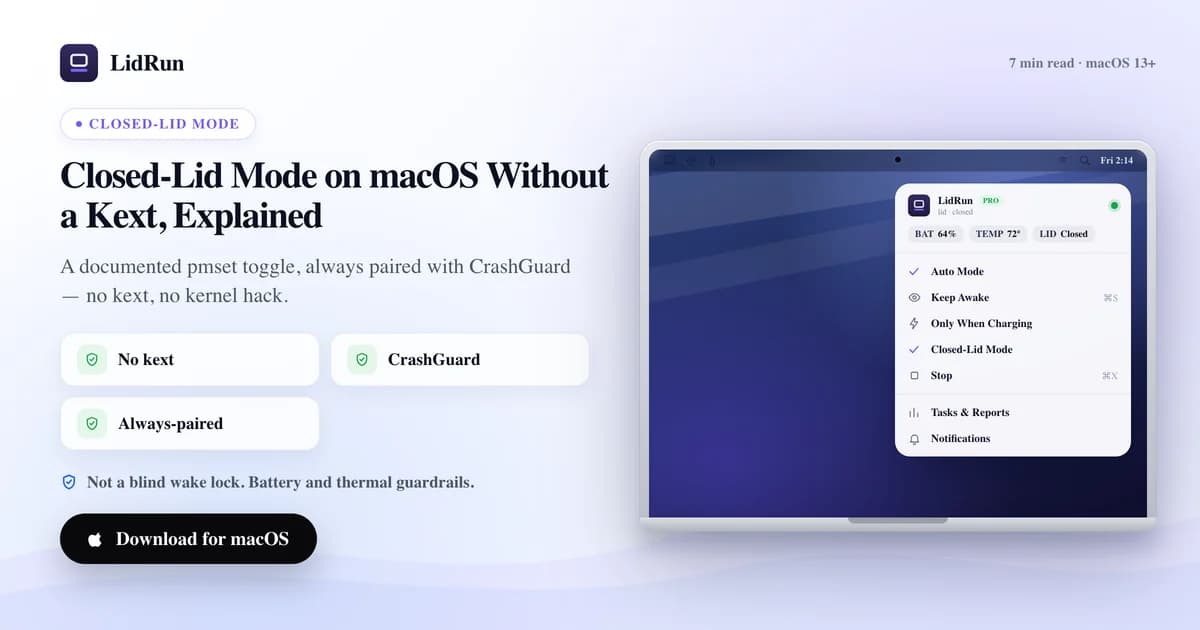
Sim — o modo closed-lid em um Mac funciona sem extensão de kernel. É o toggle documentado pmset disablesleep, a mesma alavanca por trás do sudo pmset -a disablesleep 1 no Terminal, só que mantido automaticamente em vez de ficar por sua conta gerenciar na mão. Aqui está a versão específica: o que esse toggle realmente faz, o que o caffeinate e o próprio modo clamshell com display externo da Apple já oferecem de graça, o que dá errado se você ativar o interruptor sozinho, e como o LidRun mantém isso sem deixar seu Mac travado acordado.
Por que fechar a tampa coloca um Mac para dormir, afinal
Feche a tampa de um MacBook sem mais nada conectado e o macOS entra em suspensão em segundos. Essa é a suspensão em modo clamshell, um mecanismo diferente da suspensão comum por inatividade. A própria forma suportada pela Apple de contornar isso é o modo clamshell com display externo: conecte um monitor, fique na tomada, e o Mac roda com a tampa fechada indefinidamente sem nenhum software de terceiros — existe uma tela para o macOS continuar controlando, então a tampa fechada deixa de importar.
Sem um display externo, nenhuma das ferramentas populares de manter-acordado consegue tocar nesse limite da forma normal. caffeinate, Amphetamine, KeepingYouAwake, Lungo e Caffeine funcionam todas segurando uma power assertion do IOKit — IOPMAssertionCreateWithName, a API documentada para "não entrar em suspensão por inatividade". Isso é real, e realmente funciona para manter uma tela ou o Mac inteiro acordado enquanto a tampa está aberta. Mas uma assertion só bloqueia a suspensão por inatividade. Fechar a tampa dispara uma suspensão em modo clamshell de nível mais baixo, que nenhuma assertion consegue impedir, não importa qual app esteja segurando ela — esse é um limite do próprio sistema operacional, não uma falha de nenhuma ferramenta em particular.
A única alavanca pública e documentada que realmente muda o comportamento ao fechar a tampa sem display conectado é o pmset disablesleep — uma configuração de gerenciamento de energia em nível de sistema que já vem com o próprio macOS.
As opções gratuitas: o modo clamshell da Apple, o caffeinate e o pmset
Se você tem um display sobrando, use-o. Conecte, fique na tomada, e feche a tampa — essa é a configuração real e suportada da Apple para rodar de tampa fechada: sem software extra, sem senha de administrador, nada para lembrar de desligar depois. É a resposta certa para uma mesa de trabalho fixa.

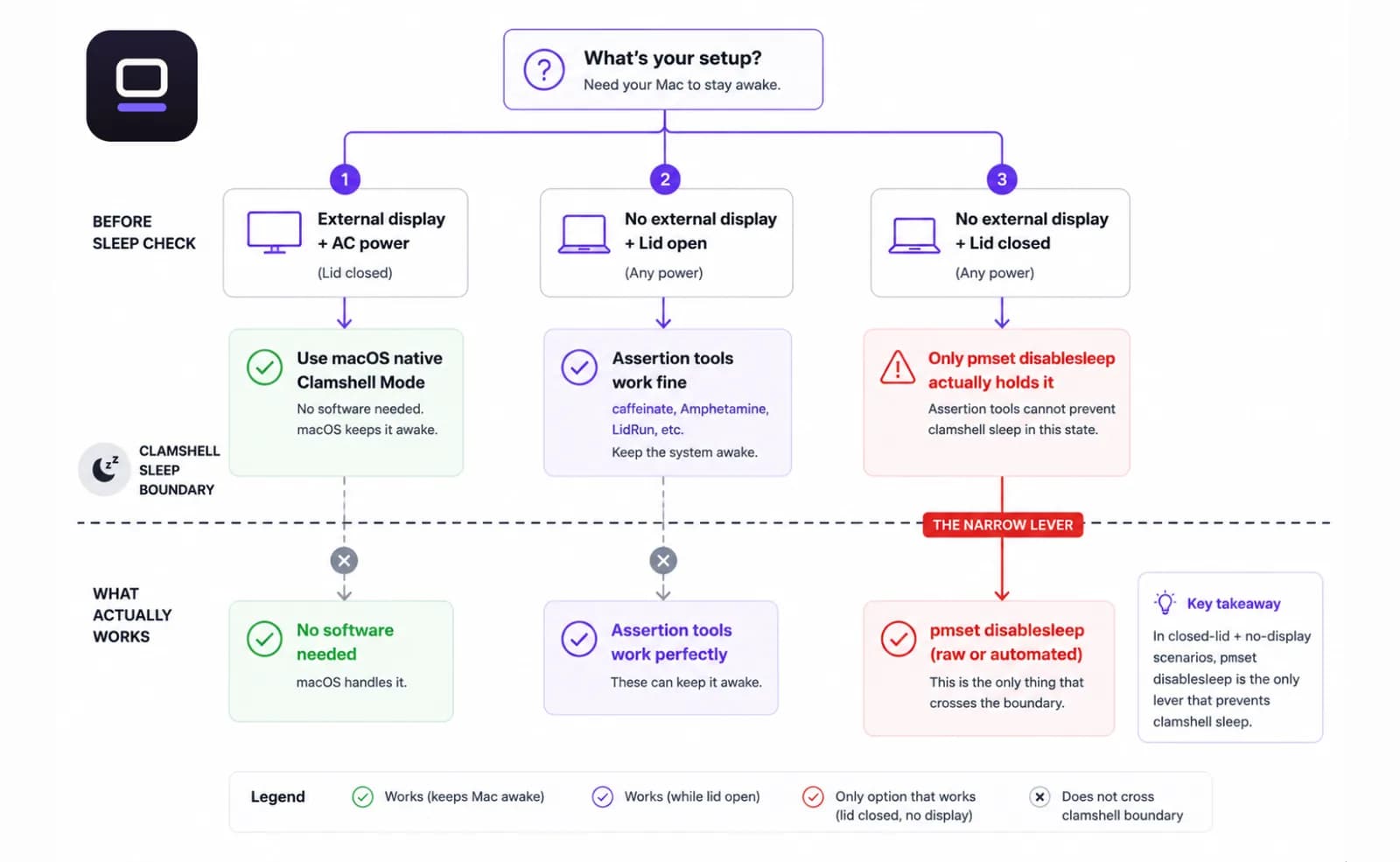
Sem display sobrando? O caffeinate é a ferramenta de linha de comando nativa da Apple (man caffeinate). caffeinate -i bloqueia a suspensão por inatividade, caffeinate -d também bloqueia a suspensão da tela, e caffeinate -s mantém o sistema inteiro acordado na tomada enquanto o processo estiver rodando. É genuinamente útil para um script que não deveria entrar em suspensão por inatividade — mas ele herda o mesmo ponto cego da suspensão em modo clamshell que qualquer ferramenta baseada em assertion: feche a tampa sem display conectado e o Mac ainda assim entra em suspensão por baixo dele.
A alavanca que realmente funciona com a tampa fechada, sem display, é a mesma que os apps de closed-lid automatizam: sudo pmset -a disablesleep 1 no Terminal, verificável a qualquer momento com pmset -g | grep SleepDisabled, e desligada de volta com sudo pmset -a disablesleep 0. É documentada, gratuita, e já está no seu Mac.
Guia relacionadoO alarme do Mac toca com a tampa fechada?A pegadinha: é uma configuração global, e ela não se desliga sozinha
O disablesleep não fica restrito à sua sessão do Terminal nem ao seu script — é uma flag persistente, em nível de sistema. Defina como 1 e ela continua 1 mesmo depois de apps fecharem, janelas do Terminal serem fechadas, e sessões SSH terminarem. Esqueça de desligar de volta e o Mac literalmente não consegue entrar em suspensão até que algo reset isso: você rodando o comando de novo, ou um reboot.
Esse é o risco real que as pessoas têm em mente quando ficam cautelosas com ferramentas de closed-lid — um notebook que fisicamente não consegue entrar em suspensão, fechado dentro de uma mochila, sem nada monitorando temperatura ou nível de bateria. O pmset em si não tem a menor ideia de qual é a temperatura do SoC ou quanto de bateria resta. Ele só mantém a configuração até que algo diga o contrário.
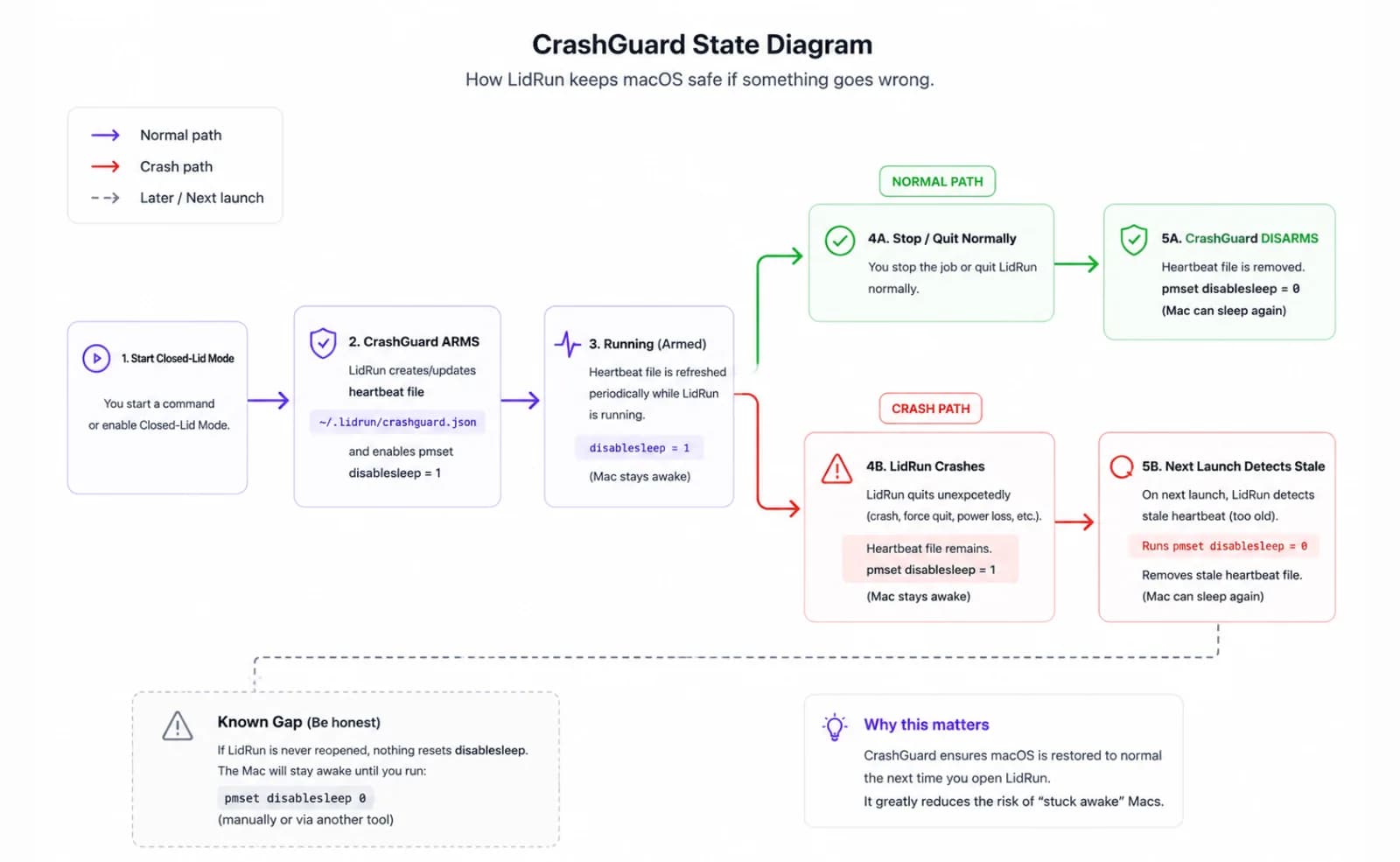
É também exatamente o tipo de falha que uma camada de segurança contra travamentos existe para capturar — porque um script ou app que define essa flag e depois trava, é forçado a fechar, ou perde a conexão SSH, deixa para trás a mesma configuração travada.
Uma forma mais segura de rodar isso na mão, se você for por esse caminho
Se você se sente confortável no Terminal e não quer outro app, trate o pareamento ligar/desligar como inegociável. Defina disablesleep como 1 bem antes do job, e coloque o disablesleep 0 correspondente em um trap no EXIT no topo do script, para que ele dispare mesmo se o job morrer no meio do caminho.
Verifique o estado antes de confiar nele — pmset -g | grep SleepDisabled mostra o valor atual em uma linha só. Vale a pena rodar antes de fechar a tampa, e de novo na próxima vez que você abrir.
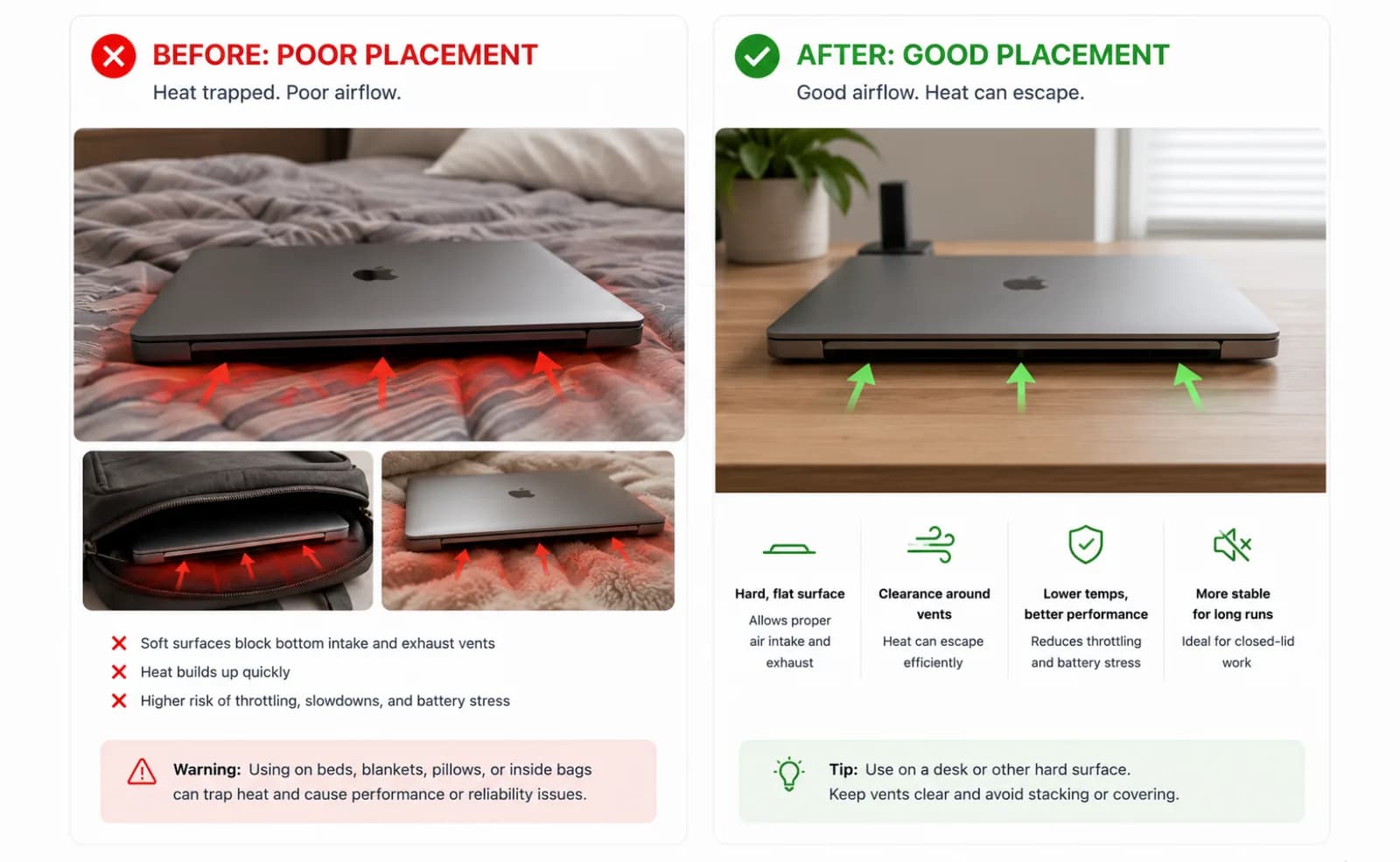
As regras físicas valem não importa qual ferramenta ativou o interruptor: uma superfície dura, plana e ventilada, nunca uma cama ou uma mochila fechada, e na tomada para qualquer coisa mais longa que um job rápido. Uma tampa fechada restringe o fluxo de ar sobre o teclado, não importa o que esteja mantendo ela fechada.
Onde o LidRun entra: o mesmo toggle, mantido automaticamente
O modo closed-lid do LidRun é esse mesmo toggle pmset disablesleep — sem extensão de kernel, sem driver DriverKit fingindo um display. O que muda é o que envolve isso. O LidRun pareia cada ativação com a desativação correspondente ao parar, ao fechar o app, e de novo ao reabrir, então a configuração não depende de você lembrar.
Para o caso de travamento que o pmset sozinho não cobre, o LidRun grava um pequeno arquivo de estado "armado" com um heartbeat enquanto o modo closed-lid está ativo. Se o app trava ou é forçado a fechar, a próxima abertura encontra esse arquivo ainda armado, reconhece que a sessão anterior nunca foi limpa, e reseta o disablesleep para 0 automaticamente — isso é o CrashGuard. Mas ele só dispara na próxima abertura: uma sessão travada sem ninguém reabrindo o LidRun deixa a configuração ligada até que você faça isso, ou até um reboot — a mesma limitação que o comando manual tem.
A autenticação de administrador é inevitável — mudar o disablesleep exige privilégios de administrador, do mesmo jeito que exigiria pelo Terminal. O LidRun pede para você aprovar um helper privilegiado uma vez durante a configuração; depois disso, o modo closed-lid ativa e desativa sem pedir senha repetidamente. Pule essa etapa e ele volta a pedir aprovação de administrador a cada uso. De qualquer forma, nada roda sem sua aprovação explícita.
No lado térmico, o LidRun trata o SoC como crítico assim que ele registra 100°C ou mais, ou quando a CPU cai para 30% ou menos do desempenho normal por throttling — o que disparar primeiro. Se esse estado crítico se mantiver por cerca de dois minutos e você tiver se afastado (sem input por cinco minutos) ou a tampa estiver fisicamente fechada, o LidRun escala de soltar a retenção para colocar o Mac para dormir de vez. Um usuário presente com a tampa aberta nunca é forçado a dormir só por causa de calor — essa proteção existe para que uma sessão ativa não seja interrompida no meio do trabalho, sem aviso. No lado da bateria existe um piso equivalente: o limite de bateria crítica é 5% por padrão e não pode ser configurado abaixo de 4%, então esse piso de segurança não é algo que você consiga desligar por acidente.
O LidRun também verifica se você já está na configuração clamshell da própria Apple — um display externo, não embutido, controlando ativamente a área de trabalho — e trata isso como um motivo legítimo para estar acordado de tampa fechada sem precisar do próprio toggle. E como o modo closed-lid exige essa mudança de pmset em nível de administrador, ele não é compatível com o sandbox da Mac App Store; o LidRun é distribuído como um DMG notarizado de download direto, então ainda é escaneado pela Apple, só que não pela Store.
A filosofia por trás de tudo isso: agente rodando, fica acordado; agente terminado ou inseguro, libera e deixa o Mac dormir. O modo closed-lid é um recurso Pro — o plano gratuito inclui um número limitado de sessões closed-lid para experimentar antes de exigir um desbloqueio Pro único.
Como isso se compara ao Amphetamine, KeepingYouAwake, Lungo e Caffeine
Esses são apps de menu-bar sólidos e bem construídos, e para o trabalho real deles — segurar a suspensão por inatividade ou a suspensão da tela, em um horário, por app, ou por gatilho — eles fazem isso bem. Se o que você precisa é "não escurecer a tela durante uma chamada" ou "não entrar em suspensão por inatividade enquanto estou lendo", qualquer um deles é uma escolha boa e mais leve do que o LidRun.
O que nenhum deles muda é o limite entre assertion e clamshell explicado acima: uma IOPMAssertion, não importa como seja configurada, não sobrevive a uma tampa fechada sem display externo conectado. Algumas dessas ferramentas documentam suas próprias opções de closed-lid separadamente da assertion — vale a pena ler exatamente como cada uma implementa isso antes de confiar nela com um job de verdade e a tampa fechada, do mesmo jeito que este artigo deixa claro que a versão do LidRun é o pmset disablesleep, não um kext.
A diferença do LidRun não é o toggle — é que o modo closed-lid é a única coisa que ele faz com uma camada de segurança real (ativação/desativação pareada, recuperação de falhas, parada automática por temperatura e bateria), em vez de uma lista genérica de recursos de manter-acordado com uma opção de closed-lid encaixada por cima.
Trade-offs honestos antes de confiar nisso com trabalho de verdade
Nenhum toggle de software muda a física — o pmset disablesleep, a versão do LidRun dele, ou um comando digitado na mão no Terminal, todos têm o efeito idêntico sobre o fluxo de ar: nenhum. Uma tampa fechada restringe o fluxo de ar sobre o teclado, então um job pesado com a tampa fechada roda mais quente do que o mesmo job com a tampa aberta. O LidRun mostra um aviso de calor antes de você ativar o modo, então você está escolhendo esse trade-off conscientemente, e seu controlador térmico observa o aumento de pressão e pode parar a sessão automaticamente — isso ajuda a reduzir o risco, não faz o calor desaparecer.
O posicionamento ainda importa mais do que qualquer configuração: uma superfície dura, plana e ventilada, nunca uma cama ou uma mochila fechada, e na tomada para qualquer coisa mais longa que um job curto de closed-lid, para que a bateria não fique drenando também sob pressão.
E se tudo que você realmente precisa é que a tela fique ligada — não fechar fisicamente a tampa e se afastar — você nem precisa do modo closed-lid. Uma simples assertion de manter-acordado faz esse trabalho e pula completamente a etapa de aprovação de administrador/helper. Guarde o modo closed-lid para quando você realmente quiser a tampa fechada.
O LidRun mantém seu trabalho rodando com a tampa fechada, com proteção de bateria e temperatura embutida.
Já tem o LidRun? Leia o guia de configuração →
Novo no LidRun? Veja os preços →
Perguntas frequentes
Não. É o toggle documentado pmset disablesleep — sem kext, sem um driver DriverKit fingindo um display. É a mesma alavanca disponível pelo Terminal via sudo pmset -a disablesleep 1, só que pareada e reconciliada automaticamente em vez de ficar por sua conta gerenciar.
O arquivo heartbeat do CrashGuard captura isso: na próxima vez que o LidRun abre, ele encontra a configuração ainda armada de uma sessão que nunca foi limpa, e reseta o disablesleep para 0. Mas isso só acontece ao reabrir — se você nunca reabrir o app, ou reiniciar o Mac, ele fica incapaz de entrar em suspensão até que você faça isso, a mesma limitação que um comando pmset digitado na mão tem.
Mudar o pmset disablesleep realmente exige privilégios de administrador — essa é uma regra do macOS, não uma escolha do LidRun. O LidRun pede para você aprovar um helper privilegiado uma vez; depois disso, o modo closed-lid ativa e desativa sem pedir senha repetidamente. Pule essa etapa e ele volta a pedir a cada uso.
O modo closed-lid precisa da mudança de pmset disablesleep, que não é compatível com sandbox — o sandbox da App Store não permitiria isso. O LidRun é distribuído como um DMG notarizado direto: ainda é escaneado pela Apple, só que não pela Store.
Sim. Tanto o caffeinate -s quanto o pmset -a disablesleep 1 são gratuitos, nativos do macOS e documentados. O caffeinate não consegue impedir a suspensão em modo clamshell sem um display externo; o comando pmset puro consegue, mas é uma configuração global persistente sem recuperação de falhas e sem consciência de temperatura ou bateria, então pareá-lo ligando e desligando fica totalmente por sua conta.
Geralmente não. Conecte um display externo e fique na tomada, e o próprio modo clamshell do macOS mantém o Mac rodando de tampa fechada sem nenhum toggle de terceiros. O modo closed-lid do LidRun existe para o outro caso — sem display externo, tampa fechada, e ainda assim querendo que o trabalho continue rodando.
Esses são utilitários genéricos de manter-acordado construídos em torno de power assertions do IOKit — bons em bloquear a suspensão por inatividade ou da tela em um horário ou gatilho. O modo closed-lid do LidRun é uma versão mais estreita e envolta em segurança, especificamente do toggle pmset disablesleep: ativação/desativação pareada, recuperação de falhas, e parada automática por temperatura e bateria construídas em torno dele, em vez de uma lista de recursos de manter-acordado com closed-lid encaixado por cima.