Giữ MacBook chạy khi đóng nắp

Đóng nắp không nhất thiết phải cắt ngang một tác vụ kéo dài hàng giờ. Để giữ MacBook chạy khi đóng nắp cho một bản build chạy xuyên đêm, một phiên AI agent dài hơi, hay một lượt tải xuống kéo dài nhiều giờ, bạn cần nhiều hơn việc chỉ chặn lần ngủ đầu tiên — cần có thứ gì đó theo dõi pin và nhiệt độ suốt thời gian tác vụ thực sự chạy. Dưới đây là những gì việc đó đòi hỏi, và điểm mà việc phó mặc cho một lệnh terminal duy nhất không còn an toàn nữa.
Thức không có nghĩa là đang chạy
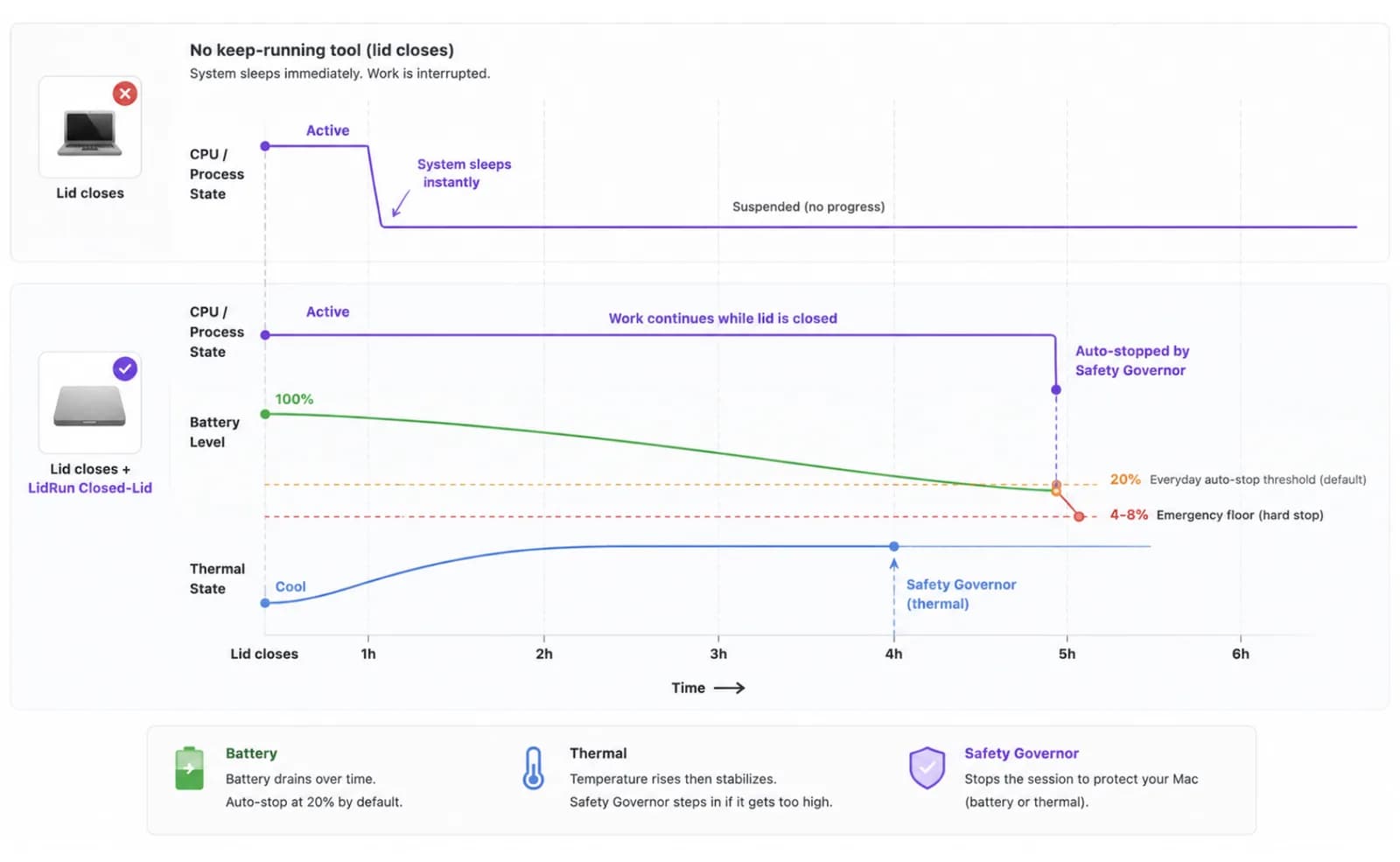
Ngay khi macOS ngủ do đóng nắp, mọi tiến trình đang chạy trên Mac cũng dừng theo — không chỉ màn hình tắt. Một bản build đang biên dịch dở sẽ khựng lại, một lượt tải xuống đứng yên ở bất kỳ phần trăm nào nó đạt được, một agent dừng giữa chừng tác vụ. Không có gì bị crash, nhưng cũng không có gì tiếp tục chạy, và tình trạng đó kéo dài cho đến khi ai đó mở nắp máy trở lại.
Với một tác vụ chỉ mất hai phút, điều đó gần như không quan trọng — dù sao thì chế độ ngủ do rảnh (idle sleep) cũng chưa kịp kích hoạt trước khi tác vụ xong. Nó bắt đầu quan trọng khi bạn nói đến thứ gì đó chạy một tiếng, vài tiếng, hoặc xuyên đêm — vì đó chính xác là khoảng thời gian mà không ai ngồi đó giữ nắp máy mở mãi được.
Vì vậy, giữ MacBook chạy khi đóng nắp thực chất là hai việc chồng lên nhau: giữ cho hệ thống tiếp tục thực thi qua lúc đóng nắp, và giữ cho việc đó an toàn trong suốt khoảng thời gian tác vụ thực sự cần. Một công cụ chỉ giải quyết vế đầu tiên chỉ là giải pháp nửa vời một khi tác vụ kéo dài quá vài phút.
Vì sao các phiên chạy dài, không người trông thất bại theo những cách mà phiên ngắn thì không
Một mẹo giữ máy thức trong năm phút hiếm khi có vấn đề gì — bạn vẫn ở gần đó, pin gần như không hao, và Mac chưa kịp tích nhiệt. Kéo dài phiên đó thành nhiều giờ hoặc xuyên đêm thì các kiểu sự cố nhân lên. Đóng nắp vốn đã giữ lại một phần nhiệt do thiết kế, nên tải nặng trong nhiều giờ khiến tình trạng nhiệt trở nên căng thẳng hơn nhiều so với một phiên mở nắp. Một bản build lẽ ra chỉ mất 40 phút có thể treo vì một dependency chập chờn rồi âm thầm chạy suốt đêm. Một lượt tải xuống chạy bằng pin có thể rút cạn viên pin từ rất lâu trước khi bạn quay lại để nhận ra. Và nếu bạn là người phải nhớ để kết thúc phiên, thì một chiếc Mac không người trông cũng dễ là một chiếc Mac không ai nhớ tới.
Không điều nào trong số đó khiến các phiên chạy dài khi đóng nắp trở nên liều lĩnh. Nó chỉ có nghĩa là công cụ phù hợp cho tác vụ 20 phút — cứ giữ máy thức là xong — không tự động phù hợp cho tác vụ 8 tiếng. Sự khác biệt lộ ra sau mười phút đầu tiên, chứ không phải mười giây đầu tiên.
Hướng dẫn liên quanBáo thức trên Mac có kêu khi đóng nắp máy không?Cách miễn phí, và điểm nó hết tác dụng khi chạy xuyên đêm
Cơ chế nền tảng chỉ là một cờ lệnh duy nhất: sudo pmset -a disablesleep 1 bảo macOS không ngủ khi đóng nắp, chấm hết. Đây chính là nguyên hàm mà Closed-Lid Mode của LidRun gọi ở tầng dưới — không có mẹo ẩn nào khác ngoài nó, và tự chạy lệnh này bằng tay thì không tốn gì cả.
Điều nó không làm là mọi thứ còn lại. Không có bộ đếm giờ, nên một tác vụ bị treo sẽ giữ Mac thức vô thời hạn cho đến khi chính bạn nhớ ra để gõ sudo pmset -a disablesleep 0. Không có ngưỡng pin sàn, nên khi chạy bằng pin nó sẽ rút cạn viên pin thay vì tự dừng lại. Không có nhận biết về nhiệt, nên một chiếc Mac làm việc sáu tiếng dưới nắp đóng không nhận được tín hiệu nào để giảm tải. caffeinate -i hay caffeinate -s thậm chí còn chưa đi xa đến mức đó — chúng chặn ngủ do rảnh (idle sleep), không chặn ngủ do đóng nắp (clamshell sleep), đó là lý do một tác vụ chạy dưới caffeinate vẫn chết ngay khi đóng nắp trên phần cứng chỉ chạy bằng pin, không gắn màn hình ngoài.
Với một phiên bạn kiểm tra mỗi hai mươi phút, đó là một sự đánh đổi có thể chấp nhận được. Nhưng với thứ bạn thiết lập trước khi đi ngủ hoặc trước khi rời văn phòng, "chấp nhận được" không còn là từ đúng nữa — bạn sẽ không có mặt để nhận ra tác vụ bị treo, pin bị rút cạn, hay máy quá nóng. (Bài hướng dẫn đồng hành về mọi cách giữ Mac thức khi đóng nắp bao quát đầy đủ hơn các phương pháp — các cờ caffeinate, chế độ clamshell thật với màn hình ngoài, các ứng dụng bên thứ ba; còn bài này nói riêng về việc chạy dài và không người trông.)
Một phiên chạy không người trông thực sự cần gì
Closed-Lid Mode của LidRun được xây dựng quanh một lời hứa duy nhất: agent còn chạy thì giữ máy thức; agent xong hoặc có gì đó không an toàn thì buông ra và để Mac ngủ. Với một phiên bạn rời đi để mặc nó chạy, lời hứa đó phải giữ vững suốt thời gian bạn vắng mặt, chứ không chỉ trong vài phút đầu sau khi đóng nắp.

Có hai cách để chạy một phiên. "Sleep when done" (Ngủ khi xong) — chế độ mặc định — theo dõi đúng tiến trình bạn đã khởi động và yêu cầu Mac ngủ khi không có gì được theo dõi hoạt động trong 10, 20, hoặc 30 phút, tùy bạn chọn. "Stay awake until I turn it off" (Thức cho đến khi tôi tắt) thì giữ máy thức theo một mức trần cố định bạn chọn trước, từ 30 phút đến 8 tiếng, hoặc vô thời hạn cho đến khi chính bạn kết thúc. Với một tác vụ chạy xuyên đêm mà bạn không biết chính xác sẽ mất bao lâu — tải một model, một agent xử lý qua một hàng đợi — "Sleep when done" là chế độ sinh ra cho việc đó: nó tự kết thúc thay vì bắt bạn đoán trước một mốc thời gian.
Trong sử dụng hằng ngày, thứ thực sự kết thúc một phiên khi chạy bằng pin là ngưỡng tự dừng bạn đặt — mặc định là 20%. Bên dưới ngưỡng đó là một mức sàn khẩn cấp cứng, được khóa trong khoảng 4% đến 8%: bạn có thể siết chặt ngưỡng dùng hằng ngày, nhưng không thể đẩy mức sàn xuống thấp đến mức khiến Mac có nguy cơ chết máy giữa lúc đang yêu cầu ngủ thay vì ngủ trọn vẹn.
Một Safety Governor (bộ điều phối an toàn) chạy độc lập với chế độ bạn đã chọn, và việc duy nhất của nó là quyết định khi nào nên buông — không bao giờ là khi nào nên giữ. Nó can thiệp khi nhiệt độ tới hạn kéo dài, khi chạm mức sàn pin, hoặc — nếu bạn bật các lớp bảo vệ tùy chọn trong Settings — sau khi Mac ở trạng thái offline chạy bằng pin mà không có gì đang chạy, hoặc không có thao tác bàn phím/chuột và không xác nhận được có tác vụ nào, trong khoảng thời gian bạn đặt từ 5 đến 120 phút. Chọn "Stay awake until I turn it off" thì các lớp bảo vệ tiện lợi đó lùi sang một bên — chỉ còn mức sàn nhiệt độ và pin cứng, vì bạn đã chủ động yêu cầu giữ máy thức. Chọn "Sleep when done" thì mọi lớp bảo vệ vẫn hoạt động, đây là thiết lập phòng thủ hơn cho một phiên không ai theo dõi.
Bản thân Closed-Lid Mode là một tính năng Pro — các bản cài chưa có license được tặng một số lượt chạy miễn phí để dùng thử trước khi quyết định, sau đó nó thuộc gói trả phí cùng với các tính năng tự động hóa khác của LidRun.
Thiết lập một phiên chạy để bạn có thể rời đi trong nhiều giờ
Nếu đây là lần đầu bạn chạy một phiên không người trông, hãy xử lý một việc trước khi bấm giờ: cấp quyền cho privileged helper của LidRun trong Settings. Không có nó, LidRun vẫn có thể buông giữ thức của chính mình, nhưng có thể không ép được Mac thực sự ngủ khi đã đóng nắp một khi disablesleep đã được bật — điều này quan trọng hơn nhiều với một phiên không ai ngồi cạnh so với một phiên bạn đang theo dõi.
Khởi động tác vụ thật trước — bản build, đồng bộ, agent, hay tải xuống — rồi mới bật Closed-Lid Mode và đóng nắp máy. Bắt đầu công việc trước giúp cơ chế phát hiện tiến trình của LidRun có thứ thật để theo dõi ngay từ lần quét đầu tiên, thay vì phải đoán mò trong một khoảng trống.
Với bất kỳ tác vụ nào không biết trước thời gian chạy — hầu hết các job AI/dev xuyên đêm — hãy chọn "Sleep when done" và đặt khoảng thời gian rảnh dựa trên mức độ "giật cục" của tác vụ: một lượt tải xuống ổn định có thể dùng khoảng ngắn 10 phút, còn một agent tạm dừng giữa các bước để chờ một API chậm nên dùng 20 hoặc 30 phút, để một khoảng lặng bình thường không bị hiểu nhầm là "đã xong".
Với một tác vụ có thời lượng đã biết trước — một lượt render theo lịch, một bản sao lưu bạn muốn giới hạn thời gian bất kể thế nào — hãy chọn "Stay awake until I turn it off" và đặt thời lượng tương ứng, từ 30 phút đến 8 tiếng. Chế độ này tắt các lớp bảo vệ tiện lợi cho trạng thái offline và rảnh không người trông, nên chỉ dùng nó khi bạn thực sự muốn Mac giữ thức trong suốt khoảng thời gian đó.
Nếu Mac đã nóng sẵn khi bạn mở hộp thoại với một thời lượng cố định đang chọn, LidRun sẽ cảnh báo và gợi ý bạn chọn một mức ngắn hơn — đáng để nghe theo trước khi đóng nắp lên một tác vụ vốn đã đang sinh nhiệt.
Đặt ngưỡng tự dừng theo pin ở mức khoảng đệm mà bạn muốn (mặc định là 20%), cắm sạc nếu tác vụ chạy quá một hai tiếng, và đặt Mac lên một bề mặt cứng, thoáng khí — một chiếc bàn, không phải giường, ghế sofa, hay túi đóng kín. Đóng nắp vốn đã cắt bớt luồng khí; không có lý do gì để chất thêm một tấm chăn lên trên nữa.
Bạn sẽ thấy gì khi quay lại
Một phiên hoạt động đúng như thiết kế sẽ tự kết thúc theo một trong ba cách: tác vụ được theo dõi hoàn tất và "Sleep when done" buông tay, mức trần thời lượng bạn đặt hết hạn, hoặc ngưỡng pin/nhiệt độ kích hoạt trước và Governor tiếp quản. Bất kỳ trường hợp nào trong số đó cũng là một kết quả bình thường, đúng như thiết kế — không phải là sự cố.
Khi điều đó xảy ra, LidRun cũng khôi phục lại cờ disablesleep mà nó đã bật — cùng cách ghép cặp giúp một lệnh pmset chạy tay không âm thầm biến Mac thành một chiếc máy không bao giờ chịu ngủ khi đóng nắp nữa. Bạn không phải nhớ bước hoàn tác như khi tự tay chạy lệnh gốc.
Nếu bạn đã bật thông báo khi vắng mặt, LidRun có thể đẩy một thông báo đến điện thoại khi có sự kiện an toàn xảy ra hoặc phiên kết thúc, để bạn biết trước khi quay lại bàn làm việc chứ không phải sau đó. Và Activity Log ghi lại dấu thời gian cho toàn bộ phiên sau đó — khi nào Closed-Lid được bật, có lớp bảo vệ pin hay nhiệt nào can thiệp hay không, khi nào tác vụ được theo dõi được đánh dấu là đã xong — để "chuyện gì thực sự đã xảy ra qua đêm" không còn là một phỏng đoán.
Khi nào nên (và không nên) dùng cách này
Hãy dùng một phiên chạy dài hoặc xuyên đêm khi đóng nắp cho những tác vụ thật sự cần chạy không người trông: một bản build phát hành, một lượt đồng bộ xuyên đêm, tải một model lớn, một phiên agent nhiều bước, một hàng đợi render. Đây chính xác là những trường hợp mà việc đóng nắp và rời đi là cả mục đích.
Bỏ qua cách này với bất cứ thứ gì mang tính tương tác — dù sao bạn cũng đang ngồi trước màn hình — hoặc bất cứ thứ gì xong trong vài phút, trước khi ngủ do rảnh kịp kích hoạt. Và cụ thể là bỏ qua phiên bản kéo dài nhiều giờ khi bạn không thể đảm bảo Mac sẽ nằm ở một nơi thoáng khí suốt chừng ấy thời gian; một tác vụ buộc phải chạy trong balo hoặc trên giường suốt tám tiếng là trường hợp mà an toàn nên thắng sự tiện lợi, và một phiên ngắn hơn, có người theo dõi, là lựa chọn tốt hơn.
Nếu bạn vẫn đang so sánh cách này với các phương pháp giữ máy thức nói chung — chứ không riêng trường hợp chạy dài, không người trông — thì bảng so sánh đầy đủ hơn nằm trong bài hướng dẫn đồng hành về giữ Mac thức khi đóng nắp. Còn bài này nói về phiên bản của câu hỏi đó bắt đầu bằng "và tôi sẽ không có mặt trong vài giờ tới".
LidRun giữ công việc của bạn chạy tiếp khi đóng nắp, với cơ chế bảo vệ pin và nhiệt tích hợp sẵn.
Đã có LidRun? Đọc hướng dẫn thiết lập →
Mới biết đến LidRun? Xem bảng giá →
Câu hỏi thường gặp
Được, với các lớp bảo vệ đứng ra theo dõi thay bạn. Closed-Lid Mode của LidRun giữ hệ thống tiếp tục thực thi qua lúc đóng nắp, đồng thời xếp chồng thêm ngưỡng pin, mức sàn an toàn về nhiệt, và một Safety Governor độc lập lên trên, để phiên tự kết thúc nếu điều kiện trở nên không an toàn thay vì chờ bạn nhận ra. Đây không phải một wake lock mù quáng chạy mà không ai kiểm tra — nó được xây để tự kiểm tra thay cho bạn.
Vì caffeinate chỉ chặn ngủ do rảnh (idle sleep), còn ngủ do đóng nắp trên một chiếc Mac chỉ chạy bằng pin là một cơ chế khác. Nếu không có màn hình ngoài để tạo một phiên clamshell thật, hoặc không bật pmset disablesleep, macOS vẫn ngủ khi đóng nắp bất kể có assertion caffeinate nào đang chạy — đó là lý do một tác vụ chạy dưới caffeinate trông vẫn ổn khi bạn ngồi ở bàn nhưng lại dừng ngay khi bạn đóng nắp và rời đi.
Không, nếu bạn dùng "Sleep when done", chế độ mặc định. Nó theo dõi tiến trình bạn đã khởi động và cho Mac ngủ ngay khi không có gì được theo dõi hoạt động trong khoảng thời gian rảnh bạn đặt — 10, 20, hoặc 30 phút — nên một bản build xong lúc 2 giờ sáng sẽ không nằm thức đốt pin cho đến khi bạn mở nắp lúc 9 giờ sáng.
Mức trần bạn đặt sẽ làm việc đó, nếu bạn có đặt — ngay cả "Stay awake until I turn it off" cũng có các lựa chọn từ 30 phút đến 8 tiếng, không chỉ riêng vô thời hạn. Và bất kể chế độ nào, ngưỡng tự dừng theo pin (mặc định 20%) và mức sàn cứng 4-8% bên dưới nó đều không thể thương lượng: một phiên chạy không được phép phớt lờ tình trạng pin gần cạn hoặc nhiệt độ tới hạn kéo dài chỉ vì không có ai ở đó để tắt bằng tay.
Đóng nắp làm giảm luồng khí, nên một chiếc MacBook làm việc nặng trong nhiều giờ dưới nắp đóng sẽ nóng hơn cùng một tác vụ đó khi mở nắp — đó là vật lý, không phải điều gì riêng của LidRun. Hãy đặt máy lên một bề mặt cứng, thoáng khí thay vì giường hay túi xách, và nếu máy đã nóng sẵn khi bạn bắt đầu một phiên có thời lượng cố định, LidRun sẽ gợi ý bạn chọn mức ngắn hơn. Mức sàn an toàn về nhiệt là lưới đỡ cuối cùng, không phải là kế hoạch — giữ cho Mac thông thoáng vẫn là việc của bạn.
Không bắt buộc, nhưng cắm sạc loại bỏ được biến số lớn nhất. Khi chạy bằng pin, một phiên kéo dài hàng giờ hoặc xuyên đêm chính là kiểu phiên mà ngưỡng pin của bạn phải làm việc thật sự — cắm sạc cho bất cứ thứ gì chạy quá một hai tiếng sẽ loại bỏ biến số đó.
Bạn tự đặt hoặc không đặt giới hạn. Các phiên có thời lượng cố định tối đa là 8 tiếng, với các lựa chọn ở giữa là 30 phút, 1, 2, 4, 5, và 6 tiếng. "Sleep when done" tự kết thúc ngay khi công việc được theo dõi dừng lại. "Until I turn it off" không có mức trần dựng sẵn nào ngoài các mức sàn an toàn về pin và nhiệt bên dưới nó.
Có — hãy cấp quyền cho privileged helper của LidRun trong Settings trước một phiên bạn sẽ không ngồi cạnh. Không có nó, LidRun vẫn có thể buông giữ thức của chính mình, nhưng có thể không ép được Mac thực sự ngủ khi đã đóng nắp một khi disablesleep đã được bật. Ứng dụng sẽ cảnh báo trực tiếp điều này nếu helper chưa được bật.