Membaca suhu CPU asli di Mac Intel dan Apple Silicon
Jawaban singkat: macOS tidak punya cara bawaan untuk menampilkan suhu CPU — tidak di Activity Monitor, tidak juga di System Settings — jadi membaca suhu CPU Mac selalu berarti mengakali celah itu dengan cara yang sama seperti semua tool lain: berbicara langsung ke SMC (System Management Controller), controller kecil yang duduk di antara sistem operasi dan sensor sebenarnya. Membacanya berarti meminta kunci sensor empat karakter tertentu, lalu men-decode format numerik yang dipakai chip itu — fixed-point sp78 di Intel, floating point IEEE flt di Apple Silicon — dan inilah juga alasan kenapa dua tool di mesin yang sama, termasuk pmset -g therm bawaan Terminal, bisa menunjukkan dua angka berbeda untuk hal yang tampak sama.
Tidak ada API Apple yang langsung memberi Anda angka
Buka Activity Monitor dan cari kolom CPU Temperature — tidak ada. Apple tidak pernah merilis tampilan suhu bawaan di mana pun dalam macOS: tidak di Activity Monitor, tidak di System Settings, tidak juga lewat API suhu publik apa pun. Ini bukan kelalaian; Apple memperlakukan data sensor sebagai detail internal dari manajemen termal miliknya sendiri, bukan sesuatu yang dimaksudkan untuk dibaca langsung oleh aplikasi.
Semua yang menampilkan angka, gratis maupun berbayar, mengakali celah itu dengan cara yang sama: berbicara ke SMC, controller kecil yang selalu aktif dan duduk di antara macOS dan sensor termal serta kipas yang sebenarnya. Tidak ada system call "read CPU temperature" — Anda meminta SMC untuk kunci sensor empat karakter tertentu (seperti TC0D atau Tp01), dan ia mengembalikan sekumpulan byte mentah yang tidak berarti apa-apa sampai Anda tahu cara men-decode-nya.
Itulah jawaban sebenarnya dari "bagaimana cara membaca suhu CPU Mac saya": pilih kunci yang tepat untuk Mac spesifik ini, lalu decode byte yang dikembalikannya dengan format yang benar untuk chip spesifik ini. Salah di salah satu langkah, dan Anda mendapat angka yang keliru, atau tidak dapat angka sama sekali — inilah persisnya kenapa dua tool suhu di Mac yang sama bisa berbeda hasil, dan kenapa sebagian reader tidak menampilkan apa-apa di chip yang baru rilis.
Dua decoder: sp78 di Intel, IEEE flt di Apple Silicon
SMC tidak mengembalikan satu tipe numerik universal — setiap kunci membawa tipe datanya sendiri, dan decoder harus mencocokkannya, kalau tidak hasilnya jadi sampah. Kunci suhu memakai dua format berbeda tergantung arsitektur Mac-nya.

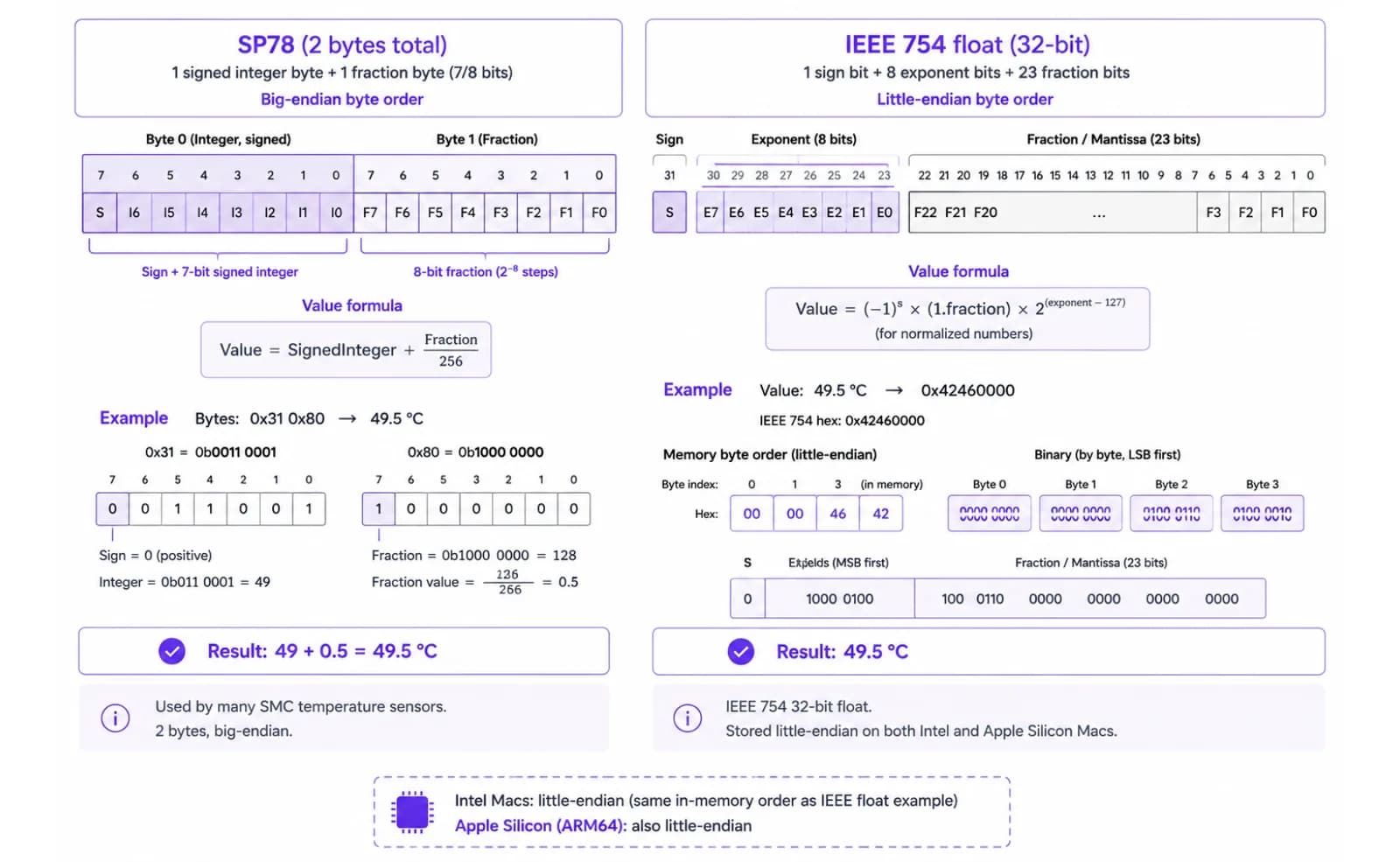
Di Mac Intel, suhu dikembalikan sebagai sp78: bilangan fixed-point 8.8 bertanda, satu byte untuk derajat bulat dan satu byte untuk pecahan. Men-decode-nya cuma aritmatika sederhana — byte pertama dibaca sebagai integer bertanda, ditambah byte kedua dibagi 256. Byte 0x31 0x80, misalnya, di-decode menjadi 49 + 128/256 = 49.5°C.
Di Apple Silicon, keluarga sensor yang sama melaporkan sebagai flt: bilangan floating point IEEE-754 4-byte standar, hanya saja disimpan little-endian, bukan urutan byte yang biasanya Anda duga. Ini format float 32-bit yang identik dengan yang dipakai di mana-mana dalam software — Apple cuma menyusun byte-nya secara terbalik.
RPM kipas juga punya pembagian encoding sendiri — fixed-point fpe2 di hardware Intel lama, flt di Intel modern dan semua Mac Apple Silicon — jadi reader yang hanya dibuat untuk format angka satu generasi chip akan salah baca, atau bahkan sama sekali gagal membaca, hardware dari sisi lain masa transisi ini. LidRun memeriksa tipe aktual yang dilaporkan tiap kunci sebelum men-decode-nya, bukannya mengasumsikan satu format untuk seluruh Mac.
Panduan terkaitKontrol kipas Mac untuk developerTidak ada satu kunci 'suhu CPU' tunggal — dan posisinya berubah di tiap chip
Bahkan setelah Anda bisa men-decode sebuah kunci, Anda tetap harus tahu kunci mana yang harus diminta, dan itu berubah menurut model Mac, dan di Apple Silicon, menurut generasi chip.
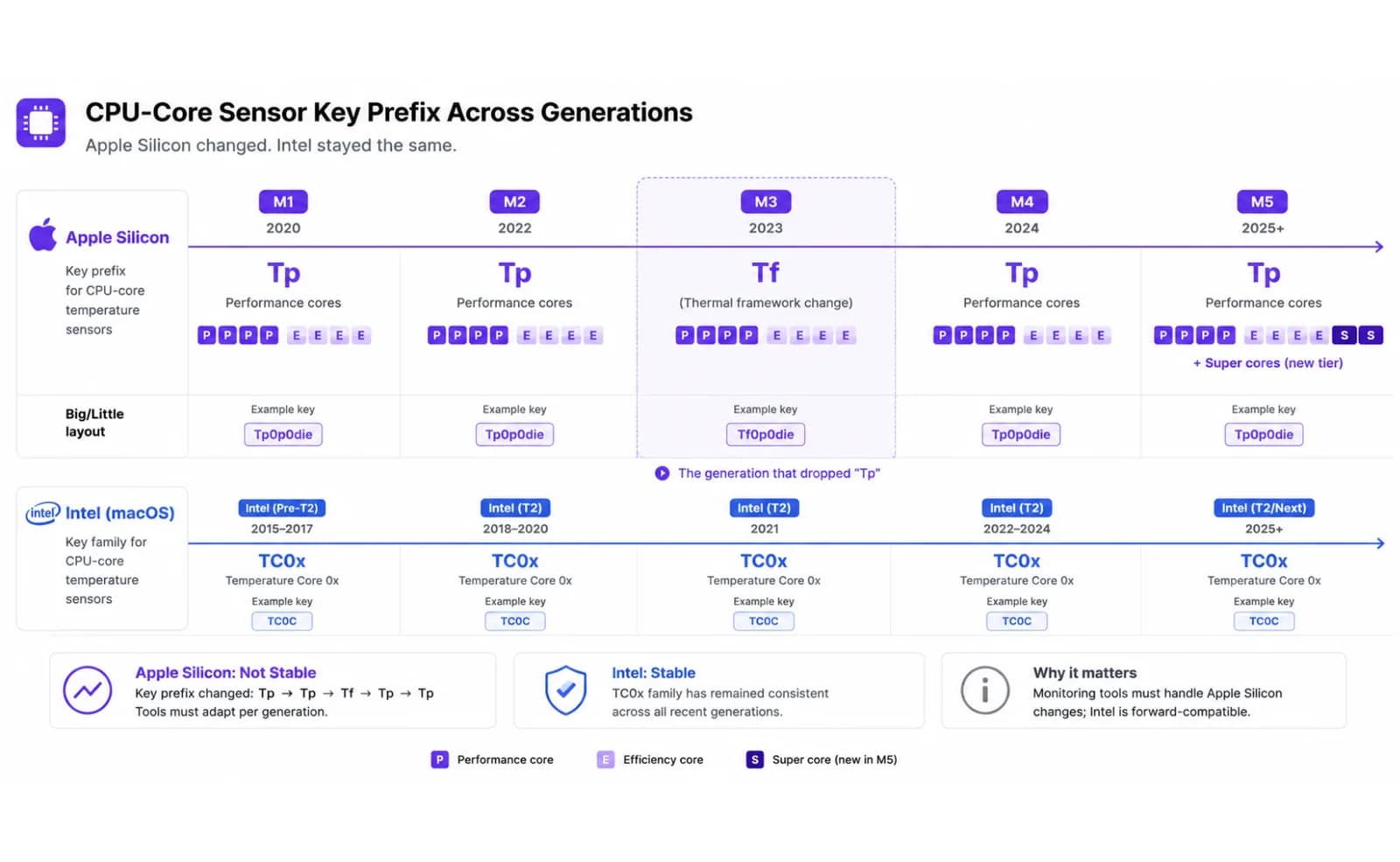
Mac Intel relatif sederhana: sensor CPU berada dalam keluarga TC0x — TC0D (die), TC0P (proximity), TC0E dan TC0F (pembacaan filtered/virtual), TCAD (package) — dan sebagian besar reader Intel cuma memeriksa daftar pendek itu.
Apple Silicon terfragmentasi dengan sengaja, karena chip ini punya jauh lebih banyak zona termal berbeda dibanding satu "die" saja. M1 mengekspos kunci performance-core seperti Tp01, Tp05, dan Tp0D, cluster CPU auxiliary di bawah Tc0a/Tc0b, dan kunci GPU di bawah Tg05/Tg0D. M2 menambahkan kunci efficiency-core terpisah (Tp1h, Tp1t) di samping performance core-nya. Lalu M3 mengubah total konvensi penamaannya: kunci performance-core dan GPU pindah ke prefix Tf baru (Tf04, Tf09…) dan efficiency core mendapat prefix Te sendiri — generasi yang benar-benar meninggalkan Tp untuk core CPU. M4 membawa kembali Tp untuk performance core sambil tetap memakai Te untuk efficiency. M5 menambahkan lagi tingkatan "super core" di bawah suffix Tp-nya sendiri.
Itulah alasan sebenarnya kenapa sebuah temperature reader bisa berubah dari bekerja sempurna menjadi tidak menampilkan apa-apa di Mac berikutnya yang Anda beli: tool dengan daftar kunci M1/M2 yang di-hardcode tidak membaca apa-apa di M3, karena kunci yang dicarinya sudah tidak ada lagi di sana — kunci itu pindah ke huruf lain. Ini bukan bug di Mac Anda; ini daftar kunci yang tidak diperbarui untuk chip baru.
LidRun menangani ini dengan pendekatan dua langkah: coba daftar kunci statis yang sudah dikenal lebih dulu (cepat, tidak perlu probing di Mac yang sudah dikenalinya), dan kalau tidak satu pun mengembalikan pembacaan, enumerasi seluruh tabel kunci SMC sekali — mulai dari beberapa ratus hingga sekitar seribu kunci tergantung Mac-nya — lalu simpan apa pun yang ter-decode menjadi suhu yang masuk akal di bawah prefix sensor die (Tp, Te, Tf, Tg, Tc), membuang sensor skin, ambient, dan baterai yang akan membuat suhu chip sebenarnya terlihat lebih rendah dari kenyataan. Hasilnya di-cache, jadi polling berikutnya nyaris tidak berbiaya.
Cara gratis dan native untuk memeriksanya sendiri
Anda tidak perlu LidRun, atau aplikasi berbayar apa pun, untuk melihat angka yang sebenarnya. Ada beberapa opsi gratis, masing-masing dengan keterbatasan nyata yang layak diketahui sebelum Anda mempercayainya.
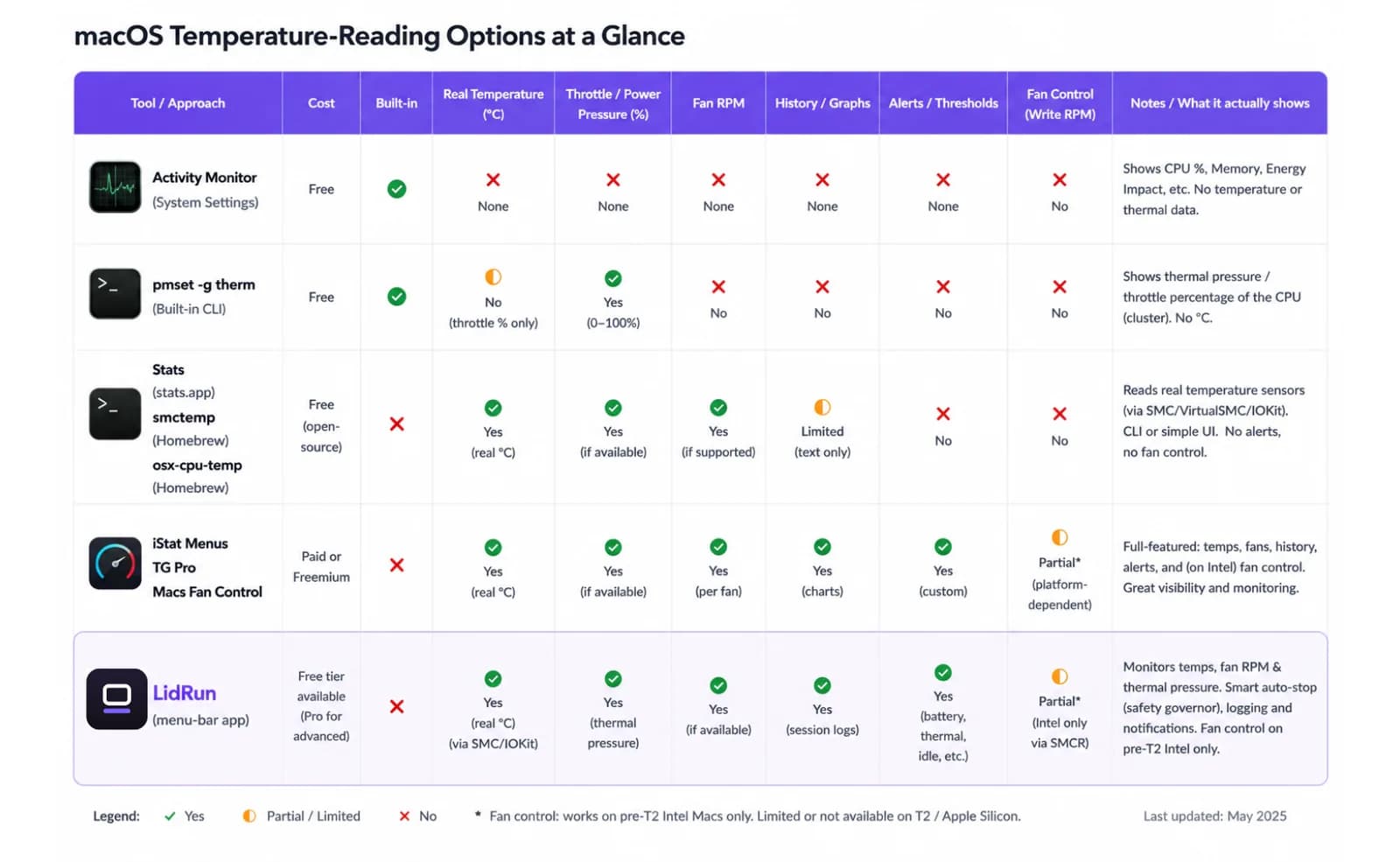
pmset -g therm bawaan Terminal adalah hal paling mendekati perintah suhu yang dikirim macOS — tapi bacalah outputnya dengan cermat: baris CPU_Speed_Limit yang ditampilkannya bukan suhu, melainkan persentase throttle. 100 berarti chip sama sekali tidak dibatasi; angka yang lebih rendah berarti macOS sedang aktif membatasi kecepatan CPU untuk mengelola panas. Ini sinyal "apakah Mac saya sedang kesulitan sekarang" yang benar-benar berguna, gratis dan bawaan, tapi tidak akan pernah menunjukkan angka derajat.
Untuk angka sebenarnya, ada reader SMC gratis dan open-source yang melakukan persis pekerjaan cari-kunci-dan-decode yang dijelaskan di atas. Stats (exelban/stats) adalah aplikasi menu-bar gratis dan open-source yang mengikuti perubahan nama kunci Apple Silicon dari rilis ke rilis. Tool command-line seperti smctemp dan osx-cpu-temp melakukan decoding yang sama dari Terminal tanpa perlu GUI (osx-cpu-temp lebih tua dari Apple Silicon dan hanya mencakup Intel).
Tool berbayar atau freemium — iStat Menus, TG Pro, Macs Fan Control — membaca kunci SMC yang sama dan menambahkan polesan: grafik riwayat, peringatan, dan pada TG Pro serta Macs Fan Control, kontrol kipas di atas pembacaan itu. Tidak satu pun dari mereka punya akses ke angka yang disembunyikan Apple dari yang lain; mereka melakukan handshake SMC yang identik, hanya dengan lebih banyak perawatan di balik daftar kuncinya dan antarmuka yang lebih rapi membungkusnya.
Kenapa dua aplikasi menampilkan angka berbeda
Jika satu tool menunjukkan 68°C dan yang lain 74°C di Mac yang sama pada saat yang sama, keduanya belum tentu salah. Hampir pasti keduanya membaca sensor yang berbeda, atau mengubah beberapa sensor menjadi satu angka dengan cara yang berbeda.
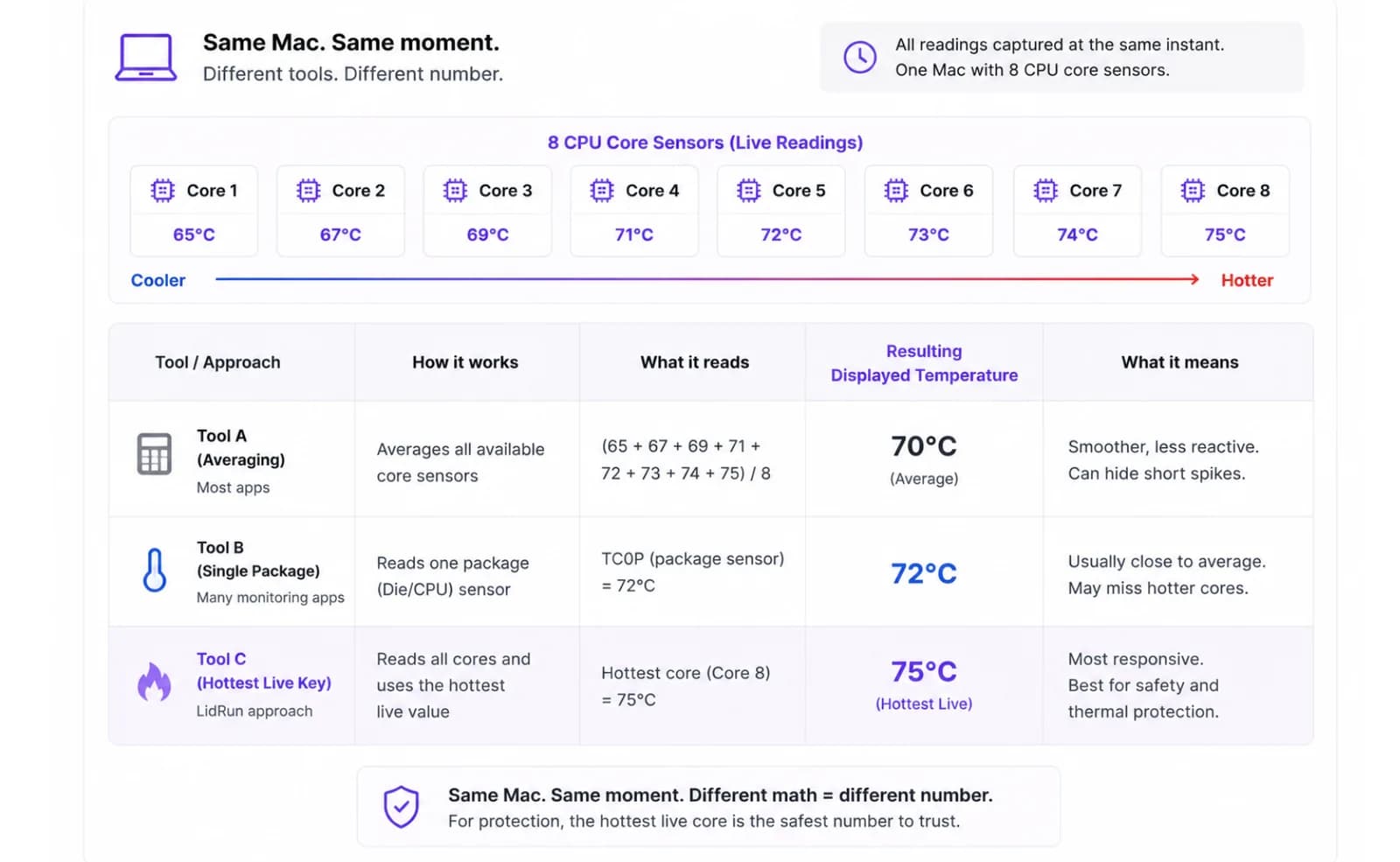
Misalnya sebuah Mac punya delapan sensor core yang membaca antara 65°C dan 75°C pada saat itu. Tool yang merata-ratakan semua core (pendekatan yang dipakai Stats dan smctemp, untuk "suhu CPU saat ini" yang lebih ramah) mungkin menunjukkan 70°C. Tool yang melaporkan satu sensor package tertentu mungkin menunjukkan 72°C. Tool yang melaporkan sensor live terpanas yang ditemukannya — pendekatan LidRun — menunjukkan 75°C. Ketiga angka itu adalah pembacaan yang nyata dan jujur dari silikon yang sama; hanya saja masing-masing menjawab pertanyaan yang sedikit berbeda.
Merata-ratakan memberi angka harian yang lebih halus dan lebih representatif. Melaporkan nilai maksimum adalah pilihan yang lebih konservatif untuk apa pun yang berkaitan dengan keselamatan, karena throttling dipicu oleh satu sensor die terpanas yang melewati batasnya, bukan oleh rata-rata — jadi monitor yang sedang memutuskan apakah harus mundur, bukan sekadar menampilkan angka, punya alasan nyata untuk memilih nilai puncak dibanding rata-rata.
Pelajaran praktisnya: perlakukan satu angka suhu CPU sebagai pembacaan dari sensor dan metode pilihan satu tool, bukan sebagai satu-satunya nilai benar untuk Mac Anda. Yang penting untuk menilai apakah ada sesuatu yang benar-benar salah adalah tren dalam beberapa menit terakhir dan seberapa jauh angkanya naik — bukan apakah angka Anda cocok persis dengan tool milik teman sampai ke derajatnya.
Risiko hanya mempercayai satu reader
Masalah generasi chip di atas bukan sekadar hipotesis — ini sudah menyebabkan kegagalan nyata yang terdokumentasi. btop, system monitor open-source yang populer, pernah merilis temperature reader yang hanya mengimplementasikan decoder sp78; karena tidak pernah menangani flt, ia diam-diam tidak menampilkan suhu CPU sama sekali di setiap Mac Apple Silicon (bug yang dilacak proyek ini sebagai issue #1653) sampai akhirnya diperbaiki. Tidak ada yang crash dan tidak ada error yang muncul — angkanya cuma hilang, yang tampak seperti "Mac saya tidak punya sensor suhu" padahal sebenarnya "decoder tool ini belum lengkap."
Pola kegagalan yang sama berlaku pada daftar kunci yang usang, bukan hanya decoder yang hilang: reader yang dibuat sebelum M3 rilis dan tidak pernah diperbarui tidak akan membaca apa-apa di M3, karena kunci performance-core yang dicarinya (Tp01, Tp05…) sudah tidak ada lagi di sana — melainkan Tf04, Tf09. Daftar kunci yang usang dan decoder yang hilang menghasilkan gejala yang identik: pembacaan kosong atau nol yang tampak seperti masalah hardware padahal bukan.
Ada risiko lain yang lebih kecil pada tool yang melangkah lebih jauh dari sekadar membaca. Macs Fan Control, TG Pro, dan smcFanControl semuanya menginstal privileged helper daemon agar bisa menulis ke SMC — mekanisme sah yang memang dibutuhkan kontrol kipas, karena Apple mewajibkan helper level-root bertanda tangan Developer-ID untuk itu dan tidak ada jalur yang lebih ringan. Tapi ini berarti sebuah proses latar belakang kedua kini punya kemampuan menahan kipas Anda pada target manual. Jika Anda menutup aplikasinya tanpa mengembalikannya ke mode otomatis, daemon itu bisa terus berjalan dengan pengaturan manual terakhirnya alih-alih mengembalikan kendali ke kurva firmware macOS sendiri.
Ini semua bukan berarti tool-tool tersebut tidak bisa dipercaya — Stats, TG Pro, dan Macs Fan Control semuanya aktif dirawat dan terus mengejar generasi Apple Silicon baru setiap kali rilis, meski dukungan penuhnya kadang tertinggal satu-dua versi dari rilis chip. Artinya, sebuah angka suhu hanya seaktual daftar kunci dan decoder di baliknya, dan daftar itu sudah berubah dengan konsekuensi nyata setiap kali Apple merilis chip baru.
Apa yang sebenarnya dianggap 'terlalu panas'
Setelah Anda punya angka yang sebenarnya, pertanyaan yang lebih sulit adalah apa yang harus dilakukan dengannya — dan tidak ada satu ambang batas aman yang berlaku untuk semua Mac, karena Apple sengaja menjalankan chip-nya mendekati batas termalnya di bawah beban berkelanjutan. Itu operasi normal, bukan tanda peringatan.
Chip M1 dirancang untuk beroperasi sepanas sekitar 100°C di bawah beban berat berkelanjutan tanpa mengalami degradasi — itu desain SoC yang bekerja sesuai rencana, bukan cacat. M2 berjalan lebih panas lagi dalam kondisi yang sama, umumnya masuk ke rentang seratusan lebih. Mac Intel biasanya berada di rentang 90–100°C di bawah beban, yang memang cara arsitektur itu bekerja. MacBook Air tanpa kipas sama sekali tidak punya kipas sebagai cadangan — ia mengelola panas murni lewat throttling, jadi pembacaan 90–100°C yang berkelanjutan pada Air adalah kondisi operasi normalnya, bukan bukti ada yang salah.
Throttling itu sendiri — chip yang membatasi kecepatannya sendiri untuk mengelola panas — biasanya mulai terjadi di sekitar 95–100°C pada sebagian besar Mac terbaru, yang merupakan proteksi bawaan hardware yang sedang menjalankan tugasnya, bukan tanda beban kerja Anda merusak sesuatu.
Karena satu angka derajat "aman" tidak berlaku konsisten di semua model, sinyal yang lebih berguna adalah sinyal kualitatif yang memang dibangun Apple untuk ini: ProcessInfo.thermalState, penilaian empat tingkat (nominal, fair, serious, critical) yang dideskripsikan berdasarkan apa yang perlu dilakukan Mac Anda, bukan berdasarkan suhu. Ini sinyal yang seharusnya direspons setiap aplikasi yang berperilaku baik, dan inilah dasar respons keselamatan LidRun sendiri dibangun, bukan ambang batas derajat tetap yang bisa salah-picu pada Mac yang sehat dan normal di bawah beban kerja nyata.
Di mana posisi LidRun
Membaca suhu bukan fitur berbayar di LidRun — setiap instalasi mendapatkannya, baik di Intel maupun Apple Silicon, memakai pendekatan cari-kunci-dan-decode yang sama seperti dijelaskan di atas: kunci valid terpanas dari daftar aktif, sp78 atau flt dicocokkan dengan apa pun yang sebenarnya dilaporkan SMC untuk kunci itu.
Alasan LidRun membaca suhu sama sekali bukan untuk menampilkan gauge yang lebih cantik dibanding tool gratis yang sudah ada. Ini ada agar respons keselamatan LidRun sendiri punya sinyal yang nyata saat sedang menahan Mac Anda tetap terjaga untuk sebuah agent run. Janji inti LidRun sederhana: agent berjalan → tetap terjaga; agent selesai atau tidak aman → lepaskan, atau tidur. Ini bukan wake lock buta yang menahan Mac tetap terbuka apa pun yang terjadi — sisi "tidak aman" bersandar terutama pada thermalState, sinyal resmi yang didokumentasikan Apple, didukung oleh angka suhu numerik dan persentase throttle CPU sebagai pemeriksaan sekunder. Pada panas critical, LidRun selalu langsung melepaskan tahanan keep-awake-nya, di Mac mana pun, baik lid terbuka maupun tertutup. Jika mode Closed-Lid aktif dan lid memang sedang tertutup — kasus di mana panas tidak punya jalan keluar — panas critical yang berkelanjutan meningkat dari sekadar release menjadi tidur sungguhan, karena kalau tidak, sleep-prevention Closed-Lid sendiri akan tetap menjaga Mac terjaga meski sudah di-release. Dengan lid terbuka, ia hanya melepaskan dan tidak pernah memaksa tidur Mac yang sedang aktif Anda gunakan.
Kontrol kipas adalah satu-satunya tempat LidRun sengaja tetap rendah hati soal apa yang dijanjikannya, terutama di Apple Silicon. RPM kipas di sana adalah write yang dijaga firmware — thermal controller SoC itu sendiri secara aktif mengelola kurvanya dan bisa langsung menolak override manual, dan pada beberapa chip Apple Silicon Pro/Max, firmware-nya sama sekali tidak akan memutar kipas di bawah sekitar 70°C-an tinggi, apa pun yang diminta aplikasi mana pun. Itu batas hardware yang nyata, bukan celah dalam rekayasa tool tertentu. Jadi perlakukan pembacaan suhu sebagai lapisan yang andal dan selalu aktif, dan jaga Mac tetap berventilasi di permukaan keras dan terbuka selama run yang panjang — itu tetap memberi lebih banyak ruang termal dibanding kurva kipas mana pun yang bisa dijanjikan sendirian.
LidRun menjaga pekerjaan Anda tetap jalan saat layar tertutup, dengan perlindungan baterai dan suhu bawaan.
Sudah punya LidRun? Baca panduan setup-nya →
Baru kenal LidRun? Lihat harga →
Sering ditanyakan
Software itu berbicara ke SMC (System Management Controller) dan meminta kunci sensor empat karakter tertentu, lalu men-decode byte-nya memakai format yang sebenarnya dilaporkan kunci itu — fixed-point sp78 di Intel, floating point IEEE flt di Apple Silicon. Tidak ada API publik macOS yang langsung mengembalikan "CPU temperature"; setiap reader, gratis maupun berbayar, melakukan handshake SMC yang sama ini.
Apple tidak pernah membangun tampilan suhu ke dalam Activity Monitor atau di bagian lain mana pun dari macOS. Data sensor berada di dalam SMC, dan Apple memperlakukannya sebagai detail internal dari manajemen termalnya sendiri, bukan sesuatu yang dimaksudkan untuk ditampilkan di UI sistem — inilah persisnya kenapa ada seluruh pasar aplikasi menu-bar pihak ketiga yang mengisi celah itu.
Model Mac yang berbeda mengekspos sensor berbeda dengan nama berbeda pula. Intel memakai keluarga TC0x; Apple Silicon menyebar pembacaannya ke banyak kunci per-cluster (Tp, Te, Tf, Tg tergantung generasi chip) karena punya lebih banyak zona termal berbeda yang harus dilaporkan. LidRun mencoba daftar kunci yang sudah dikenal dan, jika tidak ada yang cocok, mengenumerasi SMC sekali lalu menyimpan apa pun yang ter-decode menjadi pembacaan sensor die yang valid.
Hampir pasti daftar kunci yang usang, bukan masalah hardware. Kunci performance-core dan GPU Apple Silicon pindah dari prefix Tp ke prefix Tf baru khusus di M3 — generasi yang meninggalkan Tp untuk core CPU — jadi reader yang dibuat sebelum M3 rilis sedang mencari kunci yang tidak ada padanya. Risiko yang sama berlaku untuk generasi mana pun di masa depan yang mengganti nama sensornya lagi; reader yang mengenumerasi SMC secara live alih-alih mengandalkan daftar kunci tetap, seperti yang dilakukan LidRun, tidak terkena risiko ini.
Keduanya membaca sensor yang berbeda atau menggabungkannya dengan cara berbeda — satu mungkin merata-ratakan beberapa sensor core untuk angka yang lebih ramah, yang lain mungkin melaporkan satu sensor package, yang ketiga mungkin melaporkan sensor live terpanas yang ditemukannya. Ketiganya bisa jadi pembacaan yang jujur dari hardware yang sama; perlakukan satu angka mana pun sebagai nilai dari sensor pilihan tool itu, bukan satu-satunya suhu yang benar.
Tidak ada satu angka aman yang berlaku untuk semua model, karena Apple sengaja menjalankan chip-nya mendekati batas desainnya di bawah beban — M1 dirancang untuk mencapai mendekati 100°C, M2 berjalan lebih panas lagi, dan Mac Intel biasanya berada di rentang 90–100°C di bawah kerja berat, semuanya tanpa kerusakan. Sinyal yang lebih berguna dibanding angka derajat tetap adalah ProcessInfo.thermalState milik macOS sendiri (nominal/fair/serious/critical), yang sebenarnya menentukan apakah sebuah aplikasi harus mundur.
Membaca suhu dan RPM kipas bekerja dengan cara yang sama di setiap Mac yang didukung LidRun. Menulis target kipas manual adalah hal yang lebih sulit dan kurang pasti khusus di Apple Silicon — firmware-nya secara aktif mengelola kurvanya sendiri dan, pada beberapa chip Pro/Max, tidak akan memutar kipas di bawah suhu tetap tertentu apa pun yang diminta. LidRun tidak menjanjikan kurva kipas manual yang tidak bisa diandalkannya secara konsisten di hardware seri-M.