Le mode Closed-Lid sur macOS, sans kext
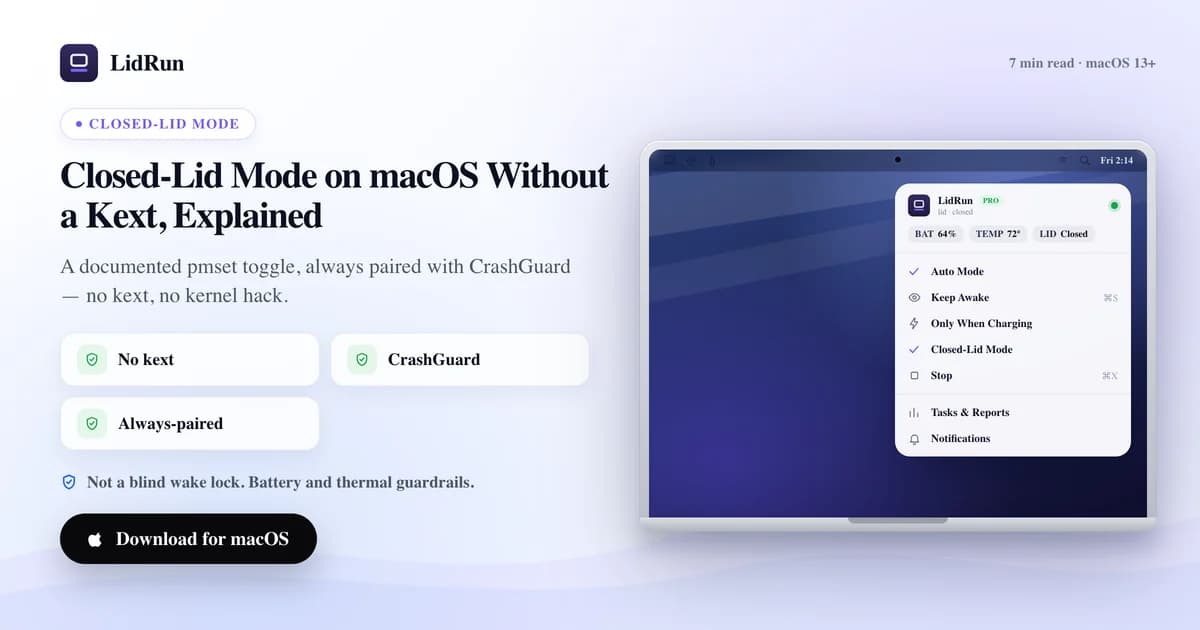
Oui — le mode Closed-Lid sur un Mac fonctionne sans extension noyau. C'est le réglage documenté pmset disablesleep, le même levier que sudo pmset -a disablesleep 1 dans Terminal, simplement maintenu automatiquement au lieu de rester à votre charge. Voici la version précise : ce que ce réglage fait réellement, ce que caffeinate et le mode clamshell avec écran externe d'Apple vous offrent déjà gratuitement, ce qui peut mal tourner si vous actionnez l'interrupteur vous-même, et comment LidRun le maintient sans laisser votre Mac bloqué éveillé.
Pourquoi fermer le capot met un Mac en veille
Fermez le capot d'un MacBook sans rien d'autre branché, et macOS s'endort en quelques secondes. C'est la veille clamshell, un mécanisme différent de la veille d'inactivité classique. La solution officielle d'Apple pour la contourner est le mode clamshell avec écran externe : branchez un moniteur, restez sur secteur, et le Mac tourne indéfiniment capot fermé, sans aucun logiciel tiers — il reste un écran à piloter pour macOS, donc le capot fermé n'a plus d'importance.
Sans écran externe, aucun des outils anti-veille classiques ne peut franchir cette limite par les moyens habituels. caffeinate, Amphetamine, KeepingYouAwake, Lungo et Caffeine fonctionnent tous en maintenant une assertion d'alimentation IOKit — IOPMAssertionCreateWithName, l'API documentée pour « ne pas passer en veille d'inactivité ». C'est bien réel, et c'est réellement efficace pour garder un écran ou tout le Mac éveillé tant que le capot est ouvert. Mais une assertion ne bloque que la veille d'inactivité. Fermer le capot déclenche une veille clamshell de niveau inférieur qu'aucune assertion ne peut arrêter, quelle que soit l'app qui la maintient — c'est une limite du système, pas une faille propre à un outil en particulier.
Le seul levier public et documenté qui change réellement le comportement à la fermeture du capot, sans écran branché, c'est pmset disablesleep — un réglage de gestion d'énergie à l'échelle du système, livré avec macOS lui-même.
Les options gratuites : le mode clamshell d'Apple, caffeinate et pmset
Si vous avez un écran de libre, utilisez-le. Branchez-le, restez sur secteur, et fermez le capot — c'est la vraie configuration closed-lid soutenue par Apple : aucun logiciel supplémentaire, aucun mot de passe admin, rien à se souvenir de désactiver ensuite. C'est la bonne réponse pour un poste de bureau permanent.

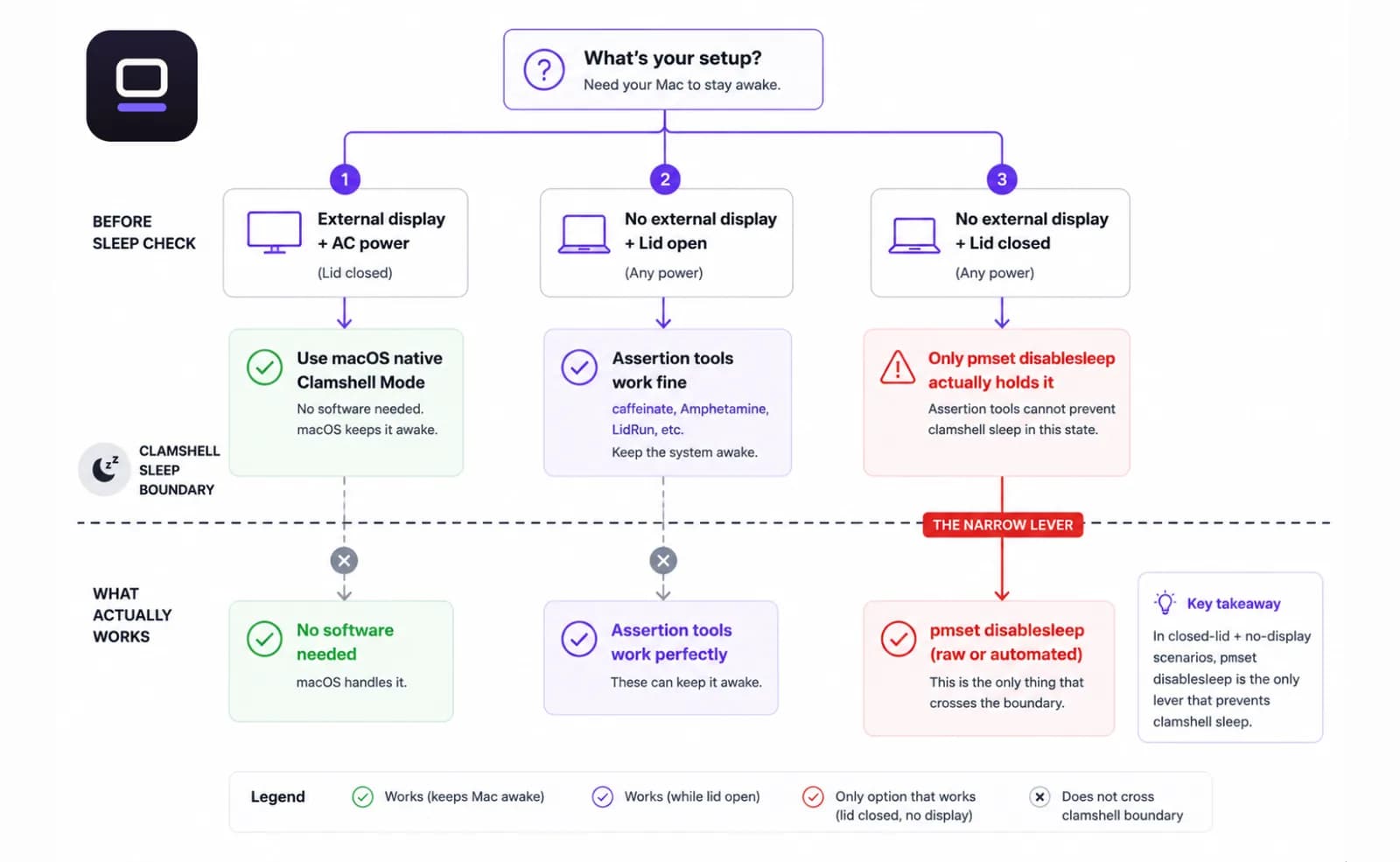
Pas d'écran de libre ? caffeinate est l'outil en ligne de commande intégré d'Apple (man caffeinate). caffeinate -i bloque la veille d'inactivité, caffeinate -d bloque aussi la veille de l'écran, et caffeinate -s garde tout le système éveillé sur secteur tant que le processus tourne. C'est vraiment utile pour un script qui ne doit pas passer en veille d'inactivité — mais il hérite du même angle mort face à la veille clamshell que tous les outils basés sur une assertion : fermez le capot sans écran branché, et le Mac s'endort quand même en dessous.
Le levier qui fonctionne réellement capot fermé, sans écran, est celui-là même que les apps closed-lid automatisent : sudo pmset -a disablesleep 1 dans Terminal, vérifiable à tout moment avec pmset -g | grep SleepDisabled, et désactivé avec sudo pmset -a disablesleep 0. C'est documenté, gratuit, et déjà présent sur votre Mac.
Guide associéUne alarme Mac sonne-t-elle avec le couvercle fermé ?Le piège : c'est un réglage global, qui ne se désactive pas tout seul
disablesleep n'est pas limité à votre session Terminal ni à votre script — c'est un indicateur persistant, valable pour tout le système. Réglez-le sur 1, et il reste sur 1 après la fermeture d'une app, d'une fenêtre Terminal, ou d'une session SSH terminée. Oubliez de le remettre à zéro, et le Mac ne peut plus se mettre en veille tant que rien ne le réinitialise : vous relançant la commande, ou un redémarrage.
C'est le vrai risque que les gens ont en tête quand ils se méfient des outils closed-lid — un ordinateur portable physiquement incapable de s'endormir, enfermé dans un sac, sans rien pour surveiller la température ou l'état de la batterie. pmset lui-même n'a aucune idée de la température du SoC ni de l'autonomie restante. Il maintient simplement le réglage jusqu'à nouvel ordre.
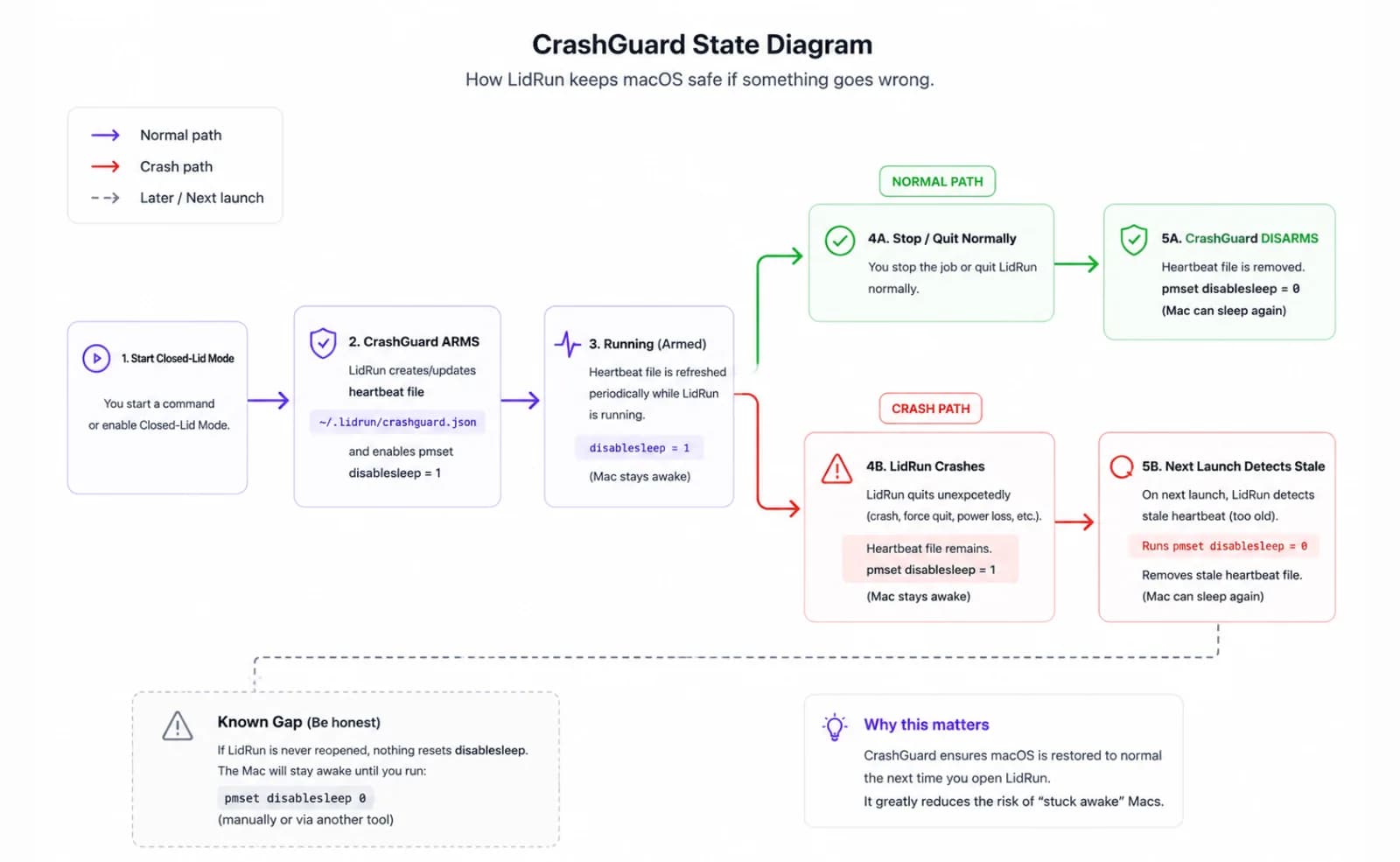
C'est exactement le scénario de panne qu'une couche de sécurité anti-crash est censée intercepter — parce qu'un script ou une app qui active ce réglage puis plante, se fait forcer à quitter, ou perd sa connexion SSH, laisse derrière lui ce même réglage bloqué.
Une façon plus sûre de le faire à la main, si vous choisissez cette voie
Si vous êtes à l'aise dans Terminal et ne voulez pas d'une app de plus, considérez la paire activation/désactivation comme non négociable. Réglez disablesleep sur 1 juste avant la tâche, et placez le disablesleep 0 correspondant dans un trap sur EXIT en haut du script, pour qu'il se déclenche même si la tâche échoue en cours de route.
Vérifiez l'état avant de lui faire confiance — pmset -g | grep SleepDisabled affiche la valeur actuelle en une ligne. Ça vaut le coup de le lancer avant de fermer le capot, et à nouveau la prochaine fois que vous l'ouvrez.
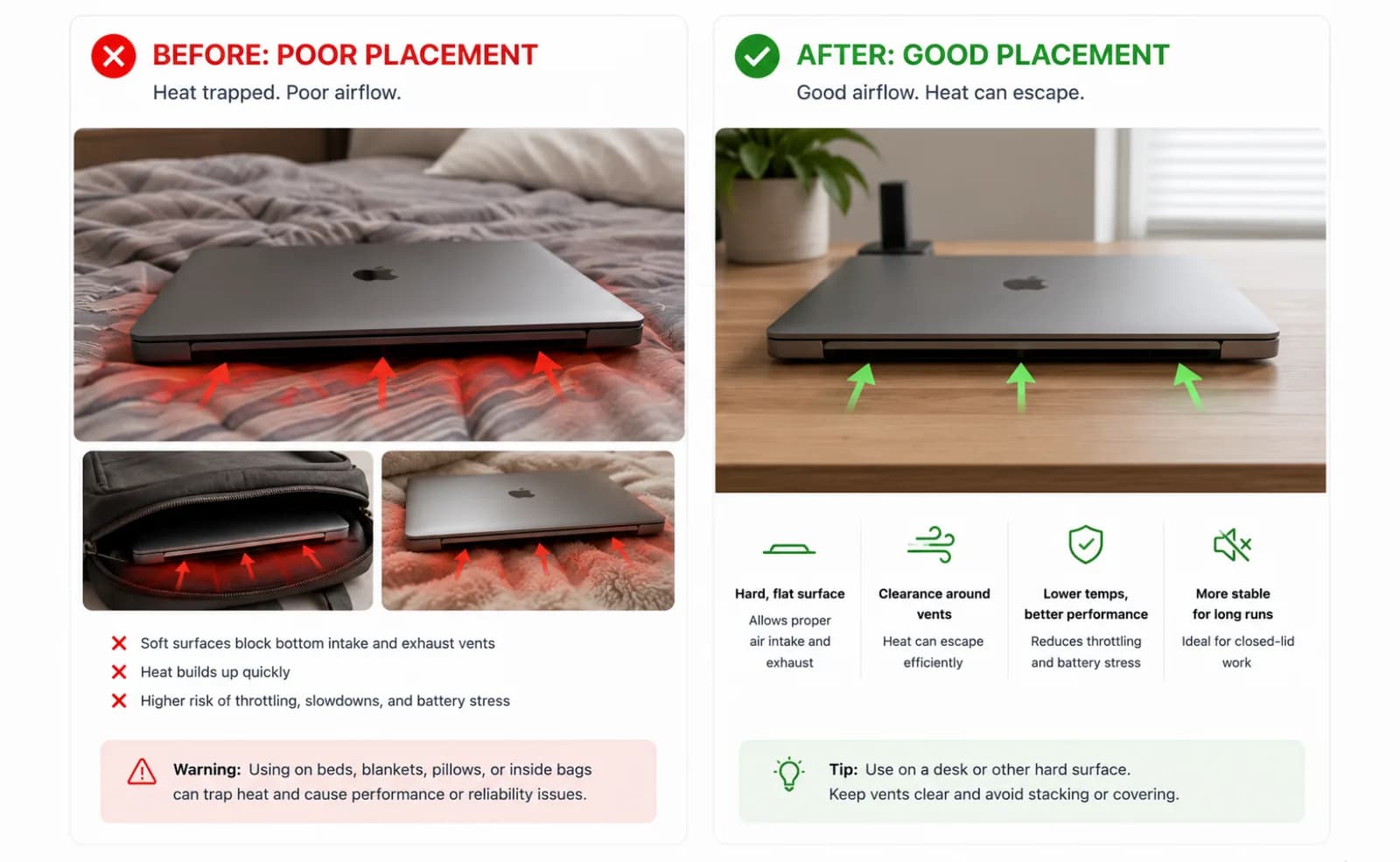
Les règles physiques s'appliquent quel que soit l'outil qui a actionné l'interrupteur : une surface dure, plane et ventilée, jamais un lit ou un sac fermé, et une alimentation secteur pour tout ce qui dépasse une tâche courte. Un capot fermé restreint la circulation d'air au-dessus du clavier, peu importe ce qui le maintient fermé.
Où LidRun se situe : le même réglage, maintenu automatiquement
Le mode Closed-Lid de LidRun, c'est exactement ce même réglage pmset disablesleep — aucune extension noyau, aucun pilote DriverKit simulant un écran. Ce qui change, c'est ce qui l'entoure. LidRun associe chaque activation à une désactivation correspondante à l'arrêt, à la fermeture de l'app, puis à nouveau au relancement, pour que le réglage ne dépende plus de votre mémoire.
Pour le cas du crash, que pmset ne peut pas couvrir seul, LidRun écrit un petit fichier d'état « armé » avec un battement de cœur (heartbeat) tant que le mode Closed-Lid est actif. Si l'app plante ou se fait tuer, le lancement suivant trouve ce fichier toujours armé, reconnaît que la session précédente n'a jamais nettoyé derrière elle, et remet disablesleep à 0 automatiquement — c'est CrashGuard. Mais ça ne se déclenche qu'au lancement suivant : une session qui a planté, sans que personne ne rouvre LidRun, laisse le réglage activé jusqu'à ce que vous le fassiez, ou jusqu'à un redémarrage — la même limite que la commande manuelle.
L'authentification admin est incontournable — modifier disablesleep exige des droits administrateur, exactement comme depuis Terminal. LidRun vous demande d'approuver un helper privilégié une seule fois, lors de la configuration ; ensuite, le mode Closed-Lid s'active et se désactive sans redemander de mot de passe. Sautez cette étape, et LidRun revient à une demande d'autorisation admin à chaque utilisation. Dans les deux cas, rien ne s'exécute sans votre approbation explicite.
Côté thermique, LidRun considère le SoC comme critique dès qu'il atteint 100 °C ou plus, ou que le CPU chute à 30 % ou moins de sa performance normale — selon ce qui se déclenche en premier. Si cet état critique se maintient environ deux minutes et que vous vous êtes absenté (aucune saisie depuis cinq minutes) ou que le capot est physiquement fermé, LidRun passe d'un simple relâchement de son maintien à une mise en veille pure et simple du Mac. Un utilisateur présent, capot ouvert, n'est jamais forcé en veille pour la seule chaleur — ce garde-fou existe pour qu'une session active ne vous soit pas arrachée sous les pieds. Côté batterie, il existe un plancher équivalent : le seuil critique de batterie est fixé par défaut à 5 % et ne peut pas être réglé en dessous de 4 %, donc ce filet de sécurité n'est pas quelque chose que vous pouvez désactiver par accident.
LidRun vérifie aussi si vous êtes déjà dans la configuration clamshell propre à Apple — un écran externe, non intégré, qui pilote activement le bureau — et considère ça comme une raison légitime de rester éveillé capot fermé, sans même avoir besoin de son propre réglage. Et comme le mode Closed-Lid nécessite ce changement pmset au niveau admin, il n'est pas compatible avec le bac à sable du Mac App Store ; LidRun est plutôt distribué sous forme de DMG notarié en téléchargement direct — toujours scanné par Apple, simplement pas via le Store.
La philosophie derrière tout ça : agent en cours d'exécution, rester éveillé ; agent terminé ou situation dangereuse, relâcher et laisser le Mac s'endormir. Le mode Closed-Lid est une fonctionnalité Pro — le plan gratuit inclut un nombre limité de sessions closed-lid à essayer avant qu'un déblocage Pro unique ne soit nécessaire.
Comparaison avec Amphetamine, KeepingYouAwake, Lungo et Caffeine
Ce sont des apps de barre de menu solides et bien conçues, et pour leur véritable mission — bloquer la veille d'inactivité ou celle de l'écran, sur un planning, par app, ou par déclencheur — elles le font bien. Si votre besoin, c'est « ne pas assombrir l'écran pendant un appel » ou « ne pas passer en veille d'inactivité pendant que je lis », n'importe laquelle d'entre elles est un choix correct et plus léger que LidRun.
Ce qu'aucune d'elles ne change, c'est la limite assertion-contre-clamshell décrite plus haut : une IOPMAssertion, quelle que soit sa configuration, ne survit pas à la fermeture du capot sans écran externe branché. Certains de ces outils documentent leurs propres options closed-lid séparément de l'assertion — ça vaut le coup de lire précisément comment chacun l'implémente avant de lui confier une vraie tâche capot fermé, tout comme cet article détaille que la version de LidRun est pmset disablesleep, pas un kext.
Ce qui distingue LidRun, ce n'est pas le réglage lui-même — c'est que le mode Closed-Lid est la seule chose qu'il fait avec un véritable enrobage de sécurité (activation/désactivation appariées, reprise après crash, arrêt automatique thermique et batterie), plutôt qu'une liste de fonctions anti-veille génériques à laquelle une option closed-lid aurait été ajoutée après coup.
Les compromis honnêtes avant de confier tout ça à un vrai travail
Aucun réglage logiciel ne change la physique — pmset disablesleep, la version qu'en fait LidRun, ou une commande Terminal tapée à la main ont exactement le même effet sur la circulation d'air : aucun. Un capot fermé restreint la circulation d'air au-dessus du clavier, donc une tâche lourde derrière un capot fermé chauffe plus que la même tâche capot ouvert. LidRun affiche un avertissement de chaleur avant que vous n'activiez le mode, pour que vous acceptiez ce compromis en connaissance de cause, et son gestionnaire thermique surveille la montée en pression et peut arrêter automatiquement la session — ça aide à réduire le risque, ça ne fait pas disparaître la chaleur.
L'emplacement compte toujours plus que n'importe quel réglage : une surface dure, plane et ventilée, jamais un lit ou un sac fermé, et une alimentation secteur pour tout ce qui dépasse une courte tâche closed-lid, pour que la batterie ne s'épuise pas en plus sous la pression.
Et si tout ce dont vous avez besoin, c'est que l'écran reste allumé — pas de fermer physiquement le capot et de partir — vous n'avez pas du tout besoin du mode Closed-Lid. Une simple assertion anti-veille fait le travail et évite complètement l'étape d'approbation admin/helper. Réservez le mode Closed-Lid pour quand vous voulez vraiment le capot fermé.
LidRun garde votre travail actif capot fermé, avec une protection batterie et thermique intégrée.
Vous avez déjà LidRun ? Lisez le guide d'installation →
Nouveau sur LidRun ? Voir les tarifs →
Questions fréquentes
Non. C'est le réglage documenté pmset disablesleep — aucun kext, aucun simulateur d'écran DriverKit. C'est le même levier accessible depuis Terminal via sudo pmset -a disablesleep 1, simplement apparié et réconcilié automatiquement au lieu de rester à votre charge.
Le fichier de battement de cœur de CrashGuard l'intercepte : la prochaine fois que LidRun se lance, il trouve le réglage toujours armé par une session qui n'a jamais nettoyé derrière elle, et remet disablesleep à 0. Mais ça ne se produit qu'au relancement — si vous ne rouvrez jamais l'app, ou ne redémarrez pas, le Mac reste incapable de s'endormir jusqu'à ce que vous le fassiez, la même limite qu'une commande pmset tapée à la main.
Modifier pmset disablesleep exige réellement des droits administrateur — c'est une règle de macOS, pas un choix de LidRun. LidRun vous demande d'approuver un helper privilégié une seule fois ; ensuite, le mode Closed-Lid s'active et se désactive sans redemander de mot de passe. Sautez cette étape, et il revient à le demander à chaque fois.
Le mode Closed-Lid a besoin du changement pmset disablesleep, qui n'est pas compatible avec le bac à sable — celui de l'App Store ne l'autoriserait pas. LidRun est plutôt distribué sous forme de DMG notarié en direct : toujours scanné par Apple, simplement pas via le Store.
Oui. caffeinate -s et pmset -a disablesleep 1 sont tous deux gratuits, intégrés à macOS, et documentés. caffeinate ne peut pas empêcher la veille clamshell sans écran externe ; la commande pmset brute le peut, mais c'est un réglage global persistant, sans reprise après crash ni conscience thermique ou de batterie — apparier l'activation et la désactivation repose entièrement sur vous.
Généralement non. Branchez un écran externe et restez sur secteur, et le mode clamshell propre à macOS garde le Mac en marche capot fermé, sans aucun réglage tiers. Le mode Closed-Lid de LidRun existe pour l'autre cas de figure : pas d'écran externe, capot fermé, et vous voulez quand même que le travail continue.
Ce sont des utilitaires anti-veille généralistes construits autour des assertions d'alimentation IOKit — efficaces pour bloquer la veille d'inactivité ou d'écran sur un planning ou un déclencheur. Le mode Closed-Lid de LidRun est une version plus ciblée et enrobée de sécurité, spécifiquement du réglage pmset disablesleep : activation/désactivation appariées, reprise après crash, et arrêt automatique thermique et batterie construits autour, plutôt qu'une liste de fonctions anti-veille avec un closed-lid ajouté après coup.