Giữ Claude Code chạy khi gập nắp MacBook

Trả lời ngắn gọn: gập nắp MacBook không chỉ tắt màn hình, nó còn kích hoạt một kiểu ngủ clamshell riêng, ở tầng thấp hơn, mà một công cụ giữ máy thức thông thường không thể chạm tới — nên Claude Code sẽ đứng hình giữa chừng dù bạn đã bật caffeinate hay một app trên thanh menu bar. Bài này sẽ nói về cách tự làm điều đó miễn phí, rủi ro khi để chạy qua đêm không ai trông, và cách giữ Claude Code chạy khi MacBook đã gập nắp với tính năng tự dừng theo pin và nhiệt độ, thay vì chỉ bật một công tắc hệ thống thô.
Vì sao gập nắp lại khiến agent chết đứng giữa chừng
Claude Code chạy như một tiến trình bình thường trong Terminal của bạn, không phải một job nằm trên server nào đó — nên nó sống chết theo trạng thái nguồn của Mac. Gập nắp lại, và trên macOS mặc định, cả máy sẽ vào chế độ ngủ chỉ trong vài giây. Agent dừng ngay giữa bước đang chạy, và bất kỳ lệnh gọi tool hay chỉnh sửa file nào đang thực hiện dở cũng đơn giản là bị treo tại chỗ.
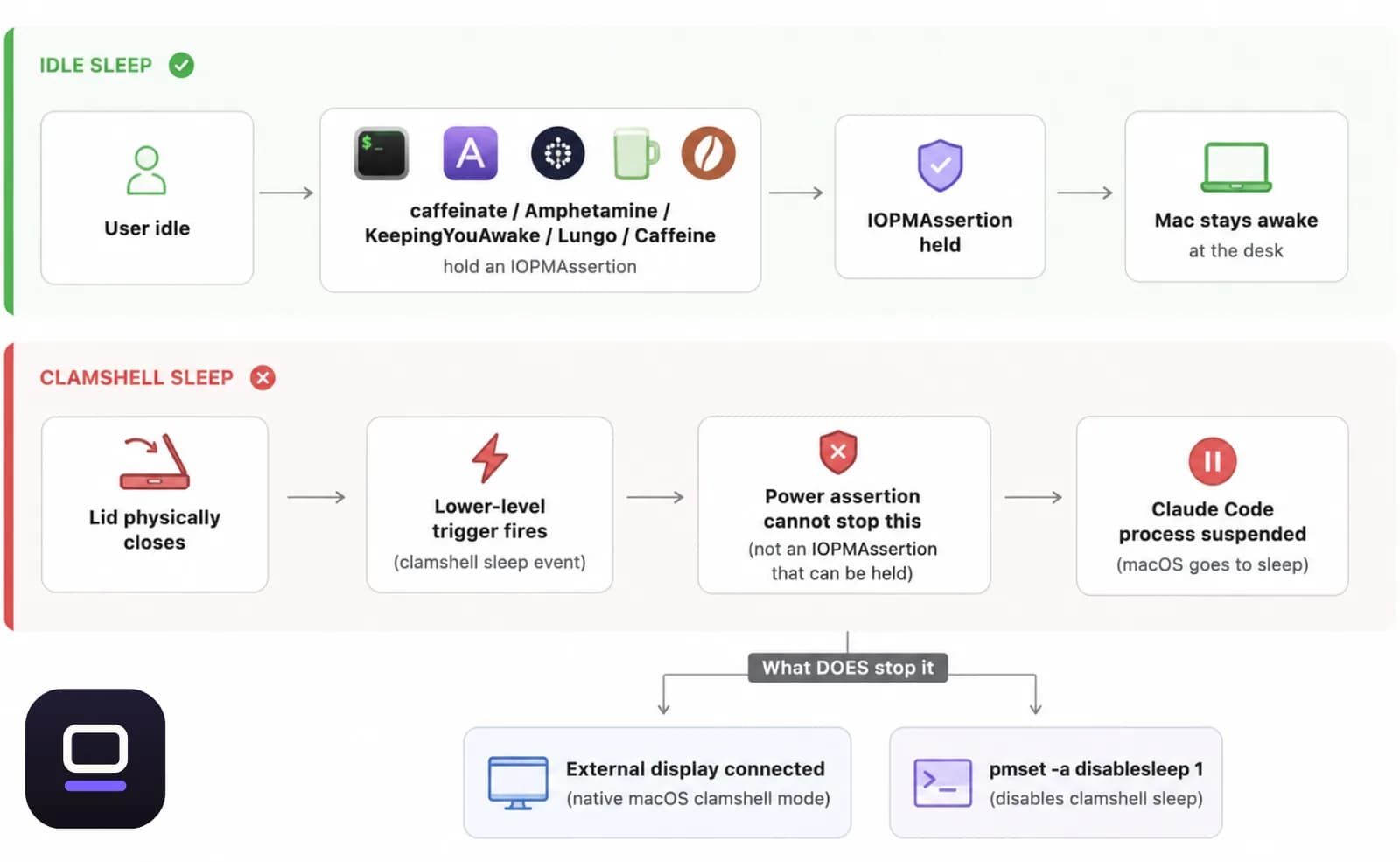
Điều khiến hầu hết mọi người bất ngờ là đây không phải kiểu ngủ mà một công cụ giữ máy thức vẫn thường chặn được. macOS có hai cơ chế kích hoạt riêng biệt. Idle sleep là khi hệ thống tự ngủ vì không có hoạt động, và đây chính là thứ caffeinate cùng phần lớn các app giữ máy thức trên menu bar chặn lại bằng cách tạo một power assertion — hầu hết chúng đều dùng chung một API công khai là IOPMAssertionCreateWithName. Clamshell sleep là một cơ chế ở tầng thấp hơn, kích hoạt ngay khi nắp máy vật lý đóng lại, và một power assertion thông thường không thể ngăn được nó. Đó chính là lý do thật sự khiến việc gập nắp giết chết Claude Code dù bạn đã bật caffeinate từ năm phút trước: bạn đã chặn nhầm loại giấc ngủ.
Thời điểm xảy ra càng khiến mọi thứ tệ hơn. Những lượt chạy agent dài — một đợt refactor nhiều file, một bộ test suite lớn, một migration chạy qua đêm — lại chính là những việc bạn muốn để yên cho nó tự chạy. Thế là nắp máy gập lại ngay sau khi bạn rời đi, và khi quay lại, bạn thấy một session đã không làm gì suốt nhiều giờ.

Cách tự làm miễn phí, và rủi ro nằm ở đâu
Trước khi tìm đến bất kỳ app nào, cũng đáng để biết những gì macOS đã cho bạn sẵn miễn phí, vì không chỉ một trong số các cách này thực sự hiệu quả.
Cách gọn gàng nhất là dùng màn hình rời. Cắm một màn hình ngoài (và trên các Mac Intel đời cũ, thêm bàn phím hoặc chuột) trong khi Mac đang cắm sạc, chế độ clamshell mặc định của macOS sẽ giữ cả máy chạy dù nắp đã gập, không cần phần mềm bên thứ ba nào. Đây là lựa chọn đúng nếu bạn đang ngồi ở bàn làm việc. Nhưng nó không giúp được gì nếu mục đích là gập nắp lại và mang mỗi cái laptop đi, vốn là tình huống thực tế phổ biến nhất của việc 'giữ Claude Code chạy khi tôi không có mặt'.
Cách hoạt động mà không cần màn hình ngoài là chạy pmset -a disablesleep 1 trong Terminal. Đây mới là thiết lập thật sự chặn được cơ chế clamshell sleep — miễn phí, có sẵn trong macOS, và cũng chính là công tắc mà mọi app bên thứ ba tự nhận 'sống sót qua gập nắp' rốt cuộc đều bật hộ bạn. Vấn đề nằm ở những gì nó không làm: đây là một thiết lập toàn cục, tồn tại vĩnh viễn, không có hẹn giờ, không kiểm tra pin, không kiểm tra nhiệt độ. Gập nắp lại, bỏ Mac vào balo, rồi quên mất là mình đã chạy lệnh đó — máy vẫn tiếp tục chạy, nóng lên, trong một không gian kín, dùng bao nhiêu pin còn lại tùy ý — cho đến khi bạn nhớ ra chạy sudo pmset -a disablesleep 0 hoặc pin cạn sạch. Quên tắt lại là cách phổ biến nhất khiến người dùng bị 'dính đòn': tối hôm đó Mac cũng sẽ không ngủ được trên ghế sofa, vì bạn chưa bao giờ tắt nó lại.
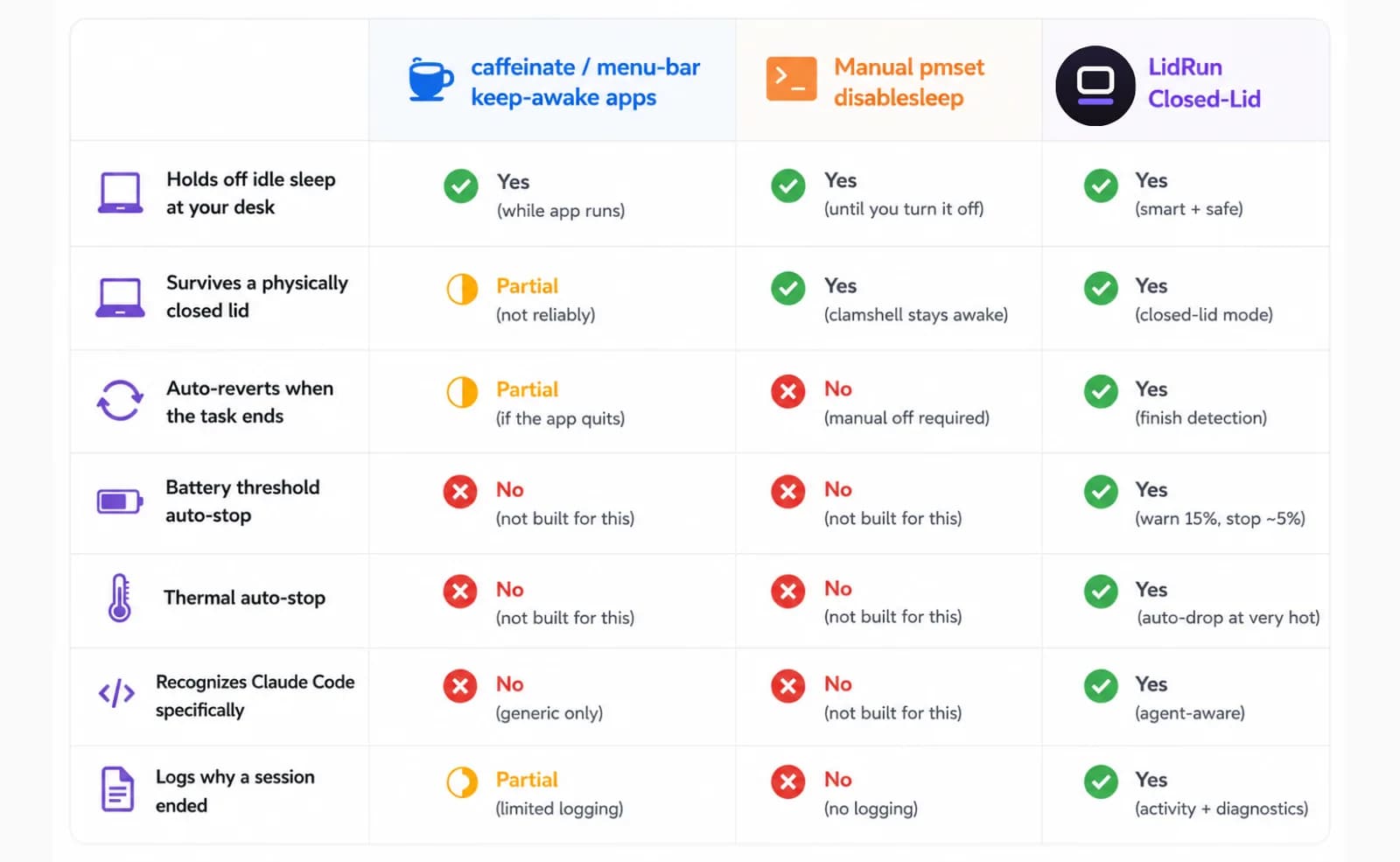
caffeinate, Amphetamine, KeepingYouAwake, Lungo và Caffeine đều thực sự tốt ở một việc khác: chặn idle sleep khi bạn đang ngồi ở bàn làm việc, giá rẻ hoặc miễn phí, với một nút bật/tắt gọn gàng trên menu bar. caffeinate của Apple đáng tin cậy đúng cho việc đó. Nhưng idle sleep không phải clamshell sleep, nên vấn đề gập nắp ở phần trên vẫn áp dụng cho bất kỳ công cụ nào chỉ xây trên API power-assertion đó — trừ khi app cụ thể có ghi rõ cách xử lý riêng cho việc gập nắp, điều đáng kiểm tra trước khi bạn tin tưởng giao nó chạy qua đêm.
Cách LidRun giữ một lượt chạy Claude Code sống an toàn
Closed-Lid Mode của LidRun được xây trên chính công tắc pmset disablesleep nói ở trên. Không có mẹo kernel riêng nào cả, chỉ là API công khai đó, được áp dụng thông qua một helper có quyền hạn nhỏ thay vì gõ thẳng lệnh Terminal. Khác biệt nằm ở những gì bọc quanh nó: LidRun luôn ghép mỗi lần bật với một lần tắt tương ứng — khi dừng, khi thoát app, và tự đối chiếu lại ngay lần mở tiếp theo nếu app từng crash lúc đang bật — nên khó có chuyện Mac âm thầm không ngủ được suốt nhiều ngày liền. Hộp thoại xác nhận nói rõ ngay từ đầu rằng lần đầu bật tính năng này có thể sẽ hỏi mật khẩu admin để cấp quyền cho helper đó; sau lần đó thì không hỏi lại nữa.
Ngoài công tắc gốc đó, LidRun còn thêm những phần mà một lệnh pmset chạy tay không thể có: nó theo dõi pin — mặc định tự dừng khi dưới 20%, có thể chỉnh từ 15% đến 50%, bật cho mọi người dùng dù đã trả phí hay chưa — và theo dõi trạng thái nhiệt, đọc trực tiếp từ tín hiệu áp lực nhiệt của macOS gồm nominal → fair → serious → critical (hiển thị cho bạn là Bình thường → Khá → Nóng → Rất nóng). Nếu áp lực nhiệt chạm mức Nóng trong lúc một session đang chạy, LidRun sẽ giảm tải; nếu chạm mức Rất nóng trong khi nắp đang gập, nó buộc Mac vào chế độ ngủ thay vì để máy tiếp tục chạy mà không có luồng khí nào lưu thông. Một ngưỡng khẩn cấp nghiêm ngặt hơn, 4–8%, luôn giữ hoạt động bất kể thế nào, để một lượt chạy dài kết thúc bằng một giấc ngủ có kiểm soát thay vì tắt máy đột ngột làm mất công việc đang dở — ngưỡng này bật cho tất cả mọi người, chỉ riêng việc tinh chỉnh chính xác nó nằm ở đâu trong khoảng đó mới thuộc về gói trả phí.
Để thực sự nhận ra Claude Code đang chạy, Auto-Watch của LidRun quét các tiến trình đang chạy mỗi 10 giây, tìm một tập hợp dấu hiệu của các công cụ dev và AI đã biết, trong đó có claude, và bật Keep Awake ngay khi thấy một trong số đó đang chạy — không cần bật tay. Vì agent dành phần lớn thời gian chờ phản hồi từ API với mức CPU gần 0% giữa các lần gọi tool, LidRun coi một tiến trình agent đã nhận diện là đang hoạt động dựa trên sự hiện diện của nó, không phải dựa trên tải CPU — nên nó không nhả Mac ra khỏi tay Claude Code chỉ vì trông có vẻ rảnh rỗi trong một phút. Bản thân Auto-Watch là tính năng Pro; ở gói miễn phí không có tính năng phát hiện tự động, nên bạn tự bật Keep Awake — hoặc bật thẳng Closed-Lid Mode, vốn tự khởi động Keep Awake luôn trong cùng một bước — trước khi gập nắp lại. Nó vẫn giữ máy đáng tin cậy y như vậy, chỉ là phải bật tay.
Mỗi session, dù kết thúc vì task đã xong, hết giờ hẹn, ngưỡng pin hay nhiệt bị vượt, hay chính bạn tắt tay, đều được ghi lại vào Activity Log kèm lý do cụ thể. Một lượt chạy bị đứng qua đêm sẽ không còn là bí ẩn vào sáng hôm sau; bạn mở log ra xem thay vì phải đoán. Đó chính là ý tưởng cốt lõi đằng sau nó: agent còn chạy thì giữ máy thức; agent xong việc — hoặc chính các ngưỡng an toàn của Mac lên tiếng — thì nhả ra và để máy ngủ. Nó không phải một khóa giữ máy thức mù quáng cứ chạy mãi cho đến khi bạn nhớ ra mà tắt.
Khi nào nên dùng, và khi nào không cần
Tính năng này thực sự đáng giá với những lượt chạy không ai trông: một đợt refactor lớn khởi động trước khi đi ngủ, một tác vụ agent dài trong lúc bạn rời khỏi bàn làm việc, bất kỳ việc gì mà nếu không có nó bạn sẽ phải ngồi lì đó chỉ để giữ Mac thức.
Nếu bạn đang trực tiếp theo dõi và điều khiển agent, bạn không cần bất kỳ thứ nào ở trên — Mac sẽ không ngủ khi nắp đang mở trong lúc bạn gõ phím hay click chuột, và những task ngắn xong trong vài phút thì tự nó đã ổn rồi. Vấn đề gập nắp chỉ thực sự xuất hiện khi bạn muốn rời đi.
Gói miễn phí bao gồm việc cắm sạc và tự bật Closed-Lid Mode (hoặc Keep Awake), cộng thêm một số lượt Closed-Lid miễn phí có giới hạn để bạn thử toàn bộ quy trình qua đêm trước khi quyết định có đáng trả phí hay không. Nếu bạn từng để nắp máy mở suốt đêm chỉ để Claude Code sống sót đến sáng, thì đây đúng là tình huống tính năng này sinh ra để giải quyết.
Thiết lập từng bước thực tế cho một lượt chạy qua đêm
Cắm sạc trước tiên. Dùng nguồn điện lưới sẽ loại bỏ hoàn toàn vấn đề pin cho một lượt chạy dài — gập nắp lại khi chỉ chạy pin, không có màn hình để kiểm tra, là cách nhanh nhất để bạn quay lại và thấy một cái Mac hết pin thay vì một task đã hoàn thành.
Bắt đầu task Claude Code trong terminal như bình thường, rồi mở icon LidRun trên menu bar và bật Closed-Lid Mode. Nó giữ Mac thức và xử lý luôn cơ chế gập nắp trong cùng một bước, nên không cần phải nhớ bật riêng Keep Awake trước. Hộp thoại xác nhận sẽ hỏi bạn muốn giữ trong bao lâu — đến khi bạn tự tắt, hoặc một khoảng thời gian cố định từ 30 phút đến 8 tiếng — và bạn muốn hành vi nào: Keep-awake giữ Mac thức suốt toàn bộ thời lượng bất kể có gì đang chạy hay không, còn Smart, chế độ mặc định, cho phép Mac tự ngủ khoảng 10 phút sau khi LidRun không còn thấy task nào được theo dõi. Smart là lựa chọn an toàn hơn cho một lượt chạy qua đêm, vì nó sẽ không ngồi đó thức trắng cả đêm sau khi Claude Code đã xong việc lúc 2 giờ sáng.
Nếu đây là lần đầu bạn bật Closed-Lid, hãy chuẩn bị tinh thần sẽ được hỏi mật khẩu admin một lần để cấp quyền cho helper của LidRun — sau đó sẽ không hỏi lại nữa. Nếu bạn chưa có license, cùng hộp thoại đó sẽ hiển thị số lượt Closed-Lid miễn phí còn lại, đủ để bạn thử thật sự trên một task qua đêm trước khi quyết định trả phí.
Gập nắp lại và rời đi. Đặt Mac lên một bề mặt cứng, thoáng khí — bàn làm việc, một cái stand, bất cứ thứ gì không phải giường, đệm sofa, hay bên trong một cái túi đã đóng kín. Nắp gập lại đã cắt mất đường lưu thông khí chính; thêm một không gian kín nữa lên trên mới là rủi ro quá nhiệt thực sự, không phải phần mềm đang chạy bên dưới.
Sáng hôm sau, mở Activity Log từ cùng menu đó để xem chính xác session đã kết thúc như thế nào — task hoàn thành, hết giờ hẹn, hay một ngưỡng pin/nhiệt đã can thiệp — thay vì phải đoán mò từ một cái trackpad đã nguội lạnh.
Khởi động bằng một phím trước khi bạn gập nắp
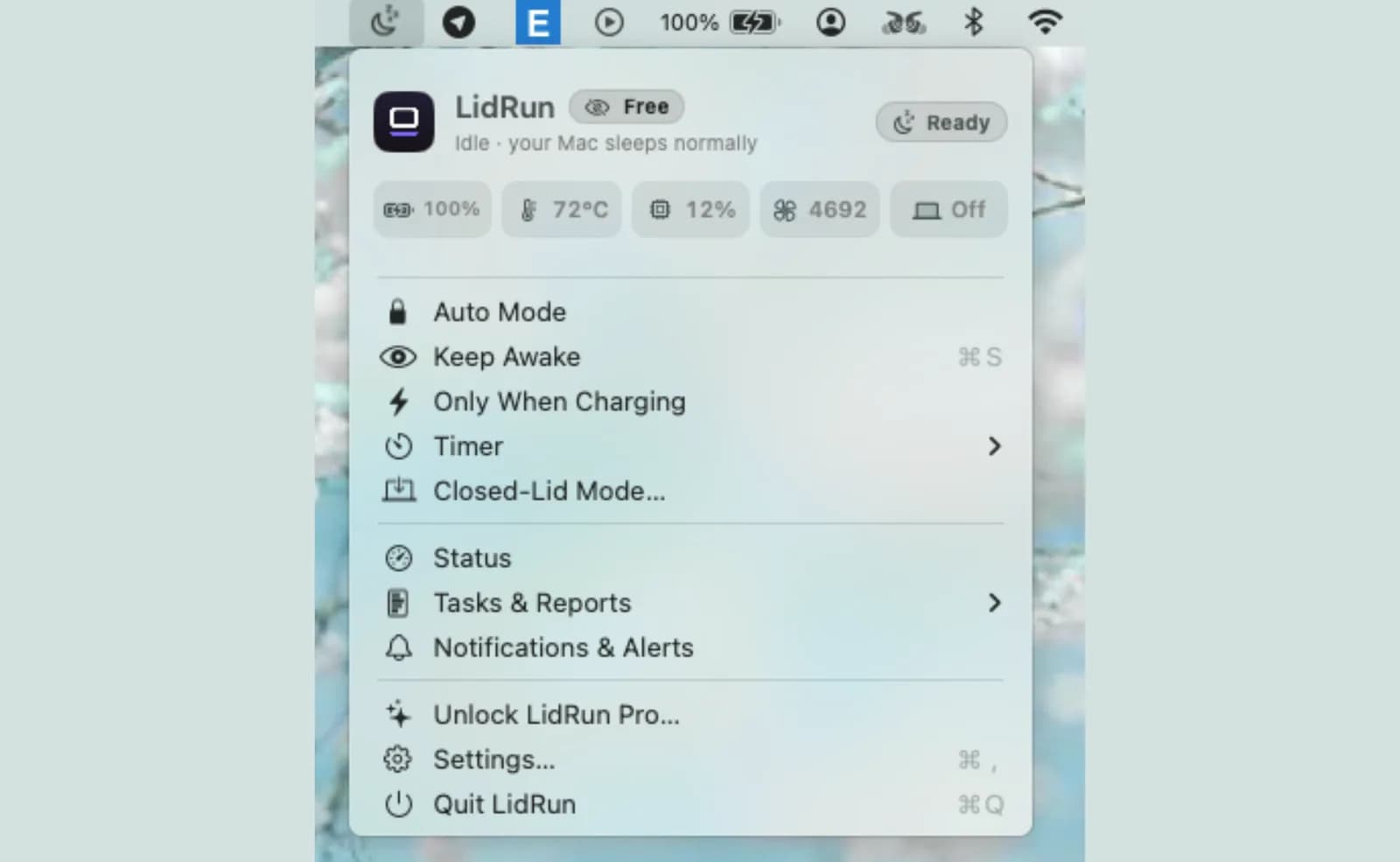
Khi Claude Code đang làm dở việc mà bạn phải đi, LidRun 1.2 biến việc bật chế độ closed-lid thành một phím: bấm ⌥L (Option-L) hoặc chạm Caps Lock, rồi gập nắp lại và để con agent làm tiếp.
Caps Lock chạy được vì khi nắp Mac đã gập thì đâu có ai gõ phím, nên tận dụng nó ở đó là an toàn và không cần thêm quyền nào. Dùng ⌥L thay thế nếu bạn giữ Caps Lock cho việc gõ chữ.
Bạn vẫn có cùng một phiên có bảo vệ: timer, charging-only, tự động dừng khi pin yếu, guardrail nhiệt, và một lời cảnh báo trước khi Mac ngủ, để một lượt agent dài không bị cắt ngang bất ngờ. Bấm phím lần nữa để tắt.
LidRun giữ công việc của bạn chạy tiếp khi đóng nắp, với cơ chế bảo vệ pin và nhiệt tích hợp sẵn.
Đã có LidRun? Đọc hướng dẫn thiết lập →
Mới biết đến LidRun? Xem bảng giá →
Câu hỏi thường gặp
Có, nếu bạn dùng Auto-Watch, một tính năng Pro — LidRun quét các tiến trình đang chạy mỗi vài giây, tìm một tập hợp dấu hiệu của các công cụ dev và AI đã biết, trong đó có claude, và bật Keep Awake ngay khi thấy một trong số đó đang chạy. Ở gói miễn phí không có tính năng phát hiện tự động; bạn tự bật Keep Awake hoặc Closed-Lid Mode trước khi gập nắp, và nó vẫn giữ máy đáng tin cậy y như vậy.
Ở chế độ Smart, mặc định của Closed-Lid, LidRun để Mac tự ngủ khoảng 10 phút sau khi không còn thấy task nào được theo dõi, thay vì giữ máy thức suốt đêm một cách vô ích. Chế độ Keep-awake giữ máy thức trong suốt thời lượng bạn đã chọn, bất kể task đã xong hay chưa.
Các ngưỡng pin và nhiệt của LidRun ở đó để giúp giảm bớt rủi ro đó — nó giảm tải khi áp lực nhiệt chạm mức Nóng và buộc ngủ khi chạm mức Rất nóng, cộng thêm một ngưỡng khẩn cấp 4–8% để một lượt chạy kết thúc bằng giấc ngủ có kiểm soát thay vì tắt máy đột ngột. Nhưng nắp gập lại vẫn cắt mất đường lưu thông khí chính của Mac, nên hãy cắm sạc và đặt máy trên bề mặt cứng, thoáng khí, không phải giường, đệm, hay trong túi, cho bất kỳ lượt chạy qua đêm nào.
Khi chạy pin, ngưỡng tự dừng mặc định 20% (có thể chỉnh 15–50%) sẽ kết thúc việc giữ máy thức trước khi pin cạn, và một ngưỡng nghiêm ngặt hơn 4–8% sẽ buộc ngủ như biện pháp cuối cùng — cả hai đều bật mặc định dù bạn đã trả phí hay chưa. Với một lượt chạy Claude Code qua đêm, cắm nguồn điện lưới vẫn là lựa chọn an toàn hơn; bạn không muốn lý do agent dừng lại chỉ vì chạm ngưỡng pin.
Vì chúng chỉ chặn idle sleep, không phải clamshell sleep. Gập nắp lại kích hoạt một kiểu ngủ riêng, ở tầng thấp hơn, mà một power assertion thông thường không thể ngăn được — công tắc duy nhất cho việc đó khi không có màn hình ngoài là pmset -a disablesleep, và đây chính là thứ Closed-Lid Mode của LidRun bọc lại bằng tính năng tự dừng theo pin, theo nhiệt độ và tự động khôi phục, thay vì để nó là một công tắc chạy tay thô mà bạn phải tự nhớ tắt.
Keep Awake, Timer, và chế độ chỉ chạy khi cắm sạc (Charging-only) chạy không giới hạn ở gói miễn phí — không dùng thử, không giới hạn số session. Bản thân Closed-Lid Mode là tính năng trả phí, nhưng người dùng chưa có license vẫn nhận được một số lượt chạy miễn phí có giới hạn để thử toàn bộ quy trình, kể cả một lượt qua đêm, trước khi quyết định có mở khóa hay không.
Bấm ⌥L (Option-L) hoặc chạm Caps Lock để bật chế độ closed-lid của LidRun, rồi gập nắp lại — Claude Code vẫn chạy tiếp. Bấm chính phím đó lần nữa để tắt.
Mặc định thì không — đóng nắp là macOS kích hoạt clamshell sleep chỉ trong vài giây, và Claude Code sẽ đứng im tại chỗ nó đang chạy, dù caffeinate hay app tương tự có đang bật cũng vậy (nó chặn một kiểu sleep khác). Nhưng nếu bạn bật Closed-Lid Mode của LidRun trước, thì được — đây đúng là tình huống nó sinh ra để xử lý.
Nếu Closed-Lid Mode đang bật thì Claude Code chạy xuyên suốt — Mac không hề đi ngủ nên cũng chẳng có chuyện tạm dừng rồi chạy tiếp. Phiên làm việc chỉ kết thúc khi Smart tự nhận ra task đã xong và thả Mac ra, hoặc khi hẹn giờ hay giới hạn pin/nhiệt độ can thiệp, hoặc chính bạn tắt nó đi — Activity Log sẽ ghi lại chính xác lý do nào. Còn không có LidRun thì đóng nắp là cả máy ngủ luôn — task dừng hẳn, chứ không âm thầm chạy nền đâu.