MacBook'ta Ollama'yı çalışır durumda tutmak
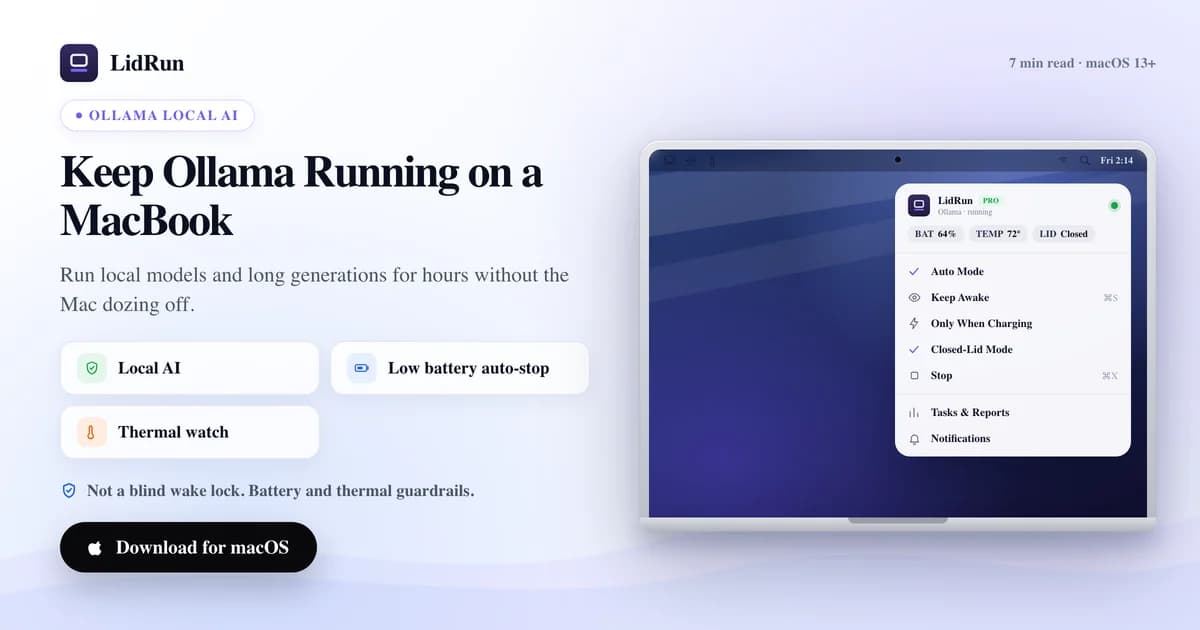
MacBook'ta uzun bir üretim işlemi ya da gece boyu süren bir batch için Ollama'yı çalışır tutmak, iki farklı uyku türünü aşmak demek — idle sleep ve kapak kapatıldığında devreye giren clamshell sleep — macOS'un ücretsiz araçları güvenilir şekilde yalnızca birincisini çözüyor. LidRun ikisini de çözüyor: Ollama'yı otomatik olarak algılayabiliyor, gerçekten çalıştığı sürece Mac'i uyanık tutuyor ve iş bittiğinde ya da bir pil veya ısı sınırı aşıldığında tekrar uykuya geçmesine izin veriyor. Şimdi ücretsiz seçeneklerin nasıl çalıştığına, uzun ve kimsenin izlemediği bir çalıştırmada nerede yetersiz kaldıklarına ve LidRun'ın özellikle Ollama'ya nasıl uyduğuna bakalım.
Mac uykuya geçtiğinde Ollama neden durur
Ollama, sıradan bir arka plan işlemi olarak çalışır — ollama serve ve yüklü olan model. macOS'un uyku mekanizmasından muaf tutulacak özel bir durumu yok. Mac uykuya geçtiğinde bu işlem de diğer her şeyle birlikte askıya alınır ve uzun bir üretim işlemi ya da model indirme, tam olarak kaldığı yerde durur.
macOS'ta aslında birbirinden ayırt edilmesi gereken iki ayrı uyku tetikleyicisi var. Idle sleep, klavye, fare veya ekran etkinliği olmadan belirli bir süre geçtiğinde devreye girer ve "idle sleep'i engelle" güç iddiasını (power assertion) tutan herhangi bir uygulama — caffeinate, LidRun'ın Keep Awake özelliği — bunu engelleyebilir. Kapak kapatma (clamshell) uykusu ise farklı, daha alt seviyede bir tetikleyicidir: harici bir ekran bağlı değilken kapağı kapatmak, hangi idle-sleep iddiaları tutuluyor olursa olsun Mac'i uykuya sokar. Çoğu "caffeinate çalıştır yeter" tavsiyesinin atladığı kısım tam olarak bu ayrım, ve bu yüzden bir idle-sleep çözümü, kapak kapalıyken Ollama'yı gerçekten çalıştırmanın ancak yarısını halleder.
Ücretsiz yol: caffeinate, pmset ve Apple'ın kendi clamshell modu
Kapak açıkken çalışan bir oturum için yerleşik çözüm caffeinate. caffeinate -i ollama serve çalıştırdığınızda iddia, tam olarak o komut çalıştığı sürece geçerli olur; caffeinate -w <pid> ise ayrı başlattığınız bir işlem için — örneğin zaten çalışan bir ollama serve daemon'u için — aynısını yapar. Ücretsizdir, script'lenebilir ve macOS ile birlikte gelir — kurulum gerektirmez.
LidRun'ın da tek adım daha az gerektiren kendi ücretsiz karşılığı var: lidrun -- ollama serve komutu sarmalar, yalnızca o işlem hayattayken bir idle-sleep iddiası tutar ve Ollama sona erdiği anda bırakır. Lisans yok, uygulama arayüzü yok, hesap yok — LidRun uygulaması çalışıyor olsun ya da olmasın çalışan, kendi başına yeten bir CLI komutu.
Bunların hiçbirine gerek kalmadan kapağı kapatmak isterseniz Apple'ın hiçbir üçüncü taraf araç gerektirmeyen kendi yerleşik çözümü var: Mac'i şarja takın, harici bir ekran bağlayın ve harici bir klavye ya da fare kullanın. Bu kurulumda Mac, kapak kapalıyken süresiz çalışır — bu Apple'ın kendi kapalı-clamshell modudur, LidRun ya da başka bir keep-awake uygulamasının taklit etmesi gereken bir şey değil.
Harici ekran yoksa kapak kapatma uykusunu durduran tek yol Terminal'de sudo pmset -a disablesleep 1 komutudur — gerçek anlamda ücretsiz bir yöntem, ve LidRun'ın Closed-Lid Mode özelliğinin arka planda otomatikleştirdiği macOS ayarının ta kendisi.
Amphetamine, KeepingYouAwake, Lungo ve orijinal Caffeine gibi menü çubuğu araçları, caffeinate ile aynı genel idle-sleep iddiası API'sini kullanır. Cilalı, App Store üzerinden dağıtılan ve ne için yapıldılarsa onda başarılı araçlardır — tek tıkla açma/kapama, zamanlanmış uyku engelleme, uygulama başına tetikleyiciler. Ama caffeinate'in kapak kapatma sınırlamasını da paylaşırlar: hiçbiri disablesleep'e dokunmaz, bu yüzden bunlardan biri açıkken bile harici ekran olmadan kapağı kapatmak Mac'i yine uykuya sokar.
Ücretsiz çözümün kimsenin izlemediği bir çalıştırmada çöktüğü nokta
caffeinate, lidrun -- ve her menü çubuğu keep-awake uygulaması Mac'i yapısal olarak uyanık tutar — Ollama'nın ne yaptığını bilmezler, sadece birinin uyanık kalmasını istediğini bilirler. caffeinate -w <pid> ile yirmi dakikalık bir model indirme çalıştırmak sorun değil. Sekiz saatlik gece boyu bir batch için caffeinate -i'yi elle çalıştırıp durdurmayı unutursanız, o da işlem bittikten çok sonra Mac'i seve seve uyanık tutmaya devam eder — kimse izlemezken pil tüketerek.
Elle ayarlanan pmset -a disablesleep 1 daha keskin bir risk taşır. Bu, global ve kalıcı bir macOS ayarıdır — ne Ollama'ya ne de Terminal oturumunuza özgüdür. Kapağı kapatıp sonrasında sudo pmset -a disablesleep 0 çalıştırmayı unutursanız ya da bunu yöneten script çökerse, siz elle geri almadığınız ya da yeniden başlatmadığınız sürece Mac kendiliğinden uyumaz. Bu, kapak kapalı, tamamen uyanık, pili ya da kapalı havalandırmaların arkasında yükselen ısıyı kontrol eden hiçbir şey olmayan bir Mac demektir.
Ücretsiz seçeneklerin hiçbiri pil seviyesine ya da ısı durumuna göre sınırlama yapmaz — bunlar bir denetleyici değil, sadece bir anahtardır. Kimsenin izlemediği bir gece boyu Ollama çalıştırmasındaki asıl açık da tam olarak bu: bellekte tutulan bir model, saatlerce belleği ve GPU'yu meşgul eder ve pilin hızla tükendiğini ya da gövdenin ısındığını fark edecek kimse yoktur.
LidRun aynı riski taşımadan Ollama'yı nasıl çalışır tutar
Auto Mode'un varsayılan izleme listesinde llama-server, vllm ve lm-studio'nun yanında zaten "ollama" da var — menü çubuğundan açtığınızda LidRun, Ollama'nın çalıştığını gördüğü anda Mac'i uyanık tutmaya başlar, kendiniz bir desen (pattern) girmenize gerek kalmaz. Algılama varsayılan olarak CPU kullanımını her 10 saniyede bir örnekler; bir işlem %20 CPU eşiğinin üzerindeyse aktif sayılır, ve — Ollama'nın token'lar arasında beklediği gibi aralıklara özel olarak ayarlanmış — 60 saniyelik bir idle holdoff, Mac'i uyku girip çıkışında sallamak yerine kısa duraklamalar boyunca iddiayı tutar.

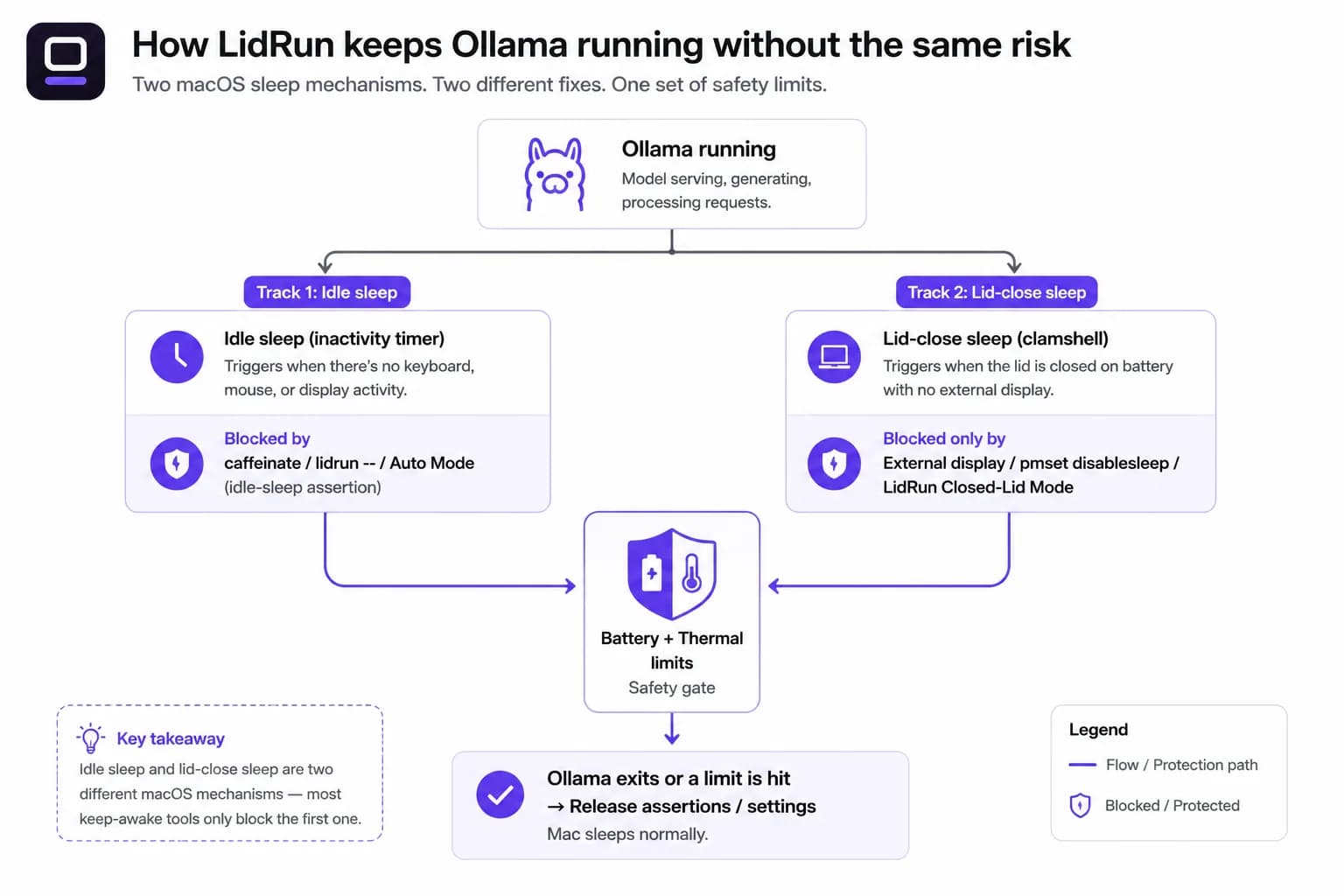
Closed-Lid Mode, elle çalıştırılan pmset -a disablesleep 1'in yerini alan parçadır. Altta yatan macOS mekanizması aynı, ama LidRun her açmayı; siz durdurduğunuzda, uygulamadan çıktığınızda ya da bir çökmeden sonra yeniden başlattığınızda otomatik bir kapatmayla eşleştirir — unutulmuş bir Terminal komutunun yol açabileceği gibi global olarak kapalı takılı kalamaz.
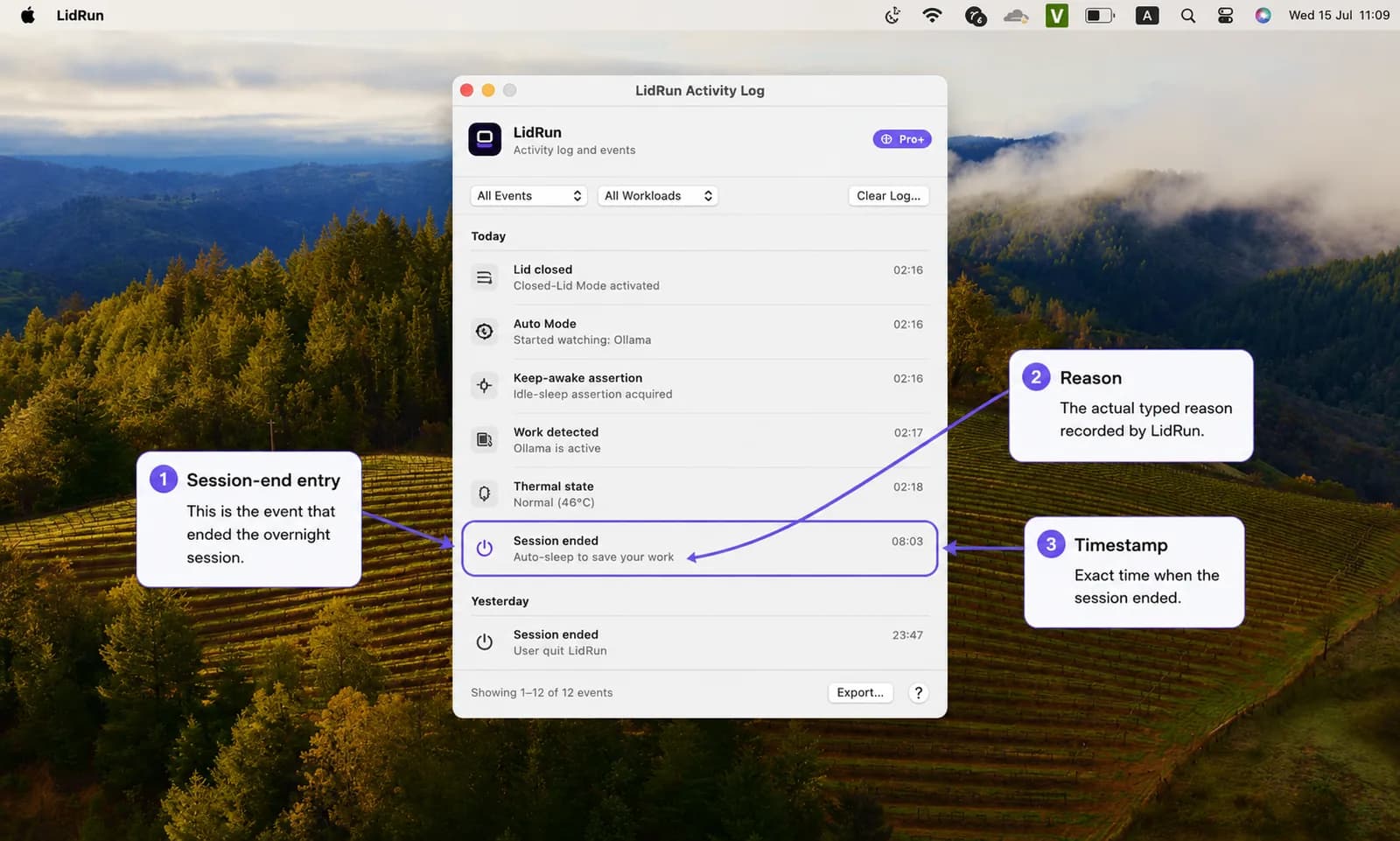
Pil ve ısı sınırları ikisinin de altında yer alır. LidRun, varsayılan olarak %20 pilde Mac'i uyanık tutmayı bırakır, Mac kritik bir ısı durumuna ulaşırsa kimsenin izlemediği oturumdan her zaman çıkar ve ne olursa olsun %4 pil tabanında zorla uyutur — uzun bir çıkarım (inference) çalıştırması sert bir kapanmayla sonlanmak zorunda kalmaz. Etkinlik günlüğü bir oturumun neden bittiğini (pil tabanına ulaşıldı, ısı sınırı, görev tamamlandı) tam olarak kaydeder, böylece takılıp kalmış bir gece çalıştırması sabah bir gizeme dönüşmez. Bunların hepsinin altındaki kural basit: Ollama çalışıyor → uyanık kal; Ollama bitti ya da güvensiz bir durum var → bırak ve Mac'in uyumasına izin ver.
Free ile Pro, dürüstçe
Keep Awake, Timer ve Charging-only sınırsız çalışır, sonsuza kadar ücretsizdir, deneme süresi yoktur. Ollama'yı başlatmadan önce Keep Awake'i elle başlatın, kapağı açık bırakın, işiniz bitince durdurun — günlük kullanımın çoğu için bu tek başına yeterlidir, aynı şekilde ücretsiz lidrun -- ollama serve CLI sarmalayıcısı da yeterlidir.
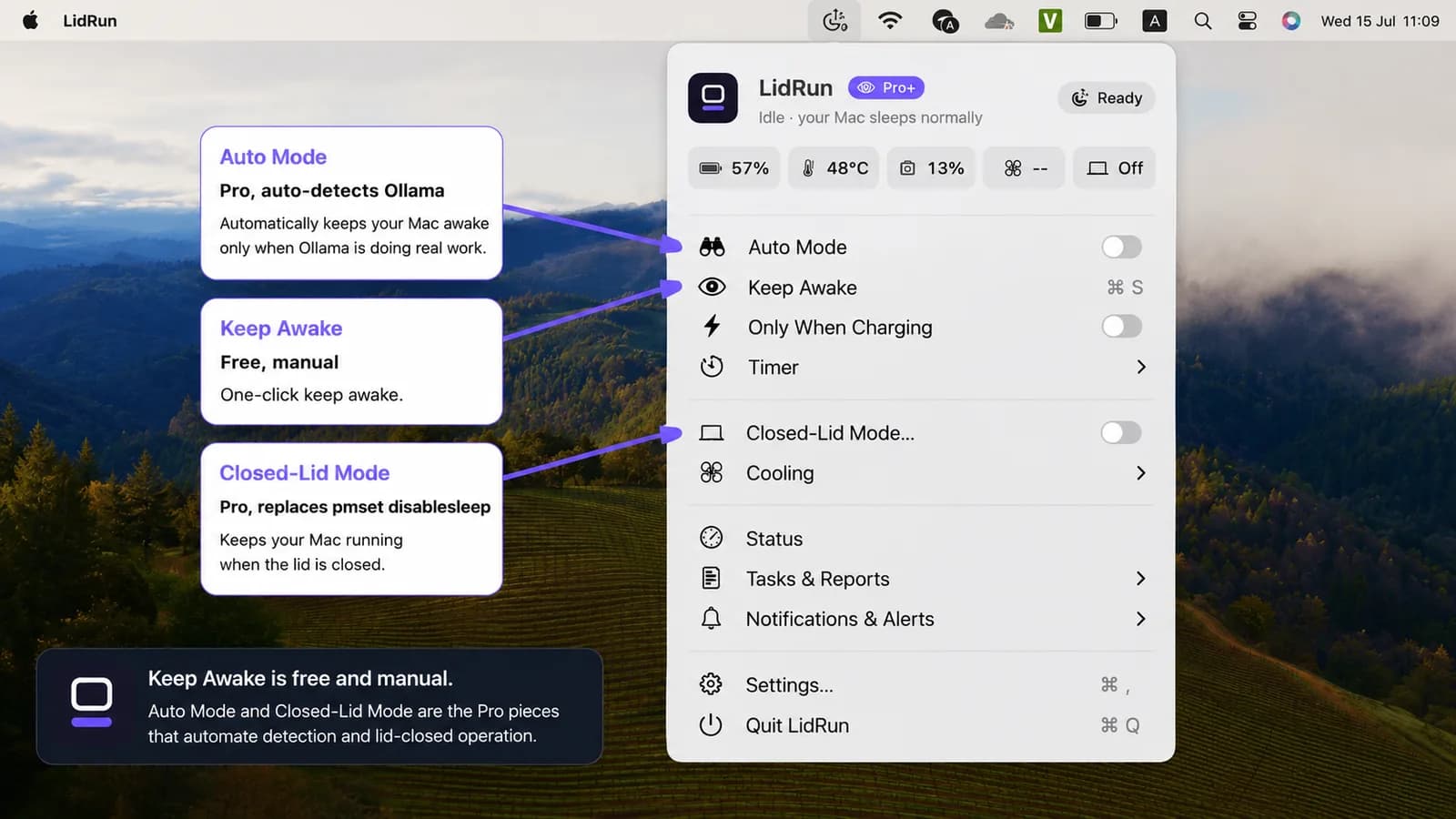
Pro olan kısım otomasyondur: Keep Awake'i kendiniz açıp kapatmayı hatırlamanıza gerek bırakmayan Auto Mode'un otomatik algılaması, ve kapak kapalıyken çalıştırmayı mümkün kılan tek şey olan Closed-Lid Mode. Closed-Lid Mode, yükseltme istemeden önce belirli sayıda ücretsiz deneme çalıştırması sunar, böylece ödeme yapmadan önce kapak kapalı bir gece çalıştırmasını deneyebilirsiniz.
Güvenlik eşiklerinin kendisi — %20 otomatik durdurma, her zaman açık ısı koruması, %4 zorla uyutma tabanı — her katmanda aynıdır ve kapatılamaz. Yalnızca tam sayıları ayarlayabilmek bir Pro özelliğidir; güvenli varsayılanlar ücretsiz kullanıcıları da korur.
Gece boyu çalıştırmalar ve ne zaman buna değer
Bunun yerini bulduğu yer uzun işlerdir: büyük bir model indirmesi, bir üretim işlemi partisi ya da ortamdan uzaklaşırken çalışır bırakmak istediğiniz bir model sunucusu. Küçük bir modelle etkileşimli sohbet ediyorsanız bunların hiçbirine ihtiyacınız yok — normal klavye etkinliği zaten Mac'i uyanık tutar ve hızlı bir prompt, idle sleep hiç devreye girmeden çok önce biter.
Açığın en çok önem kazandığı yer gece boyu çalıştırmalardır. Siz uyurken dört ila sekiz saatlik yerel çıkarım tamamen izlenmeden gerçekleşir — ısı yükselişini ya da pil düşüşünü fark edecek kimse yoktur. Isı takibi ile pil tabanının tam olarak amacı da budur: donanımın elle ayarlanmış bir disablesleep bayrağının ardında tüm gece denetimsiz çalışması yerine, bir sınır aşılmadan çalıştırmayı durdurmak.
Pratik bir kurulum
Önce Closed-Lid Mode'u açın (menü çubuğu → Closed-Lid Mode). İlk seferinde macOS, LidRun'ın yetkili yardımcı sürecini onaylamanızı bir kez ister — sonrasında şifre gerekmez. Ardından Ollama'yı otomatik olarak yakalaması için Auto Mode'u açın (menü çubuğu → Auto Mode), ya da Pro otomasyonunu atlayıp işi kendiniz yönetmek isterseniz Keep Awake'i elle başlatın.
İzleme deseni listesi, yoklama (poll) aralığı ve idle holdoff, Settings → Automation altında yer alır; pil ve ısı sınırları ise Settings → Safety altındadır. Özellikle Ollama için ikisine de dokunmanıza gerek yok — varsayılanlar zaten bunu karşılıyor.
Gece boyu bir çalıştırmadan önce şarja takın. Bellekte tutulan bir model sürekli güç çeker ve burada daha güvenli varsayılan Charging-only'dir: pille çalışırken sekiz saatlik bir çıkarım %20 otomatik durdurmaya ya da %4 zorla uyutma tabanına takılıp çalıştırmayı erken bitirebilir. Şarjda iken duraklamaya ne zaman gerek olduğuna yalnızca ısı takibi karar verir.
Mac'i kapak kapalı olsun olmasın sert, havalandırmalı bir yüzeyde tutun — kapalı bir kapak olağan havalandırmaları kapatır, bu yüzden sürekli çıkarımın ısının gidebileceği bir yere ihtiyacı var. Ve çalıştırma süresine uyan bir oturum zamanlayıcısı ayarlayın, böylece unuttuğunuz bir model sunucusu Mac'i boşuna bütün gece uyanık tutmaz. Kurulumun tamamı bu kadar: iki anahtar, bir şarj cihazı ve sizin yerinize izleyen eşikler.
LidRun, işinizi kapak kapalıyken, pil ve sıcaklık koruması yerleşik biçimde çalışır tutar.
LidRun zaten sizde mi? Kurulum rehberini okuyun →
LidRun'u yeni mi tanıdınız? Fiyatlara bakın →
Sık sorulanlar
Evet — Auto Mode'un varsayılan izleme listesinde ollama, llama-server, vllm ve lm-studio bulunur, bu yüzden sadece açmanız yeterli; kendiniz bir desen eklemenize gerek yok. Auto Mode bir Pro özelliğidir.
caffeinate — ve LidRun'ın kendi ücretsiz lidrun -- ollama serve CLI sarmalayıcısı — idle sleep'i engeller, bu da kapak açık kaldığı sürece yeterlidir. İkisi de kapak kapatma uykusunu durdurmaz; bunun için Closed-Lid Mode, Apple'ın harici ekranlı clamshell modu ya da tamamen ayrı bir macOS mekanizması olan elle pmset -a disablesleep 1 gerekir.
Hayır. Kapak açıkken Keep Awake, Timer ve Charging-only sonsuza kadar ücretsizdir — bir çalıştırmadan önce Keep Awake'i elle başlatıp sonra durdurun. Auto Mode'un otomatik algılaması ve Closed-Lid Mode (kapak kapalıyken çalıştırma) Pro'dur; önce denemeniz için sınırlı sayıda ücretsiz Closed-Lid çalıştırması sunulur.
LidRun ısı durumunu izler ve Mac kritik bir ısı durumuna ulaşırsa kimsenin izlemediği oturumdan çıkar — bu bir güvenlik durdurması, aktif soğutma değildir, ve RAM'i yönetmez. Yerel model bellek baskısı modele ve Mac'inizin donanımına bağlıdır, bir keep-awake aracının çözebileceği bir şey değildir.
Evet — Closed-Lid Mode'u Auto Mode ile birlikte açın (ya da elle Keep Awake başlatın), Mac'i şarja takılı tutun; pil ve ısı koşulları sınırlarınız içinde kaldığı sürece çalışır durumda kalır. macOS'un aksi halde tetikleyeceği kapak kapatma uykusunu asıl durduran şey Closed-Lid Mode'dur.
Auto Mode artık Ollama'yı aktif görmediğinde LidRun keep-awake iddiasını bırakır, böylece Mac normal uyku düzenine geri döner — Ollama sadece bir kez görüldü diye Mac'i süresiz uyanık tutmaz.
Evet, şarja takılıyken Auto Mode ve Closed-Lid Mode açık olduğunda — pil ve ısı eşikleri aralıkta kaldığı sürece LidRun oturumu saatlerce tutar. Kimsenin izlemediği bir gece çalıştırması için charging-only daha güvenli seçimdir, çünkü ısı durdurması özellikle bir sınır aşılmadan çalıştırmayı bitirmek için vardır, tüm gece denetimsiz sürmesine izin vermek için değil.
Çalışır, ama global, kalıcı ve hiçbir güvenlik ağı olmadan. Değeri tekrar 0'a çekmeyi unutursanız siz geri almadığınız ya da yeniden başlatmadığınız sürece Mac, pil ya da ısı ne olursa olsun kendiliğinden hiç uyumaz. Closed-Lid Mode aynı ayarı kullanır ama görev durduğunda, uygulamadan çıkıldığında ya da bir çökmeden sonra yeniden başlatıldığında açmayı her zaman bir kapatmayla eşleştirir.