Kapalı kapak ısı tuzağı: bir Mac neden çantada ya da arabada kaynar
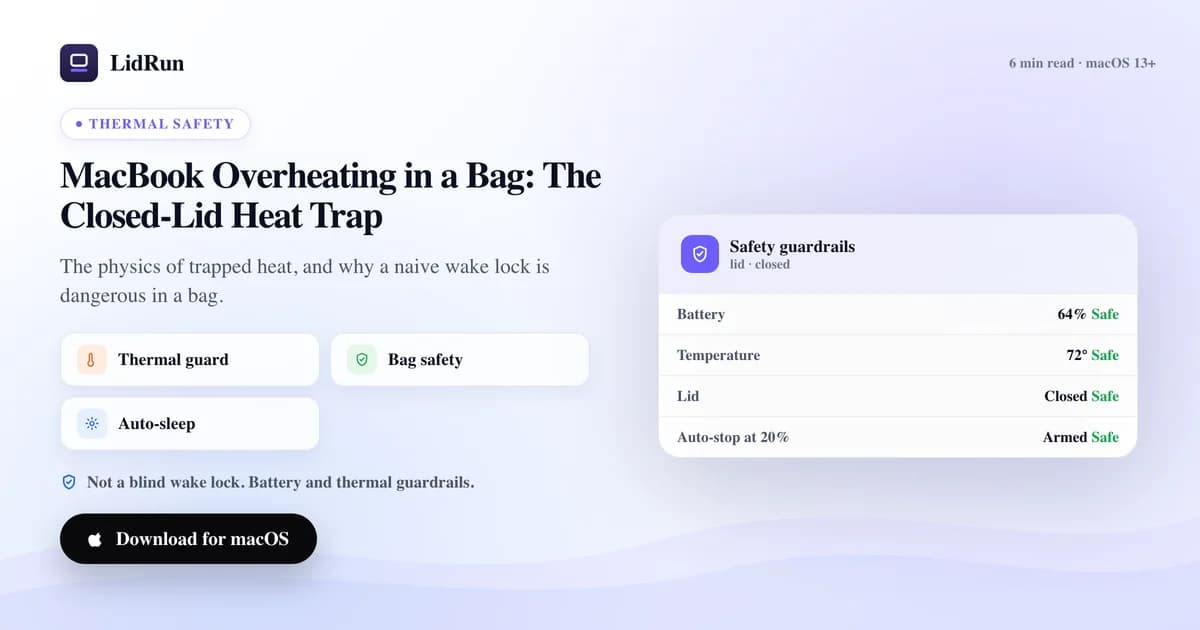
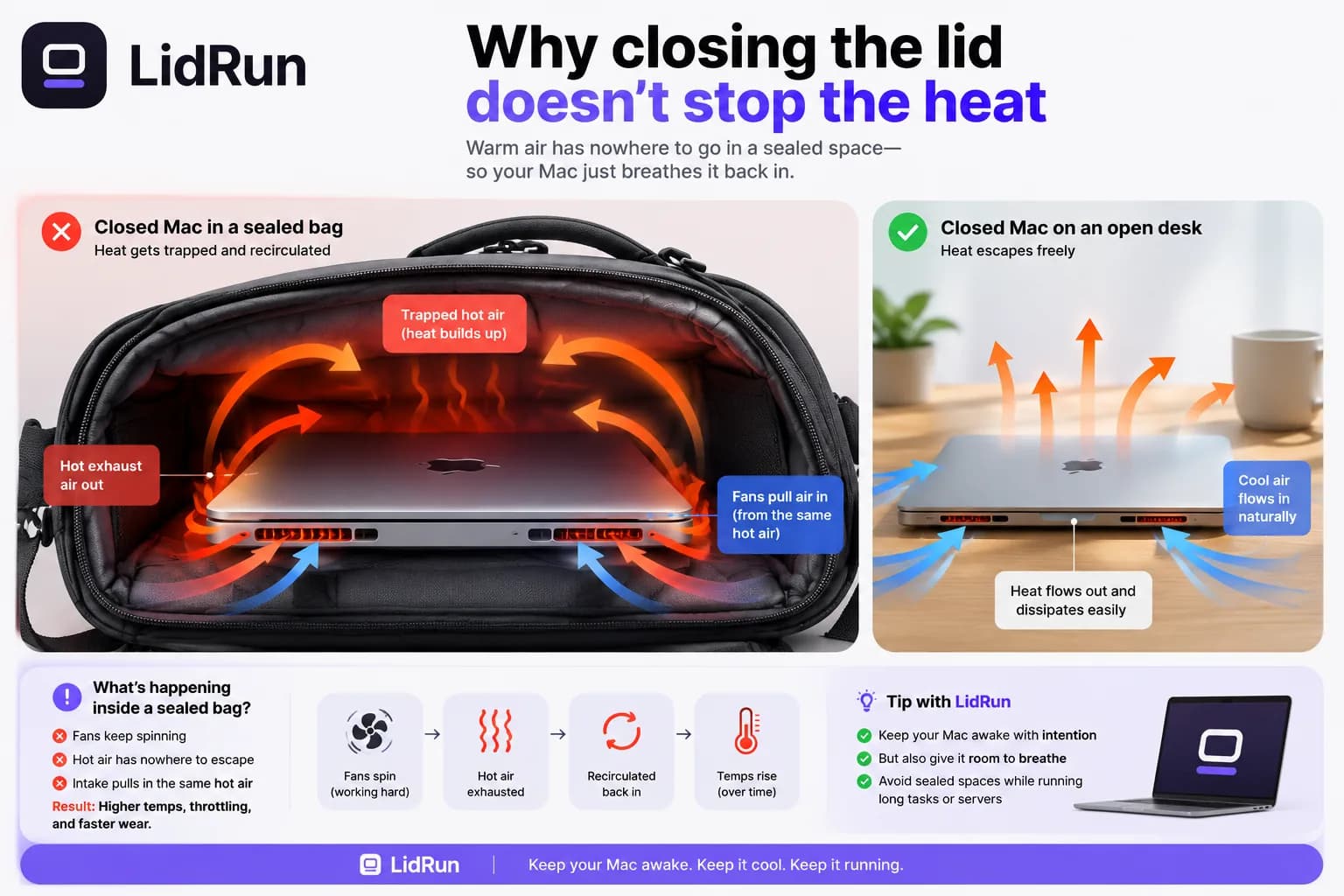
Kapağı kapalıyken, sızdırmaz bir çantanın içinde bir iş yükü çalıştırmayın — cevap bu, fizik de bunu destekliyor. Kapağı kapatmak zaten Mac'in hava akışının büyük kısmını kesiyor; sırt çantasının fermuarını çekmek geri kalanı da yok ediyor, böylece masada rahatça tahliye olan ısının gidecek hiçbir yeri kalmıyor. Çantada aşırı ısınan bir MacBook nadir görülen bir kaza değil — bir iş çalışmaya devam ettiğinde, fanlar çalışmaya devam ettiğinde ve egzoz havası geri emildiğinde olan şey tam olarak bu. Bu, çekincelerle konuşmak yerine açıkça söyleyeceğimiz tek senaryo: çalışan bir Mac'i çantaya kapatıp sızdırmaz hale getirmeyin.
Kapağı kapatmak ısıyı neden durdurmuyor
Bir Mac, iç bileşenlerinin üzerinden hava geçirip bunu havalandırma deliklerinden dışarı atarak ısınmayı önler. Kapağı kapattığınızda bu hava akışı zaten azalır — soğutma tasarımı, açık bir kapağın normal durum olduğunu varsayar. Tüm makineyi bir çantanın içine sızdırmaz şekilde kapattığınızda dış hava da ortadan kalkar, böylece makinenin az önce dışarı verdiği sıcak hava, doğrudan emiş noktasına geri dönmekten başka gidecek yer bulamaz.

LidRun'ın bir Intel MacBook üzerinde yaptığı termal testlerde, kapalı kapaklı ve çanta içindeki bir soğutma arızası CPU'yu tam saat hızının yaklaşık %24'üne kadar kısarken, macOS'un kendi kaba termal durum sinyali bu süre boyunca hâlâ daha hafif olan 'fair' seviyesini bildirmeye devam etti. Bu fark, LidRun'ın kapalı-kapak korumasının yalnızca işletim sisteminin bildirdiğine güvenmek yerine gerçek SMC sıcaklığını °C cinsinden ve CPU kısma yüzdesini doğrudan okumasının tam nedeni.
Fiziği kötüleştiren sadece sızdırmazlık değil, çantanın kendisi de bir etken. Kumaş ve köpük yalıtım yapar — ısıyı dışarı yaymak yerine gövdeye karşı tutar — bu yüzden yastıklı bir sırt çantası bölmesi, açık bir çanta torbasından daha kötüdür; içinde biraz hava boşluğu olan sert kabuklu bir kılıf da fermuar kapandığı anda yine sızdırmaz bir bölmedir. Mac zaten ısı üretmiyorsa bunların hiçbiri pek önemli değil; çanta tarafında gerçekten işe yarayan tek çözüm, çanta kapalıyken bir işi çalıştırmamaktır.
İnsanların kapak kapalıyken bir işi çalışır tutmak için denediği ücretsiz yöntem
İnsanların burada bir geçici çözüme başvurmasının gerçek bir nedeni var. macOS'un yerleşik caffeinate komutu (boşta uyumayı engellemek için caffeinate -i, AC gücündeyken ekranı uyanık tutmak için -s ve benzerleri) sağlam, ücretsiz bir araç — ama yalnızca boşta uyumayı engelliyor. Kapağı kapattığınızda Mac yine de clamshell uykuya geçiyor, çünkü bu, düz bir uyku iddiasının geçersiz kılamayacağı ayrı ve daha düşük seviyeli bir sistem davranışı. Amphetamine, KeepingYouAwake, Lungo ve Caffeine gibi menü çubuğu araçları, caffeinate'in kullandığı aynı türden bir iddiayı sarmalıyor ve tasarlandıkları iş için gerçekten iyiler: kapak açıkken masada bir Mac'i uyanık tutmak.
Kapak fiziksel olarak kapalıyken gerçekten çalışmaya devam etmenin tek yolları, güç bağlı bir harici ekran ile bir klavye veya fare takmak — Apple'ın kendi desteklediği kapalı-kapak yapılandırması, ama sırt çantasında taşıyabileceğiniz bir şey değil — ya da Terminal'den sudo pmset -a disablesleep 1 komutunu çalıştırmak; bu, macOS'a sistem genelinde kapak-kapanma uykusunu görmezden gelmesini söylüyor. İkinci seçenek, LidRun'ın Closed-Lid Mode için arka planda kullandığı aynı düşük seviyeli yöntem. Ücretsiz, macOS'a gömülü ve herkes yazabilir.
İlgili kılavuzMac uyanık tutma güvenlik denetleyicisi: LidRun ısınan ya da boşta kalan bir Mac'i neden uyuturO ücretsiz yöntemin çantada neden riskli olduğu
pmset -a disablesleep 1 bilerek kabadır. Kapağın altında ne olduğundan, makinenin hangi sıcaklıkta çalıştığından ya da ne kadar pil kaldığından haberi olmayan, kalıcı, genel bir bayraktır. Kapak kapalıyken bir build'i bitirmek için açar ve tekrar kapatmayı unutursanız, biri eşleşen disablesleep 0 komutunu çalıştırana ya da yeniden başlatana kadar Mac hiç uyumaz — masada, çantada, her yerde. 'Kapak kapalıyken bile uyanık tut' anahtarına sahip üçüncü taraf uygulamalar, daha güzel bir arayüzün arkasında tam olarak aynı şeyi yapıyor, tam olarak aynı kör noktayla.
Çantada aşırı ısınan bir MacBook'un arkasındaki gerçek arıza kalıbı bu: kapalı kapakla çalışmanın doğası gereği pervasız olması değil, bunu yapmanın tek ücretsiz yolunun açıldıktan sonra hiçbir koruma çıtası taşımaması. Düz bir uyanık-tutma aracına makineyi uyanık tutması söylenmiştir, o da bunu yapar — havalandıramayan bir muhafazanın içinde sıcaklık tırmanırken. Dikkat edilmesi gereken kısım tam olarak bu.
Tekrarlayan aşırı ısınmanın size gerçekte neye mal olduğu
Modern MacBook'lar, herhangi bir şey bozulmadan önce kendilerini koruyacak şekilde tasarlanmıştır. Çip ısındıkça ısı çıkışını azaltmak için kendi saat hızını kısar — Activity Monitor'de düştüğünü göreceğiniz CPU hız sınırı budur — ve bu yeterli olmazsa, firmware, silikonun kaynamaya devam etmesine izin vermek yerine bir uykuyu zorlar ya da en kötü durumda sert bir kapanmaya gider. Tek bir olay kendi başına nadiren anında ve kalıcı bir hasara yol açar.
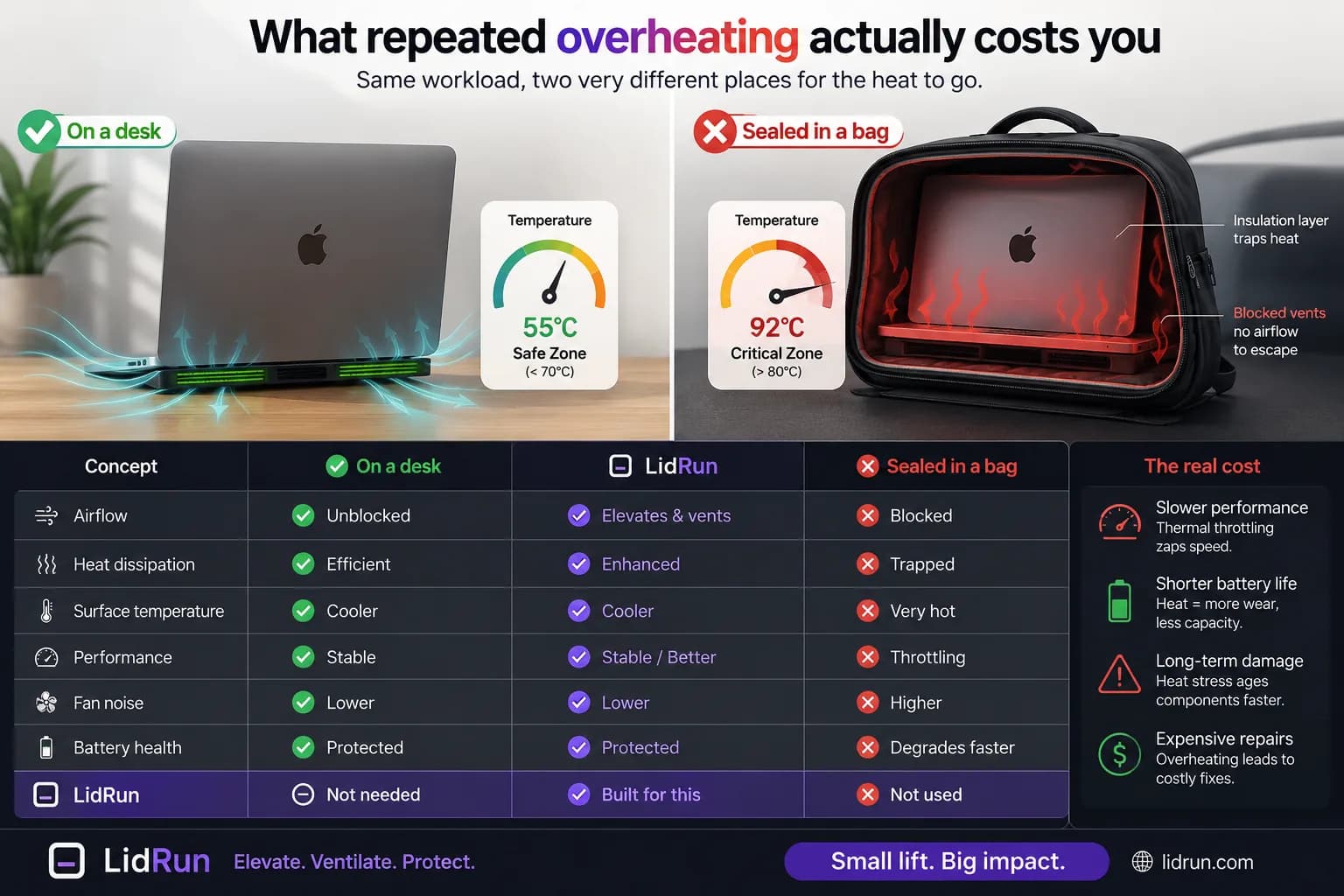
Gerçek maliyet tekrarla ortaya çıkar. Isı, lityum-iyon pil aşınmasının tek en büyük itici gücüdür, bu yüzden düzenli olarak yük altında sıcak kalan bir pil, kalmayana göre daha hızlı yaşlanır. Görev ortasında termal kapanmaya giren bir Mac ise kaydedilmemiş her şeyi kaybeder. Apple'ın kendi yayımladığı kılavuz, bir Mac dizüstünün güvenli çalışma aralığını ortam sıcaklığı için kabaca 50–95°F (10–35°C) olarak belirtiyor — doğrudan güneş altındaki kapalı bir araç kabini, makinenin kendisi hiçbir şey yapmasa bile siz daha arabaya geri dönmeden bu aralığı aşabilir.
Mac'iniz şu anda çantada zaten sıcaksa
Çıkarın ve sert, düz, havalandırılan bir yüzeye koyun — bir masa ya da sehpa, kucağınız ya da bir minder değil. Zaten uyuyor ya da tepki vermiyorsa dokunmayın; fanlar ve macOS'un kendi termal korumaları tam olarak bunu ele almak için tasarlanmıştır, kontrol etmek için onu zorla uyandırmak sadece daha fazla ısı ekler.
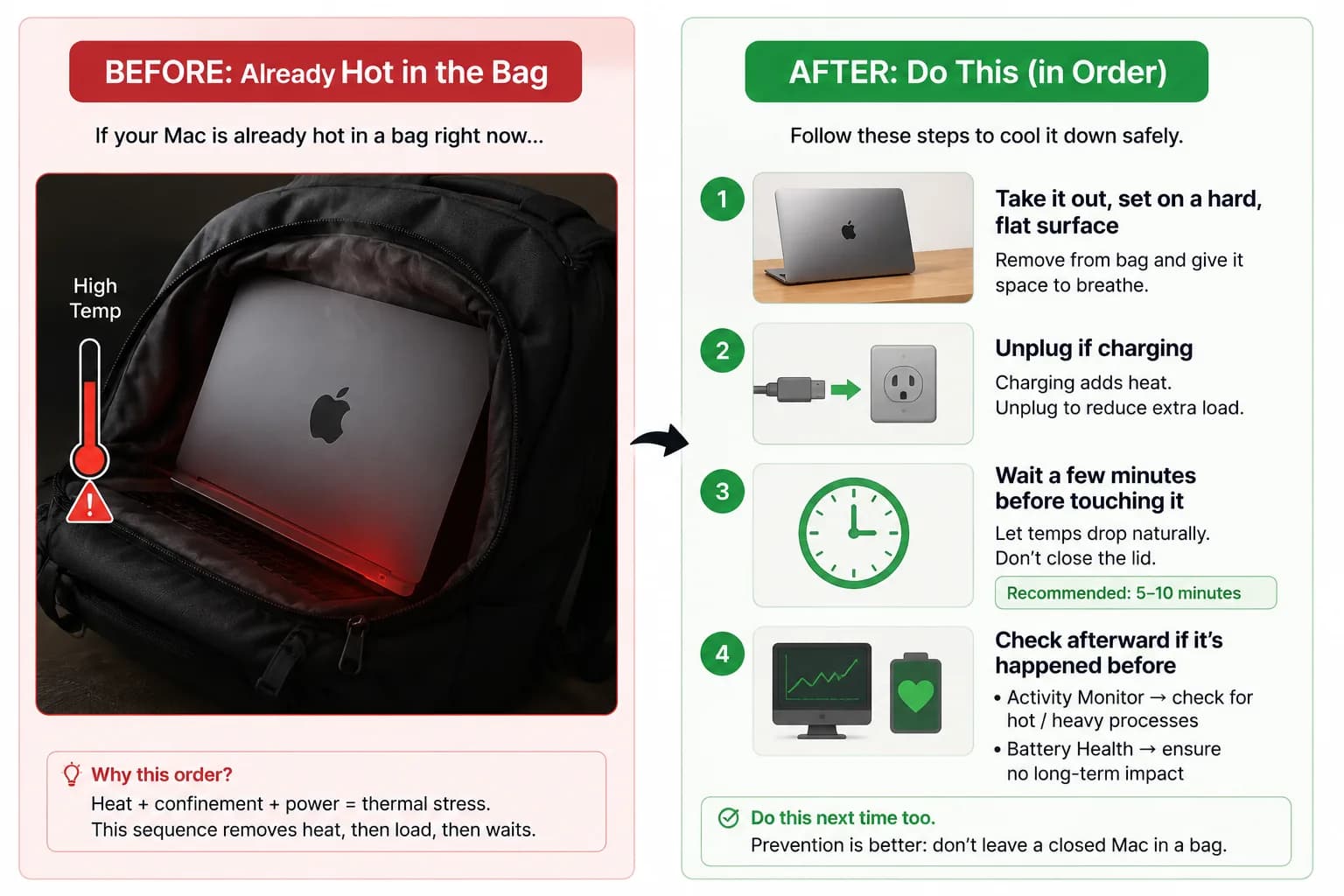
Şarj oluyorsa fişini çekin. Şarj olmak, iş yükünün ürettiği ısının üzerine kendi ısısını ekler ve bu tek değişkeni ortadan kaldırmak daha hızlı soğumasına yardımcı olur. Kapağı açmadan ya da klavyeye dokunmadan önce birkaç dakika bekleyin — çok erken kontrol etmek döngüyü yeniden başlatmaktan başka bir şey yapmaz.
Soğuduktan sonra, Activity Monitor'deki CPU bilgisine (ya da bu birden fazla kez olduysa Sistem Ayarları → Pil'e) kısa bir göz atmak, esas olarak içiniz rahat etsin diye, değer. Tekrar açılmıyorsa ya da soğuduktan sonra tuhaf davranıyorsa, bu bir Apple Store'a ya da yetkili servis sağlayıcısına sorulacak bir donanım meselesidir — yazılımın çözebileceği bir şey değil.
Daha güvenli kapalı-kapak iş akışı
Bir iş devam etmesi gerekiyorsa ve hareket etmeniz gerekiyorsa, güvenli hamle onu durdurmak, macOS'un Mac'i normal şekilde uyutmasına izin vermek ve düz, havalandırılan bir yüzeye geri döndüğünde devam etmektir. Birkaç dakikalık ilerleme kaybı, makine üzerindeki termal strese göre daha ucuza mal olur.
Kapak kapalıyken gerçekten bir şey çalıştırmak istediğinizde, ona gerçek koşullar sağlayın: sert bir yüzey, açık havalandırma delikleri, tercihen fişe takılı olması ve koşullar tırmanırsa oturumu sonlandırabilecek termal ve pil eşiklerinin açık olması. Fişe takılı olmak sızdırmaz bir çantayı güvenli yapmaz — sadece kapak kapalıyken bir masadaysanız, Mac'in aynı zamanda azalan bir pille de yarışmak yerine soğumaya devam edecek gücü olduğu anlamına gelir.
LidRun'ın termal denetleyicisi nereye oturuyor
Düz bir uyanık-tutma kilidi ile güvenlik kapılı bir kilit arasındaki fark tam olarak bu. LidRun'ın modeli basit olacak şekilde tasarlanmıştır: ajan çalışıyor → uyanık kal; ajan bitti ya da Mac güvensiz hale geldi → tutmayı bırak ve uyumasına izin ver. Özellikle ısı için, Closed-Lid Mode yalnızca macOS'un kaba termal sinyaline değil, canlı SMC sıcaklığına ve CPU kısma yüzdesine bakar, ve bağlama göre iki farklı yanıt profili çalıştırır.
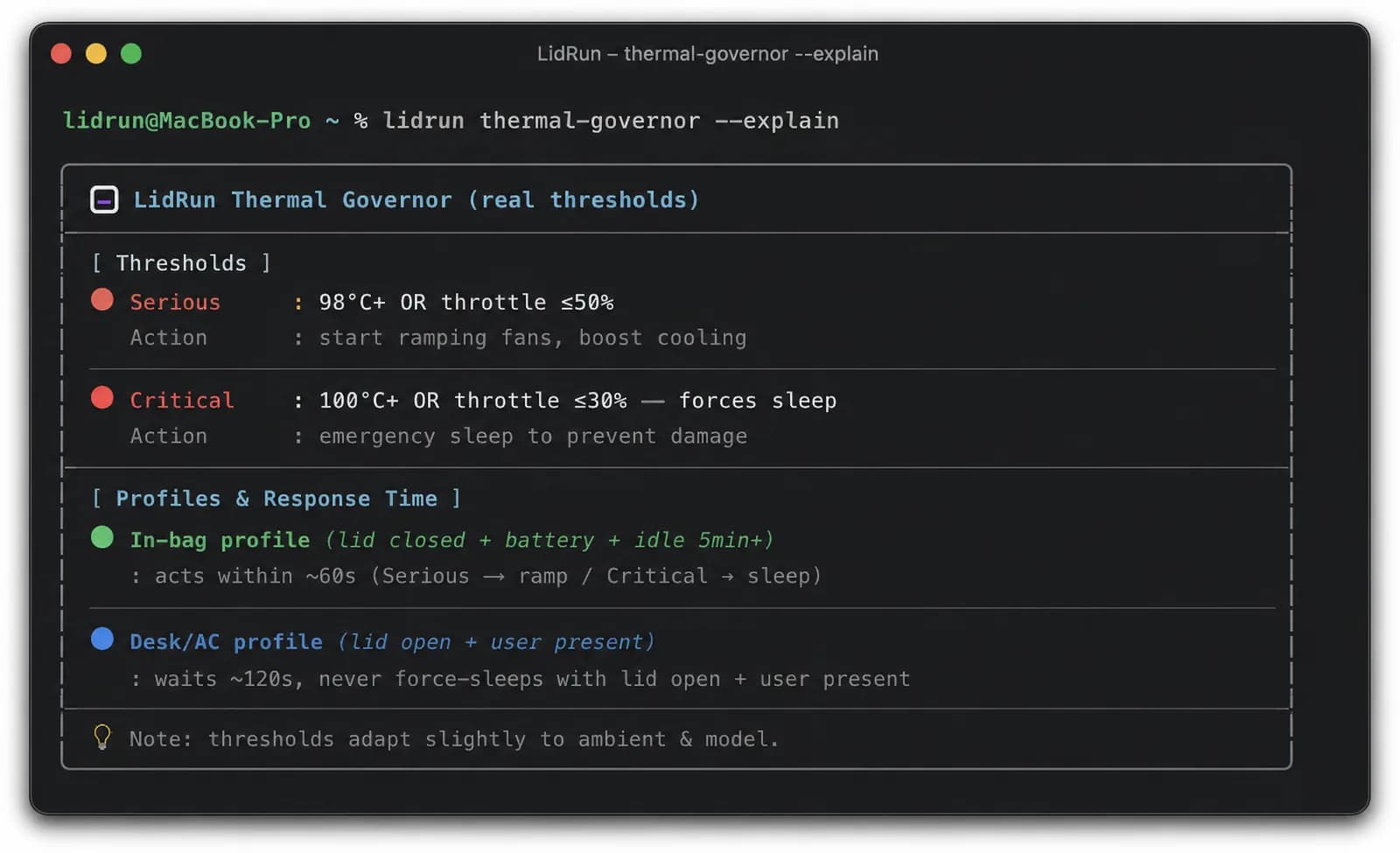
Kapak kapalıysa, Mac pil ile çalışıyorsa ve beş dakika ya da daha uzun süredir boştaysa — yani 'muhtemelen bir çantada' görünümündeyse — LidRun hızla eskalasyona geçer: yaklaşık 60 saniyelik sürekli termal baskının ardından tutmayı bırakır, böylece Mac kendi kendine clamshell uykuya geçebilir; sıcaklık zaten kritik sınırı geçtiyse de anında zorla uyutur. Birinin masada olma ihtimalinin daha yüksek olduğu AC gücünde ise daha sabırlıdır — harekete geçmeden önce yaklaşık 120 saniyelik sürekli baskı bekler — ve kapak açıkken biri makineyi aktif olarak kullanıyorsa asla zorla uyutmaz. Tüm bunlardan önce, Closed-Lid Mode'un kendi kurulum ekranı da aynı uyarıyı doğrudan gösterir: masada ya da havalandırılan bir yerde tutun, ağır görevler çalışırken çantaya koymayın.
Aşırı-ısınma-uykusu da kapatamayacağınız birkaç ayardan biridir — kritik-pil uykusu gibi, kapatılamayan bir güvenlik tabanı, çünkü tam olarak yalnızca Mac başında kimse yokken ya da kapak kapalıyken devreye girer, bu yüzden masanızdaki aktif bir oturumu asla kesmez. Ama bunun size ne kazandırdığı konusunda net olun: denetleyici sıcaklığı ve pil durumunu okuyor, sırt çantanızın içindeki bir kamerayı değil. Bir masa ile bir spor çantasını birbirinden ayırt edemez. Çantada aşırı ısınan bir MacBook riskini azaltmaya yardımcı olur. Bunu yapmayı güvenli hale getirmez — dürüst kural hâlâ şu: çalışan bir Mac'i çantaya kapatıp sızdırmaz hale getirmeyin.
LidRun, işinizi kapak kapalıyken, pil ve sıcaklık koruması yerleşik biçimde çalışır tutar.
LidRun zaten sizde mi? Kurulum rehberini okuyun →
LidRun'u yeni mi tanıdınız? Fiyatlara bakın →
Sık sorulanlar
Hayır. Sızdırmaz bir çanta hava akışını tamamen ortadan kaldırır ve hâlâ çalışan bir iş yükü, gidecek hiçbir yeri olmayan ısı üretmeye devam eder. Çantaya koymadan önce işi durdurun ve Mac'in normal şekilde uyumasına izin verin — hava akışı isteğe bağlı değil, zorunludur.
Kapağı kapatmak, Mac'in soğutma tasarımının varsaydığı hava akışını zaten azaltır. Onu bir çantanın içine koyduğunuzda dış hava da ortadan kalkar, böylece makinenin verdiği sıcak egzoz gidecek yer bulamaz ve doğrudan emiş noktasına geri çekilir. Yumuşak, yalıtkan çanta yüzeyleri, o ısıyı dışarı yaymak yerine gövdeye karşı tutarak durumu daha da kötüleştirir.
Apple'ın kesin bir sınır olarak yayımladığı tek bir sayı yok, ama LidRun'ın kapalı-kapak koruması sürekli olarak yaklaşık 98°C civarındaki CPU sıcaklıklarını (ya da tam saat hızının %50'sine veya altına kısılmasını) ciddi baskı olarak, 100°C ve üzerini (ya da %30 veya altına kısılmayı) ise kritik olarak ele alır — bu, bir iş yükünün çalışmaya devam etmesine izin vermek yerine zorla uyku yapılan noktadır.
Çıkarın ve sert, düz, havalandırılan bir yüzeye koyun — kucağınız ya da bir minder değil. Şarj oluyorsa fişini çekin ve klavyeye ya da kapağa tekrar dokunmadan önce birkaç dakika bekleyin. Tekrar açılmıyorsa ya da soğuduktan sonra tuhaf davranıyorsa, bu bir Apple Store'a ya da yetkili servis sağlayıcısına ait bir iştir.
Riski azaltmaya yardımcı olur. Closed-Lid Mode canlı SMC sıcaklığını ve CPU kısma yüzdesini okur; kapak kapalıyken, Mac pilde ve boştayken — yani çanta-içi görünümündeyken — yaklaşık bir dakikalık sürekli termal baskı içinde tutmayı bırakır ya da zorla uyutur. Ama sensörleri okuyor, sırt çantanızı izlemiyor — bir masa ile bir spor çantasını birbirinden ayırt edemez, bu yüzden sızdırmaz bir çantayı güvenli yapmak yerine riski azaltır.
Hangi güvenlik profilinin uygulanacağını değiştirir, ama hava akışının yerini tutmaz. Kapak kapalı, pilde ve hiç etkinlik yokken LidRun hızla eskalasyona geçer, çünkü bu kombinasyon bir çanta gibi görünür. Fişe takılıyken, birinin muhtemelen masada olduğu durumda, harekete geçmeden önce daha sabırlıdır. Her iki durumda da sızdırmaz bir çantanın hava akışı yoktur — fişe takılı olmak bunu değiştirmez.
Daha hızlı fanlar yalnızca hareket ettirecek serin hava varsa yardımcı olur. Sızdırmaz bir çantanın içinde sıcak havayı tekrar dolaştırırlar; Apple Silicon üzerinde ise fan RPM'i normal bir uygulamanın öylece geçersiz kılabileceği bir şey değildir — firmware tarafından denetlenir. Çip kendini korumak için kısılır, bu da ısının gerçekten dışarı çıkabildiğini varsayar.